
הקדמה
Thank you for choosing the UGREEN HiTune Max 5s Wireless ANC Headphones. This manual provides detailed instructions for setting up, operating, maintaining, and troubleshooting your headphones to ensure optimal performance and longevity. Please read this manual thoroughly before use.
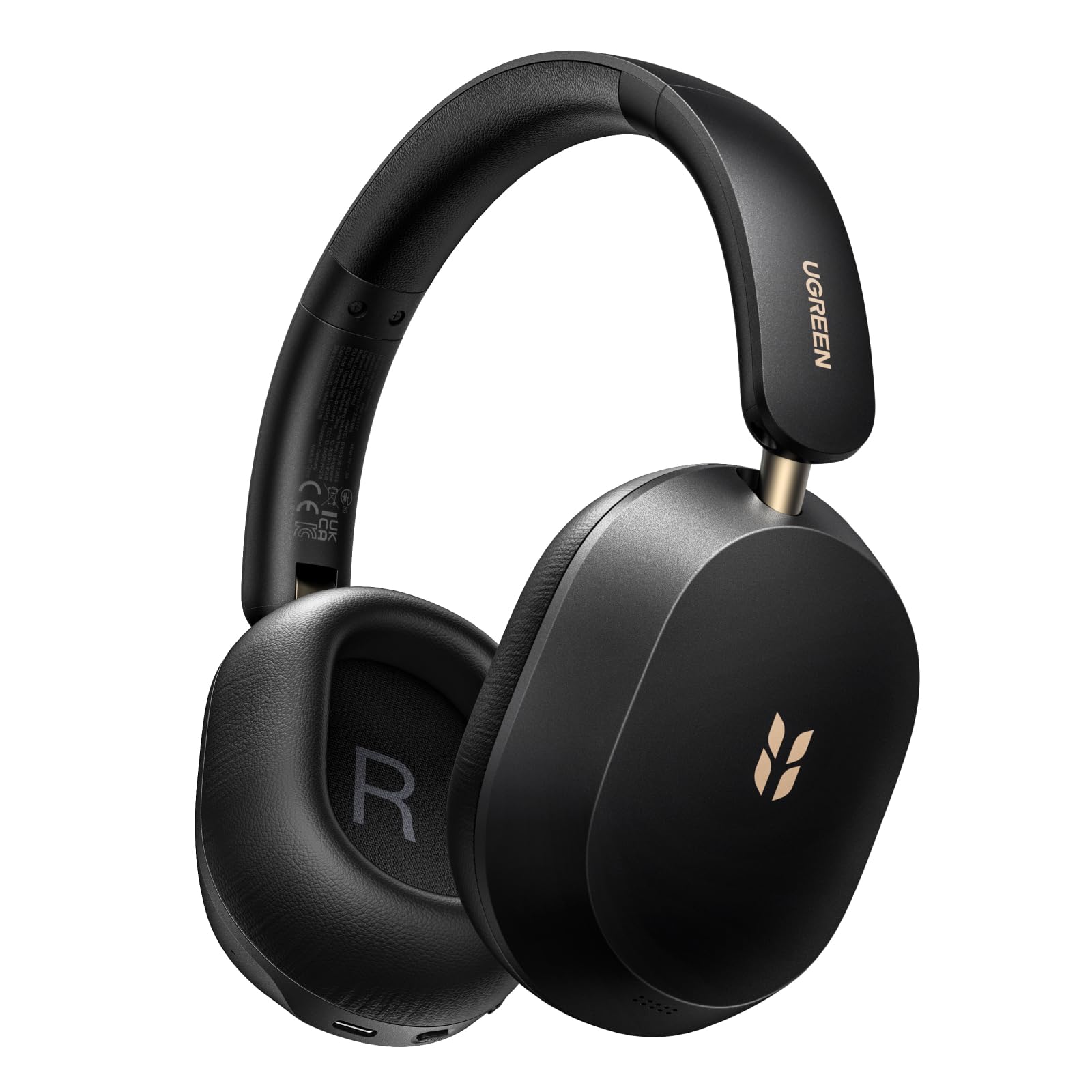
Image: UGREEN HiTune Max 5s Wireless ANC Headphones, black, shown from a slight angle.
שליסל פֿעיִקייטן:
- 45dB Adaptive Hybrid Active Noise Cancellation: Equipped with a 5-microphone array, these headphones intelligently adjust and reduce ambient noise by up to 45dB.
- הויך-רעזולטאַט אַודיאָ און ספּיישאַל אַודיאָ: Supports Hi-Res Audio and Hi-Res Audio Wireless certifications, including LDAC high-resolution codec. Features 40mm PET diaphragm drivers for clear, balanced sound and immersive 360° spatial audio.
- ביז 112 שעה באַטעריע לעבן: Enjoy extended listening with an 800mAh battery, providing up to 112 hours of playback with ANC off. A 10-minute charge offers 18 hours of listening.
- AI-Enhanced 5-Microphone Calls: Five integrated microphones with AI noise reduction algorithm ensure clear voice pickup and effective filtering of environmental noise during calls.
- Lightweight & Foldable Design: Weighing only 240 grams, the headphones offer comfort for prolonged use. The ergonomic headband and soft memory foam earcups provide a secure fit. The foldable design enhances portability.
- בלועטוט 6.0 און מולטיפונקט קאנעקשאן: Offers stable and secure wireless connectivity with the ability to connect to two devices simultaneously.
סעטאַפּ
טשאַרדזשינג די כעדפאָונז
Before first use, fully charge your UGREEN HiTune Max 5s headphones. Connect the included USB-C cable to the charging port on the headphones and to a compatible USB power source. The charging indicator light will show the charging status.

Image: UGREEN HiTune Max 5s headphones with text indicating 'Up to 112 Hours Battery Life' and '10 Minutes Charge = 18 Hours Music'.
מאַכט אויף / אַוועק
- צו קער אויף: Press and hold the Power button for approximately 2 seconds. A white light indicator will confirm power-on.
- צו קער אַוועק: Press and hold the Power button for approximately 2 seconds. A red light indicator will confirm power-off.
בלועטאָאָטה פּערינג
- מאַכן זיכער אַז די כעדפאָונז זענען פּאַוערד אַוועק.
- Press and hold the Bluetooth button until the light rapidly flashes, indicating pairing mode.
- אויף אייער באַלעבאָס מיטל (סמאַרטפאָן, טאַבלעט, קאָמפּיוטער), אַקטיווירן בלועטוט און זוכן פֿאַר בנימצא דעוויסעס.
- Select "UGREEN Studio Headphone" from the list to connect.
- Once connected, the indicator light will change to a steady blue or turn off, depending on the model.
Clearing Pairings
To clear all previous Bluetooth pairings from the headphones, press and hold the Bluetooth button for 10 seconds.
אַפּערייטינג ינסטראַקשאַנז
אַקטיווע ראַש קאַנסאַליישאַן (ANC) מאָדעס
The UGREEN HiTune Max 5s features adaptive hybrid active noise cancellation. You can switch between different modes:
- ANC אויף: Activates noise cancellation, reducing ambient sounds by up to 45dB. This mode may consume battery faster.
- ANC OFF: דיאַקטיווירט ראַש קאַנסאַליישאַן.
- אַמביאַנט געזונט מאָדע: Allows you to hear some surrounding sounds while still enjoying your audio. Note that ambient sounds are slightly reduced in level.

Image: UGREEN HiTune Max 5s headphones with a visual representation of -45dB noise reduction.
מולטיפּאָינט קאַנעקשאַן
The headphones support multipoint connection, allowing you to connect to two devices simultaneously (e.g., a smartphone and a PC). This enables seamless switching between audio sources without re-pairing.

Image: UGREEN HiTune Max 5s headphones shown with a smartphone displaying the UGREEN app and a tablet, illustrating multipoint connection.
אַודיאָ פֿעיִקייטן
- Hi-Res Audio & LDAC: Enjoy high-fidelity audio with support for Hi-Res Audio and the LDAC codec (up to 990 kbps).
- ספּיישאַל אַודיאָ: Experience immersive 360° sound for an enhanced listening experience.
- נידעריק לייטאַנס גיימינג מאָדע: For gaming, activate the low latency mode (0.08s) for synchronized audio and visuals.

Image: A person wearing UGREEN HiTune Max 5s headphones playing a mobile game, illustrating the low latency feature.
רופן פאַנגקשאַנאַליטי
The integrated 5-microphone system with AI noise reduction ensures clear voice transmission during calls, even in noisy environments. The adaptive wind noise attenuation further improves call clarity.
UGREEN Audio App
Customize your listening experience using the UGREEN Audio app. The app allows for EQ adjustments (preset profiles or graphic EQ) and button customization. A personalized sound profile feature, based on an auditory test, is expected via an OTA update.

Image: A smartphone screen displaying the UGREEN Audio app interface with options for noise cancellation control, music modes, game mode, and equalizer settings.
וישאַלט
Proper care and maintenance will extend the life of your UGREEN HiTune Max 5s headphones.
- רייניקונג: ניצט אַ ווייכע, טרוקענע שטאָף צו רייניקן די כעדפאָונז. פֿאַרמייַדט ניצן אַברייסיוו רייניגער אָדער סאָלווענטן.
- סטאָרידזש: When not in use, store the headphones in a cool, dry place. The foldable design allows for compact storage. Avoid exposing them to extreme temperatures or humidity.
- באַטערי זאָרגן: To maintain battery health, avoid fully discharging the headphones frequently. Charge them regularly, even if not used for extended periods.
- וואַסער ויסשטעלן: די קאָפּהערער זענען נישט וואַסערפּרוף. פֿאַרמייַדן אויסשטעלונג צו וואַסער אָדער איבעריקע פֿײַכטקייט.

Image: UGREEN HiTune Max 5s headphones in a folded state, being placed into a backpack, demonstrating their compact and portable design.
טראָובלעשאָאָטינג
אויב איר טרעפט פּראָבלעמען מיט אייערע כעדפאָונז, באַזירט זיך אויף די פאלגענדע געוויינטלעכע לייזונגען:
| פּראָבלעם | מעגלעך לייזונג |
|---|---|
| די קאָפּהערער ווערן נישט אנגעצינדן. | זיכער מאַכן אַז די קאָפּהערער זענען אויפגעלאָדן. פֿאַרבינדט זיי צו אַ שטראָם־מקור און פּרוּווט ווידער. |
| קען נישט פאַרבינדן זיך מיט אַ דעווייס. | Make sure the headphones are in pairing mode (rapidly flashing light). Clear previous pairings by holding the Bluetooth button for 10 seconds, then try pairing again. Ensure Bluetooth is enabled on your device. |
| Poor sound quality or unbalanced audio. | Check the audio source. Use the UGREEN Audio app to adjust the equalizer settings. Ensure the headphones are properly seated on your ears. |
| ANC איז נישט עפעקטיוו. | Ensure ANC mode is activated. For optimal performance, ensure earcups form a good seal around your ears. ANC is most effective against low-frequency, constant noises. |
| בלועטאָאָטה פֿאַרבינדונג איז אַנסטייבאַל. | Ensure your device is within the effective range (typically 10 meters) and there are no significant obstructions. Disconnect and reconnect the Bluetooth connection. |
ספּעסאַפאַקיישאַנז
| שטריך | דעטאַל |
|---|---|
| מאָדעל נאָמען | HiTune Max 5s |
| מאָדעל נומער | 16172 |
| סאָרט | UGREEN |
| קאָליר | שוואַרץ |
| וואָג | 240 גראַמז |
| אויער פּלייסמאַנט | איבער-אויער |
| פאָרם פאַקטאָר | Circum-Aural |
| ראַש קאָנטראָל | Hybrid Noise Reduction (up to 45dB) |
| קאַנעקטיוויטי טעכנאָלאָגיע | ווירעלעסס (בלועטאָאָטה) |
| ווירעלעסס קאָמוניקאַציע טעכנאָלאָגיע | בלועטאָאָטה |
| בלועטאָאָטה ווערסיע | 6.0 |
| אַרייַנגערעכנט קאַמפּאָונאַנץ | Cable (USB-C charging cable) |
| קאָנטראָל מעטאָד | דרוק קנעפּל |
| אַודיאָ דרייווער טיפּ | דינאַמיש |
| אָפטקייַט ראַנגע | 20 הערץ - 40 קילאָהערץ |
| אינערלעכער מאַטעריאַל | פאָקס לעדער |
| Special Product Uses | Music, Travel |
| קאַמפּאַטאַבאַל דעוויסעס | מאָביל טעלעפאָן |
| באַטערי | 1 ליטיום-יאָן (אַרייַנגערעכנט) |
| פאַבריקאַנט | Ugreen Group Limited |
| לאַנד פון אָריגין | כינע |
וואָראַנטי און שטיצן
וואָראַנטי אינפֿאָרמאַציע
The UGREEN HiTune Max 5s Wireless ANC Headphones come with a 24-month UGREEN warrantyביטע באַהאַלטן אייער קויפן באַווייַז פֿאַר וואָראַנטי קליימז.
קונה שטיצן
For further assistance, technical support, or warranty inquiries, please contact UGREEN customer service through their official webוועבזייטל אדער דער הענדלער וואו איר האט געקויפט דעם פּראָדוקט.