
1. הקדמה
This manual provides essential information for the safe and efficient use of your Kyocera ECOSYS MZ3201ix A3 Laser Multifunction Printer. Please read this manual thoroughly before operating the device and keep it for future reference.
פּראָדוקט איבערview
The Kyocera ECOSYS MZ3201ix is a versatile A3 laser multifunction printer designed for both office and home office environments. It offers high-resolution printing, copying, scanning, and faxing capabilities, ensuring efficient document management.
שליסל פֿעיִקייטן:
- Print resolution up to 1200 dpi.
- Print speed up to 32/17 pages A4/A3 per minute in black and white.
- 100-sheet universal feeder and 500-sheet cassette.
- Duplex unit for double-sided printing (DIN A5 - DIN A3).
- Integrated high-level security features.
- Automatic Document Feeder (ADF).
- Network-ready with Ethernet and USB connectivity.
- Scan to email functionality.
- אינטואיטיוו ריר-סקרין צובינד.
2. זיכערקייַט אינפֿאָרמאַציע
שטענדיק אָבסערווירן די פאלגענדע זיכערהייט מיטלען צו פאַרמייַדן שאָדן אָדער שעדיקן צו די מיטל.
- מאַכט צושטעלן: Connect the printer only to a grounded power outlet with the correct voltagה. איבערלאסט נישט די עלעקטרישע אײַנטעגלען.
- אָרט: Place the printer on a stable, level surface. Ensure adequate ventilation around the device. Avoid placing it near water or heat sources.
- האַנדלינג: פרובירט נישט צו צענעמען אדער מאדיפיצירן דעם דרוקער. לאָזט איבער אלע סערוויסעס צו קוואַליפֿיצירטע פּערסאָנעל.
- קאָנסומאַבלעס: Use only genuine Kyocera toner and parts. Keep toner cartridges out of reach of children.
- מאַך די מיטל: The printer is heavy (49 kg). Use appropriate lifting techniques or assistance when moving it to prevent injury.
3. וואָס איז אין דער קעסטל
פֿאָרזיכטיק אויספּאַקן די קעסטל און זיכער מאַכן אַז אַלע זאַכן זענען דאָרט:
- Kyocera ECOSYS MZ3201ix Multifunction System
- טאָונער פּאַטראָן
- וויסט טאָונער קאַנטיינער
- מאַכט קאַבלע
- זיכערקייַט ינסטראַקשאַנז
- שנעל אָנהייב פירער
If any items are missing or damaged, please contact your vendor or Kyocera support.
4. סעטאַפּ
4.1 אַנפּאַקינג און פּלייסמאַנט
- אַראָפּנעמען אַלע פּאַקאַדזשינג מאַטעריאַלן, טייפּס און פּראַטעקטיוו פילמען פון די דרוקער.
- Place the printer on a sturdy, level surface capable of supporting its weight (approximately 49 kg). Ensure there is sufficient space around the printer for ventilation and access to trays and covers.
4.2 קאַנעקטינג די מאַכט קאַבלע
- Connect the power cable to the power input on the rear of the printer.
- שטעקט אריין דעם אנדערן עק פונעם עלעקטרישן קאבל אין א געערדטן עלעקטרישן אויסגאנג.
4.3 Installing Toner and Waste Toner Container
- עפענען די פראָנט דעקל פון די דרוקער.
- Insert the toner cartridge according to the instructions provided on the cartridge and inside the printer.
- Insert the waste toner container into its designated slot.
- פאַרמאַכן די פראָנט דעקל סיקיורלי.
4.4 לאָודינג פּאַפּיר
- Pull out the paper cassette (standard 500-sheet tray or 100-sheet universal feeder).
- Adjust the paper guides to the size of the paper you are loading (supports A5 to A3).
- Load the paper stack, ensuring it does not exceed the maximum fill line.
- שטופּ אָפּ די פּאַפּיר קאַסעטע צוריק אין דרוקער.
4.5 נעץ און USB פֿאַרבינדונג
- For Network Connection (Ethernet): Connect an Ethernet cable from your network router/switch to the LAN port on the printer.
- For Direct Connection (USB): Connect a USB 2.0 cable from your computer to the USB port on the printer.
4.6 ווייכווארג ינסטאַלירונג
- קער אויף די דרוקער מיט די מאַכט קנעפּל.
- Follow the on-screen instructions on the printer's touch screen for initial setup, including language and network settings.
- On your computer, insert the driver CD (if provided) or download the latest drivers and utility software from the official Kyocera webפּלאַץ.
- Run the installer and follow the prompts to install the printer drivers and software.
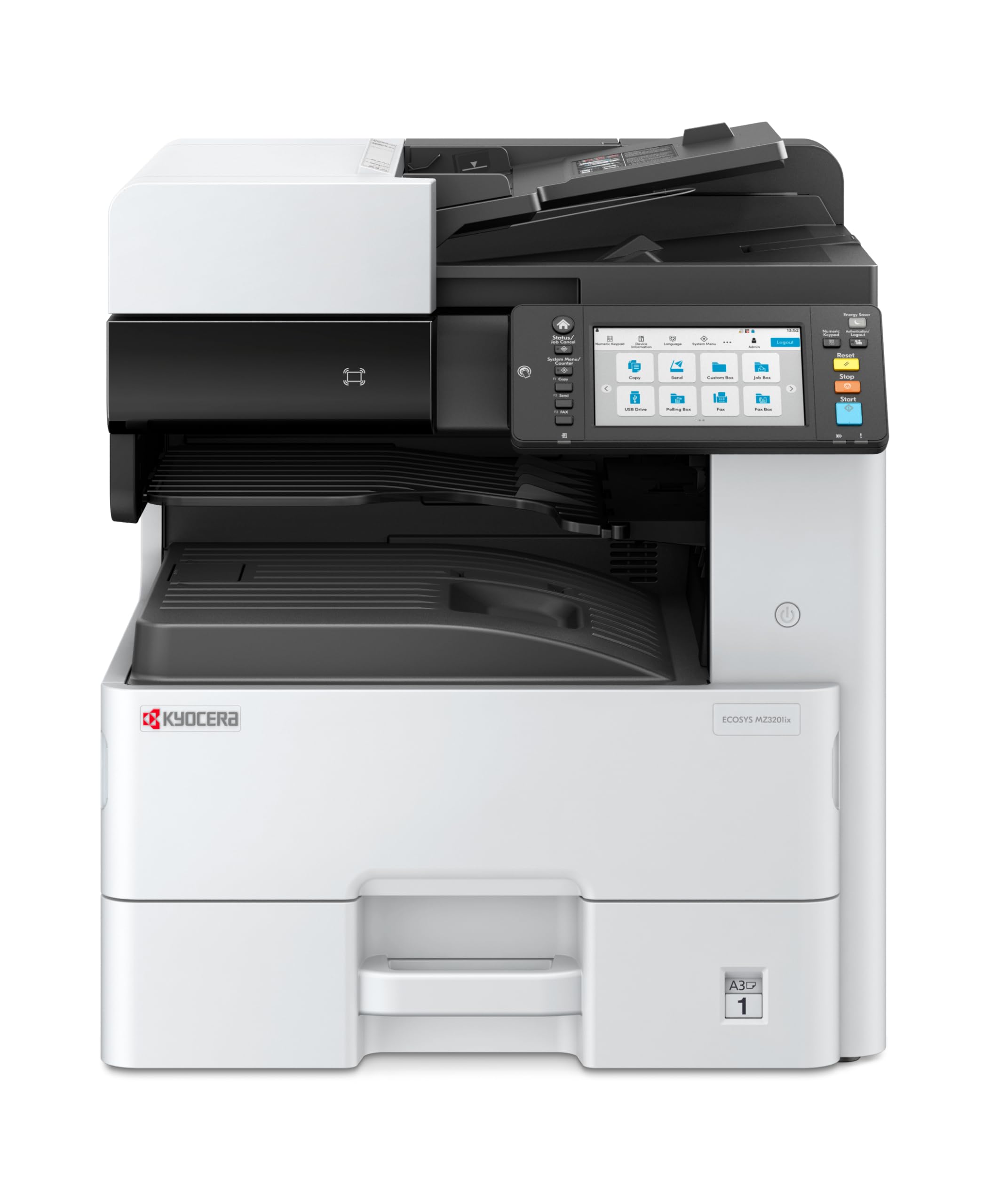
Image 1: Kyocera ECOSYS MZ3201ix A3 Laser Multifunction Printer. This image shows the front view of the printer, highlighting its compact design and the integrated touch screen panel.
5. אַפּערייטינג ינסטרוקטיאָנס
5.1 יקערדיק פּרינטינג
- עפֿנט דאָס דאָקומענט וואָס איר ווילט דרוקן אויף אייער קאָמפּיוטער.
- אויסקלייַבן File > דרוקן.
- Choose the Kyocera ECOSYS MZ3201ix from the list of available printers.
- אַדזשאַסטירן דרוק סעטטינגס (למשל, נומער פון קאפיעס, פּאַפּיר גרייס, דופּלעקס דרוק) ווי נייטיק.
- דריקט דרוקן.
5.2 קאפירן דאקומענטן
- לייגט דעם דאָקומענט מיטן פּנים אַראָפּ אויף דעם סקענער גלאָז, אָדער מיטן פּנים אַרויף אין דעם אויטאָמאַטישן דאָקומענט־פֿיטער (ADF).
- On the printer's touch screen, select the קאָפּי פֿונקציע.
- Adjust settings such as number of copies (up to 999), zoom, and paper type.
- דרוק די אָנהייב קנעפּל צו אָנהייבן קאַפּיינג.
5.3 סקענען דאקומענטן
- לייגט דעם דאקומענט אויפן סקענער גלאז אדער אין דעם ADF.
- On the printer's touch screen, select the סקאַן פֿונקציע.
- Choose your desired scan destination (e.g., Scan to PC, Scan to Email, Scan to USB).
- Configure scan settings such as resolution (up to 1200 x 1200 dpi), color mode, and file פֿאָרמאַט.
- דרוק די אָנהייב קנעפּל צו אָנהייבן סקענען.
5.4 פאַקסן דאָקומענטן
(Note: Fax functionality requires a telephone line connection, not detailed in this manual.)
- לייגט דעם דאקומענט אויפן סקענער גלאז אדער אין דעם ADF.
- On the printer's touch screen, select the פאַקס פֿונקציע.
- אַרייַן די פאַקס נומער פון דעם באַקומער ניצנדיק די קלאַוויאַטור.
- אַדזשאַסטירן אַלע נייטיקע פאַקס סעטטינגס.
- דרוק די אָנהייב קנעפּל צו שיקן די פאַקס.
6. וישאַלט
רעגולערע אויפהאלטונג גאראנטירט אפטימאלע פאָרשטעלונג און פארלענגערט די לעבן פון אייער דרוקער.
6.1 רייניקונג די פּרינטער
- עקסטעריע: ווישן די יקסטיריער סערפאַסיז מיט אַ ווייך, דamp, א לינט-פֿרײַער שטאָף. ניצט נישט קיין שרײַבנדיקע רייניגער אָדער סאָלווענטן.
- סקאַננער גלאז: Gently clean the scanner glass with a soft cloth and a non-abrasive glass cleaner.
- ADF ראָולערס: Periodically clean the ADF rollers with a lint-free cloth dampened with isopropyl alcohol to prevent paper jams.
6.2 Replacing Toner Cartridge
- When the printer indicates low toner, order a new Kyocera toner cartridge.
- עפענען די פראָנט דעקל פון די דרוקער.
- Remove the empty toner cartridge by pulling it out.
- Unpack the new toner cartridge and shake it gently to distribute the toner.
- Insert the new toner cartridge firmly into its slot until it clicks into place.
- נאָענט די פראָנט דעקל.
6.3 Replacing Waste Toner Container
- When the printer indicates the waste toner container is full, prepare a new one.
- Open the cover that provides access to the waste toner container.
- Carefully remove the full waste toner container. Seal it in a plastic bag for proper disposal.
- Insert the new waste toner container into its slot.
- נאָענט די דעקל.
7. טראָובלעשאָאָטינג
די סעקציע באהאנדלט אלגעמיינע פראבלעמען וואס איר קענט באגעגענען מיט אייער פרינטער.
7.1 פּאַפּיר דזשאַמז
- סימפּטאָם: Printer stops, and an error message indicates a paper jam.
- לייזונג: Turn off the printer. Open all covers and trays. Carefully remove any jammed paper, pulling in the direction of the paper path. Ensure no small pieces of paper remain. Close all covers and restart the printer.
7.2 שלעכטע דרוק קוואַליטעט
- סימפּטאָם: Faded prints, streaks, or spots on pages.
- לייזונג: Check toner level and replace if low. Perform a print head cleaning or calibration from the printer's maintenance menu. Ensure you are using appropriate paper for your print job.
7.3 דרוקער רעאגירט נישט
- סימפּטאָם: Printer is online but does not print documents sent from the computer.
- לייזונג: Check all cable connections (USB/Ethernet). Restart both the printer and your computer. Verify that the correct printer driver is installed and selected. Check the printer's network settings if connected via Ethernet.
7.4 טעות קאָודז
If an error code appears on the touch screen, refer to the comprehensive user manual (available on the Kyocera website) for specific instructions related to that code. Many codes indicate specific issues like open covers, paper jams, or consumable replacement needs.
8. ספּעסאַפאַקיישאַנז
| שטריך | באַשרייַבונג |
|---|---|
| סאָרט | קיאָסעראַ |
| מאָדעל נאָמען | ECOSYS MZ3201ix |
| מאָדעל נומער | 110C2V3NL0 |
| קאַנעקטיוויטי טעכנאָלאָגיע | עטהערנעט, וסב 2.0 |
| דרוק טעכנאָלאָגיע | לייזער |
| ספּעציעלע פֿעיִקייטן | Automatic Document Feeder, Auto-Duplex, Network Ready, Scan to Email, Touch Screen |
| דרוקער רעזולטאַט | מאָנאָטשראָמע |
| Max Print Speed Black & White | 32 Pages per minute (A4) |
| פּונקט וואָג | 49 קילאָגראַמס |
| פּראָדוקט דימענשאַנז (דקסווקסה) | 58.5P x 59L x 68.8H cm |
| Max Print Resolution Black & White | 1200 רענטגענ 1200 דפּי |
| סקאַננער האַכלאָטע | 1200 רענטגענ 1200 דפּי |
| דופּלעקס פּרינטינג | אָטאַמאַטיק |
| Max Copy Count | 999 |
| ערשטער בלאַט אויס צייט | 5.2 סעקונדעס |
| Max Supported Paper Size | A3 |
| מאַקסימום אַרייַנשרייַב בלאַט קאַפּאַסיטי | 1600 |
| Printing Media Type | קלאָר פּאַפּיר |
| פאַנגקשאַנז | Copy, Fax, Scan, Print |
9. וואָראַנטי און שטיצן
Your Kyocera ECOSYS MZ3201ix printer comes with a standard manufacturer's warranty. For detailed information regarding warranty terms, duration, and coverage, please refer to the warranty card included with your product or visit the official Kyocera webפּלאַץ.
קונה שטיצן:
If you encounter any issues that cannot be resolved using this manual or require technical assistance, please contact Kyocera customer support. You can find contact information on the Kyocera webוועבזייטל אדער אין דער דאקומענטאציע וואס איז צוגעשטעלט געווארן מיט אייער דרוקער.
When contacting support, please have your printer's model name (ECOSYS MZ3201ix) and serial number ready. The serial number is typically located on a label on the back or bottom of the printer.