
1. הקדמה
This manual provides essential information for setting up, operating, and maintaining your TCL 50-inch Q51K QLED 4K UHD HDR+ Google TV. Please read this manual thoroughly before using your television to ensure proper and safe operation. Keep this manual for future reference.
The TCL Q51K series offers an enhanced viewing experience with Quantum Dot technology for vibrant colors, 4K UHD resolution, HDR PRO+ with Dolby Vision, and the intelligent AIPQ Processor. Enjoy seamless entertainment with Google TV, Dolby Atmos, and DTS Virtual:X audio.
2. זיכערקייַט אינפֿאָרמאַציע
שטענדיק פֿאָלגן די גרונטלעכע זיכערהייט מיטלען ווען איר ניצט דעם טעלעוויזיע צו רעדוצירן דעם ריזיקאָ פֿון פֿײַער, עלעקטרישן קלאַפּ און שאָדן.
- מאַכט מקור: Connect the TV to an AC 110V 60Hz power supply. Do not overload power outlets.
- ווענטילאַטיאָן: זיכערט זיך אז עס איז דא גענוג ווענטילאציע ארום דעם טעלעוויזאר. בלאקירט נישט די ווענטילאציע עפענונגען.
- וואַסער און נעץ: שטעלט נישט אויס דעם טעלעוויזאר צו רעגן אדער פייכטקייט. שטעלט נישט קיין זאכן פול מיט פליסיקייטן, ווי למשל וואזאנעס, אויף דעם טעלעוויזאר.
- רייניקונג: נעמט ארויס דעם טעלעוויזאר איידער איר רייניגט. ניצט א ווייכן, טרוקענעם טוך. ניצט נישט קיין פליסיגע אדער אייראזאל רייניגער.
- מאָונטינג: If wall-mounting, ensure the wall mount is securely installed and can support the TV's weight. Follow the wall mount instructions carefully.
- קינדער: לאָזט נישט קינדער קריכן אויף דעם טעלעוויזאָר אָדער שטאַנד.
- בליץ: נעמט ארויס דעם טעלעוויזאר בעת בליץ-שטורעמס אדער ווען מען ניצט עס נישט פאר לאנגע צייטן.
3. וואָס איז אין דער קעסטל
פֿאָרזיכטיק אויספּאַקן די קעסטל און זיכער מאַכן אַז אַלע זאַכן זענען דאָרט און נישט געשעדיגט.
- TCL 50-inch Q51K QLED 4K UHD HDR+ Google TV
- ווייַט קאָנטראָל
- מאַכט קאַבלע
- וואנט קאַנטיקער
- שנעלע אָנהייב גייד (נישט אַרייַנגערעכנט אין דעם מאַנואַל)

פיגור 3.1: אריינגערעכנטע קאמפאנענטן און טעלעוויזיע דימענסיעס.
4. סעטאַפּ
4.1 גשמיות ינסטאַלירונג
Your TCL Q51K TV comes with a wall bracket for mounting. Alternatively, you can use a compatible TV stand (sold separately if not included in your specific package).
וואַנט מאָונטינג (רעקאָמענדירט)
The included wall bracket allows for flexible placement. Ensure the wall can support the TV's weight (19.8 lbs without stand). The VESA mount standard for this TV is 300 x 200 mm. Follow the specific instructions provided with the wall bracket for safe and secure installation.
שטאַנד אינסטאַלאַציע (אָפּציאָנאַל)
If using a stand, carefully attach the stand legs to the designated slots at the bottom of the TV, securing them with the provided screws. Place the TV on a stable, level surface.

פיגורע 4.1: פראָנט view of the TCL 50Q51K TV.

פיגורע 4.2: זייַט view of the TCL 50Q51K TV.
4.2 קאַנעקטינג דעוויסעס
The TV features multiple ports for connecting external devices.
- HDMI פּאָרטן (x3): פֿאַרבינדט בלו-רэй שפּילער, שפּיל קאַנסאָולז, קאַבל באָקסעס, אאַז"וו.
- יו-עס-בי פּאָרט (x1): פֿאַרבינדט USB דרייווז פֿאַר מעדיע ווידערשפּיל.
- אָפּטיש אַודיאָ רעזולטאַט: פֿאַר פֿאַרבינדן צו סאַונדבאַרס אָדער היים טעאַטער סיסטעמען.
- אַנטענע/קאַבל אַרייַנגאַנג: פֿאַר פֿאַרבינדן אַן אַנטענע אָדער קאַבל טעלעוויזיע.

פיגורע 4.3: דערציען view with connectivity ports.
4.3 מאַכט קאַנעקשאַן
נאכדעם וואס איר פארבינדט אלע נויטיגע דעווייסעס, שטעקט אריין דעם עלעקטרישן קאבל אין דעם טעלעוויזאר'ס עלעקטרישן אריינגאנג און דערנאך אין א וואנט ווענטיל.
4.4 ערשטע אויפשטעל (גוגל טיווי)
Upon first power-on, the TV will guide you through the Google TV setup process. This includes:
- שפּראַך סעלעקציע.
- קאַנעקטינג צו אַ Wi-Fi נעץ.
- זיך אריינלאָגירן מיט אייער גוגל אקאונט.
- אינסטאַלירן וויכטיקע אַפּפּס.
5. אַפּערייטינג דיין טעלעוויזיע
5.1 רימאָוט קאָנטראָל
The included Bluetooth remote control allows for easy navigation and control of your TV. Ensure batteries are inserted correctly.
- מאַכט קנעפּל: טורנס די טעלעוויזיע אויף / אַוועק.
- גוגל אַסיסטאַנט קנעפּל: אַקטיוויזירט שטימע קאָמאַנדעס.
- נאַוויגאַציע פּאַד: פֿאַר מעניו נאַוויגאַציע.
- באַנד אַרויף / אַראָפּ: אַדזשאַסץ אַודיאָ מדרגה.
- קאַנאַל אַרויף / אַראָפּ: ענדערונגען טשאַנאַלז.
- היים קנעפּל: קערט צוריק צום גוגל טיווי היים עקראַן.
- אַפּ קורץ-וועג קנעפּלעך: שנעלער צוטריט צו פּאָפּולערע סטרימינג סערוויסעס.
5.2 גוגל טיווי צובינד
Google TV organizes your favorite content from various streaming services into one personalized home screen. You can browse recommendations, access your apps, and manage your watch list.

פיגור 5.1: גוגל טיווי היים עקראַן.

Figure 5.2: Google TV applications.
6. קאַנעקטיוויטי
6.1 ווירעלעסס קאַנעקטיוויטי
- ווי-פי: פֿאַרבינדט זיך צו אייער היים־דראָטלאָזער נעץ פֿאַר אינטערנעט צוטריט און סטרימינג.
- בלועטאָאָטה 5.1: Pair wireless headphones, soundbars, or other Bluetooth-enabled devices.
6.2 סקרין מירערינג
The TV supports various screen mirroring technologies:
- Google קאַסט: וואַרפט אינהאַלט פֿון קאָמפּאַטיבלע אַפּפּס אויף אייער סמאַרטפאָון אָדער טאַבלעט.
- אַירפּלייַ 2: סטרים אינהאַלט פֿון עפּל דעוויסעס.
- SmartShare: Share content from other compatible devices.
7. בילד און קלאַנג סעטטינגס
7.1 בילד קוואַליטעט פֿעיִקייטן
- QLED קוואַנטום פּונקט קאָליר: Experience over a billion vibrant shades for richer, more realistic colors.
- High Brightness LED Backlighting: פּראָדוצירט העלערע בילדער פֿאַר אַ פֿאַרבעסערטע viewing experience, even in well-lit rooms.
- HDR PRO+ with Dolby Vision, HDR10+, and HLG: Enjoy enhanced contrast, accurate colors, and sharp details with support for leading HDR formats.
- TCL AIPQ Processor: Optimizes every scene in real-time for brightness, contrast, color, clarity, motion, and upscaling.
- באַוועגונג קורס 240 מיט MEMC ראַם ינסערשאַן: Provides exceptional motion clarity for fast-paced content.

Figure 7.1: QLED Quantum Dot Color enhancement.

Figure 7.2: High Brightness LED Backlight in action.

Figure 7.3: The AiPQ Processor.

Figure 7.4: HDR PRO+ with Dolby Vision, HDR10+, and HLG.
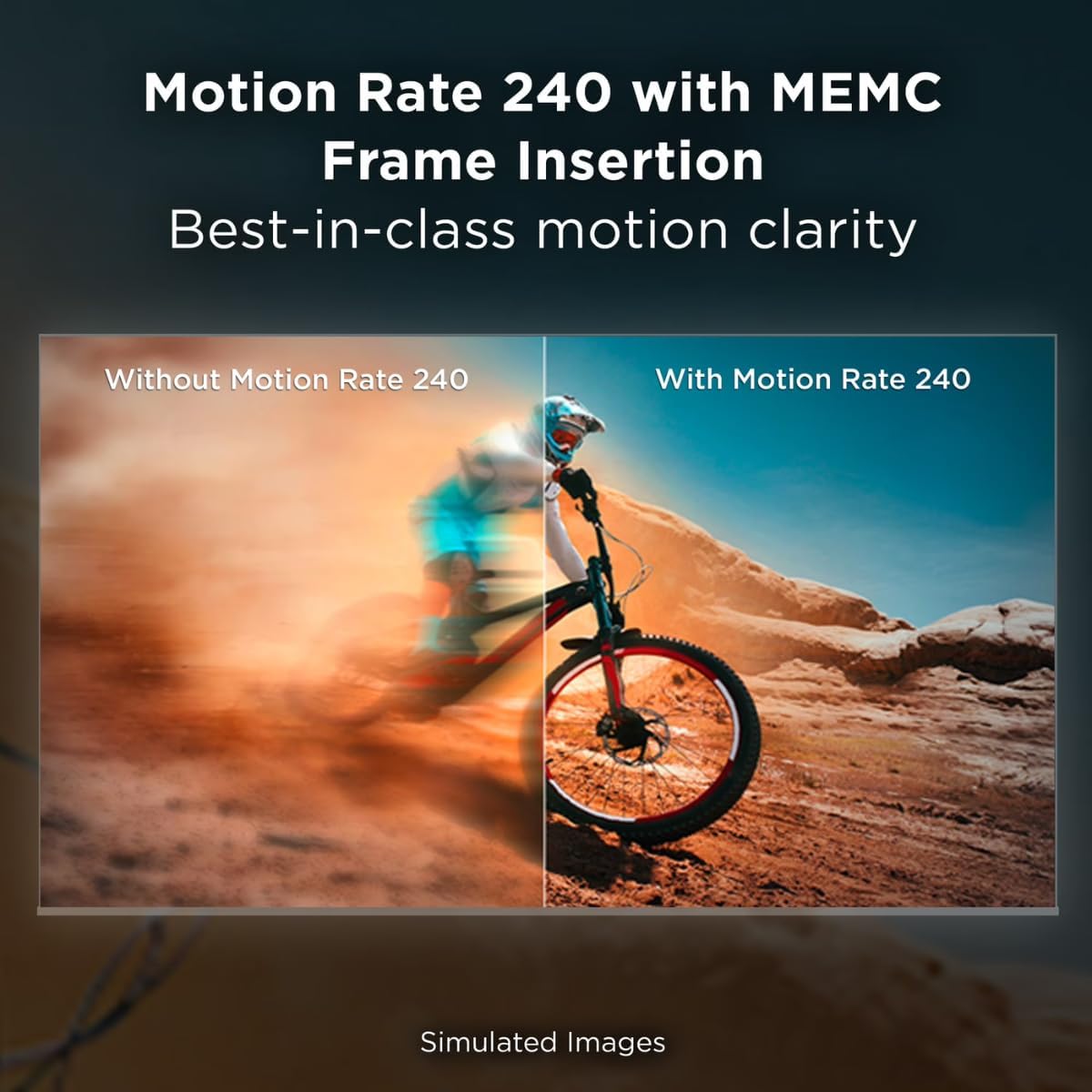
Figure 7.5: Motion Rate 240 with MEMC Frame Insertion.
7.2 אַודיאָ פֿעיִקייטן
- Dolby Atmos: Delivers immersive, multi-dimensional sound that moves around you.
- DTS Virtual:X: Provides an immersive audio experience without the need for additional speakers.
8. וישאַלט
8.1 רייניקן דעם טעלעוויזיע עקראַן
ווישט אָפּ דעם עקראַן מיט אַ ווייכן, לינט-פֿרײַעם שטאָף. פֿאַר שווערע פֿלעקן, ווישט אַ ביסלampווישט דעם שטאָף מיט וואַסער אָדער אַ ספּעציאַליזירטן עקראַן רייניגער. שפּריצט קיינמאָל נישט פליסיקייט גלייך אויפן עקראַן.
8.2 רייניקן דעם טעלעוויזיע קערפער
Use a soft, dry cloth to wipe the TV's frame and back. Avoid abrasive materials or harsh chemicals.
8.3 אַלגעמיינע קער
- ויסמיידן פּלייסינג שווער אַבדזשעקץ אויף די טעלעוויזיע.
- האַלט דעם טעלעוויזאָר אַוועק פון דירעקטער זונשייַן און היץ־קוואַלן.
- פאַרזיכערן געהעריק ווענאַליישאַן צו פאַרמייַדן אָוווערכיטינג.
9. טראָובלעשאָאָטינג
אויב איר טרעפט פּראָבלעמען מיט אייער טעלעוויזיע, באַזירט זיך אויף די פאלגענדע געוויינטלעכע לייזונגען:
- קיין מאַכט: קאָנטראָלירט צי דער שטראָם קאַבל איז זיכער פֿאַרבונדן סײַ צום טעלעוויזאָר און סײַ צום וואַנט אַוטלעט. פּרוּווט אַן אַנדער אַוטלעט.
- קיין בילד/קלאַנג: זיכער מאַכן אַז די ריכטיקע אַרייַנגאַנג מקור איז אויסגעקליבן. קאָנטראָלירט אַלע קאַבל קאַנעקשאַנז (HDMI, אַנטענע).
- ווייַט ניט ארבעטן: Replace the batteries in the remote control. Ensure there are no obstructions between the remote and the TV. Re-pair the Bluetooth remote if necessary.
- שלעכטע בילד קוואַליטעט: Check the signal source. Adjust picture settings (brightness, contrast, color). For streaming, check your internet connection speed.
- קיין אינטערנעט פֿאַרבינדונג: Verify your Wi-Fi network is active and other devices can connect. Restart your router and modem. Reconnect the TV to the Wi-Fi network in the settings.
- אַפּפּס לאָדן זיך נישט: Ensure the TV is connected to the internet. Try restarting the TV. Clear the cache of the problematic app in the TV settings.
If the problem persists after trying these steps, please contact TCL customer support.
10. ספּעסאַפאַקיישאַנז
| מאָדעל נאָמען | 50Q51K |
| פאַרשטעלן גרייס | 50 inches (49.5" diagonal) |
| ווייַז טעכנאָלאָגיע | QLED |
| האַכלאָטע | 4 ק והד (3840 רענטגענ 2160) |
| דערפרישן קורס | 60 הערץ (באַוועגונג ראַטע 240 מיט MEMC) |
| פּראַסעסער | AIPQ Processor |
| HDR שטיצן | HDR PRO+ (Dolby Vision, HDR10+, HLG) |
| אַודיאָ טעכנאָלאָגיע | דאָלבי אַטמאָס, די-טי-עס ווירטועל:X |
| אָפּערייטינג סיסטעם | גוגל טעלעוויזיע |
| קאַנעקטיוויטי | 3 x HDMI, 1 x USB, Wi-Fi, Bluetooth 5.1, Optical Audio Out |
| סקרין מירערינג | AirPlay 2, Google Cast, SmartShare |
| Product Dimensions (WxDxH, without stand) | 43.7" x 3.2" x 25.4" |
| וואָג (אָן שטיין) | 19.8 לבס |
| וועסאַ מאָונט סטאַנדאַרט | 300 רענטגענ 200 מם |
| מאַכט צושטעלן | 110 וואַק 60 הז |
| אַרייַנגערעכנט קאַמפּאָונאַנץ | Power Cable, Remote Control, Wall Bracket |
11. וואָראַנטי און שטיצן
11.1 וואָראַנטי אינפֿאָרמאַציע
This TCL 50Q51K television, being a renewed product, comes with a 90-טאָג לימיטעד וואָראַנטי. Please refer to the warranty card included with your product for specific terms and conditions. This warranty covers manufacturing defects and does not cover damage caused by misuse, accidents, or unauthorized modifications.
11.2 קונה שטיצן
For technical assistance, troubleshooting beyond this manual, or warranty claims, please contact TCL Customer Support. You can typically find contact information (phone number, website) on the manufacturer's official webוועבזייטל אדער אין דעם שנעל-שטאַרט גייד וואָס איז צוגעשטעלט געוואָרן מיט אייער טעלעוויזיע.
When contacting support, please have your TV's model number (50Q51K) and serial number ready. The serial number is usually located on a sticker on the back of the TV.


