
1. הקדמה
This manual provides essential information for the proper installation, operation, and maintenance of the Generic Replacement GREE GRZW4K-A5 V1 Air Conditioning Control Motherboard, Model DGMI5005. This component is designed as a direct-fit replacement for specific GREE air conditioning units. Please read these instructions thoroughly before proceeding with installation or any service.
2. זיכערקייַט אינפֿאָרמאַציע
ווארענונג: Installation and servicing of this product should only be performed by a qualified HVAC technician. Improper installation can result in electric shock, fire, property damage, or personal injury.
- Always disconnect power to the air conditioning unit at the main circuit breaker before beginning any installation or maintenance.
- טראָגט פּאַסיקע פּערזענלעכע שוץ-עקוויפּמענט (PPE), אַרייַנגערעכנט זיכערהייט ברילן און איזאָלירטע הענטשקעס.
- Ensure all wiring connections are secure and correctly matched according to the original unit's wiring diagram.
- ניצט נישט דעם אַפּאַראַט מיט צעבראָכענע דראָטן אָדער קאָמפּאָנענטן.
- Keep the motherboard dry and free from moisture.
3. פּראָדוקט איבערview
The Generic Replacement GREE GRZW4K-A5 V1 Air Conditioning Control Motherboard (Model DGMI5005) is a critical electronic component responsible for managing the various functions of your air conditioning system. It is engineered to meet industry standards for fit, form, and function, providing a reliable replacement for the original part.
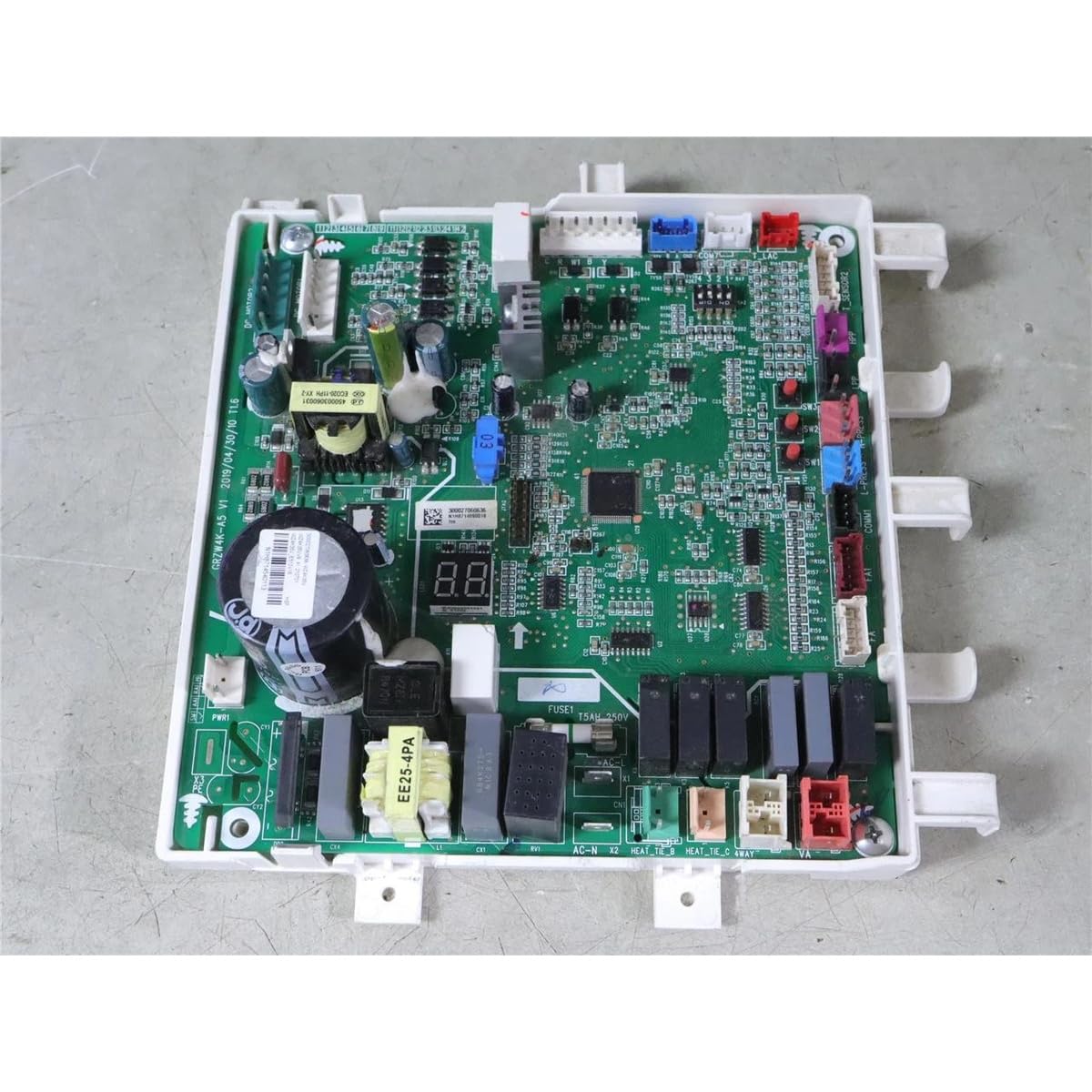
פיגור 1: פון אויבן אַראָפּ view of the Generic Replacement GREE GRZW4K-A5 V1 Air Conditioning Control Motherboard.
שליסל פֿעיִקייטן אַרייַננעמען:
- Engineered Quality: Manufactured to meet industry standards.
- Direct-Fit Installation: Designed for straightforward replacement without special tools or modifications.
- דוראַבאַל קאַנסטראַקשאַן: Built with quality materials for stable performance and long-term use.
4. סעטאַפּ און ייַנמאָנטירונג
This section outlines the general steps for replacing the air conditioning control motherboard. It is crucial to consult the specific service manual for your GREE air conditioning unit for detailed, model-specific instructions and wiring diagrams. Professional installation is highly recommended.
- מאַכט דיסקאַנעקשאַן: Ensure the main power supply to the air conditioning unit is completely disconnected at the circuit breaker. Verify with a voltagE tester.
- אַקסעס פּאַנעל באַזייַטיקונג: Carefully remove the access panels or covers of the indoor or outdoor unit to expose the existing control motherboard.
- דאָקומענט פֿאַרבינדונגען: Before disconnecting any wires, take clear photographs or make detailed diagrams of all wire connections to the old motherboard. Note the color, position, and label of each wire.
- אָפּשטעקן דראָטן: Systematically disconnect all wires and connectors from the old motherboard. Be gentle to avoid damaging the connectors or wires.
- אַראָפּנעמען די אַלטע מוטערבאָרד: Unscrew or unclip the old motherboard from its mounting points.
- אינסטאַלירן אַ נייע מוטערבאָרד: Position the new DGMI5005 replacement motherboard in the same location and secure it using the original screws or clips.
- פֿאַרבינדן די דראָטן ווידער: Carefully reconnect all wires and connectors to the new motherboard, referring to your photographs or diagrams. Ensure each connection is firm and correct. Double-check all connections before proceeding.
- זיכערע צוטריט פּאַנעלן: Once all connections are verified, reattach any access panels or covers removed earlier.
- מאַכט רעסטאָראַטיאָן: Restore power to the air conditioning unit at the main circuit breaker.

פיגורע 2: דעטאַל view of a component and label on the motherboard, important for identification.
5. Functional Verification (Post-Installation Check)
After installation, perform the following checks to ensure the motherboard is functioning correctly:
- Turn on the air conditioning unit from its thermostat or control panel.
- Verify that the unit powers on and responds to commands (e.g., changing temperature, mode).
- Check for any error codes displayed on the unit's display or thermostat. Refer to your AC unit's user manual for error code interpretations.
- Allow the unit to run through a full cycle (cooling or heating) to confirm proper operation of all components controlled by the motherboard (e.g., compressor, fan, reversing valve).
- Listen for any unusual noises or observe any abnormal behavior.
If any issues arise, immediately disconnect power and refer to the troubleshooting section or contact a qualified technician.
6. וישאַלט
The control motherboard itself requires minimal maintenance. However, to ensure its longevity and proper function, consider the following:
- האַלטן טרוקן: Ensure the area around the motherboard remains dry and free from moisture or condensation.
- ריינקייַט: Periodically, during routine AC unit maintenance, inspect the motherboard for dust or debris accumulation. If necessary, gently clean with a soft, dry brush or compressed air (ensure power is disconnected).
- ענוויראָנמענטאַל קאָנטראָל: Ensure the air conditioning unit's enclosure is properly sealed to protect internal components from environmental elements.
7. טראָובלעשאָאָטינג
If your air conditioning unit exhibits problems after motherboard replacement, consider these common troubleshooting steps:
| פּראָבלעם | מעגלעך סיבה | לייזונג |
|---|---|---|
| דער אַפּאַראַט טוט נישט מאַכט אויף. | No power supply; incorrect wiring; faulty circuit breaker. | Check circuit breaker. Verify all power connections to the motherboard. Ensure main power is on. |
| Unit powers on but does not respond to controls. | Incorrect control wiring; faulty thermostat connection; motherboard issue. | Recheck all control wiring connections. Ensure thermostat is properly connected and functional. |
| טעות קאָודז געוויזן. | Sensor malfunction; communication error; component failure. | Consult your AC unit's service manual for specific error code meanings. Verify sensor connections. |
| Specific components (e.g., fan, compressor) not operating. | Incorrect wiring to component; faulty component; motherboard output issue. | Verify wiring to the affected component. Test the component if possible. |
אויב די פראבלעם-פארהיטונג טריט לייזן נישט אויס דעם פראבלעם, איז רעקאמענדירט צו קאנטאקטירן א קוואַליפֿיצירטן HVAC טעכניקער פאר ווייטערדיגע דיאַגנאָז און פארריכטונג.
8. ספּעסאַפאַקיישאַנז
- סאָרט: גענעריק
- מאָדעל נאָמען: DME5005
- מאָדעל נומער: DGMI5005
- Manufacturer Part Number: דמי 5005
- קאַמפּאַטאַבילאַטי: Replacement for GREE GRZW4K-A5 V1 Air Conditioning Control Motherboard 300027060636 WZ4K35V
- נומער פון זאכן: 1
- געבויט-אין מידיאַ: ניין
- ASIN: B0GWM4RX97
9. וואָראַנטי אינפֿאָרמאַציע
דער פּראָדוקט קומט מיט אַ 1 יאָר וואָראַנטי from the date of purchase. The warranty covers defects in materials and workmanship under normal use. It does not cover damage resulting from improper installation, misuse, accident, unauthorized repair, or acts of nature. Please retain your proof of purchase for warranty claims.
10. שטיצן
For technical assistance, warranty claims, or further inquiries, please contact the seller or a qualified HVAC professional. When contacting support, please have your product model number (DGMI5005) and proof of purchase readily available.