
1. הקדמה
This manual provides essential information for the installation, operation, and maintenance of your ATOTO S8L 7-inch AI Android Double Din Car Stereo. Please read this manual thoroughly before using the product to ensure correct usage and to prevent damage.
2. זיכערקייַט אינפֿאָרמאַציע
- ייַנמאָנטירונג: Professional installation is recommended. Incorrect wiring can cause damage to the unit or your vehicle.
- מאַכט צושטעלן: Ensure the unit is connected to a 12V DC power supply with a negative ground.
- אָפּעראַציע: ניצט נישט דעם אַפּאַראַט אויף אַ וועג וואָס זאָל אייך אָפּלענקן פֿון פֿאָרן. שטעלט שטענדיק אין פֿאָרויס זיכערקייט אויף דער גאַס.
- טעמפּעראַטור: פֿאַרמײַדן אויסצושטעלן דעם אַפּאַראַט צו עקסטרעמע טעמפּעראַטורן אָדער דירעקטער זון פֿאַר פֿאַרלענגערטע פּעריאָדן.
- נעץ: האַלט דעם אַפּאַראַט טרוקן. אויסשטעלן צו נעץ קען פאַראורזאַכן אַ דורכפאַל אָדער עלעקטרישע קלאַפּ.
3. פּעקל אינהאַלט
באַשטעטיקט אַז אַלע זאכן וואָס זענען אויסגערעכנט אונטן זענען אַרייַנגערעכנט אין אייער פּעקל:
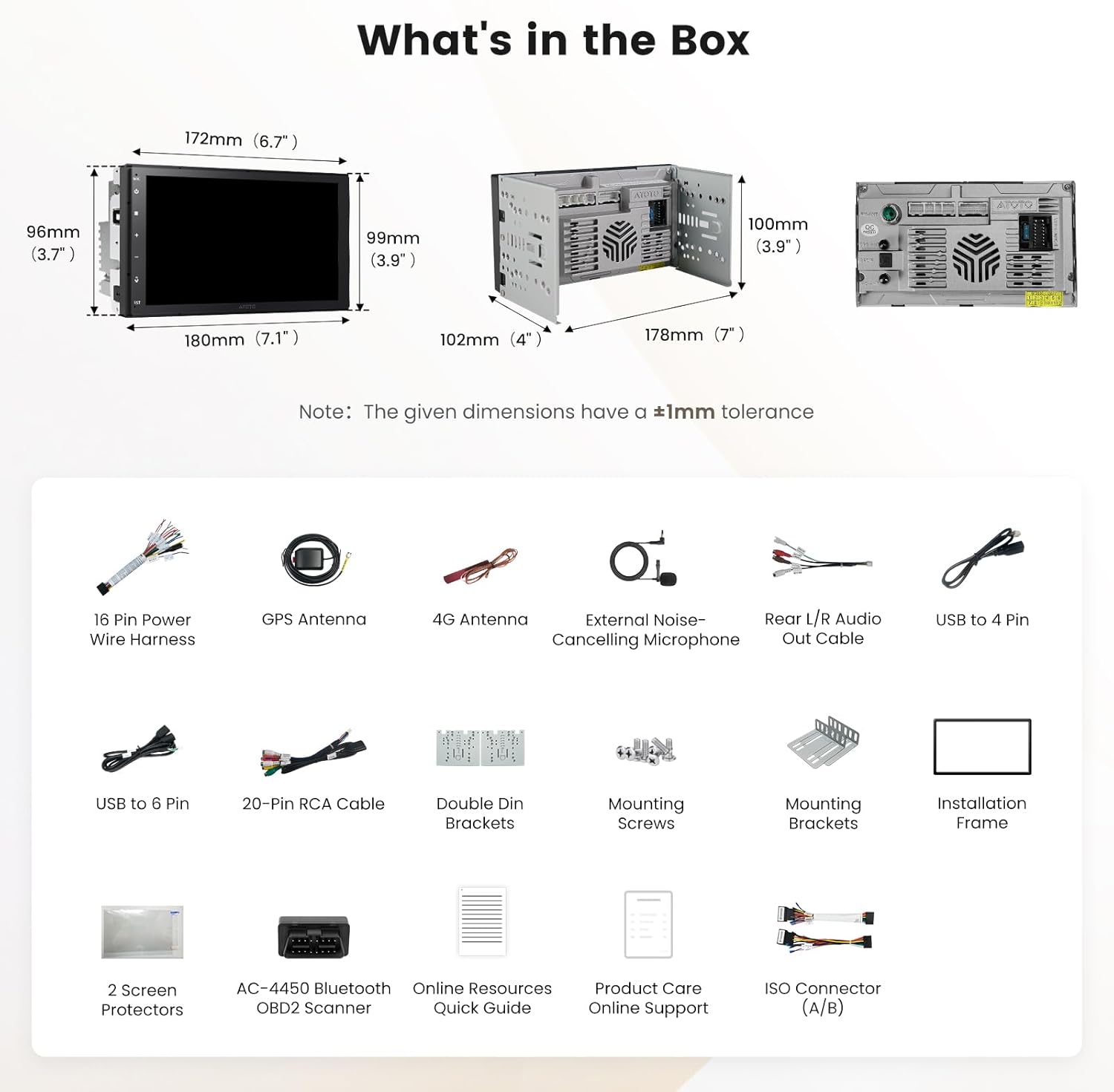
Figure 3.1: Included Components Diagram
- ATOTO S8L Double Din Car Stereo
- AC-4450 Bluetooth OBD II Scanner
- 4G אַנטענע
- גפּס אַנטענע
- External Noise-Cancelling Microphone
- 16 Pin Power Wire Harness
- רקאַ קאַבלע
- Rear L/R Audio Out Cable
- דערציען קאַמעראַ קאַבלע
- USB to 4 Pin Cable
- USB to 6 Pin Cable
- Double Din Brackets
- מאַונטינג סקרוז
- מאַונטינג בראַקאַץ
- ייַנמאָנטירונג ראַם
- 2 Screen Protectors
- אָנליין רעסאָורסעס שנעל גייד
- Product Care Online Support Information
4. ינסטאַלירונג
4.1 וויירינג דיאַגראַמע
Refer to the following diagram for proper wiring connections. Ensure all connections are secure to prevent electrical issues.

Figure 4.1: ATOTO S8L Wiring Diagram
4.2 אַלגעמיינע אינסטאַלאַציע טריט
- צוגרייטונג: דיסקאָנעקט די באַטאַרייע פֿון פֿאָרמיטל איידער איר הייבט אָן די אינסטאַלאַציע.
- אַראָפּנעמען אַלטע אַפּאַראַט: Carefully remove the existing car stereo from the dashboard.
- פאַרבינדן וויירינג: Match the wires from the ATOTO S8L harness to your vehicle's wiring harness. Use the provided 16-pin power wire harness and other cables as per the wiring diagram.
- אַנטענע קאַנעקשאַנז: Connect the GPS antenna and 4G antenna to their respective ports on the unit. Position antennas in locations with clear signal reception.
- פונדרויסנדיק מיקראָפאָן: Connect the external noise-cancelling microphone and route it to a suitable location for optimal voice pickup.
- מאָונטינג: Secure the ATOTO S8L unit into the double din opening using the provided brackets and screws.
- טעסט: Reconnect the vehicle's battery and perform a functional test of the unit before fully reassembling the dashboard.
5. אַפּערייטינג ינסטרוקטיאָנס
5.1 יקערדיק אָפּעראַציע
The ATOTO S8L operates on Android 15, providing a familiar touchscreen interface. Power on the unit by starting your vehicle. Adjust volume using the on-screen controls or steering wheel controls if configured.
5.2 ווייַז פֿעיִקייטן
The 7-inch QLED display offers vivid colors and a wide viewing angle. It supports split-screen functionality, allowing you to view navigation and media simultaneously.

Figure 5.1: QLED Display and Split-Screen Functionality
5.3 קאַנעקטיוויטי
The S8L offers multiple connectivity options to keep you connected on the road.

פיגור 5.2: קאָנעקטיוויטי אָפּציעס
- דראָטלאָז קאַרפּליי און אַנדרויד אויטאָ: Connect your smartphone wirelessly for navigation, music, calls, and voice commands. Wired Android Auto is also supported.
- 4G LTE with SIM Card: Insert a 4G SIM card for independent internet access, enabling navigation, streaming, and app usage without phone tethering.
- Wi-Fi & Bluetooth Tethering: Use your phone's hotspot for internet access when Wireless CarPlay or Android Auto is active.
5.4 AI Agent (DriveChat)
The integrated AI Agent, powered by ChatGPT 5.2 and Gemini 3.0, provides advanced voice assistance for various in-car tasks.

Figure 5.3: DriveChat AI in Action
- קול קאַמאַנדז: Control calls, apps, and system functions using your voice.
- Info & Q&A: Get real-time information, weather updates, and general knowledge.
- GeoSense: Find routes, parking, and points of interest by voice.
5.5 אַודיאָ פֿעיִקייטן
Experience enhanced audio quality with the S8L's advanced sound processing capabilities.

Figure 5.4: Audio Features Overview
- DSP & 32-Band EQ: Customize your sound with a digital signal processor and a 32-band equalizer.
- צייט אַליינמאַנט: Adjust audio delays for optimal sound staging.
- אַדזשאַסטאַבאַל קראָסאָוווערס: Fine-tune frequency distribution to speakers and subwoofers.
- SCVC (Speed Compensated Volume Control): Automatically adjusts volume based on vehicle speed.
- ראַדיאָ: Access FM/AM radio and online stations via SSRadio.
5.6 קאַמעראַ ינפּוץ
The unit supports various camera inputs for improved safety and recording.
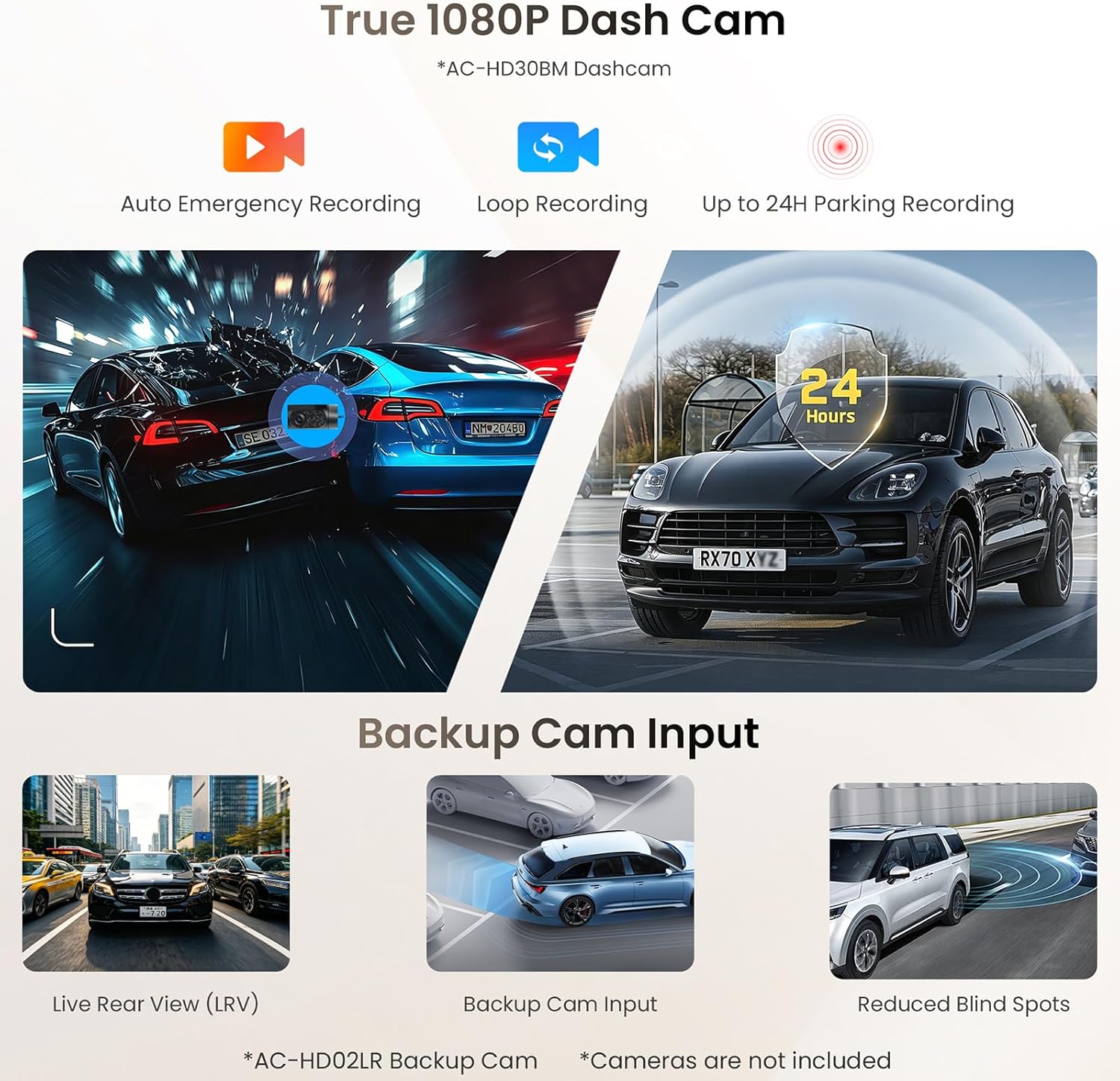
Figure 5.5: Camera Input Capabilities
- Dash Cam (AC-HD30BM, sold separately): Supports 1080P recording with emergency, loop, and 24-hour parking modes.
- Backup Cam Input (AC-HD02LR, sold separately): Provides Live Rear View (LRV) and aids in reducing blind spots during reversing.
5.7 Engine Diagnostics with OBD II
The included AC-4450 Bluetooth OBD II Scanner integrates with the S8L to provide real-time vehicle health data.

פיגור 5.6: OBD II דיאַגנאָסטיק צובינד
- פאַקטיש-צייט דאַטן: Monitor engine status, performance, and trouble codes.
- DriveChat Insights: Receive insights and proactive help based on OBD data.
5.8 Video Input and Output
The S8L supports video input for external devices and dual-zone video output for rear-seat entertainment.

Figure 5.7: Video Input and Dual-Zone Output
- ווידעא ינפּוט: Connect external video sources (e.g., game consoles) via an optional AC-HAV50 adapter.
- Dual-Zone Video Output: Allows front-seat users to navigate while rear-seat passengers enjoy media on separate screens (requires AC-AHV48 or AC-AHV68 adapters, sold separately).
5.9 סטירינג ראָד קאָנטראָל
The unit is compatible with most factory steering wheel controls. Custom key learning is available to map functions to your vehicle's buttons.
5.10 Screen Lock (Bluetooth Disconnect)
This feature automatically locks the display when your phone moves out of Bluetooth range, protecting your privacy by hiding personal information.
5.11 Smart App Suite
- TrackHU: Live GPS tracking with geofencing capabilities.
- FindApps: Provides a curated selection of car-optimized applications for easy installation.
- SSRadio: Offers access to thousands of global online radio stations.
6. וישאַלט
- רייניקונג: ניצט אַ ווייכע, טרוקענע שטאָף צו רייניקן דעם עקראַן און אַפּאַראַט. פֿאַרמייַדט אַברייסיוו רייניגער אָדער סאָלווענטן.
- Software Updates (OTA): The S8L supports Over-the-Air (OTA) updates. Regularly check for and install updates via the FindApps application to ensure optimal performance and access to new features.
- פאַרשטעלן פּראָטעקטאָרן: Utilize the provided screen protectors to guard against scratches and smudges.
7. טראָובלעשאָאָטינג
| פּראָבלעם | מעגלעך סיבה | לייזונג |
|---|---|---|
| דער אַפּאַראַט טוט נישט מאַכט אויף | Incorrect wiring; Blown fuse; Vehicle battery issue | Check power connections; Inspect vehicle fuses; Verify vehicle battery health. |
| קיין געזונט רעזולטאַט | Speaker wiring issue; Volume too low; Mute activated; DSP settings incorrect | Check speaker connections; Increase volume; Deactivate mute; Reset DSP settings. |
| ווייערלעס קארפּליי/אנדרויד אויטאָ פֿאַרבינדט זיך נישט | Bluetooth/Wi-Fi off on phone/unit; Incorrect pairing; Software glitch | Ensure Bluetooth/Wi-Fi is active; Re-pair device; Restart unit and phone. |
| דזשי-פי-עס סיגנאַל פאַרלוירן אָדער נישט ריכטיק | GPS antenna improperly installed/damaged; Obstruction to signal | Check GPS antenna connection and placement; Move vehicle to an open area. |
| טאָוטשסקרעען ניט ריספּאַנדאַבאַל | Software freeze; Physical damage | Restart the unit; If issue persists, contact support. |
8. ספּעסאַפאַקיישאַנז
| שטריך | דעטאַל |
|---|---|
| סאָרט | ATOTO |
| מאָדעל | S8L |
| ווייַז גרייס | 7 אינטשעס |
| ווייַז טיפּ | QLED |
| אָפּערייטינג סיסטעם | אַנדרויד 15 |
| באַראַן | 4 גיגאבייט |
| ראַם | 64 גיגאבייט |
| קאַנעקטיוויטי | 4G LTE, Wi-Fi 6, Bluetooth 5.4, USB, HDMI |
| ספּעציעלע פֿעיִקייטן | Wireless CarPlay & Android Auto, AI Agent (DriveChat), DSP, 32-Band EQ, SCVC, GPS Navigation, OBD II Integration, Screen Mirroring, Front/Rear Camera Input |
| אַודיאָ רעזולטאַט מאָדע | סטערעאָ |
| קאָנטראָל מעטאָד | אַפּ, ווײַט, ריר, שטימע |
| מאַכט רעזולטאַט | געבויט-אין Amplifier (4x45W Peak) |
9. וואָראַנטי און שטיצן
The ATOTO S8L comes with 12 months of product care, extendable by an additional 6 months. For technical assistance, warranty claims, or further inquiries, please refer to the online resources quick guide included in your package or visit the official ATOTO support website. Regular OTA updates ensure your device remains current with the latest features and improvements.