
SmallRig RF20C
SmallRig RF20C RGB Portable LED Photo Torch User Manual
Model: RF20C (5335)
סאָרט: SmallRig
1. הקדמה
The SmallRig RF20C RGB Portable LED Photo Torch is a versatile and powerful lighting tool designed for photographers, videographers, and content creators. It features 5-color LED beads, adjustable beam angle, and supports creative lighting effects with included gobos. This manual provides essential information for the safe and effective use of your device.
2. זיכערקייַט אינפֿאָרמאַציע
- שטעלט נישט אויס דעם אפאראט צו וואסער אדער איבעריגע הומידיטי.
- פֿאַרמײַדן דירעקטע אויגן אויסשטעל צו די LED ליכט.
- Do not disassemble or modify the device. Repairs should only be performed by authorized personnel.
- האַלטן אויס פון דערגרייכן פון קינדער.
- Ensure proper ventilation during extended use, as the device may become warm.
- ניצט נאָר דעם ספּעציפֿישן טשאַרדזשינג קאַבל און מאַכט אַדאַפּטער.
3. פּעקל אינהאַלט
באַשטעטיקן אַז אַלע זאכן זענען פאַראַן אין דיין פּעקל:
- RF20C Portable Focusable LED Video Light x 1
- Gobos x 20
- Silicone Gobo Holder x 1
- סטאָרידזש באַג X 1
- באַניצער מאַנואַל x 1 (דאָס דאָקומענט)
- טשאַרדזשינג קאַבלע X 1
4. סעטאַפּ
4.1 ערשט טשאַרדזשינג
Before first use, fully charge the RF20C. Connect the provided USB-C charging cable to the device's charging port and to a compatible USB power adapter (PD 36W recommended). The device can be used while charging.

Figure 4.1: Internal battery illustration and runtime information.

Figure 4.2: Portable design, mounting options, cooling fan, and charging capability.
4.2 Attaching Gobos
To use the creative pattern gobos, first remove the plano-convex lens from the front of the light. Then, attach the silicone gobo holder and insert the desired gobo. This ensures optimal projection effects.

Figure 4.3: Gobo projection examples and installation tip.
5. אַפּערייטינג ינסטרוקטיאָנס
5.1 אײַנשטעלן/אויסשטעלן און גרונטלעכע קאָנטראָלן
The RF20C features a single multi-function button for control. To prevent accidental activation during transport, the device requires a specific action to turn on.
- מאַכט אויף: Rotate the control button to turn on the device.
- מאַכט אַוועק: Press and hold the control button for 3 seconds.
- טוישן קאָליר: Short press the control button to cycle through the available colors (Red, 5600K White, Purple, Orange, Cyan).
- סטרויערן ברייטנאַס: Rotate the control button to increase or decrease the light brightness.
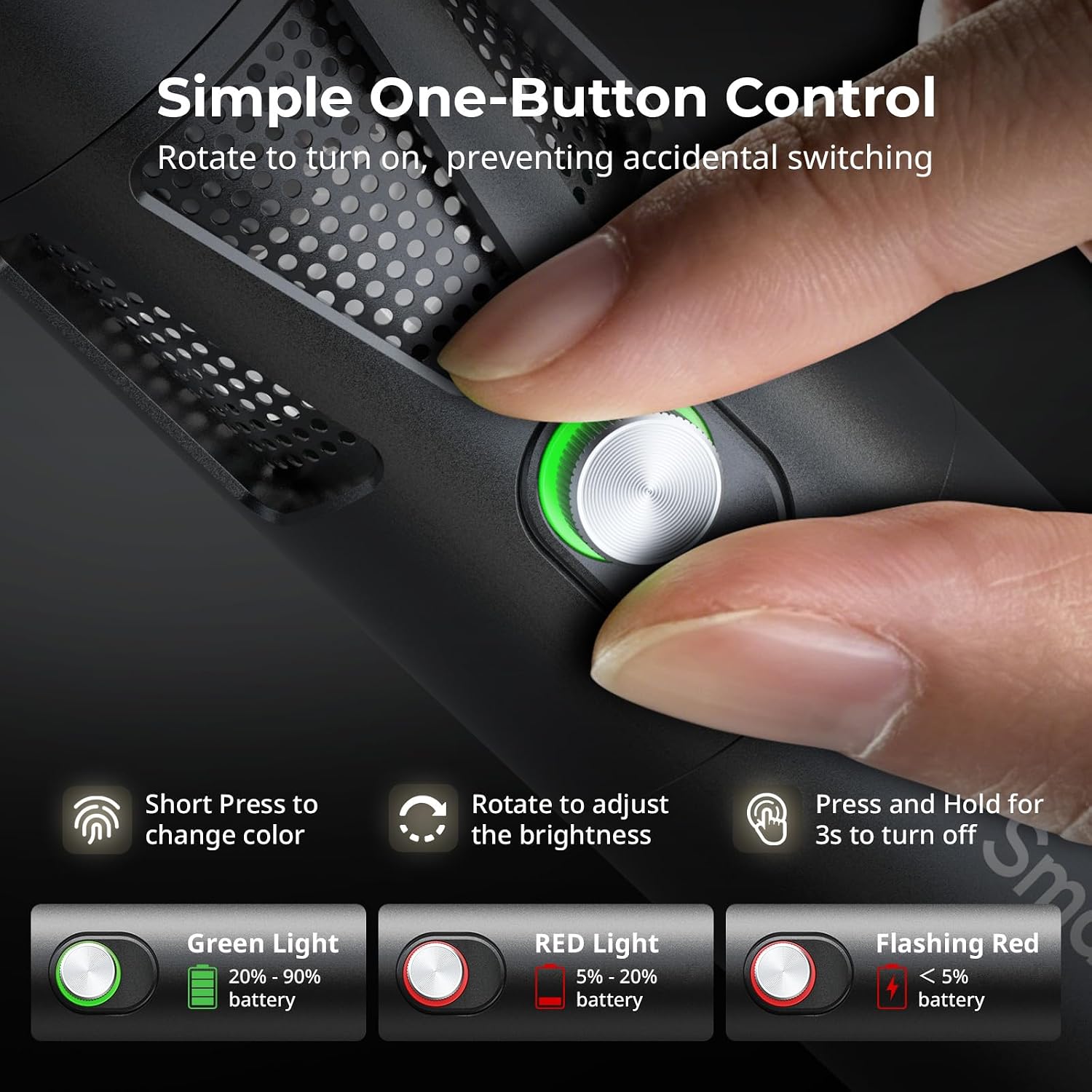
Figure 5.1: One-button control and battery indicator.

Figure 5.2: Available LED colors.
5.2 אַדזשאַסטירן שטראַל ווינקל
The front plano-convex lens allows for adjustment of the beam angle. Push or pull the lens to change the focus of the light from a narrow 24° beam to a wider 60° diffusion.
- Extend the lens: Narrows the beam (e.g., 24°).
- Retract the lens: Diffuses the beam (e.g., 60°).

Figure 5.3: Beam angle adjustment mechanism.
5.3 באַטערי ינדיקאַטאָר
The control button's LED indicates the battery status:
- גרין ליכט: 20% - 90% באַטאַרייע בלייבט איבער.
- רויט ליכט: 5% - 20% באַטאַרייע בלייבט איבער.
- פלאַשינג רויט ליכט: ווייניקער ווי 5% באַטאַרייע רוען.

Figure 5.4: Brightness comparison of RF20C.
6. וישאַלט
- Clean the device regularly with a soft, dry cloth. Do not use harsh chemicals or abrasive materials.
- האַלט דעם אַפּאַראַט אין אַ קיל, טרוקן אָרט, אַוועק פון דירעקט זונשייַן און עקסטרעמע טעמפּעראַטורן.
- When not in use for extended periods, charge the battery to approximately 50% every three months to prolong battery life.
- Keep the lens and LED surface free from dust and fingerprints for optimal light output.
7. טראָובלעשאָאָטינג
| פּראָבלעם | מעגלעך סיבה | לייזונג |
|---|---|---|
| די מיטל איז נישט קער אויף. | נידעריגע באַטעריע; אומרעכטע פּראָצעדור צו אָנצינדן. | Charge the device. Ensure you rotate the control button to power on. |
| ליכט רעזולטאַט איז טונקל. | Low battery; brightness set too low; dirty lens. | Charge the device. Rotate the control button to increase brightness. Clean the lens. |
| Gobo projection is blurry. | Plano-convex lens not removed; gobo not seated correctly. | Remove the plano-convex lens before attaching the silicone gobo holder. Ensure gobo is properly inserted. |
| Device becomes warm during use. | Normal operation, especially at high power; fan obstruction. | This is normal. Ensure the fan vents are not obstructed for proper heat dissipation. If excessively hot, reduce brightness or allow to cool. |
| דער פען ראַש איז באַמערקבאַר. | Normal operation for cooling. | The device uses a high-speed fan for efficient heat dissipation. This noise is part of normal operation. Consider distance from audio recording equipment. |
8. ספּעסאַפאַקיישאַנז
| שטריך | דעטאַל |
|---|---|
| מאָדעל | RF20C (5335) |
| מאַכט | 20 וו |
| אַרייַנשרייַב | 20 V / 1.8 A (max. 36 W) |
| געפירט קאָלאָרס | Red, 5600K White, Purple, Orange, Cyan |
| קאָליר רענדערינג אינדעקס (CRI) | ≥ 97 |
| טעלעוויזיע לייטינג קאָנסיסטענסי אינדעקס (TLCI) | ≥ 99 (at 5600 K) |
| לומינאַנסע | 5400 Lux @ 1m / 5600K |
| באַטאַרייע קאַפּאַציטעט | 10000mAh (2 x 5000mAh / 7.4V / 37Wh) |
| Runtime (Full Power) | אַרויף צו 1.5 שעה |
| טשאַרדזשינג | USB-C PD 36W Fast Charging, supports charging while operating |
| שטראַל ווינקל אַדדזשוסטמענט | 24° צו 60° |
| מאַטעריאַל | אַלומינום צומיש, אַבס |
| פּראָדוקט דימענשאַנז | φ49.0 x 200.0 mm / φ1.9 x 7.9 inches |
| פּראָדוקט וואָג | 520.0 ± 20.0 ג / 18.3 ± 0.7 אַז |
| קאַנעקטיוויטי טעכנאָלאָגיע | וסב |
| לאַנד פון אָריגין | כינע |
9. וואָראַנטי און שטיצן
SmallRig products are designed and manufactured to the highest quality standards. This product is covered by a limited warranty from the date of purchase. For detailed warranty terms, technical support, or service inquiries, please refer to the official SmallRig webזייטל אדער קאָנטאַקט אייער לאקאלן דיסטריביאַטאָר.
ביטע האַלטן דיין דערווייַז פון קויפן פֿאַר וואָראַנטי קליימז.
10. באַניץ סצענאַרן
The SmallRig RF20C is suitable for various applications, including:
- פאָטאָגראַפיע
- ווידעא רעקאָרדינג
- לעבן סטרימינג
- Creative Accent Lighting
- Macro Work and Close-ups

פיגורע 10.1: עקסamples of RF20C usage scenarios.
Ask a question about this manual
Ask about setup, troubleshooting, compatibility, parts, safety, or missing instructions. Manuals+ will review the question and use this page’s manual context to help answer it.