
הקדמה
This manual provides essential information for the safe and efficient use of your Samsung 43-Inch Class U8000H Series Crystal UHD 4K Smart TV. Please read all instructions carefully before using the product and retain this manual for future reference.
וואָס איז אין די קעסטל
באַשטעטיקן אַז אַלע קאָמפּאָנענטן זענען פאַראַן אין דער פּאַקאַדזשינג:
- Samsung 43-Inch U8000H Series Crystal UHD 4K Smart TV
- מאַכט קאַבלע
- ווייַט קאָנטראָל
- שטיין
- באַניצער מאַנואַל (דעם דאָקומענט)
- וואָראַנטי קאַרד

Image: Included components for the Samsung U8000H Series TV.
סעטאַפּ
1. Physical Setup (Stand or Wall Mount)
Before proceeding, ensure the TV is placed on a stable, level surface or securely mounted to a wall. Refer to the separate wall mount instructions if applicable.
- אַטאַטשינג די שטיין: Carefully place the TV screen-down on a soft, clean cloth. Align the stand with the designated slots on the bottom of the TV. Secure the stand using the provided screws.
- וואַנט מאָונטינג: If wall mounting, ensure you use a VESA-compatible mount (200 x 200 mm) and follow the mount manufacturer's instructions. Disconnect the stand if already attached.
בילד: הינטערשטע view of the TV, highlighting VESA mounting points and input panel.
2. קאַנעקטינג דעוויסעס
Connect your external devices (cable box, Blu-ray player, gaming console, etc.) to the TV's input ports.
- הדמי: Use HDMI cables for high-definition video and audio. The TV has 3 HDMI ports. HDMI 1 supports eARC for enhanced audio return.
- וסב: Connect USB devices for media playback or power. The TV has 1 USB port.
- עטהערנעט (לאַן): פֿאַר אַ סטאַבילע דראָטיקע אינטערנעט פֿאַרבינדונג.
- אַנטענע / קאַבלע: Connect an antenna or cable TV signal for over-the-air or cable channels.

בילד: דעטאַלירט view of the TV's connectivity panel.
3. ערשטע איינשאַלטונג און נעץ סעטאַפּ
- פֿאַרבינדט דעם מאַכט קאַבל צום טעלעוויזיע און דערנאָך צו אַ וואַנט אַוטלעט.
- דריק דעם מאַכט קנעפּל אויף דער ווײַט קאָנטראָל אָדער דעם טעלעוויזיע.
- פֿאָלגט די אינסטרוקציעס אויף דעם עקראַן צו פֿאַרענדיקן די ערשטע סעטאַפּ, אַרייַנגערעכנט שפּראַך אויסוואַל, נעץ פֿאַרבינדונג (Wi-Fi אָדער עטהערנעט), און קאַנאַל סקאַנינג.
- For smart features, you may be prompted to log in to or create a Samsung Account.
אַפּערייטינג די טעלעוויזיע
ווייַט קאָנטראָל
די אריינגערעכנטע ווײַטקאָנטראָל ערלויבט אײַך צו נאַוויגירן דעם טעלעוויזאָרס אינטערפֿייס, צופּאַסן סעטטינגס און צוטריטן צו קלוגע פֿונקציעס. מאַכט זיך באַקאַנט מיטן קנעפּל אויסלייג פֿאַר אָפּטימאַלן באַנוץ.

Image: The standard remote control for the Samsung U8000H Series TV.
שליסל פֿעיִקייטן און פאַנגקשאַנז
-
קריסטאַל פּראַסעסער 4K: This powerful processor enhances colors and sharpens details, providing a vibrant 4K viewing experience. It also performs 4K upscaling for lower-resolution content.

Image: Visual representation of the Crystal Processor 4K technology.
-
Motion Xcelerator: Enjoy clear picture and smooth motion, especially in fast-paced scenes like sports and games. This technology estimates and adjusts frame transitions in real-time.

Image: Motion Xcelerator in action, demonstrating smooth visuals.
-
קאָליר בוסטער: This feature enhances color intensity, making reds fiery and blues sparkling, transforming content into a visually rich experience.

Image: Demonstrating the enhanced colors with Color Booster.
-
4K אַפּסקיילינג: Upgrade your favorite shows and movies to crisp 4K clarity. This advanced technology enhances details and clarity even from lower-quality sources.

Image: Illustration of 4K Upscaling improving image detail.
-
אומענדלעכע פרייע אינהאַלט (Samsung TV Plus): Access over 2,700 free streaming options, including 750+ subscription-free channels. Content includes news, sports, movies, and more.

Image: Samsung TV Plus interface with free streaming options.
-
סאַמסונג גיימינג הוב: Play thousands of video games without a console. This central hub brings together games from consoles, cloud services, and gaming apps.

Image: Samsung Gaming Hub interface.
-
Vision AI Companion: Ask your TV questions and access powerful AI features. Get personalized answers with Bixby, and utilize AI agents like Microsoft Copilot for enhanced viewing.

Image: Vision AI Companion features.
-
איין יו-איי טיזען: The TV's operating system provides an intuitive smart TV platform tailored to you, with personal data secured by Samsung Knox. It also receives 7 years of automatic OS updates.

Image: One UI Tizen smart TV interface.
-
סאַמסונג נאָקס זיכערהייט: Enjoy peace of mind with built-in triple-layer data protection. Your TV experiences are secured against harmful apps and phishing sites.

Image: Samsung Knox Security features.
וישאַלט
- רייניקונג די פאַרשטעלן: ווישט אָפּ דעם עקראַן מיט אַ ווייכן, טרוקענעם מיקראָפיבער שטאָף. פֿאַר שווערע פֿלעקן, ווישט עס לייכט אָפּ.ampווישט דעם שטאָף מיט וואַסער אָדער אַ ספּעציאַליזירטן עקראַן רייניגער. פֿאַרמייַדט שטרענגע כעמיקאַלן אָדער אַברייסיוו מאַטעריאַלן.
- רייניקונג די ראַם: ניצט אַ ווייכן, טרוקענעם שטאָף צו רייניקן דעם טעלעוויזיע ראַם און שטאַנד.
- ווענטילאַטיאָן: זאָרגט פֿאַר גענוג ווענטילאַציע אַרום דעם טעלעוויזאָר צו פֿאַרמייַדן איבערהיצונג. בלאָקירט נישט די ווענטילאַציע עפענונגען.
- מאַכט שנור: קאָנטראָלירט רעגולער דעם עלעקטרישן שנור פֿאַר קיין שאָדן. אויב עס איז געשעדיגט, זאָלט איר עס גלייך אויסטוישן מיט אַן אויטאָריזירטן Samsung טייל.
טראָובלעשאָאָטינג
| פּראָבלעם | מעגלעך לייזונג |
|---|---|
| קיין מאַכט |
|
| קיין בילד / פארדרייט בילד |
|
| קיין קלאַנג / נידעריק קלאַנג |
|
| ווייַט קאָנטראָל איז נישט ארבעטן |
|
| קלוגע פֿונקציעס אַרבעטן נישט / נעץ פּראָבלעמען |
|
ספּעסאַפאַקיישאַנז
| שטריך | דעטאַל |
|---|---|
| מאָדעל נאָמען | ו8000ה |
| מאָדעל נומער | UN43U8000HFXZA |
| פאַרשטעלן גרייס | 43 אינטשעס |
| ווייַז טעכנאָלאָגיע | געפירט |
| האַכלאָטע | 4 ק והד (3840 רענטגענ 2160) |
| דערפרישן קורס | 60 הז |
| פּראַסעסער | קריסטאַל פּראַסעסער 4 ק |
| HDR פֿאָרמאַט שטיצט | HDR10+ |
| קאַנעקטיוויטי | 3x HDMI, 1x USB, Ethernet (LAN), Wi-Fi, Bluetooth 5.3 |
| אָפּערייטינג סיסטעם | טיזען |
| קאָנטראָל מעטאָד | אַפּ, ווייַט, קול |
| אַודיאָ רעזולטאַט | געבויט-אין רעדנער |
| וועסאַ מאָונט סטאַנדאַרט | 200 רענטגענ 200 מם |
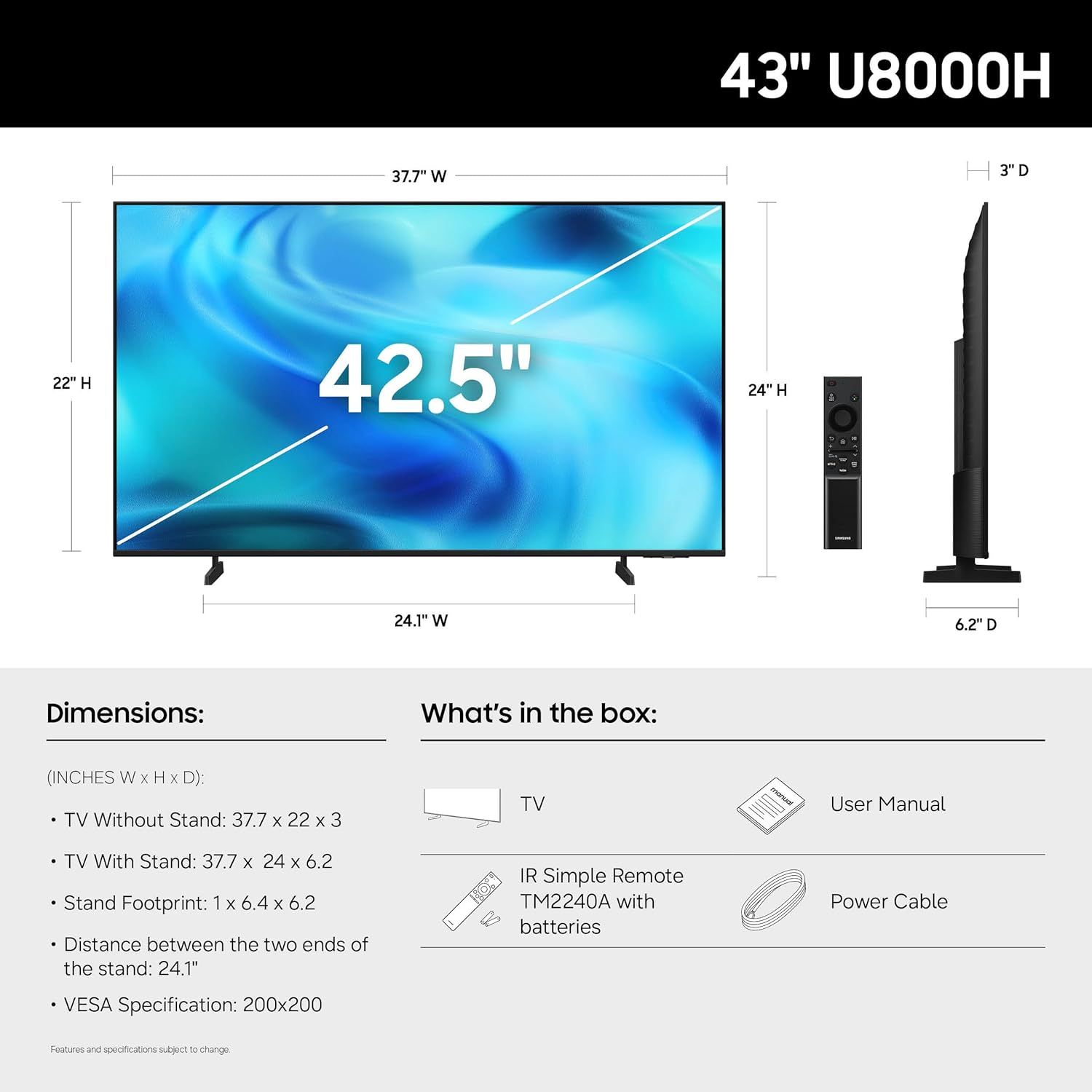
| פּראָדוקט דימענשאַנז (ד רענטגענ וו רענטגענ ה) | 6.2"ד x 37.7"ברייט x 24"ה (מיט שטאנד) |
| פּונקט וואָג | 14.8 פונט (מיט שטאַנד) |
| קאָליר | שוואַרץ |

Image: Dimensional diagram of the Samsung 43-inch U8000H TV.
וואָראַנטי און שטיצן
Your Samsung 43-Inch U8000H Series Crystal UHD 4K Smart TV comes with a 1 יאָר מאַנופאַקטורער וואָראַנטי. For warranty claims, technical support, or service inquiries, please contact Samsung Customer Service.
You can find additional support resources, FAQs, and contact information on the official Samsung support webפּלאַץ.
אָנליין שטיצן: www.samsung.com/us/support/