
1. הקדמה
Thank you for choosing Monster Persona 6th ANC Active Noise Cancelling Headphones. These headphones are designed to provide a superior audio experience with advanced features such as Active Noise Cancellation, Bluetooth 6.0 connectivity, 60 hours of playtime, and three distinct music modes. This manual will guide you through the setup, operation, and maintenance of your new headphones to ensure optimal performance and longevity.
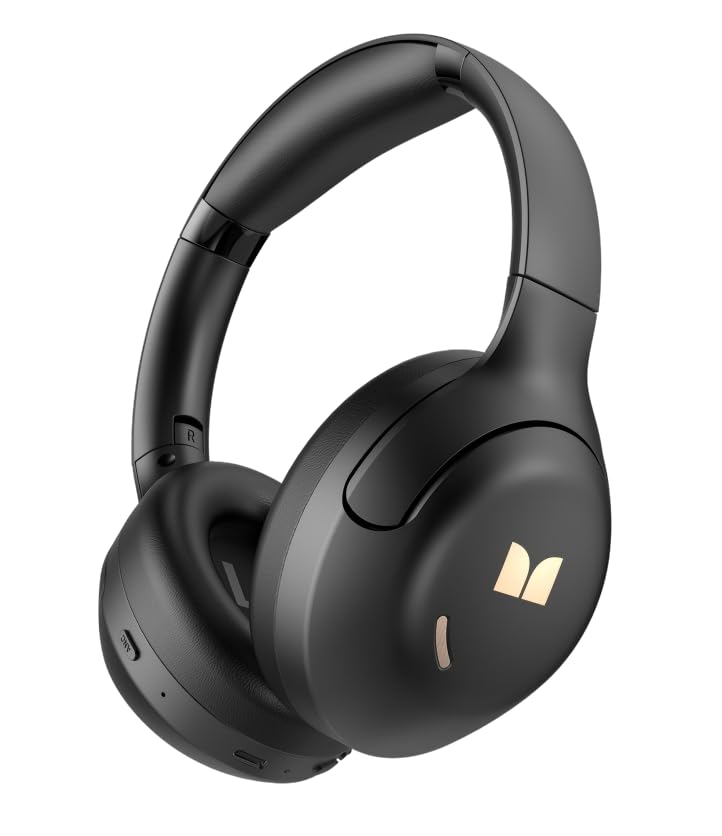
בילד 1.1: פראָנט view of the Monster Persona 6th ANC Active Noise Cancelling Headphones. The headphones feature a sleek, over-ear design with cushioned earcups and an adjustable headband, providing comfort for extended listening sessions.
2. פּעקל אינהאַלט
ביטע טשעק די פּאַקעט פֿאַר די פאלגענדע זאכן:
- Monster Persona 6th ANC Headphones × 1
- טיפּ-C טשאַרדזשינג קאַבלע × 1
- Audio Cable × 1 (for wired connection)
- באַניצער מאַנואַל × 1
3. סעטאַפּ
3.1 אויפלאָדן די קאָפּהערער
Before first use, fully charge your headphones. A full charge takes approximately 2-3 hours.
- Connect the Type-C charging cable to the charging port on the headphones.
- פֿאַרבינדט דעם אַנדערן עק פֿונעם קאַבל צו אַ USB מאַכט אַדאַפּטער (נישט אַרייַנגערעכנט) אָדער אַ קאָמפּיוטער'ס USB פּאָרט.
- די LED אינדיקאַטאָר וועט ווייַזן די טשאַרדזשינג סטאַטוס (למשל, רויט פֿאַר טשאַרדזשינג, בלוי פֿאַר גאָר טשאַרדזשד).
שנעל אָפּצאָל: A 10-minute charge provides approximately 5 hours of playback.
Image 3.1: Location of the Type-C charging port on the Monster Persona 6th ANC Headphones. The port is typically located on the bottom edge of one earcup, alongside other control buttons.
3.2 פּאַוערינג אויף / אַוועק
- מאַכט אויף: Press and hold the Power button for 3 seconds until the LED indicator flashes blue and you hear a power-on prompt.
- מאַכט אַוועק: Press and hold the Power button for 3 seconds until the LED indicator flashes red and you hear a power-off prompt.
3.3 בלועטאָאָטה פּערינג
Pair your headphones with your device for wireless audio.
- מאַכן זיכער אַז די כעדפאָונז זענען פּאַוערד אַוועק.
- דריק און האלט דעם פּאַוער קנעפּל פֿאַר 5-7 סעקונדעס ביז דער LED אינדיקאַטאָר בלינקט בלוי און רויט אָלטערנאַטיוולי, וואָס ווײַזט אויף פּערינג מאָדע.
- אויף אייער דעווייס (סמאַרטפאָן, טאַבלעט, קאָמפּיוטער), אַקטיווירט בלועטוט און זוכט פֿאַר פֿאַראַן דעווייסעס.
- Select "Monster Persona 6th ANC" from the list of devices.
- Once connected, the LED indicator will flash blue slowly, and you will hear a connection prompt.
צווייענדיק מיטל קאַנעקשאַן: These headphones support connecting to two Bluetooth devices simultaneously. After pairing with the first device, disable Bluetooth on the first device, pair with the second, then re-enable Bluetooth on the first device. The headphones should connect to both.
4. אפערירן די כעדפאָונז
4.1 יקערדיק קאָנטראָלס
| פֿונקציע | קאַמף |
|---|---|
| מאַכט אויף / אַוועק | Press and hold Power button for 3 seconds. |
| שפּיל / פּויזע | Press the Multi-function button (often the Power button when not powering on/off). |
| באַנד אַרויף | Short press '+' button. |
| באַנד אַראָפּ | Short press '-' button. |
| ווייַטער שפּור | Long press '+' button. |
| פֿריִערדיקע שפּירט | Long press '-' button. |
| ענטפֿערן / סוף רופן | דרוק דעם מולטי-פונקציע קנעפּל. |
| אָפּוואַרפן רופן | לאַנג דריקן די מולטי-פונקציע קנעפּל. |
| אַקטאַווייט די קול אַססיסטאַנט | טאָפּל דריקן די מולטי-פונקציע קנעפּל. |
Image 4.1: Diagram illustrating the location and function of control buttons on the Monster Persona 6th ANC Headphones. Buttons typically include Power/Multi-function, Volume Up/Next Track, Volume Down/Previous Track, and an ANC mode button.
4.2 Music Modes (EQ Modes)
Your headphones feature three distinct music modes to optimize your listening experience. Press the dedicated EQ/Mode button to cycle through them:
- אַקטיוו ראַש קאַנסאַליישאַן (ANC) מאָדע: Reduces ambient noise for an immersive audio experience. Ideal for travel or noisy environments.
- דורכזעיקייַט מאָדע: Allows you to hear your surroundings while still enjoying your audio. Useful for awareness in urban environments or when interacting with others.
- נאָרמאַל מאָדע: Provides a balanced, classic sound profile without active noise cancellation or transparency features.
4.3 ווייערד קאַנעקשאַן
You can use the included audio cable to connect your headphones to devices without Bluetooth capability or when the battery is depleted. Simply plug one end into the headphone's audio jack and the other into your device's 3.5mm audio output.
5. וישאַלט
5.1 רייניקונג
- ווישט די כעדפאָונז מיט אַ ווייכן, טרוקענעם, לינט-פֿרייע שטאָף.
- ניצט נישט קיין שרײַבנדיקע רייניגער, אַלקאָהאָל, אדער כעמישע סאָלווענטן.
- פֿאַרמײַדט אַרײַנצוקומען פֿײַכטקײַט אין קיין עפענונגען.
5.2 סטאָרידזש
- האַלט די כעדפאָונז אין אַ קיל, טרוקן אָרט, אַוועק פון דירעקט זונשייַן און עקסטרעמע טעמפּעראַטורן.
- If storing for an extended period, charge the headphones every three months to maintain battery health.
6. טראָובלעשאָאָטינג
אויב איר טרעפט פּראָבלעמען מיט אייערע כעדפאָונז, באַזירט זיך אויף די פאלגענדע געוויינטלעכע לייזונגען:
| פּראָבלעם | לייזונג |
|---|---|
| די קאָפּהערער ווערן נישט אנגעצינדן. | זיכער מאַכן אַז די קאָפּהערער זענען אָנגעלאָדן. פאַרבינדן צו אַ מאַכט מקור ניצן די טיפּ-C קאַבל. |
| קען נישט צופּאַסן מיטן דעווייס. | Ensure headphones are in pairing mode (flashing blue/red). Turn off and on Bluetooth on your device. Move headphones closer to the device. Clear previous Bluetooth connections on your device. |
| קיין קלאַנג אָדער נידעריקע וואָלומען. | Check headphone and device volume levels. Ensure headphones are properly paired. Try playing different audio sources. If using wired connection, ensure cable is fully inserted. |
| די ANC ארבעט נישט עפעקטיוו. | Ensure ANC mode is activated. ANC is most effective against low-frequency, constant noise. It may not completely eliminate all sounds. |
| אומגעריכטע פֿאַרבינדונג. | Ensure no obstacles between headphones and device. Move away from strong Wi-Fi signals or other Bluetooth devices that may cause interference. Keep within the 33 feet Bluetooth range. |
7. ספּעסאַפאַקיישאַנז
| שטריך | דעטאַל |
|---|---|
| סאָרט | פאַרזעעניש |
| מאָדעל נאָמען | Monster Persona 6th ANC |
| אויער פּלייסמאַנט | איבער אויער |
| ראַש קאָנטראָל | אַקטיוו ראַש קאַנסאַליישאַן |
| קאַנעקטיוויטי טעכנאָלאָגיע | Wireless (Bluetooth), Wired (3.5mm Audio Cable) |
| בלועטאָאָטה ווערסיע | 6.0 |
| בלועטאָאָטה קייט | 33 פֿיס (10 מעטער) |
| באַטערי לעבן | אַרויף צו 60 שעה |
| טשאַרדזשינג פּאָרט | טיפּ-C |
| אַודיאָ דרייווער גרייס | 40 מילאַמיטערז |
| אָפטקייַט ראַנגע | 20 הז - 20,000 הז |
| קאָנטראָל טיפּ | קנעפּל קאָנטראָל |
| מאַטעריאַל | פּלאַסטיק |
| נאָך פֿעיִקייטן | 3 Music Modes (ANC, Transparency, Standard), Dual Device Connection, Hands-free Calling |
8. וואָראַנטי און שטיצן
8.1 וואָראַנטי אינפֿאָרמאַציע
Your Monster Persona 6th ANC Headphones come with a 180-טאָג וואָראַנטי פֿון דעם קויפֿדאַטום. די וואָראַנטי דעקט פֿאַבריקאַציע חסרונות און אַרבעט אונטער נאָרמאַל נוצן. עס דעקט נישט שעדיקן געפֿירט דורך אומרעכט נוצן, אַקסאַדענטן, נישט-אָטעריזירטע מאָדיפֿיקאַציעס, אָדער נאָרמאַל טראָגן און טרער.
8.2 קונה שטיצן
For technical assistance, warranty claims, or any questions regarding your Monster Persona 6th ANC Headphones, please contact Monster customer support through their official website or the retailer where the product was purchased. Please have your purchase receipt and product model information ready when contacting support.