
WOLFANG WT01
WOLFANG WT01 4K 48MP Trail Camera User Manual
מאָדעל: WT01
הקדמה
This manual provides detailed instructions for the setup, operation, and maintenance of your WOLFANG WT01 4K 48MP Trail Camera. Please read this manual thoroughly before using the camera to ensure optimal performance and longevity.
שליסל פֿעיִקייטן
- Ultra High Resolution: Captures 4K HD video and 48MP still images.
- Invisible Night Vision: Equipped with 36/38 940nm anti-glare infrared LEDs for clear black and white night recordings without visible light.
- Optimal Waterproofing: IP66 rated design with a protective flap for the control screen and a sealed battery compartment, ensuring resistance to rain and harsh weather.
- שנעלע טריגער גיכקייט: Ultra-fast 0.3-second trigger speed with a 3-image burst mode and adjustable motion sensor.
- באַניצער-פרייַנדלעך צובינד: Intuitive menu buttons and a USB-C interface for easy file אַריבערפירן.
- ווערסאַטאַל פאַנגקשאַנז: Supports temperature detection, time-lapse recording, loop recording, drop protection, and password protection.
פּעקל אינהאַלט
באַשטעטיקן אַז אַלע זאכן זענען פאַראַן אין פּעקל:
- WOLFANG WT01 טרייל קאַמעראַ
- מאַונטינג רימען
- וסב- C קאַבלע
- באַניצער מאַנואַל
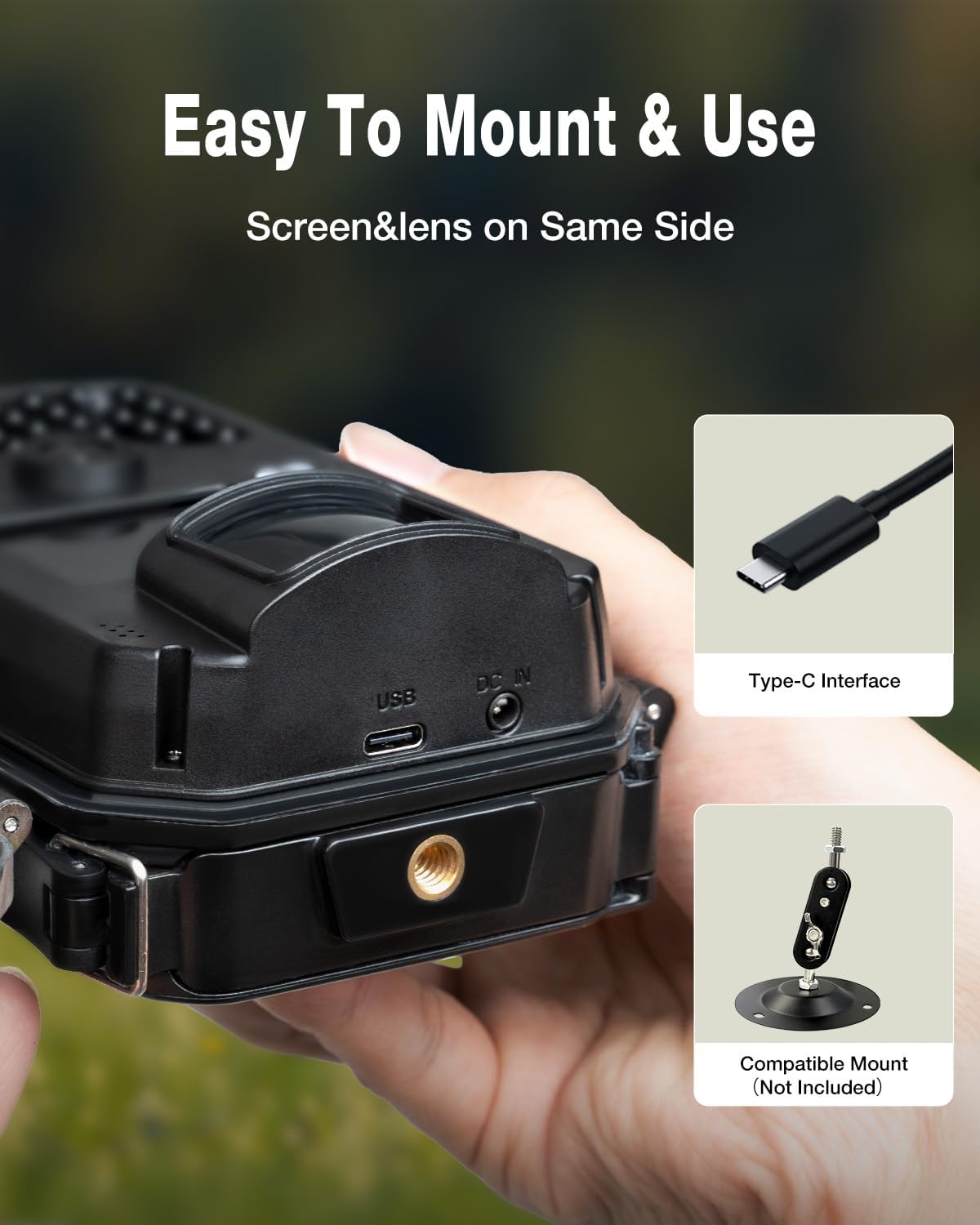
Image: Contents of the WOLFANG WT01 Trail Camera package.
סעטאַפּ גייד
1. מאַכט סופּפּלי ינסטאַללאַטיאָן
The camera requires 8 AA batteries for operation. Rechargeable 1.2V NI-MH batteries are recommended for extended use. Alternatively, the camera can be powered by an external 6V 1.5A power adapter (not included) via the DC IN port.
- עפֿנט די קאַמעראַ casinג דורך עפענען די זייט קליפס.
- געפינט די באַטעריע אָפּטייל אין די דנאָ פון די קאַמעראַ.
- אַרייַנלייגן 8 אַאַ באַטעריז, ינשורינג די ריכטיק פּאָולעראַטי (+/-).
- Close the battery compartment securely to maintain waterproofing.
2. סד קאַרד ינסטאַללאַטיאָן
A Micro SD card (up to 32GB, not included) is required to store photos and videos.
- With the camera powered off, locate the SD card slot inside the camera.
- אַרײַנשטעלן די מיקראָ SD קאַרטל מיט די גאָלדענע קאָנטאַקטן צו דער הינטערשטער זײַט פֿון דער קאַמעראַ ביז עס קליקט אַרײַן אין פּלאַץ.
- צו אַרויסנעמען, דריק די קאַרטל לײַכט ביז זי שפּרינגט אַרויס.
3. מאָונטינג די קאַמעראַ
The camera can be mounted using the provided strap or a compatible tripod mount (not included).
- רימען מאַונטינג: Thread the strap through the slots on the back of the camera and secure it around a tree or post.
- Tripod Mounting: Use the 1/4-inch threaded insert at the bottom of the camera to attach it to a tripod or other mounting accessory.

Image: WOLFANG WT01 Trail Camera securely mounted on a tree.

Image: USB-C port and tripod mount on the WOLFANG WT01 Trail Camera.
4. Initial Power-On and Basic Settings
- After installing batteries and SD card, switch the camera to the "SETUP" position.
- The internal LCD screen will activate. Use the menu buttons to navigate and adjust settings such as date, time, language, and recording mode.
- Format the SD card through the camera's menu for optimal performance.
אַפּערייטינג ינסטראַקשאַנז
1. רעקאָרדינג מאָדעס
The WT01 offers several recording modes:
- פאָטאָ מאָדע: כאַפּט סטיל בילדער (ביז 48MP).
- ווידעא מאָדע: Records video clips (up to 4K HD).
- פאָטאָ + ווידעא מאָדע: כאַפּט אַ סטיל בילד און דערנאָך אַ ווידעאָ קליפּ.
- צייט-לאַפּס מאָדע: Captures images at set intervals to create a time-lapse sequence.
Select your desired mode from the camera's menu.
2. Motion Detection (PIR)
The camera uses a Passive Infrared (PIR) sensor to detect motion and trigger recordings.
- טריגער גיכקייַט: The camera boasts an ultra-fast 0.3-second trigger speed to capture fast-moving subjects.
- סענסיטיוויטי: Adjust the PIR sensor sensitivity (Low, Medium, High) in the settings menu to suit your environment and reduce false triggers.
- פּלאַצן מאָדע: In Photo Mode, you can set the camera to take 1, 2, or 3 continuous shots per trigger.

Image: Demonstration of the camera's fast trigger speed capturing a deer.
3. נאַכט זעאונג
The WT01 features 36/38 940nm infrared LEDs for discreet night recording.
- The 940nm LEDs emit no visible glow, making the camera undetectable to animals and humans in the dark.
- Night recordings are captured in clear black and white.

Image: The camera's 940nm no-glow infrared LEDs for night vision.

Image: Comparison of day (color) and night (black and white) image quality.
4. שייַעךviewאַריבערפירן און אַריבערפירן Files
- אויף-קאַמעראַ פּלייבּעק: Switch the camera to "SETUP" mode and use the navigation buttons to review captured photos and videos on the internal LCD screen.
- USB-C Transfer: Connect the camera to a computer using the provided USB-C cable. The camera will appear as a removable disk, allowing you to copy files גלייַך.
- סד קאָרט לייענער: Remove the SD card from the camera and insert it into a computer's SD card reader to access files.
וישאַלט
- רייניקונג: ניצט אַ ווייכע, טרוקענע שטאָף צו רייניקן די קאַמעראַ לינז אוןasinז. פֿאַרמײַדן אַברייסיוו רייניגער אָדער סאָלווענטן.
- באַטערי פאַרוואַלטונג: Replace batteries when the low battery indicator appears. For long-term storage, remove all batteries.
- סד קאָרט זאָרגן: Regularly format the SD card to prevent data corruption and ensure optimal recording performance. Back up important files איידער פאָרמאַטטינג.
- וואָטערפּרופינג: Ensure all latches are securely closed and the battery compartment is sealed to maintain the IP66 waterproof rating.
טראָובלעשאָאָטינג
| פּראָבלעם | מעגלעך לייזונג |
|---|---|
| די קאַמעראַ גייט נישט אָן. | Check battery polarity. Ensure batteries are fully charged or replaced. Verify external power adapter (if used) is correctly connected and functional. |
| שלעכטע בילד/ווידעא קוואַליטעט. | Clean the camera lens. Ensure sufficient lighting for day recordings. For night recordings, ensure objects are within the effective IR range. Check camera settings for resolution and quality. |
| באַוועגונג סענסער ניט טריגערינג. | Adjust PIR sensitivity to a higher setting. Ensure there are no obstructions in front of the PIR sensor. Test the camera in different locations. |
| סד קאָרט טעות. | Ensure the SD card is correctly inserted. Format the SD card using the camera's menu. Try a different SD card (up to 32GB, Class 10 or higher recommended). |
| קורץ באַטאַרייע לעבן. | Use high-quality alkaline or rechargeable 1.2V NI-MH batteries. Reduce the number of photos per trigger or video length. Consider using an external 6V 1.5A power source for permanent installations. |
ספּעסאַפאַקיישאַנז
| שטריך | דעטאַל |
|---|---|
| סאָרט | WOLFANG |
| מאָדעל נאָמען | WT01 |
| דרינענדיק / דרויסנדיק נוצן | דרויסנדיק |
| קאַנעקטיוויטי פּראָטאָקאָל | וסב-C |
| מאַונטינג טיפּ | בוים בארג |
| ווידעא רעקאָרדינג האַכלאָטע | 4K |
| נומער פון זאכן | 1 |
| אַרייַנגערעכנט קאַמפּאָונאַנץ | 4K Wildlife Camera |
| נומער דימענשאַנז (LxWxH) | 14.5 X 10.5 X 6.8 סענטימעטער |
| באַטעריז פארלאנגט | 8x AA (ניט אַרייַנגערעכנט) |
| Screen Capture Resolution | 4K |
| ווידעא קאַפּטורע פֿאָרמאַט | mp4 |
| UPC | 850067892557 |
| GTIN | 850067892557 |
וואָראַנטי און שטיצן
WOLFANG offers a 2 יאָר וואָראַנטי for this product. For any questions, technical assistance, or warranty claims, please contact WOLFANG customer service:
- בליצפּאָסט: support.vc@wolfang.co
- WOLFANG is committed to resolving your issues promptly and to your satisfaction.
Ask a question about this manual
Ask about setup, troubleshooting, compatibility, parts, safety, or missing instructions. Manuals+ will review the question and use this page’s manual context to help answer it.