
1. הקדמה
This manual provides essential instructions for setting up, operating, and maintaining your Nothing Phone (4a) Pro. Please read this guide thoroughly to ensure proper use and to maximize the performance of your device.
2. ערשט סעטאַפּ
2.1. אויספּאַקן און קאָמפּאָנענטן
ביים עפענען דעם פעקל, זיכער מאכן אז אלע קאמפאנענטן זענען דא:
- Nothing Phone (4a) Pro device
- העאַדסעט
Note: A USB Type-C cable and SIM ejector tool may be sold separately or included depending on region. A power adapter is typically sold separately.
2.2. ינסערטינג די סים קאַרד
- געפינט די סים קארטל טאַץ אויף דער זייט פון אייער טעלעפאָן.
- Insert a SIM ejector tool (not always included) into the small hole next to the tray and press gently until the tray pops out.
- לייגט אריין אייער נאַנאָ-סים קאַרטל(ן) אין דעם טאַץ מיט די גאָלדענע קאָנטאַקטן אַראָפּ.
- פֿאָרזיכטיק צוריקשטעלט דעם טאַץ אין דעם טעלעפֿאָן ביז עס קליקט אַרײַן אין פּלאַץ.
2.3. אײַנצושאַלטן און ערשטע קאָנפיגוראַציע
- Press and hold the Power button until the Nothing logo appears.
- פֿאָלגט די אינסטרוקציעס אויף דעם עקראַן צו אויסקלײַבן אײַער שפּראַך, פֿאַרבינדט זיך צו אַ Wi-Fi נעץ, און לאָגט זיך אײַן מיט אײַער Google חשבון.
- Complete the setup process, including data transfer (if applicable) and security settings.
3. אפערירן דיין טעלעפאָן
3.1. אַרויסווייַז און באַניצער צובינד
The Nothing Phone (4a) Pro features a 6.83-inch 1.5K Flexible AMOLED Display מיט א 144 הז דערפרישן קורס, providing vibrant colors and smooth scrolling. Navigate the interface using touch gestures.
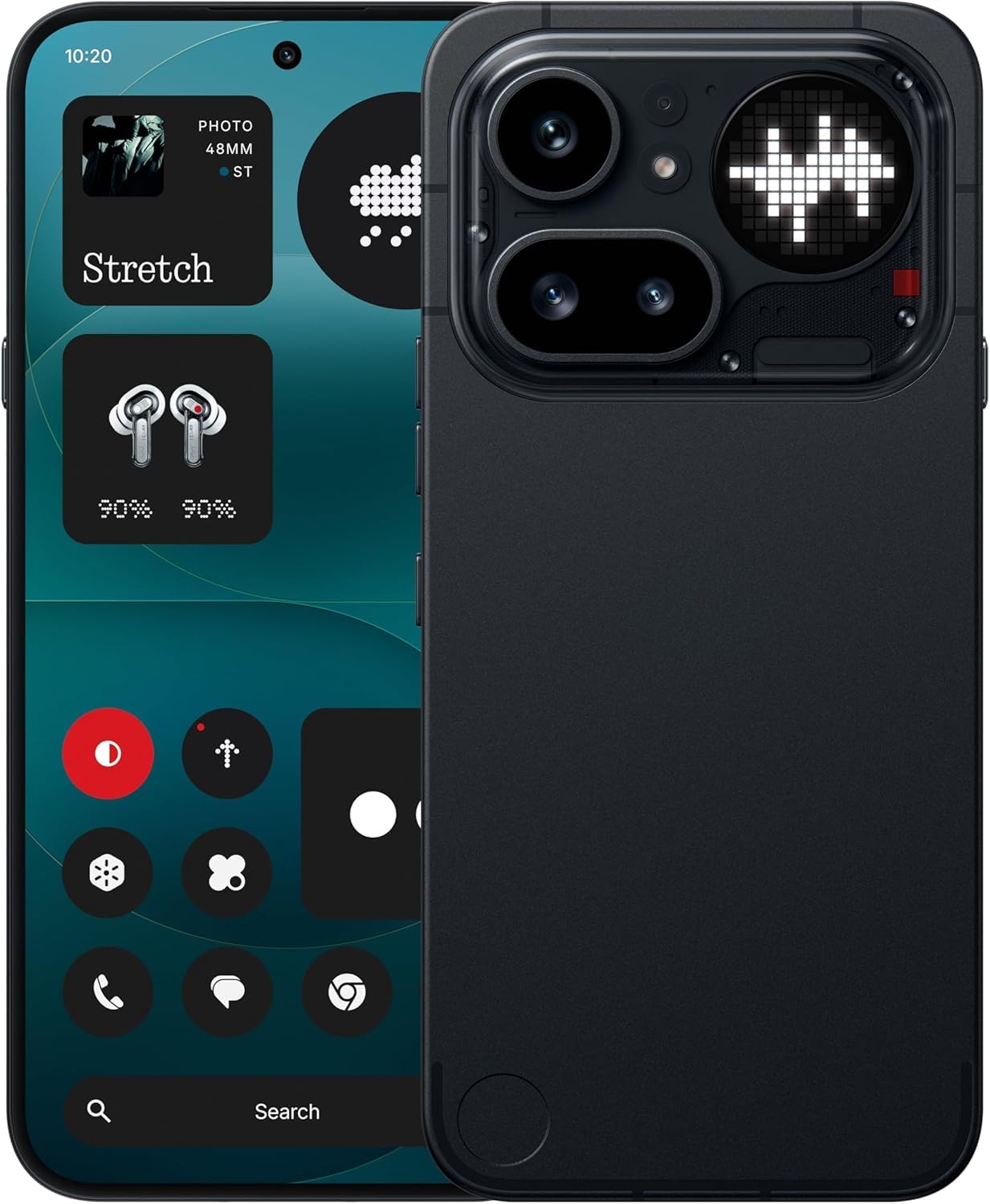
Image: The Nothing Phone (4a) Pro showcasing its flexible AMOLED display and sleek design.
3.2. קאַמעראַ סיסטעם
Your device is equipped with a Triple Camera System, allowing for versatile photography. The camera supports up to 140x ultra zoom for capturing distant subjects.
Image: Detail of the triple camera module and a screen showing 140x zoom capability.
3.3. פאָרשטעלונג
The Nothing Phone (4a) Pro is powered by the Snapdragon 7 Gen 4 processor, ensuring smooth multitasking and efficient performance for demanding applications and games. It comes with 12 גיגאבייט באַראַן for enhanced responsiveness.
Image: A visual representation of the Snapdragon 7 Gen 4 processor, highlighting the device's core performance component.
3.4. באַטאַרייע און טשאַרדזשינג
דער מיטל כולל אַ 5080 מאַה באַטאַרייע, providing extended usage times. It supports 50 וו שנעל אָפּצאָל technology, allowing for quick recharging.
בילד: אן אינערליכע view of the phone, showing the battery component with its specifications.
3.5. Software and AI Features
Your Nothing Phone (4a) Pro runs on Nothing OS, based on אַנדרויד 14, offering a clean and intuitive user experience. It integrates Essential AI tools און פֿעיִקייטן Google Gemini + ChatGPT Integration for advanced assistance and productivity.
Image: Screenshots depicting the Nothing OS home screen, an AI tools interface, and the Google Gemini + ChatGPT integration menu.
3.6. קאַנעקטיוויטי
דער מיטל שטיצט 5G cellular technology for high-speed internet access. It uses a וסב טיפּ-C (וסב 2.0) connector for charging and data transfer.
4. וישאַלט
4.1. רייניקן דיין דעווייס
To clean your phone, use a soft, lint-free cloth. Avoid abrasive materials or harsh chemicals. For stubborn smudges, slightly dampווישט דעם שטאָף מיט וואַסער אָדער אַ פאַרשטעלן רייניגער דיזיינד פֿאַר עלעקטראָניק.
4.2. ווייכווארג דערהייַנטיקונגען
קאָנטראָלירט און אינסטאַלירט רעגולער ווייכווארג דערהייַנטיקונגען צו זיכער מאַכן אַז אייער מיטל האט די לעצטע פֿעיִקייטן, זיכערהייט פּאַטשאַז און פאָרשטעלונג פֿאַרבעסערונגען. גייט צו סעטטינגס > סיסטעם > ווייכווארג דערהייַנטיקונג צו קאָנטראָלירן פֿאַר פֿאַראַן דערהייַנטיקונגען.
4.3. באַטערי קער
To prolong battery life, avoid exposing your phone to extreme temperatures. It is recommended to keep the battery charge between 20% and 80% for optimal long-term health.
5. טראָובלעשאָאָטינג
5.1. געוויינטלעכע פראבלעמען און לייזונגען
- מיטל נישט קער אויף: זיכער מאַכן אַז די באַטאַרייע איז אויפגעלאָדן. פֿאַרבינדט עס צו אַ טשאַרדזשער פֿאַר לפּחות 15 מינוט, און פּרוּווט עס ווידער אנצינדן.
- אַפּפּס קראַשן: Clear the cache of the problematic app (Settings > Apps > [App Name] > Storage & cache > Clear cache). If the issue persists, reinstall the app.
- שלעכט נעץ סיגנאַל: Check if your SIM card is properly inserted. Try restarting the phone or toggling Airplane Mode on and off.
- די באַטאַרייע פליסן געשווינד: רעדוצירן דעם ברייטקייט פון דעם עקראַן, דיאַקטיווירן אומנייטיקע הינטערגרונט אַפּפּס, און באַגרענעצן אָרט סערוויסעס.
5.2. פאַבריק באַשטעטיק
אויב איר טרעפט זיך מיט אנהאלטנדיקע ווייכווארג פראבלעמען, קען א פאַבריק ריסעט זיי פאררעכטן. ווארענונג: דאָס וועט אויסמעקן אַלע דאַטן אויף דיין טעלעפאָן. מאַכט אַ באַקאַפּ פון וויכטיקע דאַטן איידער איר גייט ווייטער. גיין צו סעטטינגס> סיסטעם> באַשטעטיק אָפּציעס> מעקן אַלע דאַטן (פאַבריק באַשטעטיק).
6. ספּעסאַפאַקיישאַנז
| שטריך | דעטאַל |
|---|---|
| מאָדעל | Nothing Phone (4a) Pro |
| אָפּערייטינג סיסטעם | Android 14 (Nothing OS) |
| פּראַסעסער | Snapdragon 7 Gen 4, 2.5 GHz |
| באַראַן | 12 גיגאבייט |
| אינערלעכער סטאָרידזש | 256 גיגאבייט |
| ווייַז | 6.83" 1.5K Flexible AMOLED, 144Hz refresh rate |
| באַטאַרייע קאַפּאַציטעט | 5080 מאַה ליטהיום-יאָן |
| טשאַרדזשינג | 50W Fast Charge, USB Type-C (USB 2.0) |
| אַפּאַראַט | Triple Camera System, up to 140x ultra zoom |
| קאַנעקטיוויטי | 5G, GSM, LTE |
| דימענשאַנז | 16.4 X 7.8 X 0.8 סענטימעטער |
| וואָג | 250 גראַמז |
| קעסטל אינהאַלט | העאַדסעט |
7. וואָראַנטי און שטיצן
7.1. פּראָדוקט וואָראַנטי
The Nothing Phone (4a) Pro comes with a 1-יאָר פאַבריקאַנט ס וואָראַנטי from the date of purchase. This warranty covers manufacturing defects and workmanship under normal use. It does not cover damage caused by accidents, misuse, unauthorized modifications, or normal wear and tear.
7.2. קונה שטיצן
For technical assistance, warranty claims, or service inquiries, please contact Nothing customer support. Refer to the official Nothing webוועבזייטל פֿאַר די מערסט אַרויף-צו-דאַטע קאָנטאַקט אינפֿאָרמאַציע.
Manufacturer: Nothing
Packer/Importer Contact: Essentially Nothing