
1. הקדמה
Thank you for choosing the Cillso GTR3 Fitness Smart Watch. This manual provides essential information for the proper setup, operation, and maintenance of your device. Please read it thoroughly to ensure optimal performance and a complete understanding of all features.
2. פּעקל אינהאַלט
באַשטעטיקן אַז אַלע זאכן זענען פאַראַן אין דיין פּעקל:
- 1 x Cillso GTR3 Smart Watch
- 1 x מאַגנעטיק טשאַרדזשינג קאַבלע
- 1 x Detailed User Manual (this document)
3. סעטאַפּ גייד
3.1 אויפלאָדן דעם סמאַרט וואַך
Before first use, fully charge your Cillso GTR3 Smart Watch. Connect the magnetic charging cable to the charging points on the back of the watch and plug the USB end into a standard USB power adapter (not included).

Image: The Cillso GTR3 Smart Watch connected to its magnetic charging cable, indicating a 350 mAh battery and 3ATM waterproof rating.
A full charge typically takes approximately 2 hours. The watch has a standby time of up to 45 days and can last up to 10 days with heavy usage.
3.2 אַפּ דאַונלאָוד און פּערינג
To unlock the full functionality of your smart watch, download the "Runmefit" application on your smartphone.
- אראפקאפיע די אַפּ: זוכן פֿאַר "Runmefit" in your smartphone's app store (compatible with iOS 12.0+ and Android 7.0+).
- געבן בלועטאָאָטה: קער אויף בלועטאָאָטה אויף דיין סמאַרטפאָנע.
- Open Runmefit App: Launch the app and follow the on-screen instructions to search for your device. Select "GTR3" from the list of available devices.
- באַשטעטיקן פּערינג: Confirm the pairing request on both your phone and the smart watch.

Image: Visual guide demonstrating the steps to download the "Runmefit" app, enable Bluetooth, and connect the GTR3 smart watch.
3.3 Enabling Bluetooth Call Function
For Bluetooth calling functionality, an additional connection is required:
- Ensure the watch is successfully bound to the "Runmefit" app.
- גייט צו די בלועטוט סעטטינגס פון אייער סמאַרטפאָון.
- Find and select "GTR3" (or a similar identifier) in the list of available devices and click to bind. This creates a separate audio connection.
- Once connected, you can use the watch to answer and make calls.
4. אַפּערייטינג ינסטרוקטיאָנס
4.1 יקערדיק נאַוויגאַציע
The Cillso GTR3 features a 1.46-inch AMOLED Ultra-HD full touchscreen display. Swipe across the screen to navigate through menus and functions. Use the physical buttons for quick access or to return to the home screen.

Image: The 1.46-inch AMOLED display of the GTR3 Smart Watch showcasing different customizable watch faces.
4.2 געזונט מאָניטאָרינג
The watch continuously monitors various health metrics:
- הארץ ראטע: טראַקט דיין האַרץ טעמפּאָ 24/7. View real-time data and historical trends in the Runmefit app.
- בלוט זויערשטאָף (SpO2): Monitors blood oxygen levels to help ensure vital signs stay within a healthy range.
- שלאָף מאָניטאָרינג: Automatically tracks sleep patterns, including deep sleep, light sleep, and awake times, providing insights into sleep quality.
- דרוק מאָניטאָרינג: Analyzes stress levels throughout the day.
- דערמאָנונג פון פיזיאַלאַדזשיקאַל ציקל: Provides reminders for women's health tracking when configured in the app.

בילד: איבערview of the GTR3's 24/7 health tracking capabilities, including heart rate, SpO2, body energy, and sleep monitoring.

בילד: דעטאַלירט view of the heart rate monitoring feature on the GTR3 Smart Watch and its companion app.

Image: The GTR3 Smart Watch showing continuous blood oxygen monitoring, with data also visible in the app.

Image: The GTR3 Smart Watch's sleep monitoring interface, showing duration of deep sleep, light sleep, and awake periods.
4.3 ספּאָרט מאָדעס
The GTR3 supports over 110 sports modes, including walking, running, cycling, soccer, and hiking. Select your desired activity to track specific metrics such as steps, distance, calories burned, and exercise duration.

Image: The GTR3 Smart Watch highlighting its 110+ sports modes and detailed tracking of steps, calories, heart rate, blood oxygen, and stress.
4.4 בלועטוט רופן און נאטיפיקאציעס
Once the Bluetooth call function is enabled (see Section 3.3), you can answer, reject, or make calls directly from your watch. The watch also displays notifications from your smartphone, including messages and app alerts.
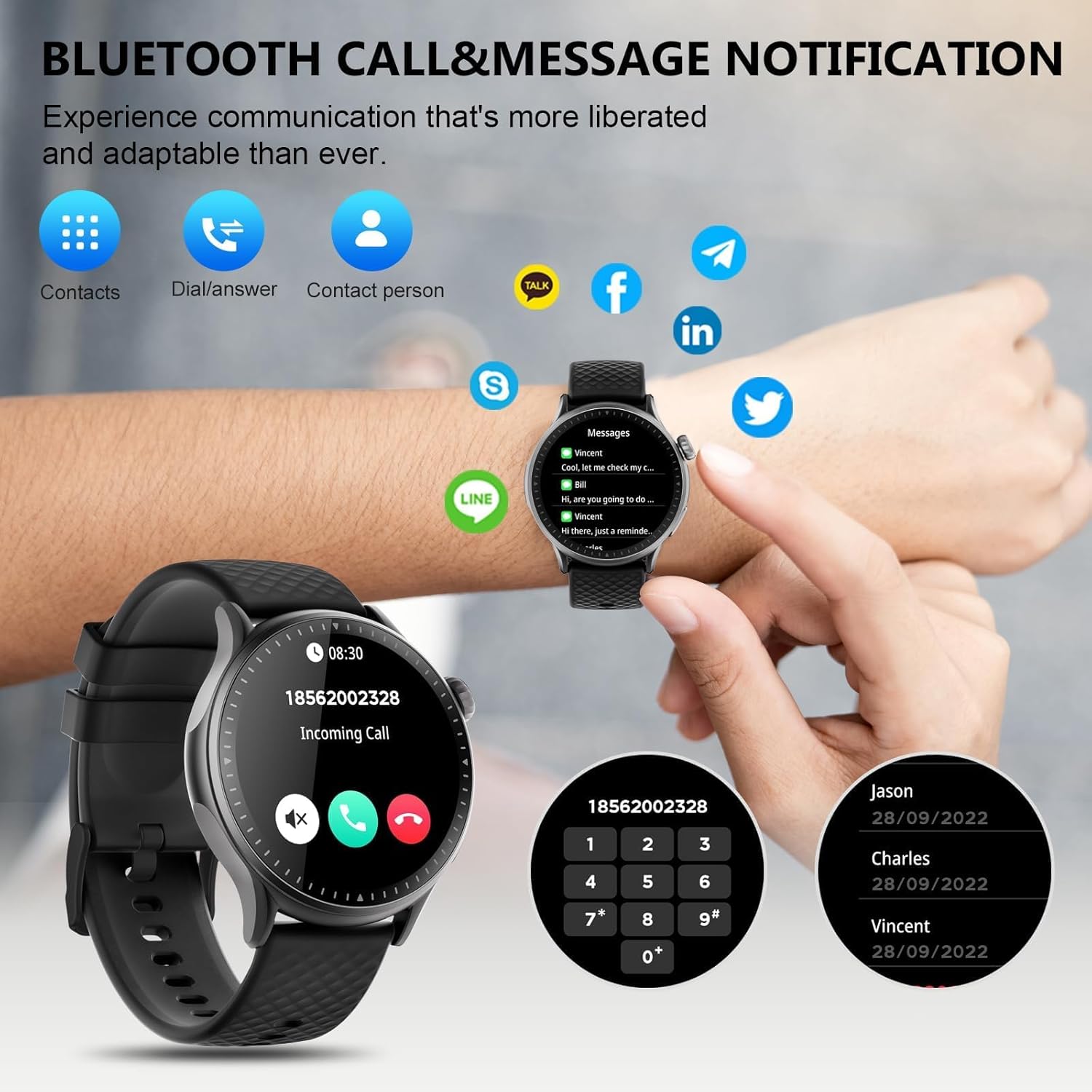
Image: The GTR3 Smart Watch displaying an incoming call and various message notification icons from social media and communication apps.
4.5 קינסטלעכע אינטעליגענץ שטימע אַסיסטאַנט
The built-in AI assistant allows for hands-free control. Use voice commands to check the weather, control music playback on your phone, set alarms, and more.

Image: The GTR3 Smart Watch's AI Voice Assistant interface, illustrating how to use voice commands for tasks like checking weather or setting alarms.
4.6 נאָך פאַנגקשאַנז
The Cillso GTR3 offers a range of other useful features:
- וועטער פאָרעקאַסט
- געפֿינען פאָון
- Stopwatch & Timer
- קאַלקולאַטאָר
- שרעק זייגער
- ווייַט קאַמעראַ קאָנטראָל
- Music Control (for your phone's music player)
- ברידינג עקסערסייזיז

Image: The GTR3 Smart Watch's app menu, showcasing icons for various functions including Find Phone, Weather, Calculator, Remote Camera Shutter, Breathing Exercises, Women's Health, and Alarm Clock.
4.7 קאַסטאַמייזן זייגער פנימער
Personalize your watch with a variety of watch faces. The "Runmefit" app offers over 200 watch faces to choose from. You can also upload your favorite photos to create custom watch faces.
5. וישאַלט
5.1 וואַסערפּרוף
The Cillso GTR3 has a 3ATM waterproof rating, meaning it is resistant to splashes, rain, and sweat. It is suitable for daily use and can withstand brief immersion in water. However, it is נישט recommended for hot showers, saunas, diving, or high-speed water sports, as steam or high water pressure can compromise the seals.
5.2 רייניקונג און זאָרגן
To maintain your watch's appearance and functionality:
- ווישט דעם עקראַן און רימען רעגולער מיט אַ ווייכן, דamp שטאָף.
- ויסמיידן ניצן שטרענגע כעמיקאַלן, אַברייסיוו רייניגער, אָדער סאָלוואַנץ.
- זיכער מאַכן אַז די טשאַרדזשינג קאָנטאַקטן זענען ריין און טרוקן איידער טשאַרדזשינג.
- פֿאַרמײַדן אויסצושטעלן די זייגער צו עקסטרעמע טעמפּעראַטורן אָדער דירעקטע זון פֿאַר פֿאַרלענגערטע פּעריאָדן.
5.3 באַטעריע לאַנגלעבעדיקייט
To maximize battery life, avoid fully discharging the watch frequently. Charge it when the battery level is low, and disconnect it once fully charged.
6. טראָובלעשאָאָטינג
If you encounter issues with your Cillso GTR3 Smart Watch, refer to the following common problems and solutions:
| פּראָבלעם | מעגלעך לייזונג |
|---|---|
| Watch not connecting to phone via Bluetooth. | Ensure Bluetooth is enabled on your phone. Restart both the watch and phone. Make sure the "Runmefit" app is open and running in the background. Check if the watch is already paired with another device. |
| Bluetooth call function not working. | Verify that the watch is connected via Bluetooth in ביידע the "Runmefit" app and your phone's native Bluetooth settings (as a separate audio device). |
| Notifications or calls only vibrate, no sound. | Check the sound settings on your watch and in the "Runmefit" app. Ensure the watch's speaker volume is not muted or set too low. Note that the speaker volume may be limited in noisy environments. |
| Inaccurate step count or health data. | Ensure the watch is worn snugly on your wrist. Calibrate the watch in the "Runmefit" app if available. Keep the app connected to sync data regularly. |
| וועטער אינפֿאָרמאַציע ווערט נישט אַפּדעיטעד. | Ensure your phone's location services are enabled and the "Runmefit" app has permission to access your location. The app must be connected and running in the background to sync weather data. |
| Watch disconnects frequently. | Maintain close proximity between your watch and smartphone. Avoid obstacles that may interfere with the Bluetooth signal. Ensure the "Runmefit" app is not being closed by your phone's power-saving features. |
| Cannot customize watch faces. | Ensure the watch is connected to the "Runmefit" app. Follow the app's instructions for selecting or uploading watch faces. Some watches may have limitations on the number of custom faces stored simultaneously. |
7. ספּעסאַפאַקיישאַנז
| שטריך | דעטאַל |
|---|---|
| מאָדעל נאָמען | GTR3 |
| סאָרט | סילסאָ |
| ווייַז טיפּ | AMOLED |
| פאַרשטעלן גרייס | 1.46 אינטשעס |
| האַכלאָטע | 1.46" AMOLED Ultra-HD |
| אָפּערייטינג סיסטעם | יאָס 12.0+ און אַנדרויד 7.0+ |
| זכּרון סטאָרידזש קאַפּאַסיטי | 128 מב |
| קאַנעקטיוויטי טעכנאָלאָגיע | בלועטאָאָטה |
| ווירעלעסס קאָמוניקאַציע סטאַנדאַרד | בלועטאָאָטה |
| באַטאַרייע קאַפּאַציטעט | 350 mAh (approximate, based on image) |
| באַטערי דורכשניטלעך לעבן | Up to 10 days (heavy usage), 45 days (standby) |
| וואַסער קעגנשטעל מדרגה | 3ATM (30 Meters) |
| מעטריקס געמאסטן | Heart Rate, Sleep Duration, Blood Oxygen Monitor |
| ספּעציעלע פֿעיִקייטן | 24/7 Activity Tracker, Heart Rate Monitor, Sleep Monitor, AI Voice Control, Message Notifications, Answer/Make Call, AMOLED Touchscreen, Cycle Tracking, Alarm Clock, Blood Oxygen Monitor, 110+ Sport Modes, Music Control, Distance Record/Pedometer/Calories, Distance Tracker |
| באַנד מאַטעריאַל טיפּ | Silicone, Rubber, or Fluoroelastomer |
| גפּס | גפּס דורך סמאַרטפאָנע |
| ציל וילעם | יוניסעקס ערוואַקסענע |
8. וואָראַנטי אינפֿאָרמאַציע
The Cillso GTR3 Smart Watch comes with a 1-יאָר נאָרמאַל וואָראַנטי from the date of purchase. This warranty covers manufacturing defects and malfunctions under normal use. It does not cover damage caused by misuse, accidents, unauthorized modifications, or failure to follow the instructions in this manual.
ביטע האַלטן דיין דערווייַז פון קויפן פֿאַר וואָראַנטי קליימז.
9. קונה שטיצן
For further assistance, technical support, or warranty inquiries, please refer to the contact information provided with your purchase or visit the official Cillso website. Ensure you have your product model (GTR3) and proof of purchase ready when contacting support.