
פּראָדוקט איבערview
The AT&T EL2131-11 is a DECT 6.0 cordless landline phone designed for reliable communication. It features a powerful call blocker, caller ID, a full-duplex speakerphone, and a backlit display and keypad for enhanced visibility. This model includes one handset.
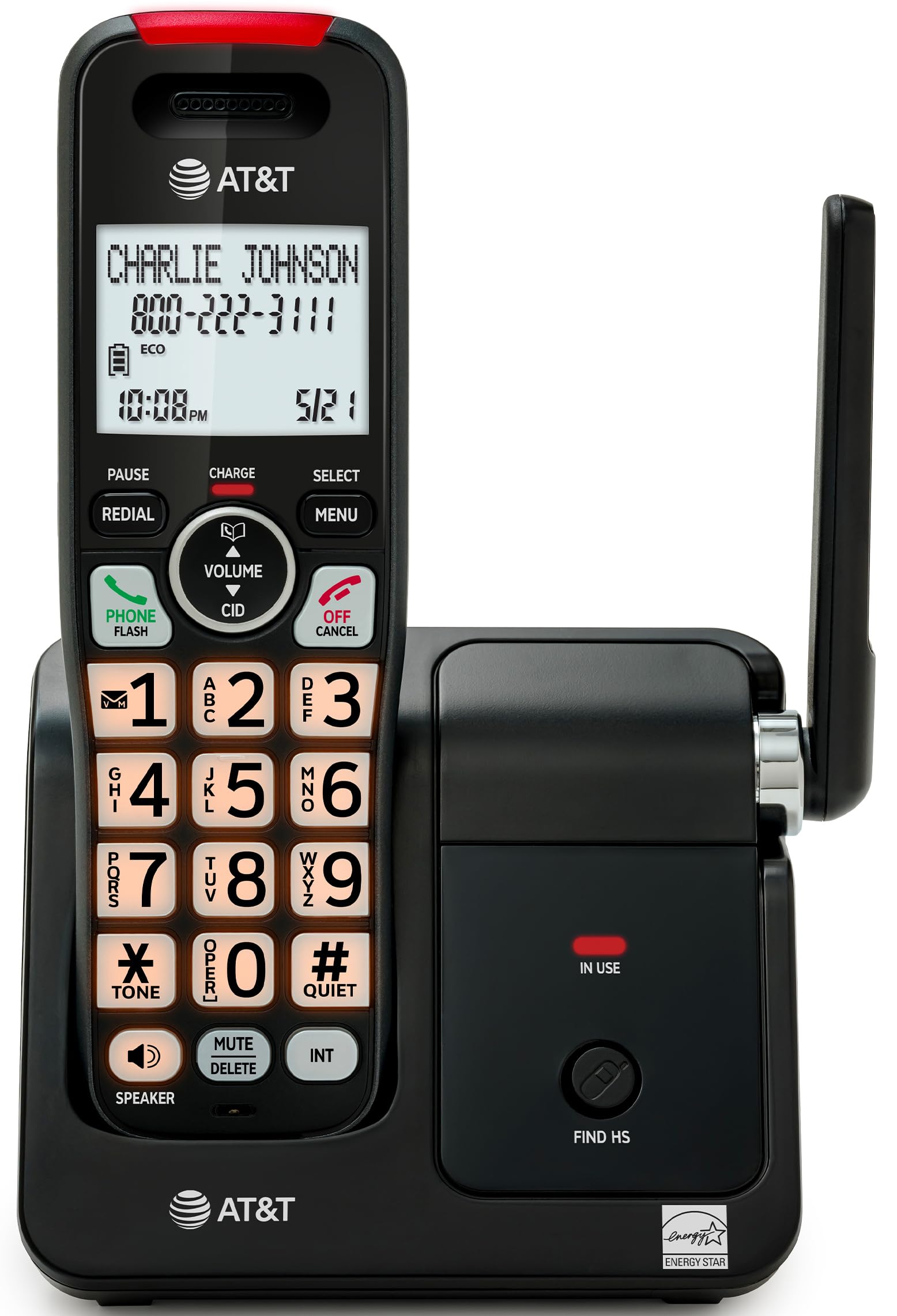
Image: The AT&T EL2131-11 cordless phone, showing the handset docked in its base unit.
שליסל פֿעיִקייטן:
- רוף בלאקירער: Blocks up to 50 unwanted numbers.
- קאַללער שייַן: האלט אפ ביז 50 רופן, ווייזנדיג נאמען, נומער, צייט און דאטום.
- גאַנץ דופּלעקס ספּיקערז: Allows both parties to speak and listen simultaneously.
- באַקלייט ווייַז & קיפּאַד: גיט קלאָרע זעאונג אין נידעריק-ליכט באדינגונגען.
- שטיל מאָדע: Silences the ringer instantly.
- עקאָ מאָדע: Reduces power consumption and extends battery life.
- DECT 6.0 טעכנאָלאָגיע: Ensures interference-free communication and extended range.
סעטאַפּ
וואָס איז אין די קעסטל:
- באַזע אַפּאַראַט
- 1 קאָרדלעסס כאַנדסעט
- 1 מאַכט אַדאַפּטער
- טעלעפאָן ליניע שנור
- 2 באַטערי סעלז
- שנעל אָנהייב גייד
- וואַנט-אָנקלאַפּן קאַנטיקער
1. באַטאַרייע ייַנמאָנטירונג
- געפֿינען די באַטאַרייע אָפּטייל אויף די צוריק פון די כאַנדסעט.
- Insert the two supplied battery cells, ensuring correct polarity (+ and -).
- פאַרמאַכן די באַטאַרייע אָפּטייל דעקן סיקיורלי.
2. באַזע אַפּאַראַט פֿאַרבינדונג
- פֿאַרבינדט דעם קליינעם עק פֿונעם מאַכט אַדאַפּטער צום מאַכט דזשאַק אויף דער הינטערשטער זײַט פֿון דער באַזע אַפּאַראַט.
- שטעקט אריין דעם גרויסן עק פונעם מאַכט אַדאַפּטער אין אַ נאָרמאַלן עלעקטרישן ווענטיל.
- פֿאַרבינדט איין עק פֿון דער טעלעפֿאָן ליניע שנור צום TEL LINE דזשעק אויף דער הינטערשטער זײַט פֿון דער באַזע אַפּאַראַט.
- שטעקט אריין דעם אנדערן עק פונעם טעלעפאן ליניע שנור אין א טעלעפאן וואנט דזשעק.
3. ערשטע אויפלאָדונג
Place the handset in the base unit with the display facing forward. The handset will begin charging. Allow the handset to charge for at least 16 hours before initial use to ensure optimal battery performance.

Image: The handset charging in its base, with an overlay indicating a 5-day battery life on a single charge.
אַפּערייטינג ינסטראַקשאַנז
מאַכן און באַקומען קאַללס
- צו מאַכן אַ רוף: דרוק טעלעפאָנירן / פלאַש, דערנאָך דרײַלט די נומער.
- צו ענטפֿערן אַ רוף: ווען דער טעלעפאָן רינגס, דריקן טעלעפאָנירן / פלאַש אדער יעדע דייאַלינג קנעפּל (0-9, * אדער #).
- צו ענדיקן אַ רוף: דרוק OFF/CANCEL or place the handset back in the base unit.
ניצן די ספּעאַקערפאָנע
דריקן די בעשאַס אַ רוף רעדנער button to activate the full-duplex speakerphone. Press it again to switch back to the handset earpiece.

Image: A man holding a small dog, speaking hands-free using the phone's speakerphone function. The phone's base unit is visible on a table.
קאַללער שייַן
When a call comes in, the caller's information (name and number) will appear on the handset display if you subscribe to Caller ID service. The phone stores up to 50 caller ID records.

Image: A close-up of the phone's display showing a caller's name and number, along with the time and date.
רופן בלאַקער
The call blocker feature allows you to block up to 50 unwanted numbers. To block a number:
- During a call or from the Caller ID log, press MENU.
- Scroll to 'Call Blocker' and press אויסקלייַבן.
- Follow the on-screen prompts to add the number to the block list.

Image: A visual representation of the call blocker feature, showing a list of blocked numbers on the phone's display.
שטיל מאָדע
כדי צייטווייליג שטיל צו מאכן דעם רינגער, דריק און האלט די # QUIET button on the handset. The ringer will be silenced for a set period, typically 1 to 12 hours, which can be adjusted in the settings.

Image: A close-up of the phone's display indicating that 'Quiet mode' is active.
עקאָ מאָדע
The ECO mode automatically adjusts power consumption to conserve battery life. This mode is typically active by default and indicated by an 'ECO' icon on the display.

Image: The phone's display showing the 'ECO' icon, indicating power-saving mode is active.
רעדיאַל
צו רידיאַל די לעצטע נומער גערופן, דריקן די אָפּלייקענונג קנעפּל.

Image: The phone's display showing the 'Redial' function with a previously dialed number.
באַקלייט ווייַז און קיפּאַד
The handset features a backlit LCD display and illuminated keypad for easy readability and operation in various lighting conditions.

Image: A hand holding the phone, demonstrating its bright backlit screen and illuminated keypad in a low-light environment.
וישאַלט
רייניקונג די טעלעפאָן
- ניצן אַ ווייך, אַ ביסל דamp cloth to clean the surfaces of the phone and base unit.
- Do not use cleaning sprays or harsh chemicals, as they may damage the finish or electronic components.
- Ensure the phone is unplugged from the power outlet before cleaning.
באַטערי קער
- For optimal battery life, keep the handset in the base unit when not in use.
- If the phone will be unused for an extended period, remove the batteries to prevent leakage.
- Replace batteries when they no longer hold a charge effectively. Use only the specified battery type.
טראָובלעשאָאָטינג
If you experience issues with your AT&T EL2131-11 phone, refer to the following common troubleshooting steps:
| פּראָבלעם | לייזונג |
|---|---|
| קיין רעדל טאָן |
|
| האַנדסעט לאָדט זיך נישט אויף |
|
| קען נישט מאַכן/באַקומען רופן |
|
| שלעכטע געזונט קוואַליטעט/סטאַטיק |
|
ספּעסאַפאַקיישאַנז
| שטריך | דעטאַל |
|---|---|
| סאָרט | AT&T |
| מאָדעל נומער | EL2131-11 |
| טיפּ פון טעלעפאָן | קאָרדלעסס |
| טעכנאָלאָגיע | DECT 6.0 |
| קאָליר | שוואַרץ & זילבער |
| מאַטעריאַל | פּלאַסטיק |
| מאַכט מקור | באַטאַרייע פּאַוערד |
| נומער דימענשאַנז (L X W X H) | 5.06 x 4.65 x 7.23 אינטשעס (באַזע אַפּאַראַט) |
| טעלעפאָן רעדן צייט | 10 שעה |
| טעלעפאָן סטענדביי צייט | 5 טעג |
| רופער אידענטיפיקאציע | יא |
| מולטיליין אפעראציע | איין-ליניע אָפּעראַציע |
| ענטפער סיסטעם טיפּ | ניין |
| UPC | 650530034510 |

Image: The AT&T EL2131-11 base unit with handset, showing its height (7.23 inches), length (5.06 inches), and width (4.65 inches).
וואָראַנטי אינפֿאָרמאַציע
This AT&T EL2131-11 Cordless Landline Phone comes with a 1-יאָר לימיטעד וואָראַנטי from the manufacturer. Please retain your proof of purchase for warranty claims. For specific terms and conditions, refer to the warranty card included in your product packaging or visit the official AT&T support webפּלאַץ.
קונה שטיצן
For further assistance, technical support, or to inquire about replacement parts, please contact AT&T customer service. You can typically find contact information on the official AT&T website or in the quick start guide provided with your phone.
Online resources may include FAQs, detailed user manuals, and support forums.