
1. הקדמה
This manual provides essential information for setting up, operating, and maintaining your iFFALCON 50U95A 50-inch 4K QD-Mini LED Smart Google TV. Please read it thoroughly before using the product to ensure safe and optimal performance. Keep this manual for future reference.
The iFFALCON 50U95A combines advanced QD-Mini LED display technology with a 144Hz native refresh rate, HDR 1000nit peak brightness, and an ONKYO 2.1 Hi-Fi audio system to deliver an immersive viewing and listening experience. Powered by Google TV, it offers a wide range of smart features and content.
2. וויכטיק סאַפעטי אינפֿאָרמאַציע
שטענדיק פֿאָלגן די גרונטלעכע זיכערהייט מיטלען ווען איר ניצט דעם טעלעוויזיע צו רעדוצירן דעם ריזיקאָ פֿון פֿײַער, עלעקטרישן קלאַפּ און שאָדן.
- דו זאלסט נישט ויסשטעלן די טעלעוויזיע צו רעגן אָדער נעץ.
- Do not open the cabinet; refer all servicing to qualified personnel.
- Ensure proper ventilation and do not block ventilation openings.
- Use only the power adapter and cable supplied with the unit.
- Position the TV on a stable, level surface to prevent it from falling.
- האַלט דעם טעלעוויזיע אַוועק פון דירעקטער זונשייַן, היץ קוועלער און עקסטרעמע טעמפּעראַטורן.
- נעמט ארויס דעם טעלעוויזאר בעת בליץ-שטורעמס אדער ווען מען ניצט עס נישט פאר לאנגע צייטן.
3. וואָס איז אַרייַנגערעכנט
באַשטעטיקן אַז אַלע קאָמפּאָנענטן זענען פאַראַן אין דער פּאַקאַדזשינג:
- iFFALCON 50U95A 50-inch 4K QD-Mini LED Smart Google TV
- מאַכט אַדאַפּטער
- מאַכט קאַבלע
- ווייַט קאָנטראָל
- טעלעוויזיע שטאַנד (2 שטיק)
- באַניצער מאַנואַל (דעם דאָקומענט)

בילד: פראָנט view of the iFFALCON 50U95A 50-inch TV. This image shows the television from the front, highlighting its slim bezels and stand.
4. סעטאַפּ
4.1 אַטאַטשינג די שטיין
- לייגט פֿאָרזיכטיק דעם טעלעוויזאָר מיטן פּנים אַראָפּ אויף אַ ווייכער, גלאַטער ייבערפֿלאַך כּדי צו פֿאַרמייַדן שאָדן צום עקראַן.
- Align the stand pieces with the screw holes on the bottom of the TV.
- באַפעסטיקט די שטאַנדן מיט די צוגעשטעלטע שרויפן. מאַכט זיכער אַז זיי זענען פעסט באַפעסטיקט.

בילד: זייט view of the iFFALCON 50U95A TV with stand. This image illustrates the television's profile and how the stand supports it.
4.2 קאַנעקטינג פּעריפעראַלס
The TV features multiple connectivity options:
- HDMI פּאָרטן (x4): פֿאַרבינדט בלו-רэй שפּילער, גיימינג קאַנסאָולז און אַנדערע HDMI-ענייבאַלד דעוויסעס.
- יו-עס-בי פּאָרט (x1): פֿאַרבינדט USB סטאָרידזש דעוויסעס פֿאַר מעדיע ווידערשפּיל.
- Wi-Fi און בלועטוט: For wireless network and accessory connections.
בילד: הינטערשטע view of the iFFALCON 50U95A TV showing ports. This image displays the back panel of the television, indicating the location of various input and output ports.
4.3 מאַכט אויף
- פֿאַרבינדט דעם מאַכט קאַבל צום טעלעוויזיע און דערנאָך צו אַ מאַכט ווענטיל.
- דריק דעם מאַכט קנעפּל אויף דער ווײַטקאָנטראָל אָדער אויף דער טעלעוויזיע אַליין.
- Follow the on-screen instructions for initial setup, including network connection and Google TV account login.
5. אַפּערייטינג ינסטרוקטיאָנס
5.1 רימאָוט קאָנטראָל פאַנגקשאַנז
The remote control allows you to navigate the TV's interface, adjust settings, and access smart features. Refer to the remote control diagram in the separate quick start guide for button layout.
5.2 גוגל טיווי צובינד
Your iFFALCON TV runs on Google TV, providing a personalized experience with content recommendations, access to streaming apps, and Google Assistant voice control.
- היים פאַרשטעלן: Access your favorite apps, movies, and shows.
- גוגל אַססיסטאַנט: דריק דעם גוגל אַסיסטאַנט קנעפּל אויף אייער ווייַטקאָנטראָל צו נוצן שטימע קאָמאַנדעס פֿאַר זוכן אינהאַלט, קאָנטראָלירן סמאַרט היים דעוויסעס און מער.
- אַפּפּס: Download and manage apps from the Google Play Store.
5.3 בילד און קלאַנג סעטטינגס
צוטריט די סעטטינגס מעניו צו קאַסטאַמייז דיין viewהערן און הערן דערפאַרונג:
- בילד מאָדעס: Choose from various presets (e.g., Standard, Vivid, Movie, Game) or customize brightness, contrast, color, and sharpness.
- געזונט מאָדעס: Select audio presets (e.g., Standard, Music, Movie) or adjust equalizer settings.
- HDR סעטטינגס: The TV supports HDR10, HDR10+, Dolby Vision, and HLG. Ensure your content source is HDR compatible for optimal performance.
- שפּיל־מייסטער: Activate Game Master mode for reduced input lag and optimized gaming performance.
6. שליסל פֿעיִקייטן
6.1 QD-Mini LED Display Technology
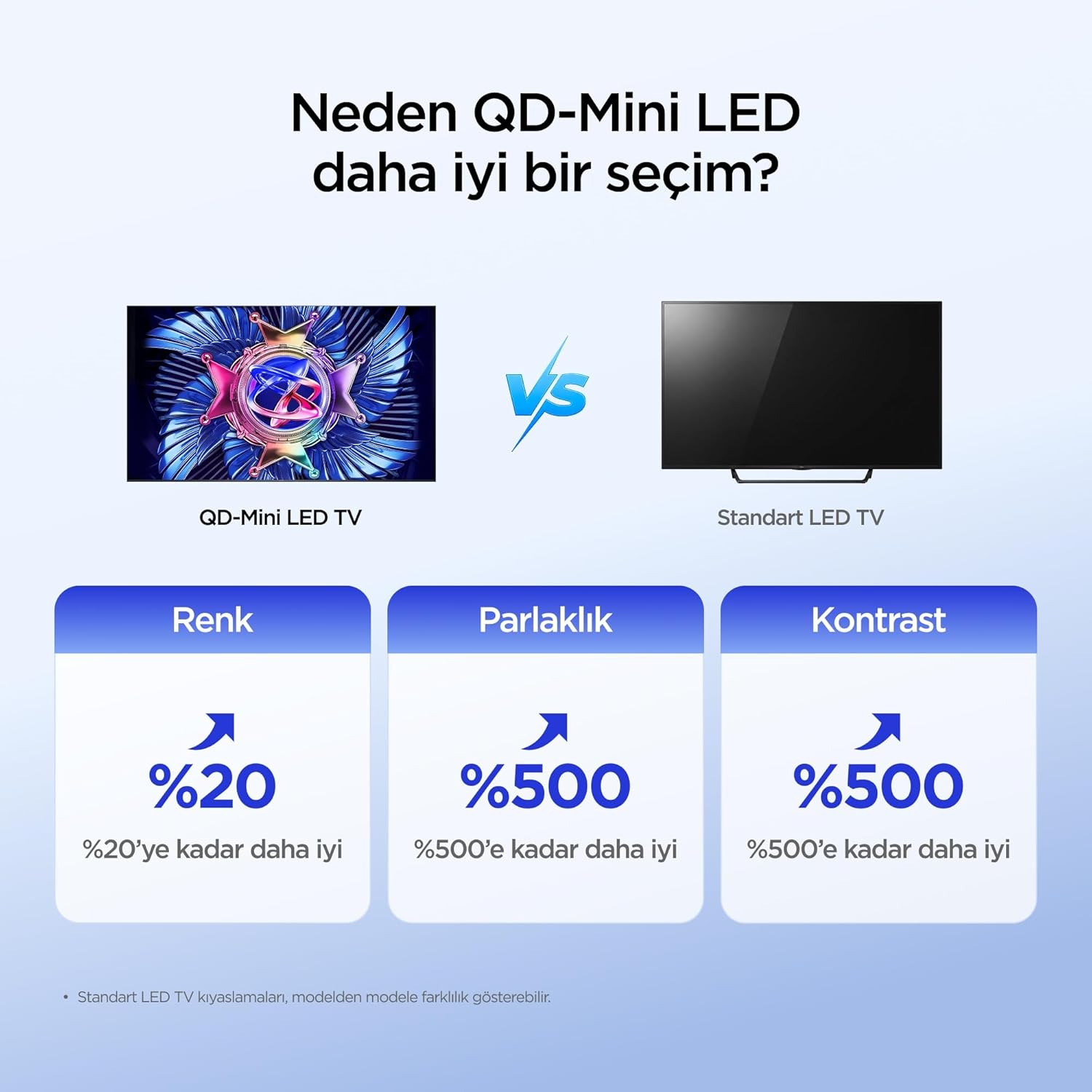
The iFFALCON 50U95A utilizes QD-Mini LED technology, combining Quantum Dot color with Mini LED backlighting. This results in superior brightness, contrast, and color accuracy compared to traditional LED TVs.

Image: Comparison illustrating the benefits of QD-Mini LED over standard LED TVs in terms of color, brightness, and contrast.
With over 500 local dimming zones, the TV provides precise light control at a pixel level, enhancing detail in both bright and dark scenes. It achieves a peak brightness of 1000 nits, ensuring vibrant images even in well-lit environments.

Image: A vibrant image demonstrating the 1000 nits peak brightness capability of the TV.
6.2 144Hz Native Refresh Rate
Experience smoother motion and clearer images with the 144Hz native refresh rate. This is particularly beneficial for fast-paced action movies and gaming, reducing motion blur and ghosting.

Image: A dynamic image of a race car, illustrating the smooth motion provided by the 144Hz native refresh rate.
6.3 ONKYO 2.1 Hi-Fi Audio System with Dolby Atmos
The integrated ONKYO 2.1 channel speaker system delivers rich, immersive stereo sound with deep bass. Combined with Dolby Atmos, it creates a cinematic audio experience, bringing sound to life with incredible clarity and depth.

Image: A living room scene depicting sound waves emanating from the TV, illustrating the immersive audio experience of the 2.1 speaker system.
6.4 AI PQ Pro Processor
The AI PQ Pro Processor intelligently analyzes and optimizes content pixel by pixel. This advanced processor enhances picture quality, delivering sharper details, improved contrast, and more vibrant colors for an overall superior viewינג דערפאַרונג.

Image: A visual representation of the AI PQ Pro Processor chip, highlighting its role in optimizing image quality.
6.5 Matte HVA Panel & Ultra Slim Design
The Matte HVA Panel reduces glare and reflections, providing a comfortable viewing experience even in bright rooms. Its ultra-slim design allows for seamless integration into any living space, whether on a stand or wall-mounted.

Image: A comparison showing the reduced reflections and improved viewing experience of a Matte HVA Panel compared to a standard panel.

Image: A visual representation of the TV's ultra-slim design, highlighting its sleek profile.
7. וישאַלט
7.1 רייניקן דעם עקראַן
- Turn off the TV and unplug the power cord.
- דזשענטלי ווישן די פאַרשטעלן מיט אַ ווייך, לינט-פריי שטאָף.
- פֿאַר שווערע פֿלעקן, לײַכט דריקןampווישט דעם שטאָף מיט וואַסער אָדער אַ ספּעציאַליזירטן עקראַן רייניגער (שפּריצט נישט גלייך אויפן עקראַן).
- Avoid using harsh chemicals, abrasives, or alcohol-based cleaners.
7.2 רייניקונג די קאַבינעט
- ווישט אָפּ דעם קאַבינעט מיט אַ ווייכן, טרוקענעם שטאָף.
- Do not use liquid or aerosol cleaners directly on the cabinet.
8. טראָובלעשאָאָטינג
| פּראָבלעם | מעגלעך סיבה | לייזונג |
|---|---|---|
| קיין מאַכט | עלעקטרישע שנור נישט פארבונדן; עלעקטרישע ווענטיל ארבעט נישט. | זיכער מאַכן אַז די עלעקטרישע שנור איז גוט איינגעשלאָסן. פּרובירן די אַוטלעט מיט אַן אַנדער מיטל. |
| קיין בילד נישט, אבער סאונד איז דא | Incorrect input source selected; backlight off. | Press the "Input" button on the remote to select the correct source. Check picture settings. |
| קיין קלאַנג, אָבער בילד איז דאָ | Volume muted or too low; incorrect audio output selected. | Unmute volume or increase level. Check audio output settings (e.g., TV speakers, external soundbar). |
| ווייַט קאָנטראָל נישט ארבעטן | באַטעריעס זענען טויט אָדער נישט ריכטיק אַרײַנגעשטעלט; אַ פֿאַרשטאָפּונג צווישן דער ווײַטקאָנטראָל און דער טעלעוויזיע. | טוישן די באַטעריעס. זיכער מאַכן אַז די זעאונג איז קלאָר צום טעלעוויזיע'ס IR ופנעמער. |
| ווי-פי קשר ישוז | אומרעכט פּאַראָל; פּראָבלעמען מיטן ראַוטער; טעלעוויזיע צו ווייט פֿונעם ראַוטער. | Re-enter Wi-Fi password. Restart router. Move TV closer to router or use a Wi-Fi extender. |
If the problem persists after trying these solutions, please contact iFFALCON customer support.
9. ספּעסאַפאַקיישאַנז
| שטריך | דעטאַל |
|---|---|
| מאָדעל | 50U95A |
| פאַרשטעלן גרייס | 50 אינטשעס |
| ווייַז טעכנאָלאָגיע | קד-מיני געפירט |
| האַכלאָטע | 4K (3840 X 2160) |
| דערפרישן קורס | 144 הערץ (געבוירן) |
| שפּיץ ברייטנאַס | 1000 ניץ |
| HDR שטיצן | HDR10, HDR10+, Dolby Vision, HLG |
| אַודיאָ סיסטעם | ONKYO 2.1 Channel Speakers, Dolby Atmos, DTS Virtual:X |
| אָפּערייטינג סיסטעם | גוגל טעלעוויזיע |
| פּראַסעסער | AI PQ Pro Processor |
| קאַנעקטיוויטי | 4x HDMI, 1x USB, Wi-Fi, Bluetooth |
| דימענשאַנז (די רענטגענ וו x ה) | 6.9D x 111.1W x 64.6H cm |
| וואָג | 13 קג |
10. וואָראַנטי און שטיצן
Your iFFALCON 50U95A TV comes with a 2-יאָר פאַבריקאַנט ס וואָראַנטי. This warranty covers defects in materials and workmanship under normal use. For warranty claims or technical support, please contact iFFALCON customer service through their official webזייטל אדער די קאָנטאַקט אינפֿאָרמאַציע וואָס איז צוגעשטעלט אין אייער פּראָדוקט דאָקומענטאַציע.
For the latest support information, FAQs, and software updates, visit the official iFFALCON support webפּלאַץ: www.iffalcon.com