
הקדמה
This manual provides essential information for setting up, operating, maintaining, and troubleshooting your Samsung 75-Inch Class M80H Series Mini LED 4K Smart TV. Please read this manual thoroughly to ensure proper use and to maximize your viewינג דערפאַרונג.
סעטאַפּ
וואָס איז אין די קעסטל
באַשטעטיקן אַז אַלע קאָמפּאָנענטן זענען פאַראַן איידער איר הייבט אָן די אינסטאַלאַציע.
Image: Contents of the box including the TV, remote, power cable, and stand.
- Samsung 75-Inch Class M80H Series Mini LED 4K Smart TV
- BT Simple Remote TM2280A with batteries
- מאַכט קאַבלע
- שטיין קאַמפּאָונאַנץ
- באַניצער מאַנואַל (דעם דאָקומענט)
- וואָראַנטי קאַרד
גשמיות ינסטאַלירונג
Ensure the TV is placed on a stable surface or securely mounted to a wall. Refer to the Installation Manual (PDF) for detailed mounting instructions.
- TV Dimensions (W x H x D): 65.7" x 39.7" x 11" (מיט שטאַנד)
- TV Dimensions (W x H x D): 65.7" x 37.7" x 3" (אָן שטאַנד)
- VESA Mount Standard: 400 רענטגענ 300 מם
- נומער וואָג: 48.5 pounds (with stand), 47.6 pounds (without stand)
Connecting Power and Initial Setup
- פֿאַרבינדט דעם מאַכט קאַבל צום טעלעוויזיע און דערנאָך צו אַ וואַנט אַוטלעט.
- דרוק די מאַכט קנעפּל אויף די ווייַט קאָנטראָל צו קער אויף די טעלעוויזיע.
- Follow the on-screen instructions to complete the initial setup, including network connection, channel scanning, and Samsung Account login.
אפערירן דיין טעלעוויזיע
ווייַט קאָנטראָל
The included BT Simple Remote allows for intuitive control of your TV. It uses Bluetooth technology for enhanced range and responsiveness.
Smart Hub and Tizen OS
Your Samsung TV runs on the Tizen operating system, providing access to a personalized Smart Hub. This platform allows you to stream content, play games, and access various applications.
קאַנעקטיוויטי
The TV offers multiple ports for connecting external devices.

Image: Rear panel connections including HDMI, USB, LAN, and Antenna ports.
- HDMI פּאָרטן (3): Connect Blu-ray players, game consoles, soundbars, and other HDMI-compatible devices. HDMI 1 supports eARC for enhanced audio return.
- יו-עס-בי פּאָרט (1): Connect USB storage devices for media playback or power low-power accessories.
- עטהערנעט (LAN) פּאָרט: For a wired internet connection, ensuring stable streaming and updates.
- Antenna (ANT) Input: For connecting an over-the-air antenna or cable TV signal.
- ווירעלעסס קאַנעקטיוויטי: Built-in Wi-Fi and Bluetooth 5.3 for network access and connecting wireless accessories like headphones.
שליסל פֿעיִקייטן
The Samsung M80H Series TV incorporates advanced technologies for an enhanced viewing and interactive experience.
Mini LED with AI Mode

Image: Visual representation of Mini LED with AI Mode enhancing picture vibrancy.
Mini LED with AI Mode utilizes compact, high-efficiency Mini LEDs combined with intelligent processing. This technology delivers a brighter, more dynamic picture by analyzing and enhancing each scene for improved clarity, color, and contrast.
באַוועגונג קססעלעראַטאָר 144 הז

Image: Dynamic racing scene showcasing the smooth motion provided by Motion Xcelerator 144Hz.
Experience ultra-smooth performance with a 144Hz refresh rate, ideal for fast-paced games and sports. Variable Refresh Rate (VRR) technology dynamically matches your display to the content, reducing stutter and tearing.
Pure Spectrum Color

Image: Visual comparison highlighting the expanded color range with Pure Spectrum Color.
Pure Spectrum Color delivers one billion true-to-life colors through advanced color technology and Mini-LED precision, providing rich reds, deep blues, and vibrant greens for realistic visuals.
אַוטאָ HDR רעמאַסטערינג

Image: Comparison showing SDR content transformed to HDR-like quality with brighter highlights and clearer details.
This feature intelligently transforms Standard Dynamic Range (SDR) content to High Dynamic Range (HDR)-like quality, resulting in brighter highlights, more vibrant colors, and clearer details.
NQ4 AI Gen2 פּראַסעסער

בילד: דעטאַלירט view of the NQ4 AI Gen2 Processor, the core of the TV's performance.
The NQ4 AI Gen2 Processor analyzes and enhances content in real-time, delivering sharper images, smoother motion, and more vibrant colors. It also contributes to advanced sound processing for a cinematic experience.
4K AI ופּסקאַלינג

בילד: עקסample of 4K AI Upscaling transforming content to higher resolution with enhanced detail.
Advanced AI processing upscales content to captivating 4K resolution, ensuring sharp visuals and smooth picture quality for streaming, gaming, or movies.
AI Customization Mode

Image: AI Customization Mode interface, showing automatic optimization of picture settings.
This mode automatically detects the type of content you are watching and intelligently optimizes picture settings to your preferences.
פאַקטיש דיפּטה ענכאַנסער

Image: Scene with rhinoceroses demonstrating enhanced depth and realism through foreground contrast adjustment.
Analyzes and enhances every scene by intelligently adjusting foreground contrast to create lifelike depth, making images pop with realistic dimension.
AI Sound Controller

Image: AI Sound Controller interface allowing independent adjustment of voice and background audio levels.
Allows independent adjustment of voice, music, and sound effects volume. This technology adapts in real-time to provide sound customized to your preferences.
Live Translate

Image: TV screen showing content with subtitles translated live into the preferred language.
דער קינסטלעכער אינטעליגענץ פּראַסעסער אידענטיפיצירט די שפּראַך פון אייער אינהאַלט און איבערזעצט עס גלייך, שאַפֿנדיק אונטערטיטלען אין אייער בילכער שפּראַך.
Generative Wallpaper

Image: Generative Wallpaper interface, allowing selection of keywords to create AI-generated background images.
Choose keywords to generate stunning, one-of-a-kind AI images that beautifully fit your mood or decor.
Gaming Hub & Game Bar

Image: Gaming Hub interface, a central location for console and cloud gaming services.
The Gaming Hub is a central platform for games from consoles, cloud services, and gaming apps. The Game Bar provides an in-game menu for fine-tuning settings like FPS, input lag, and aspect ratios (21:9, 32:9).
פרעעסינק פּרעמיום

Image: Visual comparison demonstrating how FreeSync Premium reduces screen tearing during gameplay.
Reduces stuttering and tearing, keeping content fluid and smooth during intense gameplay action.
אָבדזשעקט טראַקינג סאָונד ליטע

Image: Visual representation of sound moving with objects on screen, indicating Object Tracking Sound Lite.
Experience motion-based sound that moves with the action on screen. A virtual top channel provides immersive audio, with clear, dynamic sound that enhances every scene.
ק-סימפאָניע

Image: TV and soundbar synchronized, demonstrating Q-Symphony for enhanced audio.
Allows the TV and a compatible soundbar to work together, enhancing the audio experience without muting the TV speakers.
Samsung Vision AI Companion

Image: Samsung Vision AI Companion interface, highlighting personalized content and AI features.
This feature provides AI-enhanced picture and sound, along with personalized experiences that engage you more deeply with your content.
One UI Tizen Smart TV Platform

Image: One UI Tizen platform showing a customizable interface with streaming applications.
Stream, game, and explore content on an intuitive Smart TV platform. Features Samsung Knox security and automatic OS updates for a secure and up-to-date experience.
סאַמסונג טעלעוויזיע פּלוס

Image: Samsung TV Plus interface, offering free access to over 400 channels and on-demand shows.
Instantly access over 400 free channels and thousands of on-demand shows and movies without a subscription.
קונסט סטאָר

Image: Art Store interface, showcasing a selection of world-famous artworks.
Access art from world-famous galleries and artists, including The Met, MoMA, and works by Salvador Dalí.
Now Brief
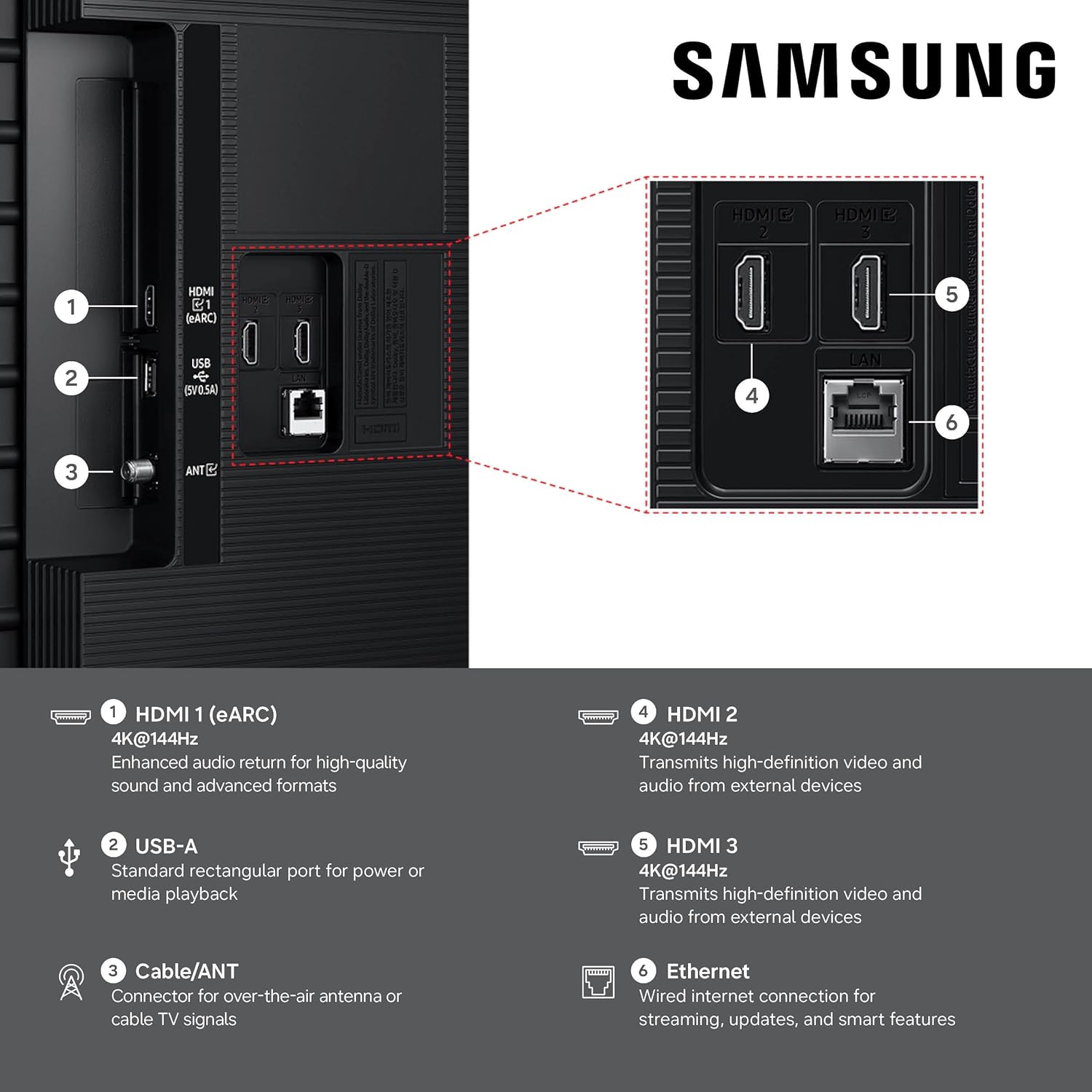
Image: Now Brief interface, displaying essential daily information like weather and memos.
Customize your Now Brief with widgets for weather, memos, music, and tips. Access hands-free via voice activation.
סאַמסונג נאָקס זיכערהייט

Image: Samsung Knox Security logo, symbolizing built-in triple-layer data protection.
Enjoy peace of mind with built-in triple-layer data protection. Samsung Knox Security defends against harmful apps and phishing sites, safeguarding sensitive data and connected IoT devices.
SmartThings
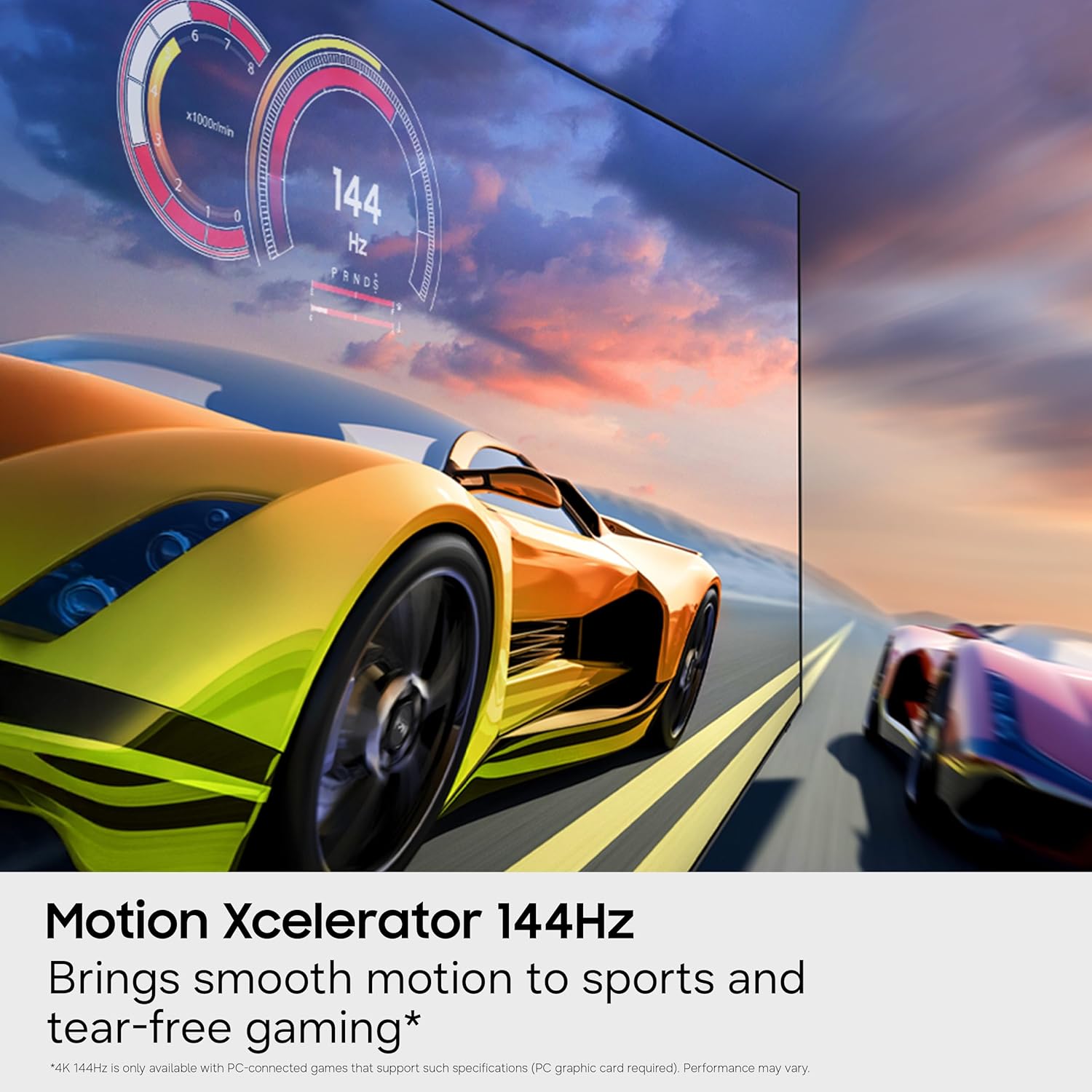
Image: SmartThings Hub interface on TV, showing control over smart home devices.
Connect and control smart devices through your TV using the built-in SmartThings Hub. Get notifications and a 3D Map View of your smart home ecosystem.
Quick Remote

Image: Smartphone displaying the Quick Remote app, used to control the TV.
Use your phone to change channels, adjust volume, and access Samsung Tizen TV features like media and ambient mode.
ליבלינג זאָרג

Image: TV displaying a Pet Care alert, indicating detection of a dog's barking.
On-device AI detects your dog's barking and alerts you when your pet needs attention. You can also set rules to turn on content to comfort your pet while you are away.
סטאָרידזש ייַנטיילן

Image: TV screen displaying multimedia files shared seamlessly from a Samsung Galaxy phone.
View מולטימעדיאַ files from your phone or tablet on the big screen without hassle. The TV auto-detects nearby compatible Galaxy devices and offers to sync and store their content.
אַי ענערגיע מאָדע

Image: AI Energy Mode interface, illustrating adaptive brightness and energy-saving options.
Helps reduce power consumption by auto-adjusting brightness based on the room's lighting and your user activity.
קאַראַאָקע
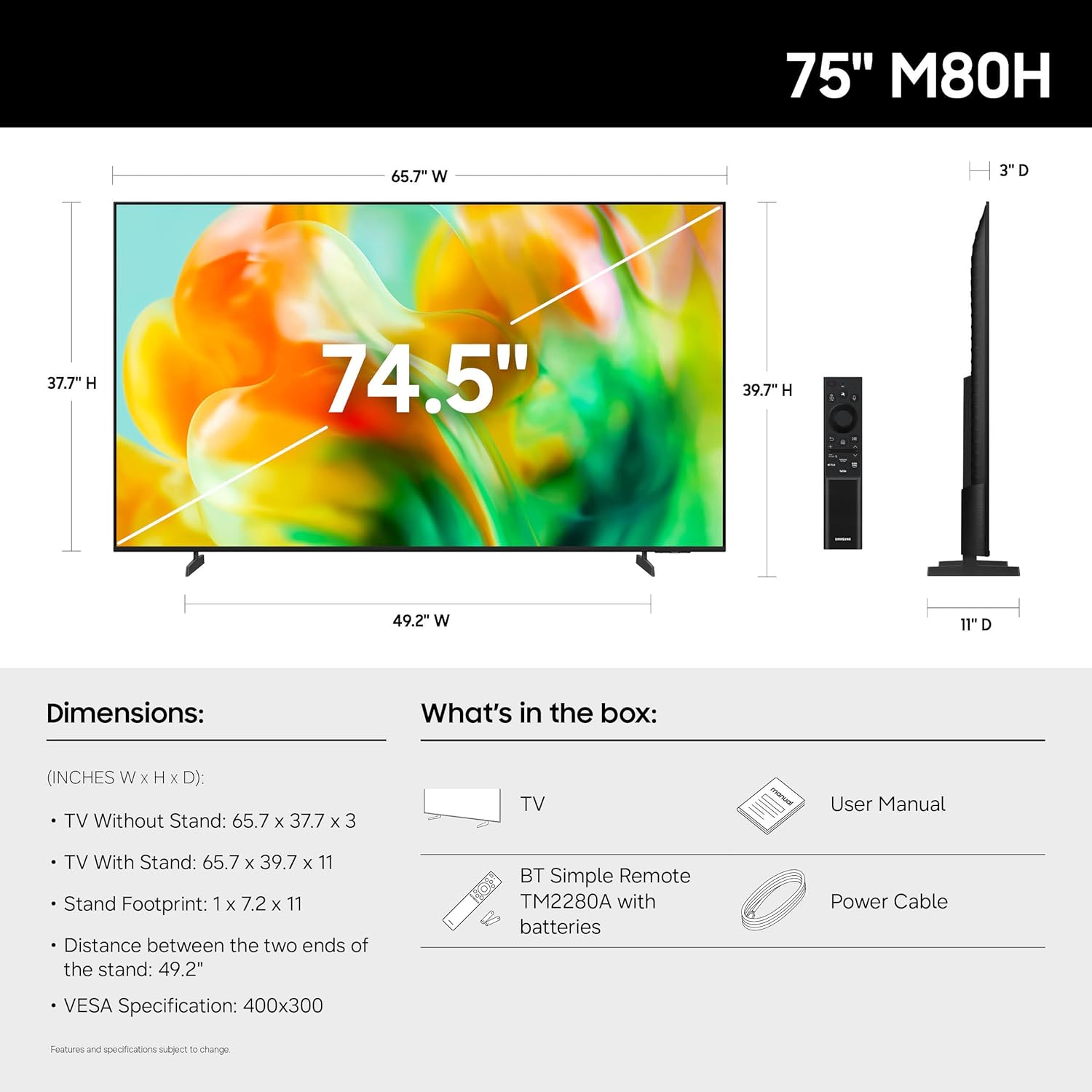
Image: Group of friends enjoying karaoke with lyrics displayed on the TV screen.
Transform your TV into a karaoke stage with the karaoke feature in Samsung Daily+. Connect your phone as a microphone.
מעטאַלסטרים דיזיין

בילד: זייט פּראָfile of the TV, highlighting its elegant MetalStream design with a slim bezel.
Enhance your home decor with a TV crafted from a single metal sheet, featuring a slim bezel for minimal distractions.
Official Product Video: Samsung M80H Features
ווידעא: אן אפיציעלע איבערview of the key features and functionalities of the Samsung M80H Series TV.
וישאַלט
רייניקונג דיין טעלעוויזיע
- שטענדיק אויסשטעקן דעם טעלעוויזאר איידער איר רייניגט.
- ניצט אַ ווייכן, טרוקענעם מיקראָפיבער שטאָף צו ווישן דעם עקראַן און די אויסערלעכע ייבערפלאַכן.
- פֿאַר שווערע פֿלעקן, לײַכט דריקןampווישט דעם שטאָף מיט וואַסער אָדער אַ ספּעציאַליזירטן עקראַן רייניגער (פאַרמייַדט שטרענגע כעמיקאַליען).
- שפּריצט נישט די רייניקונג לייזונג גלייך אויף דעם עקראַן.
ווייכווארג דערהייַנטיקונגען
Regular software updates ensure optimal performance and access to new features. Your TV can be set to update automatically when connected to the internet. You can also manually check for updates via the TV's settings menu.
טראָובלעשאָאָטינג
אויב איר טרעפט פּראָבלעמען מיט אייער טעלעוויזיע, באַזירט זיך אויף די פאלגענדע געוויינטלעכע לייזונגען:
| פּראָבלעם | מעגלעך לייזונג |
|---|---|
| קיין מאַכט | זיכער מאַכן אַז דער עלעקטרישער קאַבל איז זיכער פֿאַרבונדן צו ביידע דעם טעלעוויזיע און אַ אַרבעטנדיקן עלעקטרישן אַוטלעט. פּרוביר דעם אַוטלעט מיט אַן אַנדער מיטל. |
| קיין בילד / פארדרייט בילד | Check all cable connections (HDMI, antenna). Ensure the correct input source is selected. Try restarting the TV. If using an external device, check its power and connections. |
| קיין קלאַנג / פֿאַרדרייטער קלאַנג | Check volume levels on both the TV and any connected audio devices. Ensure mute is not activated. Verify audio cable connections. If using a soundbar, check its settings and connection. |
| ווייַט קאָנטראָל איז נישט ארבעטן | Replace the batteries in the remote. Ensure there are no obstructions between the remote and the TV. Re-pair the Bluetooth remote if necessary (refer to the full user manual). |
| נעץ קאַנעקשאַן ישוז | Check your Wi-Fi router and modem. Restart network equipment. Re-enter Wi-Fi password in TV settings. Try a wired Ethernet connection if possible. |
ספּעסאַפאַקיישאַנז
Detailed technical specifications for the Samsung 75-Inch Class M80H Series TV.
| שטריך | דעטאַל |
|---|---|
| פאַרשטעלן גרייס | 75 אינטשעס |
| ווייַז טעכנאָלאָגיע | מיני-געפירט |
| האַכלאָטע | 4K (3840 X 2160) |
| דערפרישן קורס | 120 Hz (Motion Xcelerator 144Hz for PC-connected games) |
| פּראַסעסער | NQ4 AI Gen2 פּראַסעסער |
| HDR פֿאָרמאַט שטיצט | HDR10+ |
| Maximum Display Brightness | 1000 ניט |
| אָפּערייטינג סיסטעם | טיזען |
| קאַנעקטיוויטי | 3 HDMI Ports, 1 USB Port, Ethernet, Wi-Fi, Bluetooth 5.3 |
| אַודיאָ רעזולטאַט | Built-in speakers (2 audio channels) |
| וועסאַ מאָונט סטאַנדאַרט | 400 רענטגענ 300 מם |
| מאָדעל נומער | UN75M80HAFXZA |
| UPC | 198957275562 |
וואָראַנטי אינפֿאָרמאַציע
Your Samsung M80H Series TV comes with a 1 יאָר מאַנופאַקטורער וואָראַנטי. For specific terms and conditions, please refer to the Warranty Card included in your product packaging or visit the official Samsung support webפּלאַץ.
שטיצן & רעסאָורסעס
For further assistance, detailed instructions, or to download digital copies of manuals, please refer to the following resources:
- באַניצער גייד (PDF)
- אינסטאַלאַציע מאַנואַל (PDF)
- Visit the official Samsung Support website for FAQs and additional assistance.


