
1. הקדמה
Thank you for choosing the Sharp 40HF2265E Full HD Google TV. This manual provides essential information for setting up, operating, and maintaining your television. Featuring integrated Google TV, HDR10 support, Dolby Digital audio, and Bluetooth connectivity, your new TV offers a rich entertainment experience. Please read this manual thoroughly before use to ensure proper operation and to maximize your viewינג פאַרגעניגן.

בילד 1.1: פראָנט view of the Sharp 40HF2265E Full HD Google TV.
2. וואָס איז אין דער קעסטל
Carefully unpack your television and check that all the following items are included:
- שאַרפּ 40HF2265E טעלעוויזיע
- מאַכט קאַבלע
- ווײַטקאָנטראָל (דאַרפֿט 2 AAA באַטעריעס, נישט שטענדיק אַרייַנגערעכנט)
- באַניצער מאַנואַל (דעם דאָקומענט)
- וואָראַנטי קאַרד
If any items are missing or damaged, please contact your retailer or Sharp customer support immediately.
3. סעטאַפּ
3.1 שטיין ייַנמאָנטירונג
To install the TV stand, place the TV screen-down on a soft, flat surface to prevent scratches. Align the stand feet with the corresponding slots on the bottom of the TV and secure them with the provided screws. Ensure the stand is firmly attached before placing the TV upright.

בילד 3.1: פראָנט view of the TV with stand feet attached.
3.2 וואנט מאָונטינג
If you prefer to wall-mount your TV, you will need a VESA-compatible wall mount (not included). The Sharp 40HF2265E supports a VESA mounting standard of 200 x 200 mm. Refer to the wall mount's instructions for installation. Always ensure the wall can support the weight of the TV and the mount.

בילד 3.2: דערציען view of the TV, highlighting VESA mounting points and ports.
3.3 קאַנעקטינג פּעריפעראַלס
Connect your external devices to the appropriate ports on the back and side of the TV. The TV features multiple HDMI, USB, and other connectivity options.
- HDMI פּאָרץ: פֿאַר פֿאַרבינדן בלו-רэй שפּילער, שפּיל קאַנסאָולז, סעט-טאָפּ באָקסעס, אאַז"וו.
- וסב פּאָרץ: פֿאַר פֿאַרבינדן USB סטאָרידזש דעוויסעס צו שפּילן מעדיע אָדער פֿאַר ווייכווארג דערהייַנטיקונגען.
- עטהערנעט פּאָרט: פֿאַר אַ דראָטיקער אינטערנעט פֿאַרבינדונג.
- אַנטענע/קאַבל אַרייַנגאַנג: פֿאַר פֿאַרבינדן אַן אַנטענע אָדער קאַבל טעלעוויזיע סיגנאַל.
- אַודיאָ רעזולטאַט: פֿאַר פֿאַרבינדן עקסטערנע אַודיאָ סיסטעמען.
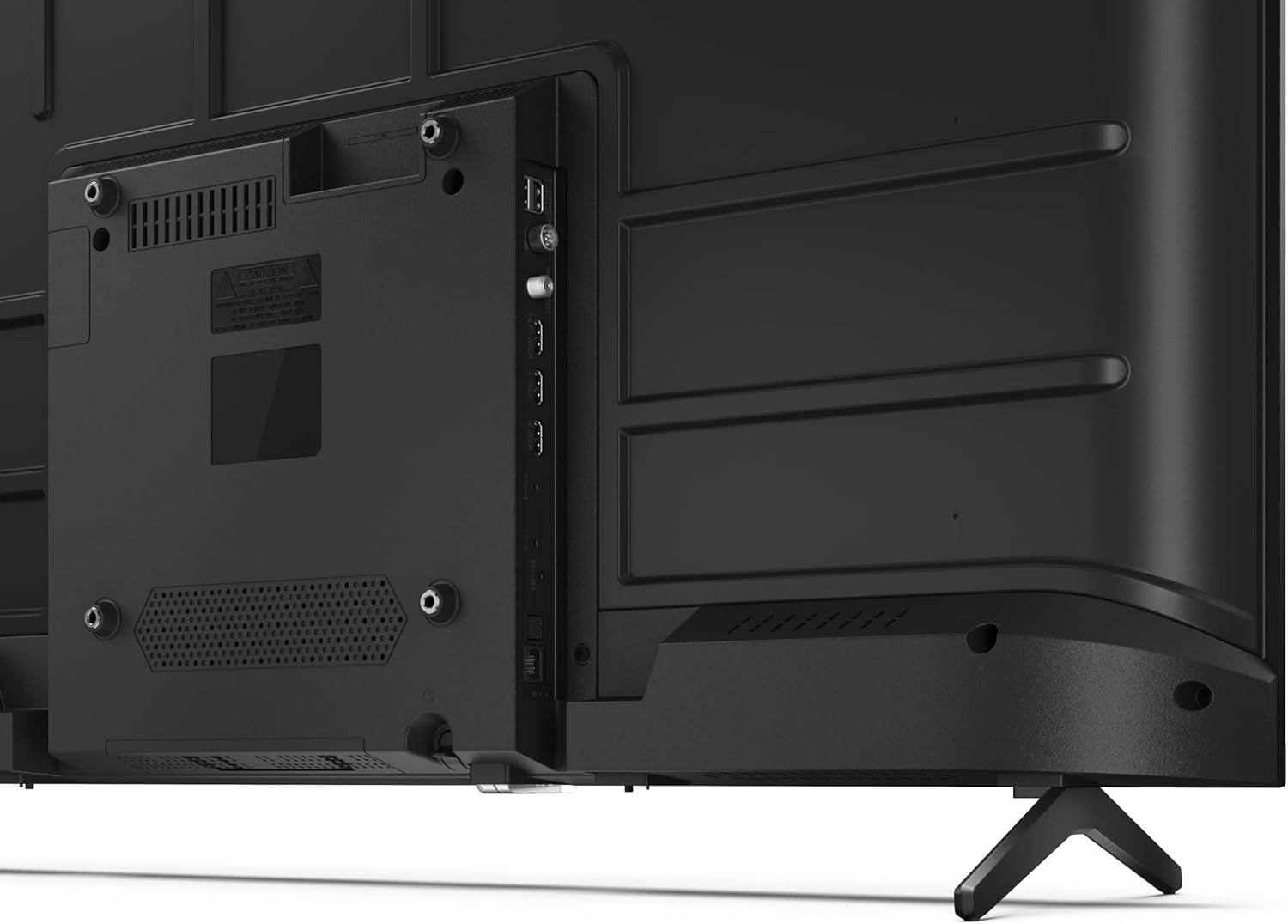
בילד 3.3: דעטאַלירט view פון די טעלעוויזיע'ס קאַנעקטיוויטי פּאָרץ.
3.4 ערשטע איינשטראָם און גוגל טיווי סעטאַפּ
After connecting all necessary cables, plug the power cable into an electrical outlet. Press the power button on the remote control or on the TV. Follow the on-screen instructions to complete the initial setup, including network connection, Google account login, and channel scanning.
4. אָפּערייטינג
4.1 רימאָוט קאָנטראָל פאַנגקשאַנז
The remote control allows you to navigate the TV's features. Common buttons include Power, Volume Up/Down, Channel Up/Down, Input Source, Home (Google TV), Navigation (directional arrows, OK), Back, and Google Assistant.
4.2 גוגל טיווי צובינד
Your Sharp TV runs on Google TV, providing a personalized home screen with content recommendations from your subscriptions. Use the remote's navigation buttons to browse movies, shows, apps, and your library.

Image 4.1: The Google TV home screen on the Sharp 40HF2265E.
4.3 אַרייַנשרייַב סעלעקציע
To switch between connected devices (e.g., HDMI 1, HDMI 2, TV tuner), press the 'Input' or 'Source' button on your remote control and select the desired input from the on-screen menu.
4.4 בילד און קלאַנג סעטטינגס
Access the TV's settings menu to adjust picture modes (Standard, Vivid, Cinema, Game), brightness, contrast, color, and sound modes (Standard, Music, Movie, Speech). The TV supports HDR10 for enhanced contrast and color, and Dolby Digital for rich audio.

Image 4.2: Visual representation of HDR (High Dynamic Range) technology.
4.5 גוגל אַסיסטאַנט און כראָומקאַסט
Use the built-in Google Assistant for voice control. Press the Google Assistant button on your remote and speak your commands, such as searching for content, controlling smart home devices, or getting information. Chromecast allows you to cast content directly from compatible devices like smartphones or tablets to your TV.

Image 4.3: Google Assistant integration for voice commands.
4.6 בלועטוט קאָנעקטיוויטי
Pair Bluetooth-enabled devices such as headphones or soundbars with your TV for a wireless audio experience. Navigate to the TV's settings menu, select 'Remotes & Accessories', and then 'Pair new device' to connect.
5. וישאַלט
5.1 רייניקן דעם טעלעוויזאר
Always unplug the TV before cleaning. Use a soft, dry cloth to wipe the screen and TV body. For stubborn marks, lightly dampen the cloth with water or a specialized screen cleaner. Never use abrasive cleaners, waxes, or solvents.
5.2 ווייכווארג דערהייַנטיקונגען
Your Google TV may receive automatic software updates. Ensure your TV is connected to the internet to receive these updates, which can improve performance and add new features. You can also manually check for updates in the settings menu.
6. טראָובלעשאָאָטינג
אויב איר טרעפט פּראָבלעמען מיט אייער טעלעוויזיע, באַזירט זיך אויף די פאלגענדע געוויינטלעכע לייזונגען:
- קיין מאַכט: קאָנטראָלירט צי דער עלעקטרישער קאַבל איז זיכער אַרײַנגעשטעקט אין ביידע דעם טעלעוויזאָר און דעם וואַנט אַוטלעט. מאַכט זיכער אַז דער אַוטלעט אַרבעט.
- קיין בילד/קלאַנג: באַשטעטיקט אַז די ריכטיקע אַרייַנגאַנג מקור איז אויסגעקליבן. קאָנטראָלירט אַלע קאַבל קאַנעקשאַנז (HDMI, אַנטענע). פּרוּווט ריסטאַרטן די טעלעוויזיע.
- רימאָוט קאָנטראָל נישט ארבעטן: טוישט די באַטעריעס (2 AAA). מאַכט זיכער אַז עס זענען נישטאָ קיין שטערונגען צווישן דעם ווײַטקאָנטראָל און דעם טעלעוויזיע'ס IR סענסאָר.
- נעץ פֿאַרבינדונג פּראָבלעמען: For Wi-Fi, check your router and ensure the TV is within range. For wired connections, check the Ethernet cable. Try restarting your router and the TV.
- בילד קוואַליטעט פּראָבלעמען: אַדזשאַסטירן בילד סעטטינגס (ברייטקייט, קאָנטראַסט, שאַרפֿקייט). זיכער מאַכן אַז די אַרייַנגאַנג מקור גיט אַ הויך-קוואַליטעט סיגנאַל.
For more complex issues, consult the comprehensive troubleshooting section in the full digital manual or contact Sharp customer support.
7. ספּעסאַפאַקיישאַנז
Below are the technical specifications for the Sharp 40HF2265E Full HD Google TV:

Image 7.1: Dimensions of the Sharp 40HF2265E TV.
| שטריך | באַשרייַבונג |
|---|---|
| סאָרט | שאַרף |
| מאָדעל נומער | 40HF2265E |
| מאָדעל נאָמען | HF סעריע |
| מאָדעל יאָר | 2025 |
| פאַרשטעלן גרייס | 40 אינטשעס (81 סענטימעטער) |
| ווייַז טעכנאָלאָגיע | געפירט |
| האַכלאָטע | 1080p (פול HD) |
| דערפרישן קורס | 60 הז |
| אַספּעקט פאַרהעלטעניש | 16:9 |
| קאַנטראַסט פאַרהעלטעניש | 100000:1 |
| Screen Finish | מאַט |
| ענטפער צייט | 8 מיליסעקאַנדז |
| באַקלייט טעכנאָלאָגיע | געפירט |
| Supported HDR Format | HDR10, HLG |
| בילד קוואַליטי ענכאַנסמאַנט | Dynamic Contrast, HDR10, HLG |
| Motion Enhancement Technology | Motion Interpolation |
| אָפּערייטינג סיסטעם | גוגל טעלעוויזיע |
| Internet Applications | Apple TV, Google TV, Hulu, Prime Video, YouTube |
| ספּעציעלע פֿעיִקייטן | Bluetooth, Chromecast, Dolby Digital, HD Tuner |
| קאַנעקטיוויטי טעכנאָלאָגיע | עטערנעט, יו-עס-בי, וויי-פיי |
| ווירעלעסס טעכנאָלאָגיע | בלועטאָאָטה |
| בלועטאָאָטה ווערסיע | 5.0 |
| Screen Mirroring Technology | Chromecast, Google Cast |
| גאַנץ הדמי פּאָרץ | 3 |
| Total USB 2.0 Ports | 2 |
| Number of Composite Video Inputs | 1 |
| אַודיאָ אַרייַנשרייַב | Mini composite/CVBS + audio input |
| Total Audio Output Ports | 2 |
| אַודיאָ רעזולטאַט מאָדע | סטערעאָ |
| אַודיאָ קאָדירונג | DD |
| Integrated Surround Sound Format | Dolby AC-4, Dolby Digital, Dolby Digital Plus |
| מאַקסימום רעדנער אַרויסגאַנג מאַכט | 16 Watts (2x8W) |
| נומער פון אַודיאָ טשאַנאַלז | 2.0 |
| בראָדקאַסט סיסטעם | DVB-T2/C/S/S2 |
| ווידעא קאָדירונג | MKV |
| פּראָדוקט דימענשאַנז (דקסווקסה) | 8.4P x 89.2L x 50.9H cm |
| פּונקט וואָג | 5.4 קילאָגראַמס |
| וואָג אָן שטיין | 5.4 קילאָגראַמס |
| באַזע ברייט | 765 מילאַמיטערז |
| VESA מאָונטינג סטאַנדאַרד | 200 רענטגענ 200 מם |
| מאַכט קאַנסאַמשאַן | 37 וואטס |
| Voltage | 230 וואלט |
| Remote Control Battery Size | אַאַאַ |
| Remote Control Battery Quantity | 2 |
| Parental Control Technology | Kindersicherung Über Google Tv |
| אי.יו. רעזערוו טיילן פאַראַנען | 7 יאר |
8. וואָראַנטי און שטיצן
8.1 פּראָדוקט וואָראַנטי
The Sharp 40HF2265E television comes with a 2-year manufacturer's warranty. Please refer to the included Warranty Card for detailed terms and conditions regarding coverage and service. Keep your proof of purchase for warranty claims.
8.2 קונה שטיצן
If you require further assistance, have questions not covered in this manual, or need technical support, please contact Sharp customer service. Contact information can typically be found on the Warranty Card or the official Sharp webפּלאַץ.