
1. הקדמה
This manual provides detailed instructions for the setup, operation, and maintenance of your Eyoyo EY-009L 1D Mini Bluetooth Barcode Scanner. This compact and portable scanner offers versatile 3-in-1 connectivity options: USB wired, 2.4G wireless, and Bluetooth. It is designed for efficient 1D barcode scanning across various platforms including iOS, Windows, Android, tablets, and computers.
2. פּעקל אינהאַלט
איידער איר גייט ווייטער, ביטע זיכער מאכן אז אלע זאכן זענען פאראן אין אייער פעקל:
- אייאָיאָ EY-009L באַרקאָדע סקאַנער
- וסב טשאַרדזשינג / דאַטאַ קאַבלע
- 2.4G ווירעלעס דאָנגל
- סיליקאָנע פּראַטעקטיוו קאַסטן
- האַנטגעלענק רימען
- באַניצער מאַנואַל (דעם דאָקומענט)
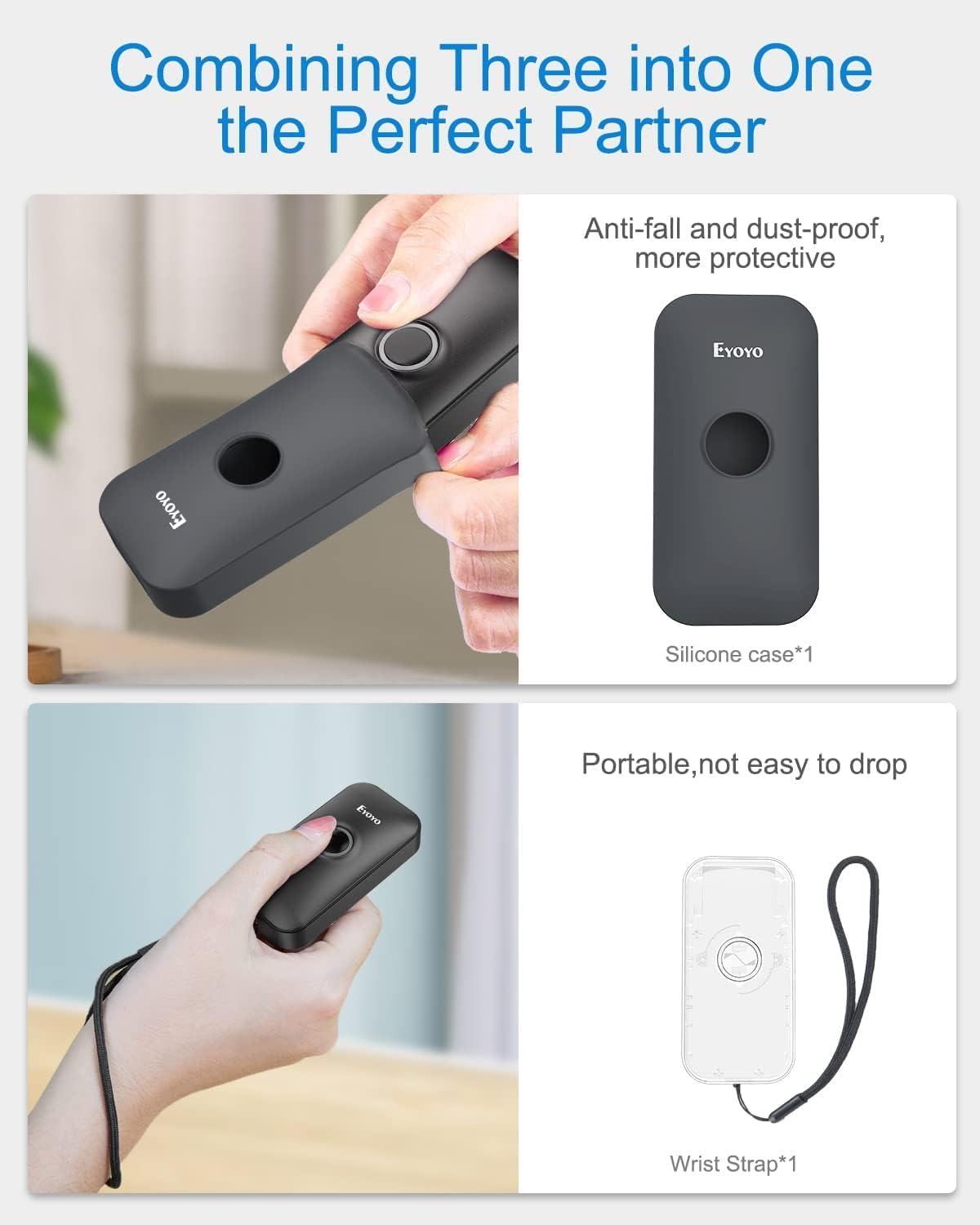
Image: Contents of the Eyoyo EY-009L package, including the scanner, USB cable, 2.4G dongle, silicone case, wrist strap, and user manual.
3. פּראָדוקט איבערview
The Eyoyo EY-009L is a compact and lightweight 1D barcode scanner designed for portability and ease of use. It features a durable silicone case for protection and multiple connectivity options.
3.1 שליסל פֿעיִקייטן
- סאָליד פּלאַן: Weighs approximately 35g (1.23oz) with dimensions of 3.07" x 1.50" x 0.47".
- 3-אין-1 קאָנעקטיוויטי: Supports 2.4G Wireless, Bluetooth, and USB Wired modes.
- 1D באַרקאָד שטיצע: Reads UPC/EAN, Code 39, Interleaved 2 of 5, Code 93, Code 128, Codabar, Industrial 2 of 5, and Matrix 2 of 5.
- לאנג באַטאַרייע לעבן: 650mAh rechargeable battery provides up to 5 hours of continuous scanning.
- הויך קאַמפּאַטאַבילאַטי: Works with Windows, Mac OS, Linux, iOS, and Android devices.

Image: The compact Eyoyo EY-009L barcode scanner held in a hand, illustrating its small size and portability.
4. סעטאַפּ און קאַנעקשאַן
The scanner offers three connection modes. Choose the mode that best suits your device and environment.

Image: Visual representation of the three connection modes: USB Wired, 2.4G Wireless, and Bluetooth, connecting the scanner to various devices.
4.1 וסב ווייערד מאָדע
- פאַרבינדן די סקאַננער צו דיין קאָמפּיוטער מיט די צוגעשטעלט וסב קאַבלע.
- דער סקאַנער וועט אויטאָמאַטיש אַרייַן דראָט מאָדע און אָנהייבן טשאַרדזשינג.
- No additional drivers are typically required. The scanner will function as a keyboard input device.
4.2 2.4G ווירעלעס מאָדע
- Insert the 2.4G wireless dongle into a USB port on your computer or device.
- צינד אן דעם סקענער. עס זאָל זיך אויטאָמאַטיש פֿאַרבינדן צום דאָנגל.
- A successful connection is indicated by a specific LED light pattern or sound (refer to the scanner's indicator guide for details).
- The 2.4G wireless mode offers a transmission range of up to 30m (98ft) in a barrier-free environment.
4.3 בלועטאָאָטה מאָדע
- Ensure the scanner is powered on and in Bluetooth pairing mode (usually indicated by a blinking blue LED). If not, scan the "Bluetooth Pairing" barcode from the full user manual.
- אויף אייער באַלעבאָס מיטל (סמאַרטפאָן, טאַבלעט, קאָמפּיוטער), אַקטיווירן בלועטוט און זוכן פֿאַר בנימצא דעוויסעס.
- Select "Eyoyo Barcode Scanner" or a similar name from the list of devices to pair.
- Once paired, the scanner's LED will change to a solid blue, and a confirmation sound may be heard.
- Bluetooth mode provides a transmission range of up to 50m (164ft) in a barrier-free environment.

Image: Diagram showing the effective transmission distances for 2.4G wireless mode (up to 30m/98ft) and Bluetooth mode (up to 50m/164ft) in different environments.

Image: Illustration of the scanner's compatibility with Windows, Android, iOS/macOS, and Linux operating systems, connecting to PCs, laptops, tablets, and smartphones.
5. אַפּערייטינג ינסטרוקטיאָנס
5.1 גרונטלעכע סקענירן
- Ensure the scanner is connected to your device in the desired mode.
- Open an application or text field where you want the scanned data to appear (e.g., Notepad, Word document, POS software).
- Point the scanner's light beam at the 1D barcode you wish to scan.
- Press the scan button. A successful scan will be indicated by a beep and/or a green LED flash, and the barcode data will appear in your application.
5.2 אַפּערייטינג מאָדעס
דער סקאַנער שטיצט צוויי הויפּט אָפּערירן מאָדעס:
- רעגע צופֿעליקער מאָדע: Scanned data is immediately transmitted to the connected device. This is the default mode.
- סטאָרידזש מאָדע: Scanned data is stored in the scanner's internal memory. Data can be uploaded later by scanning a specific "Upload Data" barcode (refer to the full user manual for this barcode). This mode is useful when out of range of the host device.
To switch between modes, scan the corresponding configuration barcodes found in the comprehensive user manual.
5.3 קאַסטאַמייזיישאַן אָפּציעס
The scanner offers various customizable settings by scanning specific configuration barcodes:
- געזונט און ווייבריישאַן: Enable or disable audible beeps and vibration feedback.
- פּרעפיקס/סופֿיקס: לייג צו אייגענע אותיות פאר אדער נאך געסקענטע דאטן.
- Character Deletion: Remove specific characters from scanned data.
- קלאַוויאַטור קיז: Insert special keys like TAB or CR&LF (Carriage Return & Line Feed) after each scan for automatic cursor movement.
Refer to the complete user manual for a full list of configuration barcodes and detailed instructions.
6. באַטאַרייע און טשאַרדזשינג
The scanner is equipped with a 650mAh rechargeable battery.
- טשאַרדזשינג: Connect the scanner to a USB power source (computer USB port or USB wall adapter) using the provided USB cable. The charging indicator light will show charging status. A full charge takes approximately 2 hours.
- באַטאַרייע לעבן: A fully charged battery provides up to 5 hours of continuous scanning or 720 hours of standby time.

Image: Infographic detailing the 650mAh rechargeable battery, 5 hours scanning time, 720 hours standby time, and 4 hours charging time for the Eyoyo barcode scanner.
7. וישאַלט
- רייניקונג: ניצט אַ ווייכע, טרוקענע שטאָף צו רייניקן די אויסערלעכע זייט פון דעם סקאַנער. ניצט נישט קיין שרײַבנדיקע רייניגערס אדער סאָלווענטן.
- סטאָרידזש: האַלט דעם סקאַנער אין אַ קיל, טרוקן אָרט אַוועק פון דירעקט זונשייַן און עקסטרעמע טעמפּעראַטורן.
- שוץ: Always use the provided silicone protective case to guard against drops and scratches.

Image: The Eyoyo barcode scanner being inserted into its anti-fall and dust-proof silicone case, and an image showing the scanner with an attached wrist strap for portability.
8. טראָובלעשאָאָטינג
| פּראָבלעם | מעגלעך סיבה | לייזונג |
|---|---|---|
| סקאַנער טוט זיך נישט אָן. | נידעריק באַטאַרייע. | לאָדט אויף דעם סקאַנער פֿאַר מינדעסטנס 2 שעה. |
| קיין דאַטן נישט טראַנסמיטירט נאָך סקאַנינג. | Not connected to host device; incorrect operating mode; application not in focus. | Ensure proper connection (USB, 2.4G, or Bluetooth). Check if the scanner is in "Instant Upload Mode". Make sure the cursor is in the desired text field of your application. |
| קען נישט פארבינדן דורך בלוטוט. | Scanner not in pairing mode; device Bluetooth off; interference. | Scan the "Bluetooth Pairing" barcode. Ensure Bluetooth is enabled on your device. Move closer to the device and away from potential interference sources. |
| Scanner reads barcodes incorrectly or not at all. | Damaged barcode; scanner lens dirty; incorrect barcode type enabled. | Try scanning a different, known-good barcode. Clean the scanner lens. Refer to the full manual to enable/disable specific barcode symbologies. |
9. ספּעסאַפאַקיישאַנז
| שטריך | דעטאַל |
|---|---|
| מאָדעל נומער | EY-009L |
| קאַנעקטיוויטי טעכנאָלאָגיע | 2.4G ווירעלעסס, בלועטאָאָטה, וסב קאַבלע |
| קאַמפּאַטאַבאַל דעוויסעס | Desktop, Laptop, Smartphone, Tablet (iOS, Windows, Android, Mac OS, Linux) |
| באַרקאָד טיפּן געשטיצט | 1D codes: UPC/EAN, Code 39, Interleaved 2 of 5, Code 93, Code 128, Codabar, Industrial 2 of 5, Matrix 2 of 5 |
| באַטאַרייע קאַפּאַציטעט | 650 מאַה |
| קאָנטינויִערלעכע סקאַנינג צייט | אַרויף צו 5 שעה |
| טשאַרדזשינג צייט | בעערעך 2 שעה |
| דימענשאַנז (די רענטגענ וו x ה) | 0.48" x 1.56" x 3" |
| וואָג | 35 ג (1.23 אַז) |
| אַפּערייטינג וואָלtage | 5 וואלטס |
| מאַקסימום סטאָרידזש טעמפּעראַטור | 50 דיגריז סעלסיוס |
| סערטיפיקאַטיאָנס | סע, פקק, ראָהס |
10. וואָראַנטי און שטיצן
The Eyoyo EY-009L Barcode Scanner comes with a 1-יאָר מאַנופאַקטורער וואָראַנטי.
For technical support, warranty claims, or further assistance, please contact Eyoyo customer service through their official webוועבזייטל אדער די קאָנטאַקט אינפֿאָרמאַציע וואָס איז צוגעשטעלט געוואָרן מיט אייערע קויף דאָקומענטאַציע.
ביטע באַהאַלטן אייער קויפן-באַווייַז פֿאַר גאַראַנטיע צוועקן.