
הקדמה
Thank you for choosing the UGREEN M785DR Wireless Trackball Mouse. This manual provides detailed instructions for setting up, operating, maintaining, and troubleshooting your device. Please read this manual thoroughly before use to ensure optimal performance and longevity of your trackball mouse.
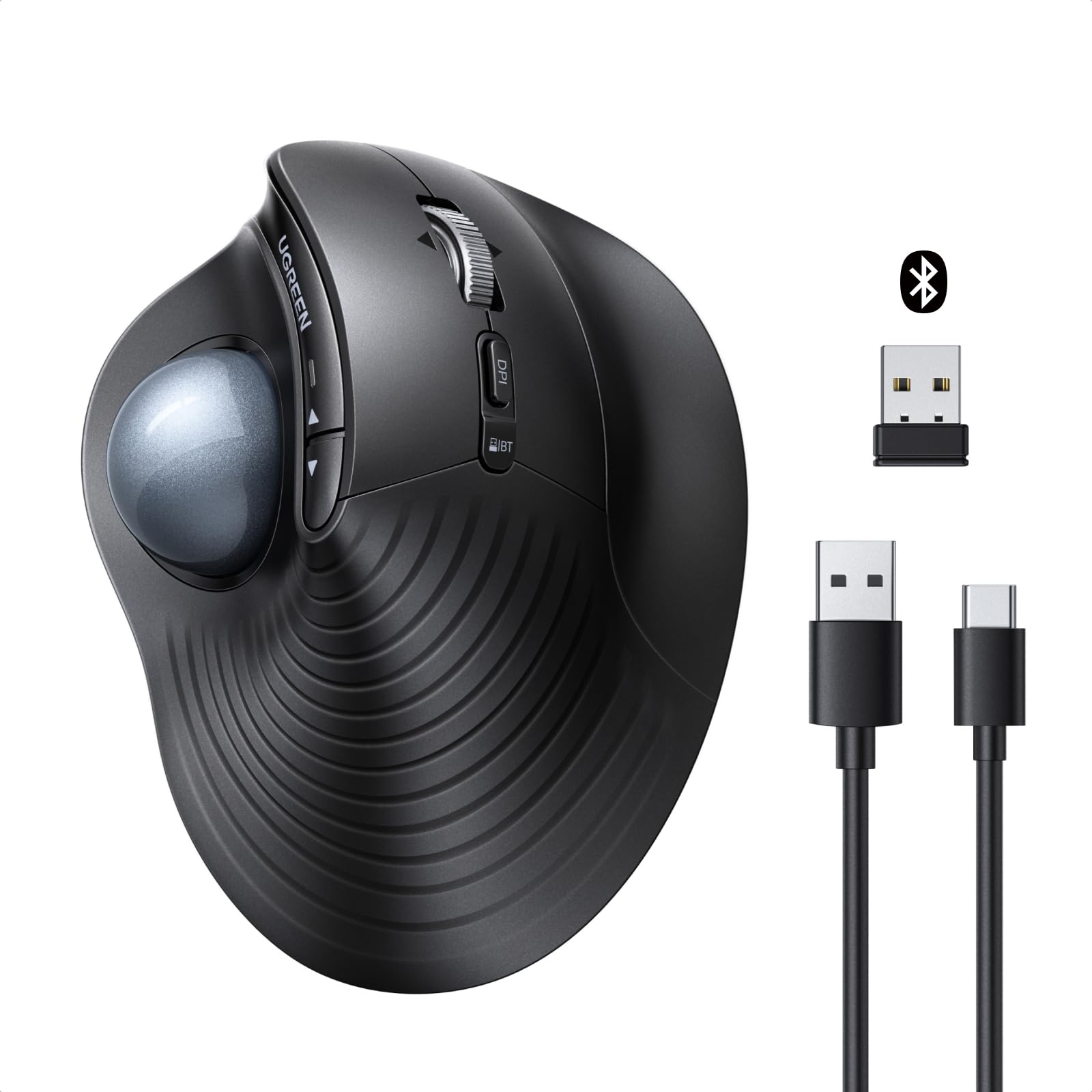
בילד: איבערview of the UGREEN M785DR Wireless Trackball Mouse, highlighting its ergonomic design, trackball, and various buttons. Icons indicate Bluetooth & 2.4G connectivity, USB-C charging, 5 DPI levels, 4D scroll wheel, silent operation, customizable buttons, and simultaneous connection to up to 3 devices.
פּראָדוקט איבערview
Familiarize yourself with the components and controls of your UGREEN M785DR Trackball Mouse.

Image: Detailed diagram illustrating the various buttons and ports on the UGREEN M785DR Trackball Mouse. Labels include Left button, Scroll wheel, Right button, DPI toggle button, Connection toggle button, USB-C port for charging, Power button, Trackball, Back button, Forward button, Battery/Mode indicator, and the location of the USB receiver.
שליסל קאַמפּאָונאַנץ:
- טראַקקבאָל: For precise cursor control with your thumb.
- לינקס / רעכט קנעפּלעך: נאָרמאַלע מויז קליק פונקציעס.
- סקראָל ראָד: 4D scrolling for vertical and horizontal navigation.
- צוריק / פֿאָרווערטס קנעפּלעך: For quick navigation in web בראַוזערז און file עקספּלאָרערס.
- DPI טאַגאַל קנעפּל: אַדזשאַסטירט קורסאָר סענסיטיוויטי.
- Connection Toggle Button: Switches between 2.4G and Bluetooth connections.
- Battery/Mode Indicator: Displays battery status and connection mode.
- USB-C טשאַרדזשינג פּאָרט: פֿאַר איבערלאָדן די אינערלעכע באַטאַרייע.
- מאַכט קנעפּל: טורנס די מויז אויף אָדער אַוועק.
- וסב ופנעמער: Stored inside the mouse for 2.4G wireless connection.
סעטאַפּ
1. אויפלאָדן די מויז
Before initial use, ensure the mouse is fully charged. A USB-A to USB-C charging cable is included.
- Connect the USB-C end of the charging cable to the mouse's USB-C port.
- Connect the USB-A end to a power source (e.g., computer USB port, USB wall adapter).
- The battery/mode indicator light will show the charging status. It takes approximately 1.5-2 hours for a full charge.

Image: The UGREEN M785DR mouse connected via a USB-C cable to a laptop for charging. The image indicates the charging process and fully charged states with color codes.
2. קאַנעקטינג די מאַוס
The UGREEN M785DR supports dual-mode connectivity: 2.4G wireless via USB receiver and Bluetooth. It can connect to up to three devices simultaneously.
2.1. 2.4ג ווירעלעסס קאַנעקשאַן
- Locate the USB receiver inside the mouse's bottom compartment.
- צאַפּן די וסב ופנעמער אין אַ בנימצא וסב פּאָרט אויף דיין קאָמפּיוטער.
- צינדט אן די מויז מיטן מאַכט קנעפּל.
- Press the connection toggle button until the indicator light shows the 2.4G mode (usually a specific color or blink pattern). The mouse should connect automatically.
2.2. בלועטאָאָטה קאַנעקשאַן
The mouse supports two Bluetooth channels (BT1 and BT2).
- צינדט אן די מויז מיטן מאַכט קנעפּל.
- Press the connection toggle button to select either BT1 or BT2 mode. The indicator light will blink rapidly, indicating pairing mode.
- On your device (PC, Mac, tablet, etc.), go to Bluetooth settings and search for new devices.
- Select "UGREEN M785DR" from the list of available devices to pair.
- Once paired, the indicator light will stop blinking and remain solid for a few seconds.

Image: The UGREEN M785DR mouse positioned between a monitor, laptop, and tablet, illustrating its ability to connect to three devices simultaneously via Bluetooth (BT1, BT2) and 2.4G wireless. Compatible operating systems are listed below the image.
3. וועקסלען צווישן פארבונדענע דעווייסעס
To switch between connected devices, simply press the connection toggle button on the mouse. The indicator light will change to reflect the active connection mode (2.4G, BT1, or BT2).
4. קאַמפּאַטאַבילאַטי
The UGREEN M785DR is compatible with a wide range of operating systems:
- Windows
- macOS
- לינוקס
- אַנדרויד
- ChromeOS
אַפּערייטינג ינסטראַקשאַנז
1. Ergonomic Design and Usage
The vertical ergonomic shape and thumb-controlled trackball are designed to reduce forearm rotation and wrist strain, promoting a more natural hand posture during extended use. Cursor movement is achieved by rolling the trackball with your thumb, eliminating the need to move the entire mouse.

Image: A comparison showing the hand posture with a conventional mouse (requiring wrist movement) versus the UGREEN M785DR trackball mouse (enabling intuitive thumb operation without moving the mouse, reducing wrist twisting).
2. דפּי אַדזשאַסטמאַנט
The mouse features 5 adjustable DPI levels to suit various tasks and preferences. Press the DPI toggle button to cycle through the sensitivity settings.
- 400 דפּי: One blink of the indicator light.
- 800 דפּי: Two blinks of the indicator light.
- 1200 דפּי: Three blinks of the indicator light.
- 1600 דפּי: Four blinks of the indicator light.
- 2000 דפּי: Five blinks of the indicator light.

Image: Diagram illustrating the 5 DPI levels (400, 800, 1200, 1600, 2000) and their corresponding indicator light blinks. A low battery warning is also shown.
3. 4D Hyper-Fast Scroll Wheel
The scroll wheel supports both vertical and horizontal scrolling. It also features speed switching for efficient navigation through long documents or wide spreadsheets. Simply tilt the scroll wheel left or right for horizontal scrolling.
4. קוסטאָמיזאַבלע קנעפּלעך
The product buttons can be customized to assign frequently used functions (e.g., copy, paste, task switching). This requires downloading and installing the corresponding software from the UGREEN official webפּלאַץ.
5. Space-Saving Operation
Since the mouse does not need to be moved, it is ideal for small desks, cluttered workspaces, or even use on your lap. It operates reliably on almost any surface without requiring a mouse pad.
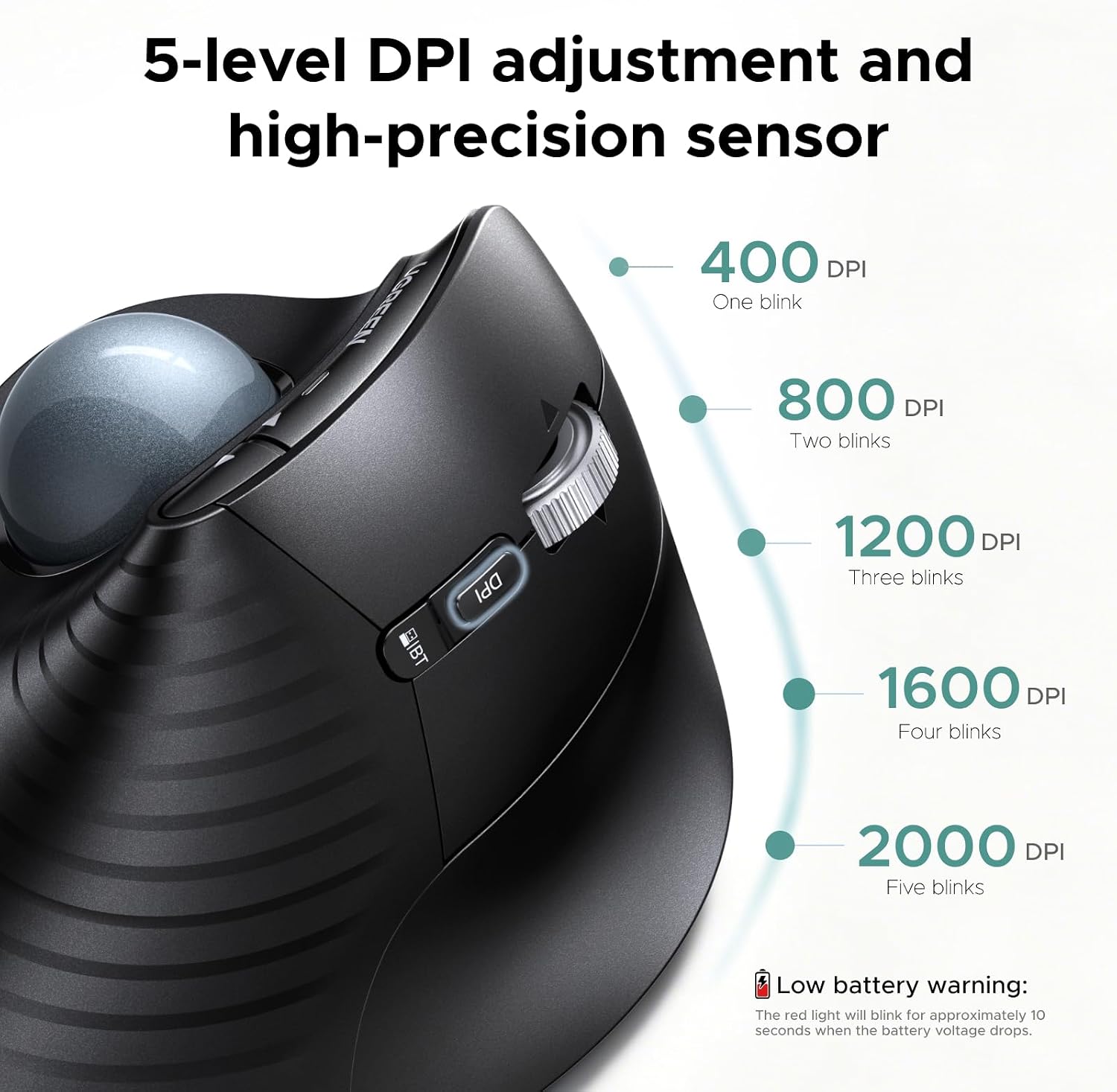
Image: Three scenarios demonstrating the UGREEN M785DR mouse being used in limited spaces: on a train tray table, on a small desk, and resting on a user's lap, highlighting its versatility.
וישאַלט
רייניקונג די טראַקבאָל
For optimal performance and smooth tracking, regularly clean the trackball. Dust and debris can accumulate and affect its movement.
- קער אַוועק די מויז.
- Gently push the trackball out from the bottom of the mouse.
- Wipe the trackball with a soft, lint-free cloth.
- Use a cotton swab or a small brush to clean the inner socket where the trackball rests, removing any accumulated dust or debris.
- שטעקט צוריק אריין דעם טרעקבאָל אין זיין סאָקעט.
Monthly cleaning is recommended to maintain smooth and responsive tracking.
טראָובלעשאָאָטינג
פּראָסט ישוז און סאַלושאַנז:
- מויז ענטפערט נישט:
- מאַכן זיכער אַז די מויז איז פּאַוערד אויף.
- קאָנטראָלירט די באַטאַרייע מדרגה; ריטשאַרדזש אויב נייטיק.
- For 2.4G connection, ensure the USB receiver is securely plugged in and the mouse is in 2.4G mode.
- For Bluetooth connection, ensure Bluetooth is enabled on your device and the mouse is correctly paired and in the selected BT mode (BT1/BT2). Try re-pairing if necessary.
- פרובירט זיך צו פארבינדן צו אן אנדערן USB פארט אדער דעווייס צו אויסשליסן פארט/דעווייס פראבלעמען.
- קורסאָר באַוועגונג איז נישט סטאַביל אָדער נישט גלאַט:
- Clean the trackball and its socket as described in the Maintenance section.
- Adjust the DPI sensitivity using the DPI toggle button.
- ווארענונג פֿאַר נידעריק באַטערי:
- The red indicator light will blink for approximately 10 seconds when the battery voltage drops. Recharge the mouse promptly.
- Buttons not functioning correctly:
- If buttons are customized, ensure the customization software is running and configured correctly.
- Test the mouse on another device to determine if the issue is with the mouse or the host device's settings.
ספּעסאַפאַקיישאַנז
| סאָרט | UGREEN |
| מאָדעל נומער | 85892 (M785DR) |
| קאַנעקטיוויטי טעכנאָלאָגיע | בלועטוט, 2.4G וויירלעס |
| באַוועגונג דעטעקשאַן טעכנאָלאָגיע | טראַקבאָל |
| נומער פון קנעפּלעך | 8 |
| דפּי לעוועלס | 400, 800, 1200, 1600, 2000 (אַדזשאַסטאַבאַל) |
| באַטערי | 500mAh Rechargeable (1 Nonstandard Battery included) |
| טשאַרדזשינג פּאָרט | וסב-C |
| האַנט אָריענטירונג | אַמבידעקסטראַס |
| קאַמפּאַטאַבאַל דעוויסעס | פערזענלעכע קאָמפּיוטער |
| אָפּערייטינג סיסטעם | Windows, macOS, Linux, Android, ChromeOS |
| פּונקט וואָג | 155 ג |

Image: A size guide for the UGREEN M785DR mouse, comparing it to small, medium, and large hand sizes. Dimensions of the mouse (6.7cm width, 12cm length, 6.5cm height) are also provided, indicating it is specifically designed for medium to large hands.
וואָראַנטי און שטיצן
וואָראַנטי אינפֿאָרמאַציע
The UGREEN M785DR Wireless Trackball Mouse comes with a 2-יאָר מאַנופאַקטורער וואָראַנטיביטע באַהאַלטן אייער קויפן באַווייַז פֿאַר וואָראַנטי קליימז.
קונה שטיצן
For further assistance, technical support, or to download customization software, please visit the official UGREEN website or contact UGREEN customer service.
Webפּלאַץ: www.ugreen.com