
1. זיכערקייַט אינפֿאָרמאַציע
Please read all safety instructions carefully before using the NiPoGi Mini PC E3B. Failure to follow these instructions may result in electric shock, fire, or damage to the device.
- ניצן בלויז די מאַכט אַדאַפּטער צוגעשטעלט מיט די מיטל.
- שטעלט נישט אויס דעם אפאראט צו וואסער, פייכטקייט, אדער עקסטרעמע טעמפעראטורן.
- ויסמיידן פּלייסינג די מיטל לעבן היץ קוואלן אָדער אין דירעקט זונשייַן.
- נישט עפענען דעם אפאראט casinז. איבערגעבן אלע סערוויסינג צו קוואַליפֿיצירטע פּערסאָנעל.
- ענשור געהעריק ווענטאַליישאַן אַרום די מיטל צו פאַרמייַדן אָוווערכיטינג.
2. פּעקל אינהאַלט
באַשטעטיקן אַז אַלע זאכן זענען פאַראַן אין דיין פּעקל:
- 1 x NiPoGi Mini PC E3B
- 1 x אי.יו. מאַכט אַדאַפּטער
- 1 x HDMI קאַבלע
- 1 x וועסאַ מאָונט
- 1 x באַניצער מאַנואַל
3. פּראָדוקט איבערview
3.1 פראָנט און דערציען פּאַנאַלז

The image above illustrates the various ports and buttons available on the front and rear of the NiPoGi Mini PC E3B.
פראָנט פּאַנעל:
- מאַכט קנעפּל: צו קער די מיטל אויף אָדער אַוועק.
- 3.5 מם אַודיאָ דזשאַק: פֿאַר כעדפאָונז אָדער מיקראָפאָנען.
- USB3.2 Gen2 Type-A Ports (x2): הויך-גיכקייט USB פּאָרץ פֿאַר פּעריפעריאַלס.
- USB3.2 Gen2 Type-C Port (x1): Supports data transfer and 4K@60Hz video output.
ריר פּאַנעל:
- דק אין: מאַכט אַרייַנשרייַב פּאָרט.
- HDMI 2.0 Port (x1): Supports 4K@60Hz video output.
- DP1.4 Port (x1): Supports 4K@60Hz video output.
- RJ45 Gigabit Ethernet Port (x2): For wired network connection (10M/100M/1000Mbps).
- USB3.2 Gen1 Type-A Ports (x4): נאָרמאַלע USB פּאָרץ פֿאַר פּעריפערישע דעוויסעס.
3.2 Internal Components and Expansion

The NiPoGi Mini PC E3B is designed for easy storage expansion. It features:
- 24GB LPDDR5 RAM: High-speed memory for efficient multitasking.
- 512GB M.2 SSD: Primary storage for the operating system and applications.
- Additional M.2 Slots: Supports M.2 NVMe PCIe 3.0 x4 or PCIe 4.0 x4 SSDs, expandable up to 4TB.
- 2.5-inch SSD/HDD Bay: Supports external 2.5-inch SSD/HDD expansion up to 2TB (drive not included).
4. סעטאַפּ
4.1 קאַנעקטינג פּעריפעראַלס
- פֿאַרבינדן דיספּליי: Use the HDMI, DisplayPort, or USB-C port to connect your monitor(s). The device supports up to three 4K displays simultaneously.
- פֿאַרבינדן קלאַוויאַטור און מויז: Plug your USB keyboard and mouse into any available USB-A ports.
- פאַרבינדן מאַכט: Plug the EU power adapter into the DC IN port on the rear panel, then connect it to a power outlet.
- Optional Network Connection: For a wired connection, connect an Ethernet cable to one of the RJ45 ports.
4.2 ערשטע איינשטראָם און ווינדאָוס סעטאַפּ
- Press the power button on the front panel. The device will boot up.
- Upon the first startup, you will be guided through the Windows 11 Pro setup process. Follow the on-screen instructions to select your language, region, and create a user account.
- Ensure you have an internet connection (wired or Wi-Fi) during setup for updates and account synchronization.
4.3 וועסאַ מאָונט אינסטאַלאַציע
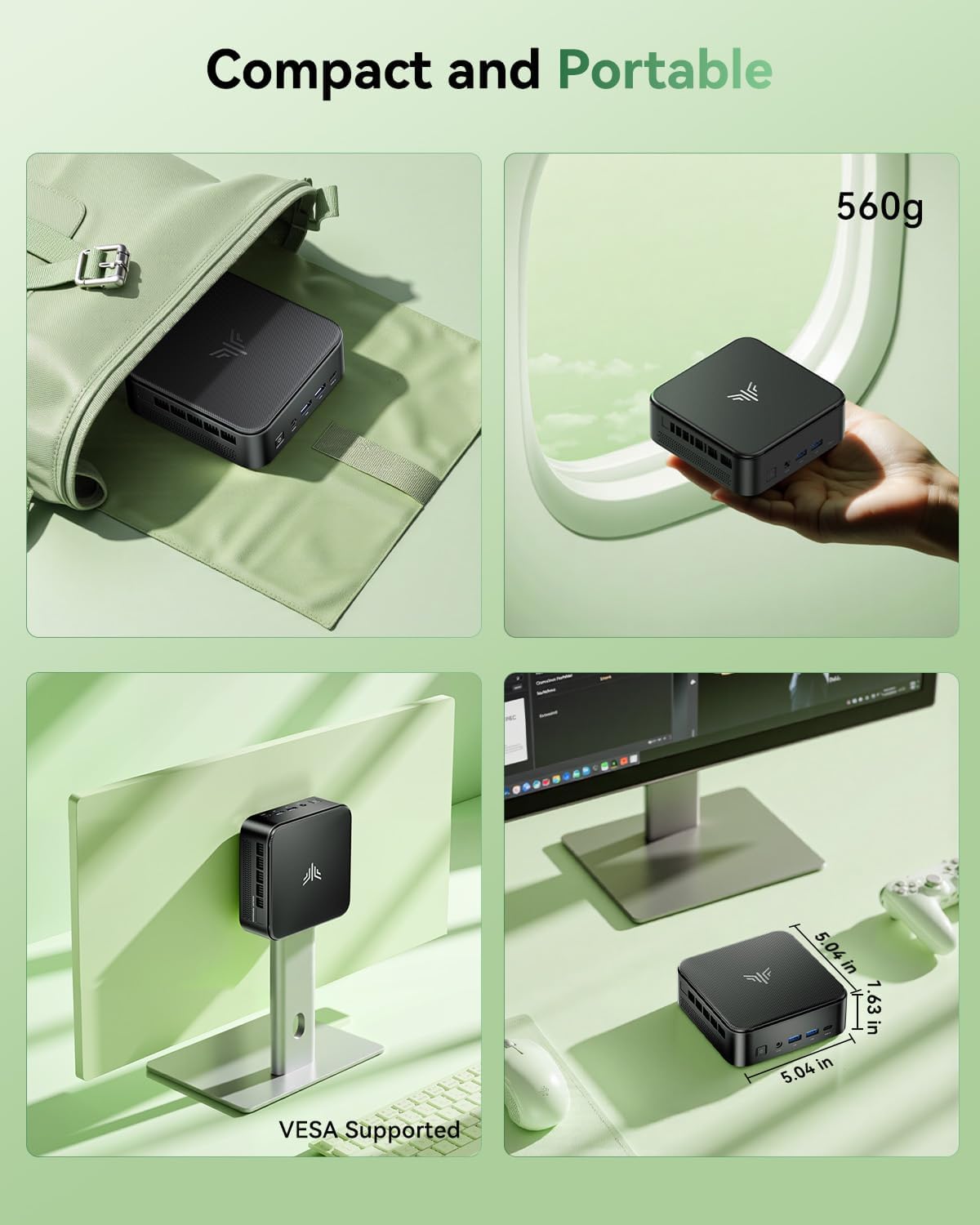
The included VESA mount allows you to attach the Mini PC to the back of a compatible monitor or TV, saving desk space.
- Locate the VESA mounting holes on the back of your monitor (typically 75x75mm or 100x100mm).
- Attach the VESA bracket to the monitor using the provided screws.
- Slide the Mini PC onto the VESA bracket until it clicks securely into place.
5. אַפּערייטינג ינסטרוקטיאָנס
5.1 מאַכט אויף / אַוועק
- צו מאַכט אויף: דרוק די מאַכט קנעפּל אַמאָל.
- צו פאַרמאַכן אַראָפּ: Click the Windows Start button, then select Power > Shut down. Alternatively, press and hold the power button for 4-5 seconds.
- צו ריסטאַרט: דריקט דעם Windows Start קנעפּל, און דערנאָך אויסקלײַבן Power > Restart.
5.2 BIOS Settings (Automatic Power On)
The Mini PC supports automatic power-on after a power failure. To enable this feature:
- בעתן סטאַרטאַפּ, דריק איבער און איבער די ESC שליסל צו אַרייַן די בייאָוס סעטאַפּ נוצן.
- Navigate to the "Boot" section.
- Locate and select "Enable Automatic Power On" (or similar option).
- היט ענדערונגען און אַרויסגאַנג די בייאָוס.
5.3 Display Configuration (Triple Display)

The NiPoGi Mini PC E3B supports connecting up to three 4K displays simultaneously via its HDMI, DisplayPort, and USB-C outputs. This allows for an extended desktop environment, enhancing productivity.
- Connect your monitors to the available HDMI, DP, and Type-C ports.
- Once connected, Windows will automatically detect the displays. You can configure display settings (extend, duplicate, etc.) by right-clicking on the desktop and selecting "Display settings."
5.4 נעץ קאָנעקטיוויטי

The Mini PC offers both wired and wireless network options.
- ווייערד קשר: Connect an Ethernet cable to one of the two RJ45 Gigabit Ethernet ports.
- Wireless Connection (Wi-Fi 6): The device features integrated 802.11ax dual-band (2.4G/5G) Wi-Fi 6 for faster and more stable wireless connectivity. To connect, click the network icon in the Windows taskbar, select your Wi-Fi network, and enter the password.
5.5 בלועטוט קאָנעקטיוויטי
The Mini PC includes Bluetooth 5.2, allowing you to connect various wireless devices such as keyboards, mice, headphones, and speakers.
- גיי צו ווינדאָוס סעטטינגס > דעוויסעס > בלועטוט און אנדערע דעוויסעס.
- ענשור בלועטאָאָטה איז פארקערט אויף.
- Click "Add Bluetooth or other device" and follow the on-screen instructions to pair your device.
6. וישאַלט
- רייניקונג: Use a soft, dry cloth to clean the exterior of the Mini PC. Do not use liquid cleaners or aerosols. Ensure ventilation openings are free from dust.
- ווייכווארג דערהייַנטיקונגען: Regularly check for and install Windows updates and driver updates for optimal performance and security. You can find driver updates on the NiPoGi official website or through Windows Update.
7. טראָובלעשאָאָטינג
- קיין מאַכט: זיכער מאַכן אַז דער מאַכט אַדאַפּטער איז זיכער פארבונדן צו ביידע די מיני פּיסי און אַ אַרבעטנדיק מאַכט אַוטלעט. פּרוּווט אַן אַנדער אַוטלעט.
- קיין ווייַז: Check that the monitor is powered on and correctly connected to the Mini PC. Try a different video cable or monitor. Ensure the correct input source is selected on your monitor.
- פּאַמעלעך פאָרשטעלונג: Close unnecessary applications. Check for background processes. Ensure sufficient free storage space. Consider updating drivers or performing a system scan for malware.
- נעץ ישוז: For wired connections, check the Ethernet cable and router. For Wi-Fi, ensure the Wi-Fi adapter is enabled and you are connected to the correct network with the right password. Restart your router and the Mini PC.
- פּעריפעראַלס אַרבעטן נישט: Ensure USB devices are properly connected. Try different USB ports. Update or reinstall device drivers if necessary.
8. ספּעסאַפאַקיישאַנז
| שטריך | באַשרייַבונג |
|---|---|
| פּראַסעסער | AMD Ryzen 7 7735HS (8 קערנס/16 פֿעדעם, ביז 4.75 GHz) |
| גראַפיקס | AMD Radeon 680M (Integrated, 12 Cores, 2200MHz) |
| באַראַן | 24GB LPDDR5 (5500 MT/s) |
| סטאָרידזש | 512GB M.2 SSD (Expandable up to 4TB via M.2 slots, 2.5-inch SSD/HDD up to 2TB) |
| אָפּערייטינג סיסטעם | Windows 11 Pro (64-ביסל) |
| ווירעלעסס קאַנעקטיוויטי | Wi-Fi 6 (802.11ax, Dual Band 2.4G/5G), Bluetooth 5.2 |
| ווייערד קאַנעקטיוויטי | 2 x RJ45 Gigabit Ethernet Ports |
| ווידעא רעזולטאַט | 1 x HDMI 2.0, 1 x DisplayPort 1.4, 1 x USB-C (supports 4K@60Hz triple display) |
| וסב פּאָרץ | 2 x USB3.2 Gen2 Type-A (Front), 4 x USB3.2 Gen1 Type-A (Rear), 1 x USB3.2 Gen2 Type-C (Front) |
| אַודיאָ פּאָרט | 1 x 3.5mm Headphone/Microphone Combo Jack |
| דימענסיעס (L X W X H) | 11.9 X 11.9 X 3.6 סענטימעטער (4.69 X 4.69 X 1.42 אינטשעס) |
| וואָג | 1.36 קג (3 לבס) |
| מאַכט קאַנסאַמשאַן | 28 וואט |
9. וואָראַנטי און שטיצן
The NiPoGi Mini PC E3B comes with a 1-year warranty, providing peace of mind for your purchase. For technical support, troubleshooting assistance, or warranty claims, please refer to the contact information provided with your product packaging or visit the official NiPoGi webפּלאַץ.
NiPoGi is committed to providing high-quality customer service and professional support.