
1. הקדמה
The JOC H1011BT portable radio is designed to provide a versatile audio experience, combining traditional FM radio with modern digital media playback capabilities. This device allows you to enjoy your favorite music and radio programs anywhere, offering seamless connectivity via Bluetooth, USB, and TF card. Its compact design and rechargeable battery make it an ideal companion for home, office, or travel.
2. זיכערקייַט אינפֿאָרמאַציע
- שטעלט נישט אויס דעם אפאראט צו וואסער אדער איבעריגע פייכטקייט.
- פֿאַרמײַדט צו צענעמען דעם אַפּאַראַט. רעפּאַראַציעס זאָלן נאָר דורכגעפֿירט ווערן דורך קוואַליפֿיצירטע פּערסאָנעל.
- Use only the specified charging cable and power source to prevent damage.
- האַלטן די מיטל אַוועק פון עקסטרעם טעמפּעראַטורעס און דירעקט זונשייַן.
- Do not block the speaker grille during operation to ensure optimal sound quality.
3. פּעקל אינהאַלט
ביטע טשעק די פּאַקעט פֿאַר די פאלגענדע זאכן:
- JOC H1011BT Portable Digital FM Radio
- וסב טשאַרדזשינג קאַבלע
- פירן רימען
- באַזיצער ס מאַנואַל (דאָס דאָקומענט)
- 1 x Lithium-ion battery (pre-installed or separate)

פיגור 3.1: פּראָדוקט פּאַקאַדזשינג
4. פּראָדוקט איבערview
The JOC H1011BT is a compact and feature-rich portable radio. It includes a digital display, easy-to-use control buttons, and multiple connectivity options for diverse audio playback.
4.1 פראָנט View
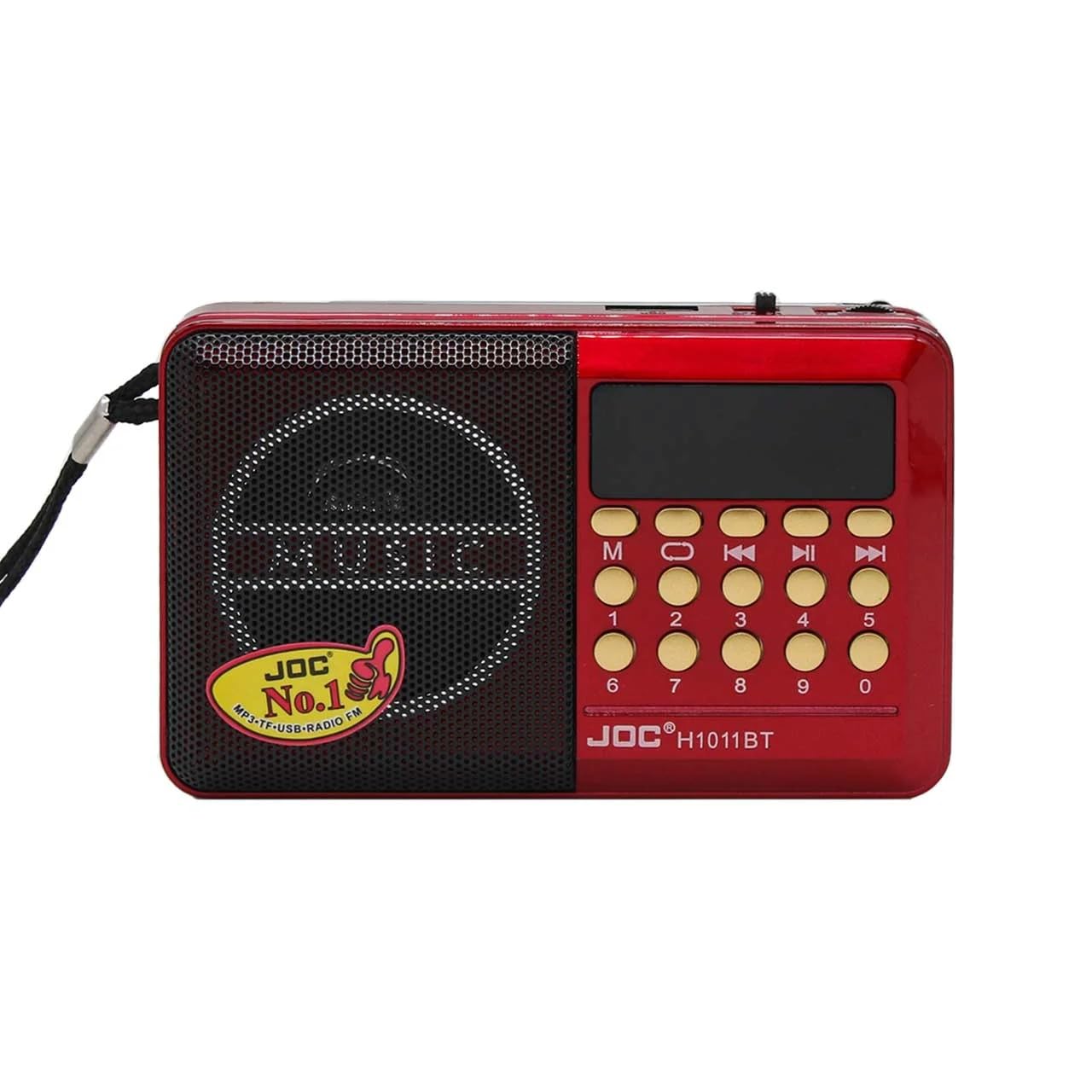
פיגורע 4.1: פראָנט View פון די ראַדיאָ
This image displays the main interface of the radio, including the speaker, digital screen, and numeric keypad for direct frequency input or track selection.
4.2 זייַט View און פּאָרטן
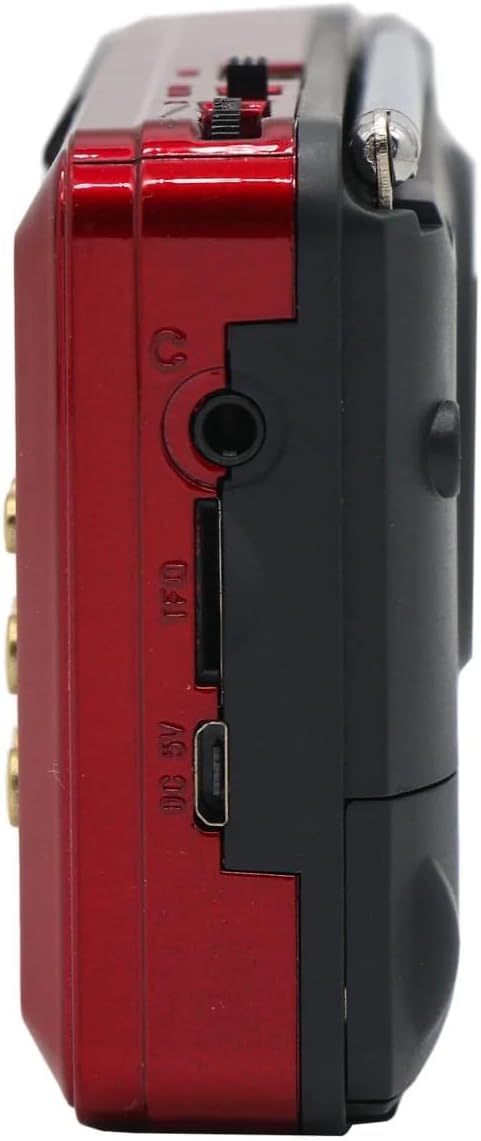
Figure 4.2: Side Ports and Connections
The side of the radio features essential ports: a DC 5V micro-USB charging port, a TF (MicroSD) card slot for memory card playback, a USB-A port for USB drive playback, and a 3.5mm headphone jack for private listening.
4.3 Antenna and Portability

Figure 4.3: Radio with Extended Antenna
דאס view shows the radio with its telescopic antenna extended, crucial for optimal FM reception. The compact size and included carry strap enhance its portability.
4.4 Compact Design

Figure 4.4: Demonstrating Portability
This image illustrates the radio's ergonomic and lightweight design, making it comfortable to hold and carry for on-the-go use.
5. סעטאַפּ
5.1 טשאַרדזשינג די באַטאַרייע
- Locate the DC 5V charging port on the side of the radio (refer to Figure 4.2).
- Connect the provided USB charging cable to the radio's charging port.
- Connect the other end of the USB cable to a standard USB power adapter (5V, not included) or a computer's USB port.
- The charging indicator light (if present) will illuminate during charging and turn off or change color when fully charged.
- לאָזט עס אָפּ בערך 2-3 שעה פֿאַר אַ פֿולע אָפּלאָדונג איידער איר ניצט עס צום ערשטן מאָל.
5.2 ערשט מאַכט אויף
After charging, slide the power switch (usually located on the side or top) to the 'ON' position. The digital display will light up, and the radio will typically start in FM radio mode or the last used mode.
6. אַפּערייטינג ינסטרוקטיאָנס
6.1 מאַכט אויף/אויס און באַנד קאָנטראָל
- מאַכט: Slide the power switch to 'ON' or 'OFF' to turn the device on or off.
- באַנד: Use the dedicated volume knob or buttons (usually '+' and '-') to adjust the sound level.
6.2 FM ראַדיאָ אָפּעראַציע
- באַשטימען צו FM מאָדע: Press the 'M' (Mode) button until 'FM' appears on the display.
- אויטאָמאַטישער סקען: Press and hold the 'Play/Pause' button (often labeled with a play symbol) to initiate an automatic scan for FM stations. The radio will scan and save available stations.
- מאַנואַל טונינג: Use the 'Previous' (<<) or 'Next' (>>) buttons to manually tune to frequencies or navigate through saved stations.
- Direct Frequency Input: Use the numeric keypad (0-9) to directly enter an FM frequency (e.g., 102.5).
- אַנטענע: Extend the telescopic antenna for better FM reception (refer to Figure 4.3).
6.3 בלועטוט פּלייבּעק
- איבערגיין צו בלועטוט מאָדע: Press the 'M' (Mode) button until 'BT' or 'Bluetooth' appears on the display. The radio will enter pairing mode, indicated by a flashing Bluetooth icon or sound.
- פּאָרינג: On your smartphone or other Bluetooth-enabled device, search for available Bluetooth devices and select 'H1011BT' (or similar name).
- פּלייבאַק: Once paired, you can play music from your device, and the audio will stream through the radio. Use the radio's 'Previous' (<<), 'Next' (>>), and 'Play/Pause' buttons to control playback.
6.4 USB/TF קאַרטל פּלייבּעק
- אריינלייגן מעדיע: Insert a USB flash drive into the USB port or a TF (MicroSD) card into the TF card slot (refer to Figure 4.2). Ensure audio files (MP3, WAV, etc.) are stored on the media.
- Switch to Media Mode: The radio should automatically switch to USB or TF card playback mode. If not, press the 'M' (Mode) button until the corresponding indicator appears.
- פּלייבאַק קאָנטראָל: Use the 'Previous' (<<), 'Next' (>>), and 'Play/Pause' buttons to navigate tracks and control playback.
7. וישאַלט
- רייניקונג: Use a soft, dry cloth to clean the exterior of the radio. Do not use liquid cleaners or abrasive materials.
- סטאָרידזש: ווען נישט אין באַנוץ פֿאַר לענגערע פּעריאָדן, זאָל מען דאָס ראַדיאָ האַלטן אין אַ קיל, טרוקן אָרט, אַוועק פֿון דירעקטער זון און עקסטרעמע טעמפּעראַטורן.
- באַטערי זאָרגן: To prolong battery life, avoid fully discharging the battery frequently. Charge it regularly, even if not in use.
8. טראָובלעשאָאָטינג
| פּראָבלעם | מעגלעך סיבה | לייזונג |
|---|---|---|
| ראַדיאָ גייט נישט אָן. | Battery is discharged. Power switch is off. | Charge the battery. Ensure the power switch is in the 'ON' position. |
| קיין קלאַנג אָדער נידעריקע וואָלומען. | Volume is too low. Mute is active. | Increase the volume. Check if the device is muted. |
| נעבעך עפעם אָפּטראָג. | Antenna not extended. Weak signal area. | Fully extend the telescopic antenna. Try moving the radio to a different location. |
| בלועטוט קאנעקט נישט. | Radio not in BT mode. Device not discoverable. | Ensure the radio is in Bluetooth pairing mode. Make sure Bluetooth is enabled on your device and it's discoverable. |
| די USB/TF קארטל שפילט נישט. | אומרעכט file format. Media not inserted correctly. | פאַרזיכערן אַודיאָ files are in a supported format (e.g., MP3). Reinsert the USB drive or TF card. |
9. ספּעסאַפאַקיישאַנז
| שטריך | דעטאַל |
|---|---|
| סאָרט נאָמען | Joc |
| מאָדעל נומער | H1011BT |
| קאָליר | רויט |
| ספּעציעלע פֿעיִקייטן | Bluetooth, FM Radio, Digital Music Player, USB Support, TF Card Support |
| קאַנעקטיוויטי טעכנאָלאָגיע | USB, TF Card, Bluetooth, FM Radio |
| פּראָדוקט דימענשאַנז (L x W x H) | 16 סענטימעטער X 5 סענטימעטער X 8 סענטימעטער |
| טונער טעכנאָלאָגיע | דיגיטאַל עפעם ראַדיאָ |
| סטייל | Modern Portable Digital |
| מאַכט מקור | Rechargeable Lithium-Ion Battery / Electric |
| ראַדיאָ באַנדס געשטיצט | AM, עפעם |
| אַרייַנגערעכנט קאַמפּאָונאַנץ | Carry Strap, Owner's Manual, Joc H1011bt Radio, USB Charging Cable |
| קאַמפּאַטאַבאַל דעוויסעס | Smartphones, Tablets, Laptops, MP3 Players, any Bluetooth-enabled device |
| מאַקסימום רעדנער אַרויסגאַנג מאַכט | 3 וואטס |
| נומער פון באַטעריז | 1 Lithium-ion battery (Included) |
| מאַטעריאַלס | פּלאַסטיק, מעטאַל |
| רעקאָמענדירטע פּראָדוקט ניצט | Outdoor use, Office use, Home use, FM radio listening, Personal entertainment, Travel, Music playback |
| פּונקט וואָג | 250 גראַמז |
10. וואָראַנטי און שטיצן
וואָראַנטי: The product's warranty description is N/A. Please refer to your retailer's return and warranty policy at the time of purchase.
שטיצן: For any issues or questions regarding your JOC H1011BT radio, please contact the retailer or point of purchase for assistance. Keep your purchase receipt as proof of purchase.