
1. הקדמה
The FG-300 Signal Generator is a versatile device designed for generating various waveforms, including sine, square, and chamfered square waves. It offers a wide frequency adjustment range from 0.01 Hz to 200,000 Hz, with a default Schumann resonance frequency of 7.83 Hz. This generator is suitable for electronic equipment testing, instrument calibration, scientific experiments, and other applications requiring precise signal generation in laboratory and studio environments. Its compact size and USB power supply ensure portability and ease of use.
2. זיכערקייַט אינפֿאָרמאַציע
Please read and understand all safety instructions before operating the device. Failure to follow these instructions may result in electric shock, fire, or damage to the product.
- מאַכט מקור: Use only a 5V USB power source. Do not use power adapters with higher voltagE אַוטפּוץ.
- סוויווע: Operate the device in a dry environment. Avoid exposure to moisture, water, or extreme temperatures.
- האַנדלינג: Handle the device with care. Do not drop or subject it to strong impacts.
- מאָדיפיקאַטיאָנס: פּרוּווט נישט צו צענעמען, פאַרריכטן אָדער מאָדיפֿיצירן דאָס אַפּאַראַט. לאָזט איבער אַלע סערוויסינג אַרבעטן צו קוואַליפֿיצירטע פּערסאָנעל.
- ווענטילאַטיאָן: זיכער מאַכן אַז די ווענטילאַציע אַרום דעם אַפּאַראַט איז ריכטיק בעתן אָפּעראַציע.
3. פּעקל אינהאַלט
באַשטעטיקט אַז אַלע זאכן וואָס זענען אויסגערעכנט אונטן זענען אַרייַנגערעכנט אין אייער פּעקל:
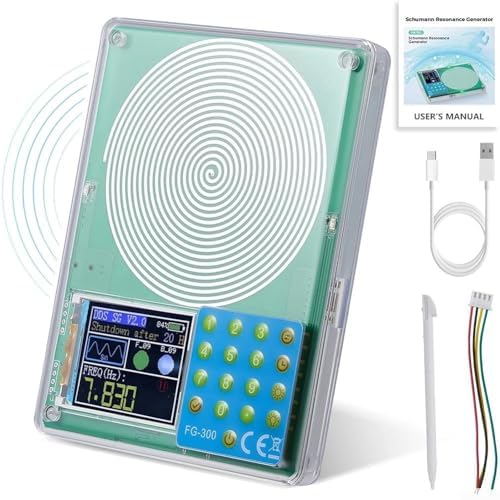
- 1 x FG-300 Adjustable Sine Wave Resonator Generator with Acrylic Case
- 1 x וסב דאַטאַ קאַבלע
- 1 x באַניצער מאַנואַל
בילד: The FG-300 Signal Generator shown with its USB data cable, a stylus for screen interaction, and the user manual.
4. פּראָדוקט איבערview
The FG-300 Signal Generator features a compact design with an acrylic case, making it durable and portable. It includes a display screen for frequency and waveform settings, and a keypad for input. The device is powered via a standard USB connection.
בילד: אַ קלאָר view of the FG-300 Signal Generator, highlighting its main components including the spiral coil, digital display, and control keypad.

בילד: The FG-300 device labeled as an FM783 Schumann Resonance Generator, illustrating its function in generating a frequency field.

בילד: The FG-300 device being placed into a bag, emphasizing its small and convenient design for portability.
5. סעטאַפּ
To set up your FG-300 Signal Generator, follow these simple steps:
- אַנפּאַק: קערפאַלי באַזייַטיקן אַלע קאַמפּאָונאַנץ פון די פּאַקקאַגינג.
- פאַרבינדן מאַכט: Connect the provided USB data cable to the USB port on the FG-300 device. Plug the other end of the USB cable into a compatible 5V USB power source (e.g., a computer USB port, a USB wall adapter, or a power bank).
- מאַכט אויף: The device should power on automatically or can be activated by pressing the power button. Refer to the 'Operating Instructions' section for details on screen activation.
6. אַפּערייטינג ינסטרוקטיאָנס
This section details how to operate your FG-300 Signal Generator, including power management, frequency adjustment, and waveform selection.
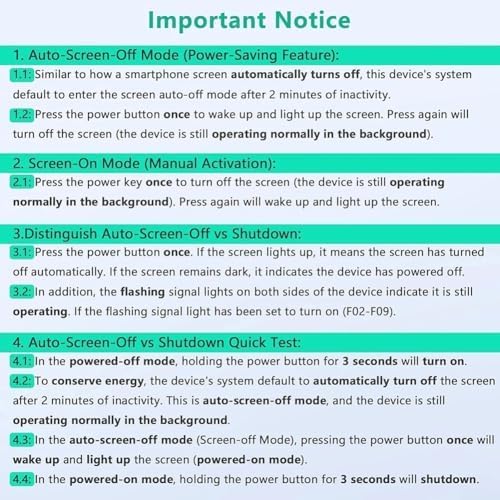
6.1. Power Management and Screen Control

בילד: An important notice outlining the device's screen-off modes, manual activation, and how to distinguish between auto-screen-off and full shutdown.
- Auto-Screen-Off Mode (Power-Saving): The device's system will automatically enter screen auto-off mode after 2 minutes of inactivity. The device continues to operate normally in the background.
- Screen-On Mode (Manual Activation): Press the power button once to wake up and light up the screen. Pressing it again will turn off the screen, but the device remains operational.
- Distinguishing Auto-Screen-Off vs. Shutdown:
- Press the power button once. If the screen lights up, the device was in auto-screen-off mode.
- If the screen remains dark, the device has powered off.
- Flashing signal lights on both sides of the device indicate it is still operating (if the flashing signal light has been set to turn on, F02-F09).
- שאַטדאַון: In powered-on mode, hold the power button for 3 seconds to shut down the device.
6.2. אָפטקייַט אַדזשאַסטמאַנט
The FG-300 allows for precise frequency adjustment across a broad range.
- אָפטקייַט קייט: The adjustable frequency range is 0.01 Hz to 200,000 Hz.
- פעליקייַט אָפטקייַט: The default Schumann resonance frequency is 7.83 Hz.
- Preset Frequencies: The device can also be adjusted to specific higher frequencies such as 174 Hz, 285 Hz, 396 Hz, 417 Hz, 528 Hz, 639 Hz, 741 Hz, 852 Hz, and 963 Hz.
- אַדזשאַסטמאַנט: Use the keypad and display interface to input and set the desired frequency. Refer to the on-screen prompts for navigation.
6.3. Waveform Selection
The FG-300 supports multiple waveform outputs to suit various applications.

בילד: A visual representation of the multiple waveform outputs available from the device, including sine, square, triangle, forward sawtooth, reverse sawtooth, ECG, half wave, Lorentz, Gauss, Singer, exponential rise, exponential fall, and 7.83Hz for Schumann wave.
- פֿאַראַן כוואַליעפֿאָרמען: Sine wave, square wave, and chamfered square wave.
- סעלעקציע: Use the device's interface to select the desired waveform. The display will show the currently active waveform.
- רעזולטאַט Amplitudes: Sine wave signal voltage amplitude is approximately 3 V. Square wave signal voltage amplitude is approximately 5 V.
7. וישאַלט
Proper maintenance ensures the longevity and optimal performance of your FG-300 Signal Generator.
- רייניקונג: Use a soft, dry cloth to clean the device's exterior. Do not use liquid cleaners or solvents, as they may damage the acrylic case or internal components.
- סטאָרידזש: ווען נישט אין באַנוץ, האַלט די דעווייס אין אַ קיל, טרוקן אָרט, אַוועק פון דירעקט זונשייַן און עקסטרעמע טעמפּעראַטורן.
- האַנדלינג: ויסמיידן דראַפּינג אָדער אונטערטעניק די מיטל צו גשמיות שאַקס.
8. טראָובלעשאָאָטינג
This section addresses common issues you might encounter with your FG-300 Signal Generator.
- אַפּאַראַט אַרבעט נישט אָן:
- Ensure the USB cable is securely connected to both the device and a working 5V USB power source.
- Try a different USB cable or power source to rule out cable/power supply issues.
- Screen is dark but device is operating:
- The device may be in Auto-Screen-Off Mode. Press the power button once to reactivate the screen.
- Check if the flashing signal lights (if enabled, F02-F09) are active, indicating background operation.
- Incorrect waveform or frequency output:
- Verify the settings on the display screen. Use the keypad to adjust frequency and waveform as needed.
- Ensure the device is not in a mode that overrides manual settings.
9. ספּעסאַפאַקיישאַנז
| טייל נאָמען | גענעראַטאָר |
| סאָרט | גענעריק |
| מאָדעל נומער | Generic54 |
| מאַטעריאַל | פּקב |
| קאָליר | Primarily Green |
| דימענסיעס (L X W X H) | בעערעך 12.7 X 9.9 X 2 סענטימעטער (5 X 3.9 X 0.8 אינטשעס) |
| פּונקט וואָג | בעערעך 190 ג (0.42 לבס) |
| אָפטקייַט ראַנגע | 0.01 הז צו 200,000 הז |
| פעליקייַט אָפטקייַט | 7.83 הערץ (שומאַן רעזאָנאַנץ) |
| מאַכט צושטעלן וואָלtage | 5 V (USB powered) |
| Sine Wave Signal Voltage Ampליטוד | 3 V |
| Square Wave Signal Voltage Ampליטוד | 5 V |
10. וואָראַנטי & שטיצן
Information regarding product warranty and customer support is not available in the provided data. Please refer to the seller or manufacturer's webזייטל פֿאַר פרטים וועגן וואָראַנטי קאַווערידזש און שטיצע אָפּציעס.