
פּראָדוקט איבערview
The BTMETER BT-881W is a versatile digital instrument designed to measure various environmental parameters, including wind speed, ambient temperature, humidity, and Wet Bulb Globe Temperature (WBGT). It serves as both a digital anemometer and a heat stress monitor, suitable for indoor and outdoor applications.
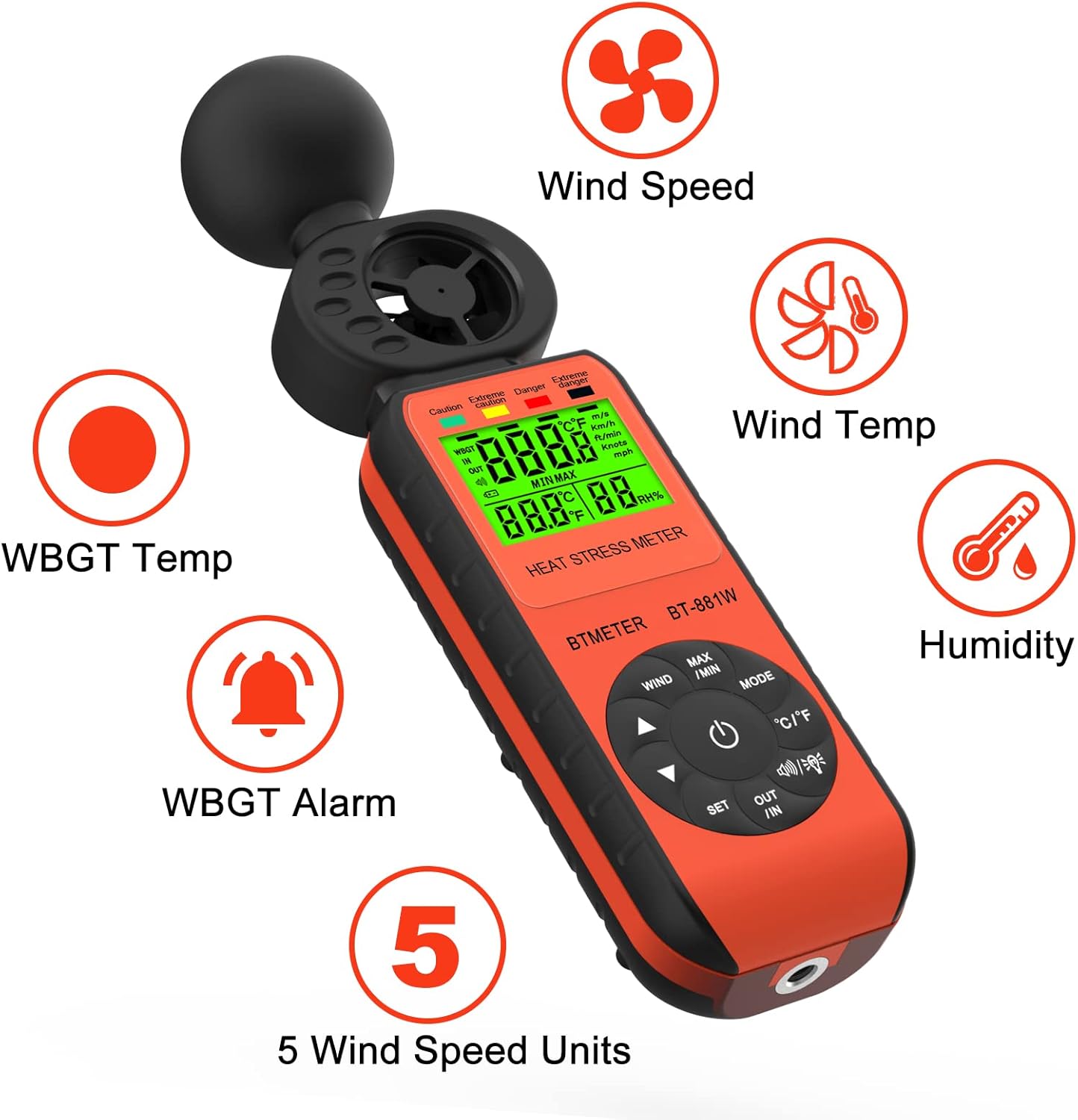
Figure 1: BTMETER BT-881W Heat Stress Meter Anemometer with its primary functions: Wind Speed, Wind Temperature, WBGT Temperature, Humidity, WBGT Alarms, and 5 Wind Speed Units.
שליסל פֿעיִקייטן:
- מולטיפונקציאָנעלע מעסטונג: Measures wind speed, ambient temperature, humidity, and WBGT.
- הויך אַקיעראַסי: Features upgraded wind and temperature sensors for precise readings.
- WBGT Monitoring: Includes WBGT alarms and supports indoor/outdoor WBGT measurement modes.
- באַניצער-פרייַנדלעך: Offers 5 air velocity units, 2 temperature units, data hold, backlit LCD, and auto power-off.
- דרייפּאָד מאָונטאַבלע: Equipped with a 1/4" screw hole for tripod installation.
סעטאַפּ
ייַנמאָנטירונג פון באַטאַרייע:
The BT-881W requires one 9V battery (not included). To install the battery:
- געפינט דעם דעקל פונעם באַטעריע־אָפּטייל אויף דער הינטערשטער זייט פונעם אַפּאַראַט.
- עפענען די דעקל.
- Insert a 9V battery, ensuring correct polarity.
- פאַרמאַכן די באַטאַרייע אָפּטייל דעקן סיקיורלי.
Tripod Mounting (Optional):
For stable measurements, the device can be mounted on a tripod. A 1/4" screw hole is located at the bottom of the unit.
- Locate the 1/4" screw hole at the base of the meter.
- Align the meter with your tripod's mounting screw.
- Gently twist the meter onto the tripod until it is secure.

פיגורע 2: דערציען view of the BT-881W showing the battery compartment and dimensions.
אַפּערייטינג ינסטראַקשאַנז
מאַכט אויף / אַוועק:
- דרוק די מאַכט קנעפּל צו קער די מיטל אויף.
- The device features an auto power-off function to conserve battery life.
Mode Switching (Wind Speed / WBGT):
דרוק די מאָדע button to switch between wind speed measurement and WBGT (Wet Bulb Globe Temperature) measurement.
Wind Speed Unit Selection:
In wind speed mode, press the ווינט button to cycle through the 5 available air velocity units: m/s, Ft/min, Knots, Km/h, Mph.

Figure 3: Display showing various wind speed units and the tripod mounting option.
Temperature Unit Switching (°C / °F):
דרוק די ° C / ° F קנעפּל צו באַשטימען צווישן צעלזיוס און פאַהרענהייט טעמפּעראַטור איינהייטן.
Indoor/Outdoor WBGT Mode:
In WBGT display mode, press the OUT / IN button to switch between indoor and outdoor WBGT measurement modes. This helps account for differences in temperature, humidity, and direct or radiant sunlight.
דאַטאַ האַלטן פֿונקציע:
דרוק די מאַקסימום / מין button briefly to activate the data hold function, which freezes the current measurement on the display. Press again to release.
WBGT Alarm Settings:
The device can alert you when the black globe temperature (TG) level reaches a set threshold (20~50°C).
- דרוק די שטעלן קנעפּל צו אַרייַן שרעק באַשטעטיקן מאָדע.
- ניצן די פייַל קנעפּלעך (▲ / ▼) to adjust the alarm temperature value.
- When WBGT alarms are triggered, the backlight color changes to red.

Figure 4: WBGT alarm levels and corresponding temperature ranges (Caution, Extreme Caution, Danger, Extreme Danger).
ווידעא דעמאַנסטראַציע:
Video 1: Official BTMETER 881W Heat Stress Meter Anemometer demonstration, covering unboxing, basic operation, and feature highlights.
וישאַלט
- האַלטן די מיטל ריין און טרוקן. ניצן אַ ווייך, דamp שטאָף פֿאַר רייניקונג; ניצט נישט אַברייסיוו רייניגער אָדער סאָלווענטן.
- Store the device in its protective pouch when not in use to prevent damage.
- אַרויסנעמען די באַטאַרייע אויב די דעווייס וועט נישט ווערן גענוצט פֿאַר אַ לענגערע צייט צו פאַרמייַדן באַטאַרייע ליקאַדזש.
- ויסמיידן יקספּאָוזינג די מיטל צו עקסטרעם טעמפּעראַטורעס, דירעקט זונשייַן אָדער הויך הומידיטי.
טראָובלעשאָאָטינג
If you encounter issues with your BTMETER BT-881W, consider the following common troubleshooting steps:
- די מיטל איז נישט פּאַוערינג: Check if the 9V battery is installed correctly and has sufficient charge. Replace the battery if necessary.
- נישט פּינקטלעכע לייענונגען: Ensure the sensors are clean and unobstructed. Allow the device to equilibrate to the environment for several minutes, especially for WBGT measurements.
- אַרויסווייַז פּראָבלעמען: אויב דער עקראַן איז טונקל אָדער פליקערט, טוישט די באַטאַרייע.
- WBGT alarm not working: Verify that the alarm temperature is set correctly in WBGT mode.
פֿאַר ווייטערדיקע הילף, ביטע זעט די שטיצע אָפּטייל.
ספּעסאַפאַקיישאַנז
| מאָדעל נומער | BT-881W |
| פּראָדוקט דימענשאַנז | 2.05 X 1.57 X 8.19 אינטשעס (5.2 X 4.0 X 20.8 סענטימעטער) |
| פּונקט וואָג | 4.96 אונס (0.31 פונט) |
| מאַכט מקור | Battery Powered (1 x 9V battery required, not included) |
| ווייַז טיפּ | לקד |
| סענסאָר טעכנאָלאָגיע | אַלטראַסאַניק |
| ווינט ספּיד ראַנגע | 0 ~ 30 עם / s |
| אַמביאַנט טעמפּעראַטור ראַנגע | 0 ~ 50 ° C (32 ~ 122 ° F) |
| טעמפּעראַטור אַקקוראַסי | ±0.6°C (±2°C overall) |
| הומידיטי ראַנגע | 0.1% ~ 99.9% רה |
| WBGT Temperature Range | 32~122°F (Celsius/Fahrenheit Switchable) |
| מאַטעריאַל טיפּ | פּלאַסטיק |
| אַרייַנגערעכנט קאַמפּאָונאַנץ | 1*Heat Stress Meter, 1* User manual |
וואָראַנטי און שטיצן
וואָראַנטי אינפֿאָרמאַציע:
The BTMETER BT-881W comes with a 1-יאָר מאַנופאַקטורער וואָראַנטי. All BTMETER electrical products are strictly calibrated before shipment.
טעכניש שטיצן:
BTMETER provides lifetime technical support for this product. For any technical inquiries, troubleshooting assistance, or warranty claims, please contact BTMETER customer service directly. Refer to the contact information provided with your purchase or visit the official BTMETER webפּלאַץ פֿאַר שטיצן דעטאַילס.