
1. הקדמה
This manual provides detailed instructions for the setup, operation, and maintenance of your new Indoor Security Camera. This device is designed to enhance home security and provide monitoring capabilities for various needs, including baby, pet, and elderly care. Please read this manual thoroughly before using the product to ensure proper function and safety.
2. פּראָדוקט איבערview
The Indoor Security Camera features a compact design with advanced functionalities for comprehensive indoor surveillance. It includes pan and tilt capabilities, two-way audio, night vision, and intelligent motion detection.

2.1 פּעקל אינהאַלט
- דרינענדיק זיכערהייַט קאַמעראַ
- מאַכט אַדאַפּטער
- מאָנטירונג קיט (שרויף, וואַנט פּלאַגז)
- באַניצער מאַנואַל
3. שליסל פֿעיִקייטן
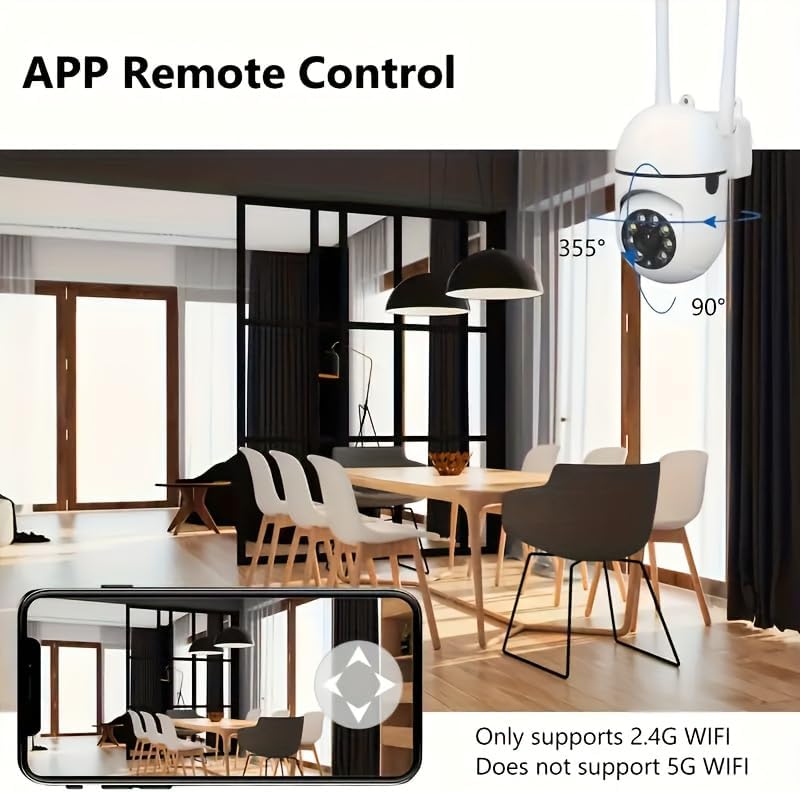
- 355° פּאַן און 90° טילט: Remotely control the camera's viewing angle to cover a wide area.
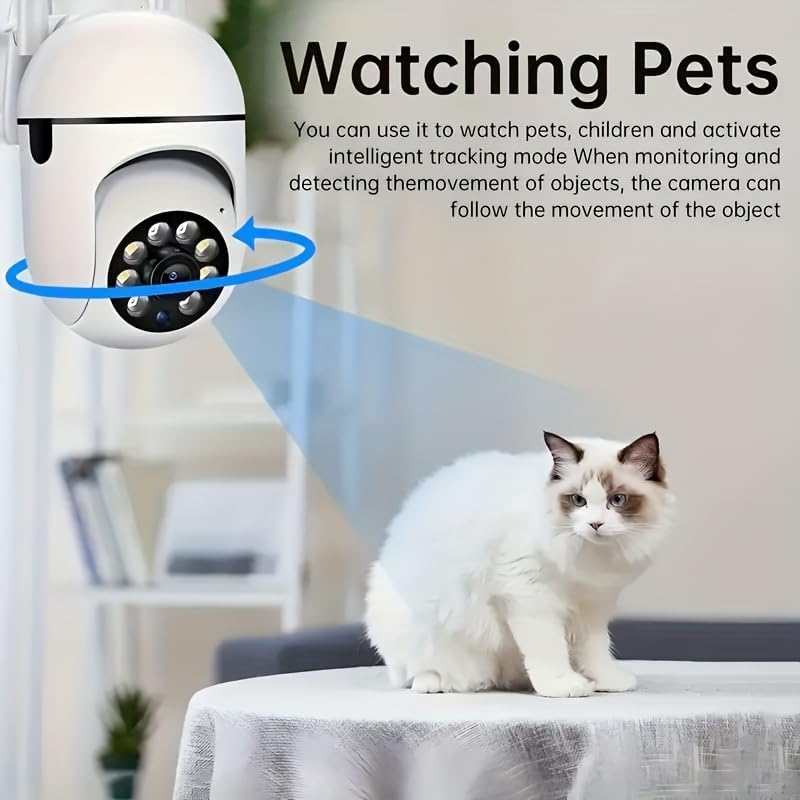
- AI Motion Detection & Human Tracking: Intelligently detects human movement and can automatically track the subject.
- צוויי-וועג אַודיאָ: אן איינגעבויטער מיקראָפאָן און רעדנער ערמעגלעכן קאָמוניקאַציע אין רעאַל-צייט.
- נאַכט זעאונג: Provides clear video monitoring in low-light or no-light conditions.
- 2.4GHz Wi-Fi קאַנעקטיוויטי: Connects to your home network for remote access (Note: 5GHz Wi-Fi is not supported).
- Multi-person Sharing: Allows multiple authorized users to view live streams simultaneously.


4. סעטאַפּ גייד
4.1 מאַכט אויף
- פֿאַרבינדט דעם מאַכט אַדאַפּטער צום קאַמעראַ'ס מאַכט אַרייַנגאַנג פּאָרט.
- צאַפּן די מאַכט אַדאַפּטער אין אַ נאָרמאַל עלעקטריקאַל ווענטיל.
- The camera will power on, and an indicator light will typically flash, indicating it is ready for setup.
4.2 אַפּ אראפקאפיע און ינסטאַלירונג
זוכן פֿאַר the companion application (e.g., 'Smart Home Cam' or similar, refer to packaging for exact name) in your device's app store (App Store for iOS, Google Play Store for Android) and install it.
4.3 קאַנעקטינג צו Wi-Fi
- Open the installed application on your smartphone.
- שאַפֿן אַ נייַע חשבון אָדער קלאָץ אין אויב איר שוין האָבן איין.
- Follow the in-app instructions to add a new device. This usually involves scanning a QR code on the camera or selecting the camera model from a list.
- When prompted, select your 2.4GHz Wi-Fi נעץ און אַרייַן די פּאַראָל. Ensure your phone is also connected to the 2.4GHz network during setup.
- The camera will connect to your Wi-Fi network. A solid indicator light usually signifies a successful connection.
4.4 מאָנטירן די קאַמעראַ (אָפּציאָנאַל)
If you wish to mount the camera on a wall or ceiling:
- Choose a suitable location with a clear view and within range of your Wi-Fi signal.
- Use the provided mounting template (if included) to mark screw positions.
- Drill pilot holes and insert wall plugs if mounting into drywall.
- Secure the mounting bracket (if applicable) with screws.
- צוטשעפּען די אַפּאַראַט צו די מאַונטינג קלאַמער.
5. אַפּערייטינג ינסטרוקטיאָנס
5.1 לעבן View
Once connected, open the app and select your camera to view the live feed. You can pinch to zoom or rotate your phone for a full-screen view.
5.2 פּאַן און טילט קאָנטראָל
אויף די לייוו view screen, use the directional controls (often a joystick-like interface) within the app to remotely pan (horizontal movement) and tilt (vertical movement) the camera lens.
5.3 צוויי-וועג אַודיאָ
To use two-way audio, tap the microphone icon in the app. Speak into your phone, and your voice will be transmitted through the camera's speaker. Tap the speaker icon to listen to audio from the camera's location.
5.4 באַוועגונג דעטעקציע און וואָרענונגען
- נאַוויגירן צו די קאַמעראַ סעטטינגס אין דער אַפּ.
- Locate the 'Motion Detection' or 'Alarm Settings' section.
- Enable motion detection and adjust sensitivity levels as needed.
- Configure alert notifications (e.g., push notifications to your phone).
- Enable 'Human Tracking' if available, to have the camera follow detected human movement.
5.5 רעקאָרדינג און פּלייבאַק
The camera typically supports local storage via a microSD card (not included) or cloud storage (subscription may be required). Refer to the app for specific recording and playback options.
- לאקאלע רעקאָרדירונג: Insert a microSD card (up to 128GB, Class 10 recommended) into the camera's slot. Recordings will be stored on the card.
- פּלייבאַק: אַקסעס רעקאָרדעד פאָאָtage through the 'Playback' or 'History' section in the app.
5.6 טיילן דיווייס צוטריט
To allow other users to view your camera's feed:
- In the app, go to the camera settings.
- Find the 'Share Device' or 'Invite Members' option.
- Follow the instructions to invite other users, typically by entering their account ID or scanning a QR code.
6. וישאַלט
6.1 רייניקן די קאַמעראַ
To maintain optimal performance, periodically clean the camera lens and body with a soft, dry cloth. Avoid using harsh chemicals or abrasive materials.
6.2 פירמוואַרע דערהייַנטיקונגען
Regularly check for firmware updates through the camera's settings in the app. Firmware updates can improve performance, add new features, and enhance security.
6.3 סטאָרידזש פאַרוואַלטונג
אויב איר ניצט אַ מיקראָSD קאַרטל, רידייז עס פּעריִאָדיש.view און פירן סטאָרד פאָאָtage. You may need to format the card occasionally to ensure continuous recording and optimal performance.
7. טראָובלעשאָאָטינג
| פּראָבלעם | מעגלעך סיבה | לייזונג |
|---|---|---|
| די אַפּאַראַט מאַכט נישט אויף | Power adapter not connected; faulty outlet | Ensure power adapter is securely connected; try a different outlet. |
| קענען ניט פאַרבינדן צו ווי-פי | Incorrect Wi-Fi password; 5GHz network selected; camera too far from router | Verify Wi-Fi password; ensure you are connecting to a 2.4GHz network; move camera closer to the router. |
| נעבעך ווידעא קוואַליטעט | Weak Wi-Fi signal; dirty lens | Improve Wi-Fi signal strength; clean the camera lens. |
| צוויי-וועג אַודיאָ איז נישט ארבעטן | Microphone/speaker muted in app; app permissions | Check app settings to ensure audio is enabled; verify app has microphone permissions on your phone. |
| באַוועגונג וואָרענונגען נישט באַקומען | Motion detection disabled; app notifications off; incorrect sensitivity | Enable motion detection and notifications in app settings; adjust sensitivity. |
7.1 באַשטעטיק די אַפּאַראַט
If you encounter persistent issues, you may need to reset the camera to its factory settings. Locate the reset button (often a small pinhole) on the camera. Use a pin or paperclip to press and hold the button for approximately 5-10 seconds until the camera indicates a reset (e.g., a voice prompt or indicator light change). After resetting, you will need to set up the camera again from scratch.
8. ספּעסאַפאַקיישאַנז
- פּאַן ראַנגע: 355°
- טילט ראַנגע: 90°
- קאַנעקטיוויטי: Wi-Fi 2.4GHz (IEEE802.11b/g/n)
- סטאָרידזש: מיקראָסד קאַרטל (ביז 128 גיגאבייט, נישט אַרייַנגערעכנט)
- מאַכט אַרייַנשרייַב: DC 5V/1A (typical)
- נאַכט זעאונג: ינפרערעד לעדס
- אַודיאָ: Two-way (built-in microphone and speaker)
- אַפּערייטינג טעמפּעראַטור: 0°C צו 50°C (32°F צו 122°F)
9. וואָראַנטי און שטיצן
This product comes with a standard manufacturer's warranty. Please refer to the product packaging or the retailer's website for specific warranty terms and conditions. For technical support or further assistance, please contact the customer service provided by your retailer or the product manufacturer.