
1. הקדמה
The Joso Mix Master Keyboard and Mouse Adapter is designed to enhance your gaming experience on PlayStation 5 consoles by allowing the use of a standard keyboard and mouse. This adapter converts keyboard and mouse inputs into controller signals, providing precise control for various game genres. It features a 1000Hz polling rate for ultra-low latency and supports on-the-fly sensitivity adjustments.
2. פּעקל אינהאַלט
ביטע באַשטעטיקן אַז אַלע זאכן וואָס זענען ליסטעד אונטן זענען אַרייַנגערעכנט אין דיין פּעקל:
- 1 x Joso Mix Master Keyboard and Mouse Converter
- 1 x P5 General Adapter
- 1 x Type-C to USB-A Cable
- 1 x USB-A (Female) to Type-C (Male) Adapter (for PS5 front Type-C port)
- 1 x באַניצער מאַנואַל

Image: The Joso Mix Master adapter and its included accessories, displayed on a product box.
3. קאַמפּאַטאַבילאַטי
The Joso Mix Master adapter is compatible with the following PlayStation 5 console models:
- PlayStation 5 (P5)
- PlayStation 5 Slim (P5 Slim)
- PlayStation 5 Pro (P5 Pro)
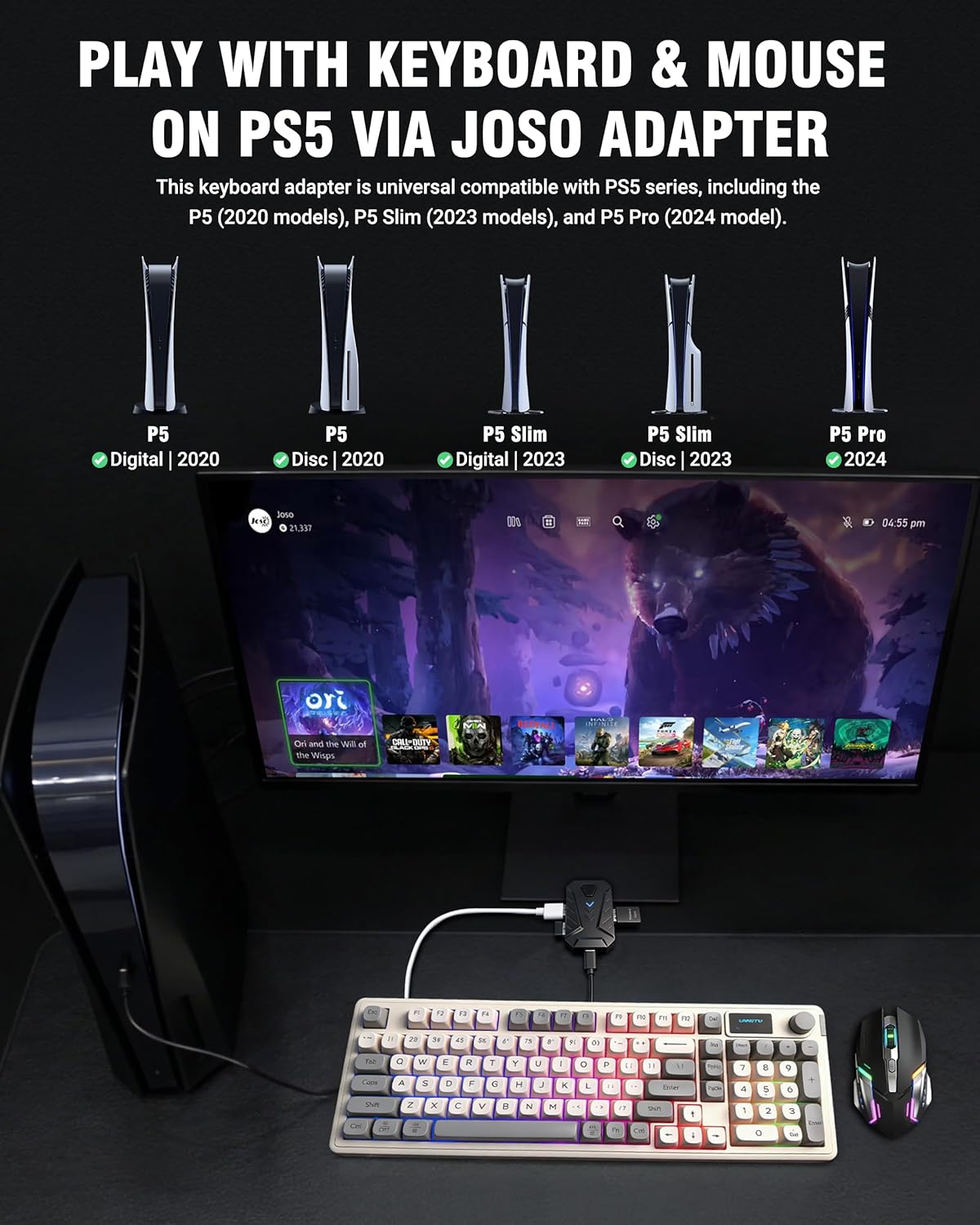
Image: A visual representation of the Joso adapter connected to a PS5 console, illustrating compatibility with different PS5 models (Digital, Disc, Slim, Pro).
4. סעטאַפּ אינסטרוקציעס
Follow these steps to connect and set up your Joso Mix Master adapter:
- Enable USB Cable Function: On your PlayStation 5 console, navigate to the settings and enable the "Use USB Cable" function. This is crucial for the adapter to function correctly.
- פאַרבינדן פּעריפעראַלס: Plug your keyboard and mouse into the designated USB ports on the Joso Mix Master adapter.
- Connect Adapter to PS5:
- For standard PS5 models, plug the adapter directly into an available USB-A port on the console.
- For PS5 Slim/Pro models, use the included USB-A (Female) to Type-C (Male) adapter to connect the Joso Mix Master to the front Type-C port of your console.
- באַשטעטיקן קשר: Once connected, the blue indicator light on the Joso Mix Master adapter will stay on, indicating a successful connection and recognition by the console.

Image: A step-by-step diagram illustrating how to connect the Joso adapter, keyboard, and mouse to a PS5 console, including the use of the Type-C adapter for Slim/Pro models. The indicator light is also shown.
5. אַפּערייטינג ינסטרוקטיאָנס
5.1. General Gameplay
The Joso Mix Master allows you to use your keyboard and mouse for precise control in various games, including FPS, RPG, and adventure titles. This setup provides enhanced aiming accuracy, faster building, and superior movement compared to a standard controller.

Image: A gamer actively playing on a PS5 using a keyboard and mouse connected via the Joso adapter, demonstrating precise control in a first-person shooter game.

Image: A graphic illustrating various game genres (FPS, RPG, Adventure) and popular titles like Apex, COD, and Fortnite, indicating the adapter's versatility.
5.2. On-the-Fly Sensitivity Adjustment
You can adjust mouse sensitivity during gameplay without pausing the action:
- General Sensitivity: האַלטן אַראָפּ די קטרל key on your keyboard and scroll the mouse wheel up or down to adjust the overall mouse sensitivity. Release the Ctrl key to lock in your preferred setting.
- Aim Down Sights (ADS) Sensitivity: To adjust ADS sensitivity, actively aim down sights in-game and then hold down the קטרל key while scrolling the mouse wheel up or down. This allows for precise adjustments specific to aiming scenarios.

Image: A close-up of the Joso adapter and a mouse, with an overlay demonstrating how scrolling the mouse wheel while holding Ctrl adjusts sensitivity, comparing controller vs. keyboard/mouse aiming.
5.3. One-Touch Fire Function Switching
The adapter supports switching between different fire modes for an improved shooting experience:
- דרינגלעך די "F4" key on your keyboard can toggle various fire modes on or off.
- In Rapid Fire mode, you must press and hold the left mouse button to fire continuously.

Image: A hand operating a mouse, with an in-game overlay showing the effect of the one-touch fire function, highlighting the F4 key for mode switching.
6. שליסל מאַפּינג
The Joso Mix Master adapter provides a default key mapping that translates keyboard and mouse inputs to PS5 controller actions. Refer to the diagram below for a visual representation of the default key assignments.
Image: A detailed diagram showing the default key mappings from a standard keyboard and mouse to PS5 controller buttons (e.g., ESC to PS button, Q to L1, E to R1, Space to X, etc.).
7. וישאַלט
To ensure the longevity and optimal performance of your Joso Mix Master adapter, follow these simple maintenance guidelines:
- האַלט דעם אַדאַפּטער ריין און פֿרײַ פֿון שטויב. ניצט אַ ווייכן, טרוקענעם שטאָף פֿאַר רייניקונג.
- פֿאַרמײַדט אויסשטעלן דעם אַדאַפּטער צו עקסטרעמע טעמפּעראַטורן, פֿײַכטקייט, אָדער דירעקטער זון.
- Do not attempt to disassemble or modify the adapter, as this will void the warranty and may cause damage.
- האַלט דעם אַדאַפּטער אין אַ זיכערן אָרט ווען עס איז נישט אין באַנוץ, כּדי צו פאַרמייַדן גשמיותן שאָדן.
8. טראָובלעשאָאָטינג
If you encounter any issues with your Joso Mix Master adapter, please refer to the following common solutions:
- Adapter Not Recognized / No Input:
- Ensure the "Use USB Cable" function is enabled in your PS5 settings.
- קאָנטראָלירן אַלע קאַבלע קאַנעקשאַנז צו ענשור אַז זיי זענען זיכער.
- Try connecting the adapter to a different USB port on your PS5.
- Verify that the blue indicator light on the adapter is solid, indicating a successful connection.
- Ensure your keyboard and mouse are functioning correctly when connected directly to a computer.
- Lag or Input Delay:
- The Joso Mix Master features a 1000Hz polling rate for minimal latency. If you experience lag, ensure your PS5 system software is up to date.
- Try restarting your PS5 console and reconnecting the adapter.
- Firmware דערהייַנטיקונגען:
- Periodically check the official Joso website for any available firmware updates for the Mix Master adapter. Firmware updates can improve performance and compatibility. Instructions for updating firmware will be provided on the webפּלאַץ.
9. ספּעסאַפאַקיישאַנז
| שטריך | דעטאַל |
|---|---|
| מאָדעל נומער | Mix Master |
| סאָרט | Joso |
| קאַמפּאַטאַבאַל דעוויסעס | PlayStation 5 (PS5, PS5 Slim, PS5 Pro) |
| ספּעציפֿישע פּראָדוקט ניצט | ווידעא שפּיל קאַנסאָול |
| קאַנעקטער טיפּ | וסב טיפּ א |
| קאָליר | שוואַרץ |
| נומער פון פּאָרץ | 4 |
| מאַכט פּלוג טיפּ | Type C – 2 pin (European plug) |
| פּאָללינג קורס | 1000 הז |
10. וואָראַנטי און שטיצן
Specific warranty information for the Joso Mix Master Keyboard and Mouse Adapter is not provided within this manual. For details regarding warranty coverage, technical support, or to inquire about firmware updates, please refer to the official Joso website or contact Joso customer service directly.


