
הקדמה
This manual provides detailed instructions for the setup, operation, maintenance, and troubleshooting of your BOSGAME P3 Pro Mini PC. This compact desktop computer is equipped with an AMD Ryzen 9 7940HS processor, 16GB DDR5 RAM, and a 1TB PCIe SSD, designed for various applications including office work, design, home use, education, and gaming.
פּעקל אינהאַלט
ביטע באַשטעטיקן אַז אַלע זאכן זענען פאַראַן אין דעם פּעקל:
- BOSGAME P3 Pro Mini PC
- מאַכט אַדאַפּטער
- HDMI קאַבלע
- באַניצער מאַנואַל
- וועסאַ מאָונט (אפציאָנעל, קען זיין אַנדערש לויט פּעקל)
סעטאַפּ גייד
1. קאַנעקטינג פּעריפעראַלס
איידער איר צינדט אן אייער מיני פּיסי, פארבינדט אלע נויטיגע פּעריפערישע דעוויסעס.
- ווייַז: Connect your monitor(s) using the HDMI, DisplayPort (DP), or USB-C ports. The P3 Pro supports triple display output at 4K@60Hz.
- קלאַוויאַטור און מויז: Connect your USB keyboard and mouse to the available USB 3.2 Type-A ports.
- נעץ: For a wired connection, connect an Ethernet cable to one of the two 1000M LAN ports. For wireless, the device supports Wi-Fi 6E.
- מאַכט: Connect the power adapter to the DC-in port on the back of the Mini PC, then plug the adapter into a power outlet.
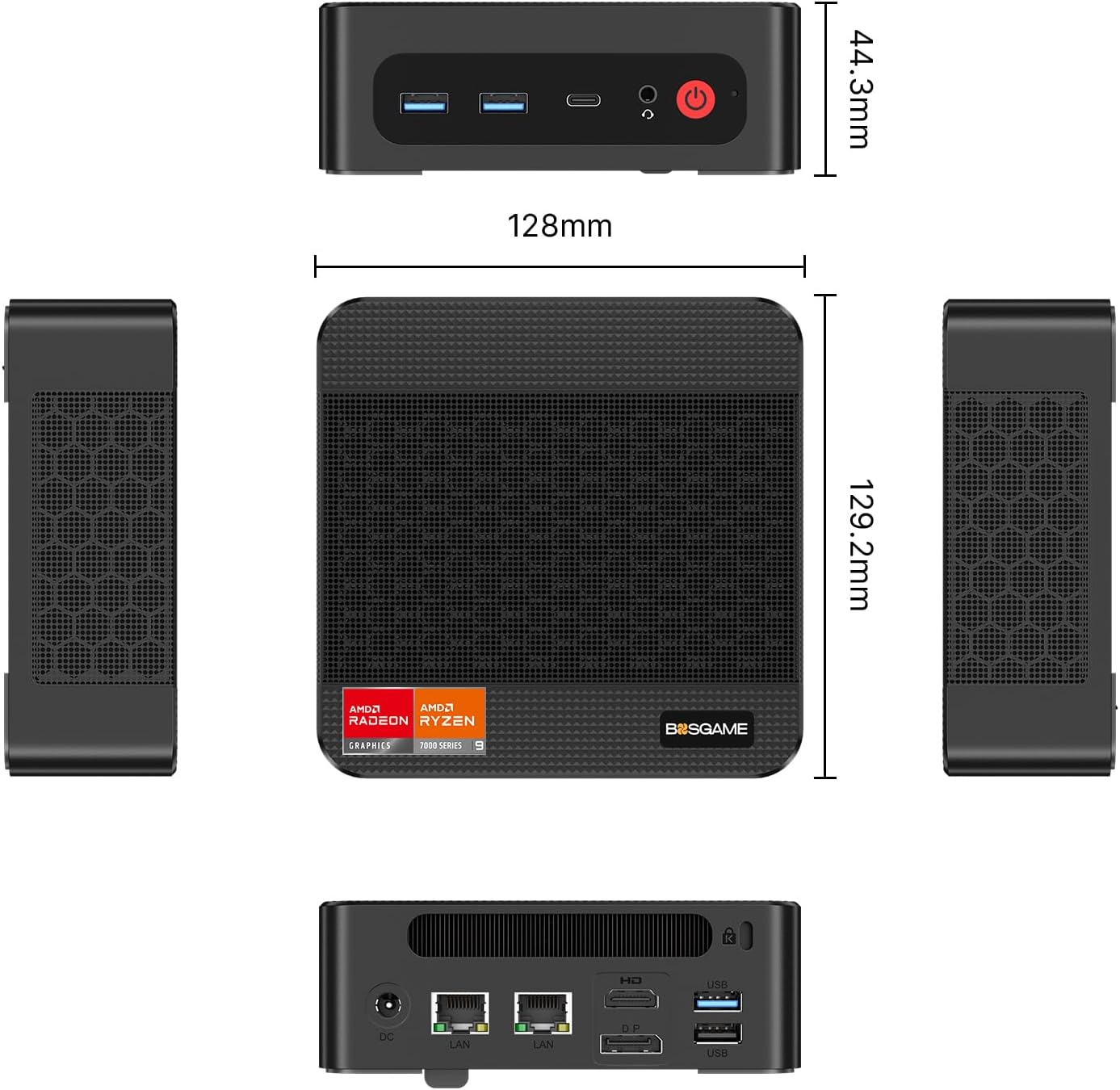
בילד: פאָרנט און הינטן view of the BOSGAME P3 Pro Mini PC, illustrating port locations and overall dimensions.

Image: Detailed diagram showing the dimensions and port layout of the BOSGAME P3 Pro Mini PC, including USB, HDMI, DP, USB-C, and LAN ports.
2. ערשטע איינשאַלטונג
Press the power button located on the front of the Mini PC. The system will boot up.
3. אָפּערייטינג סיסטעם
The BOSGAME P3 Pro comes with Windows 11 Pro pre-installed. Follow the on-screen instructions to complete the initial Windows setup. The device also supports other operating systems such as Ubuntu and Linux.
4. ווירעלעסס קאַנעקטיוויטי
To connect to a wireless network, navigate to the network settings in your operating system and select your Wi-Fi 6E network. For Bluetooth devices, enable Bluetooth on your Mini PC and pair with your accessories.

בילד: איבערview of the BOSGAME P3 Pro Mini PC's core features, including processor, wireless connectivity, and storage options.
5. וואַנט מאָונטינג (אַפּשאַנאַל)
The Mini PC can be mounted on the back of a monitor or on a wall using the included VESA mount. This frees up desk space.
אַפּערייטינג ינסטראַקשאַנז
1. יקערדיק אָפּעראַציע
Once the operating system is loaded, you can use your Mini PC like any standard desktop computer. The AMD Ryzen 9 7940HS processor with 8 cores and 16 threads, boosting up to 5.2GHz, provides robust performance for demanding tasks.

Image: Detailed breakdown of the BOSGAME P3 Pro's internal components and display capabilities.
2. Triple Screen Display
The P3 Pro supports connecting up to three displays simultaneously via HDMI 2.0, DisplayPort 1.4, and the full-function USB-C port. Each port supports 4K resolution at 60Hz, enhancing productivity for multi-tasking environments.

Image: Visual representation of the BOSGAME P3 Pro Mini PC supporting a triple monitor setup, demonstrating its multi-display capability.
3. Wake on LAN / Auto Power On
The Mini PC supports Wake on LAN and Auto Power On features. These can be configured in the BIOS settings to allow remote startup or scheduled power-on. Refer to the BIOS settings for detailed configuration options.
For more details on setting up auto power on, you may visit the official BOSGAME webפּלאַץ.
וישאַלט און אַפּגרעידס
1. סטאָרידזש יקספּאַנשאַן
The P3 Pro Mini PC includes a 1TB PCIe 4.0x4 NVMe SSD. For additional storage, you can expand by adding another M.2 2280 NVMe PCIe4.0X4 SSD. Ensure the device is powered off and unplugged before performing any internal upgrades.
2. אַלגעמיינע קער
Keep the Mini PC in a well-ventilated area to prevent overheating. Regularly clean the exterior with a soft, dry cloth. Avoid exposing the device to liquids or extreme temperatures.
טראָובלעשאָאָטינג
1. Driver Installation Issues (AMD)
If you encounter issues with AMD driver installation, ensure that the Microsoft Visual C++ Redistributable packages are installed on your system. This often resolves driver conflicts.
2. System Sluggishness (Windows 11)
For Windows 11 users experiencing initial sluggishness, disabling "Core Isolation (Memory Integrity)" in Windows Security settings may improve system responsiveness.
3. פען ראַש
The fan noise level can vary depending on the operating system and workload. Users have reported that the device runs quieter on Linux compared to Windows under similar loads. Ensure the device has adequate ventilation.
ספּעסאַפאַקיישאַנז
| שטריך | דעטאַל |
|---|---|
| סאָרט | BOSGAME |
| מאָדעל נאָמען | P3 Pro |
| פּראַסעסער | AMD Ryzen 9 7940HS (8 קערנס, 16 פֿעדעם, ביז 5.2 GHz) |
| גראַפיקס | AMD Radeon 780M Graphics (Max Graphics Frequency 2700 MHz) |
| באַראַן | 16GB DDR5 (Dual-channel, 4800 MHz, expandable to 64GB) |
| סטאָרידזש | 1TB PCIe 4.0x4 NVMe SSD (Expandable with M.2 2280 NVMe PCIe4.0X4 SSD) |
| אָפּערייטינג סיסטעם | Windows 11 Pro (Supports Win/Ubuntu/Linux) |
| ווידעא רעזולטאַט | HDMI 2.0 (4K@60Hz) x1, DisplayPort 1.4 (4K@60Hz) x1, USB-C (4K@60Hz) x1 (Triple Display Support) |
| נעטוואָרקינג | Dual 1000M Ethernet LAN, Wi-Fi 6E (802.11 a/b/g/n/ac/ax), Bluetooth 5.2 |
| פּאָרץ | USB 3.2 Type-A x3, USB-C x1 (full function), HDMI x1, DisplayPort x1, RJ45 LAN x2, DC-in |
| דימענשאַנז | אומגעפער 128 מ״מ x 129.2 מ״מ x 44.3 מ״מ |
וואָראַנטי און שטיצן
The BOSGAME P3 Pro Mini PC comes with a 1-יאָר פאַבריקאַנט ס וואָראַנטי.
For technical support, customer service is available 24 hours a day, and lifetime technical support is provided.
If you have any questions or require assistance, please do not hesitate to contact BOSGAME customer service.
באַניץ סינעריאָוז
The BOSGAME P3 Pro Mini PC is versatile and suitable for a wide range of applications:
- בילדונג: Ideal for students and educators requiring a powerful yet compact workstation.
- אָפיס: Efficient for daily office tasks, multitasking, and business applications.
- פאָטאָ עדיטינג: Capable of handling photo editing software with its robust processor and graphics.
- באַגעגעניש: Suitable for presentations and video conferencing.
- גיימינג: Supports light to moderate gaming with its integrated AMD Radeon 780M graphics.
- היים טעאַטער: Excellent for streaming 4K content and home entertainment setups.

בילד: וויזועל עקסamples of the BOSGAME P3 Pro Mini PC being used in different environments, showcasinג זיין ווערסאַטילאַטי.