
הקדמה
Thank you for choosing the OneOdio Focus A1Pro Wireless On-Ear Headphones. This manual provides detailed instructions for setting up, operating, maintaining, and troubleshooting your new headphones. Please read this manual thoroughly before use to ensure optimal performance and longevity of your device.
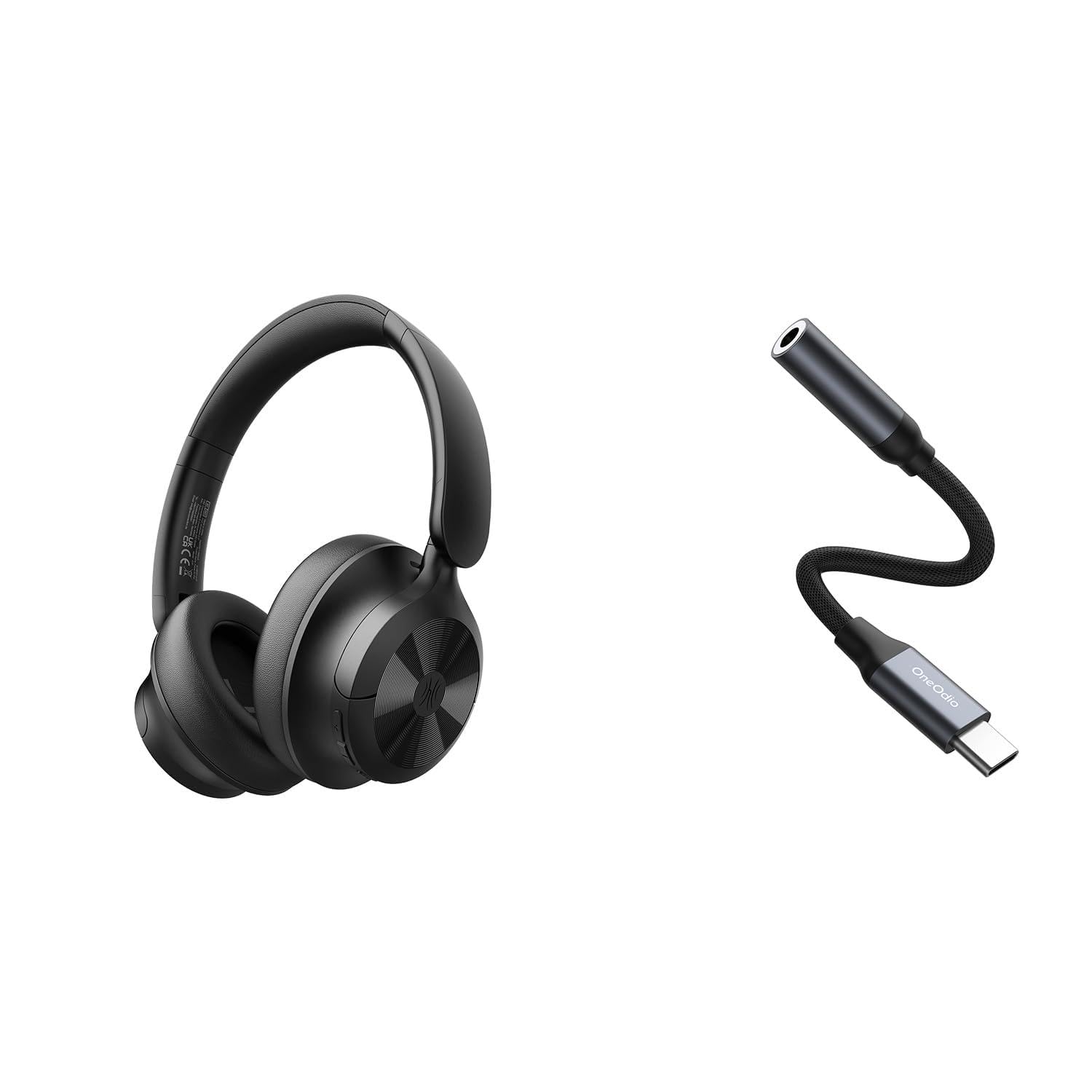
Image: OneOdio Focus A1Pro Wireless On-Ear Headphones. This image displays the headphones in their typical on-ear design, showcasinג די אויערקעפּלעך און קאָפּבאַנד.
פּעקל אינהאַלט
ביטע טשעק די פּאַקעט פֿאַר די פאלגענדע זאכן:
- OneOdio Focus A1Pro Wireless On-Ear Headphones
- USB-C צו 3.5 מם אַודיאָ אַדאַפּטער
- וסב-C טשאַרדזשינג קאַבלע
- קעריינג טאַש
- באַניצער מאַנואַל (דעם דאָקומענט)
סעטאַפּ
1. טשאַרדזשינג די כעדפאָונז
Before first use, fully charge the headphones. Connect the USB-C charging cable to the charging port on the headphones and the other end to a USB power source (e.g., computer USB port, wall adapter). The LED indicator will show charging status and turn off or change color when fully charged.

Image: Close-up of the USB-C charging port on the OneOdio Focus A1Pro headphones, with a charging cable connected.
2. פּאָווערינג אויף / אויסגעלאשן
- צו מאַכט אויף: דריק און האַלט דעם מולטי-פונקציע קנעפּל פֿאַר אַרום 3 סעקונדעס ביז די LED אינדיקאַטאָר בלינקט בלוי.
- צו מאַכט אַוועק: דריק און האַלט דעם מולטי-פונקציע קנעפּל פֿאַר אַרום 3 סעקונדעס ביז דער LED אינדיקאַטאָר בלינקט רויט און דערנאָך גייט אויס.
3. בלועטאָאָטה פּערינג
- מאַכן זיכער אַז די כעדפאָונז זענען פּאַוערד אַוועק.
- Press and hold the Multi-function button for 5-7 seconds until the LED indicator flashes red and blue alternately. This indicates pairing mode.
- אויף אייער דעווייס (סמאַרטפאָן, טאַבלעט, קאָמפּיוטער), אַקטיווירט בלועטוט און זוכט פֿאַר פֿאַראַן דעווייסעס.
- Select "OneOdio A1Pro" from the list of found devices.
- נאָך די פֿאַרבינדונג, די געפֿירט גראדן סלאָולי בלאַס.
- אויב אַ פּאַראָל איז פארלאנגט, אַרייַן "0000".
די כעדפאָונז וועלן אויטאָמאַטיש פּרובירן צו זיך ווידער צו פאַרבינדן מיטן לעצטן געפּאָרטן דעווייס ווען זיי ווערן אָנגעצונדן.
4. Wired Connection (using USB-C to 3.5mm Audio Adapter)
For a wired connection, use the provided USB-C to 3.5mm audio adapter. This allows you to connect the headphones to devices with a standard 3.5mm audio jack.
- Plug the USB-C end of the adapter into the USB-C port on the headphones.
- Plug the 3.5mm end of the adapter into the 3.5mm audio jack of your audio source device.
- Ensure the headphones are powered off for wired mode to function correctly and conserve battery.

Image: The OneOdio Focus A1Pro headphones connected to an audio source via the USB-C to 3.5mm audio adapter.
אַפּערייטינג ינסטראַקשאַנז
קאָנטראָלס איבערview
The headphones feature intuitive controls located on the earcup. Familiarize yourself with these buttons for seamless operation.

Image: Diagram showing the location and function of control buttons on the OneOdio Focus A1Pro headphones, including volume, multi-function, and ANC buttons.
מוזיק פּלייַבאַקק
- שפּיל / פּויזע: דרוק אַ מאָל אויף די מולטי-פונקציאָנירן.
- ווייַטער שפּור: דריק און האלט דעם "Volume Up" קנעפל פאר 2 סעקונדעס.
- פֿריִערדיקע שפּור: דריק און האלט דעם "Volume Down" קנעפל פאר 2 סעקונדעס.
- באַנד אַרויף: דריק קורץ דעם "Volume Up" קנעפל.
- באַנד אַראָפּ: דריק קורץ דעם "Volume Down" קנעפל.
רופן האַנדלינג
- ענטפֿערן / סוף רופן: דרוק אַ מאָל אויף די מולטי-פונקציאָנירן.
- אָפּוואַרפן רופן: דריקן און האַלטן די מולטי-פונקציע קנעפּל פֿאַר 2 סעקונדעס.
- ריאַל די לעצטע נומער: טאָפּל דריקן די מולטי-פונקציע קנעפּל.
אַקטיוו ראַש קאַנסאַליישאַן (ANC)
The Focus A1Pro headphones feature Active Noise Cancellation to reduce ambient noise.
- אַקטאַווייט ANC: Press the ANC button once. The ANC indicator light will turn green.
- דיאַקטיווייט ANC: Press the ANC button once again. The ANC indicator light will turn off.
ווערינג די כעדפאָונז
Adjust the headband to fit comfortably over your head. The earcups should fully cover your ears for optimal sound quality and noise cancellation. The earcups are typically marked 'L' for left and 'R' for right.
וישאַלט
רייניקונג
- ווישט די כעדפאָונז מיט אַ ווייכן, טרוקענעם, לינט-פֿרייע שטאָף.
- ניצט נישט קיין שרײַבנדיקע רייניגער, אַלקאָהאָל, אדער כעמישע סאָלווענטן.
- פֿאַרמײַדט אַרײַנצוקומען פֿײַכטקײַט אין קיין עפענונגען.
- The earpads can be gently wiped with a slightly damp cloth and mild soap solution, then dried thoroughly.
סטאָרידזש
When not in use, store the headphones in the provided carrying pouch to protect them from dust and scratches. Store in a cool, dry place away from extreme temperatures.
באַטערי קער
- פֿאַרמײַדט אָפֿט פֿולשטענדיק אויסצולאָדן די באַטעריע.
- לאָדט די כעדפאָונז רעגולער, אפילו אויב זיי ווערן נישט גענוצט פֿאַר לענגערע פּעריאָדן, כּדי צו האַלטן די באַטאַריע געזונט.
- Do not expose the headphones to high temperatures, as this can degrade battery performance.
טראָובלעשאָאָטינג
קיין מאַכט
- זיכער מאַכן אַז די כעדפאָונז זענען גאָר אויפגעלאָדן.
- Press and hold the Multi-function button for 3 seconds to power on.
קיין געזונט
- בלועטאָאָטה:
- Ensure the headphones are paired and connected to your device.
- Check the volume level on both the headphones and your device.
- Try unpairing and re-pairing the headphones.
- ווייערד:
- Ensure the USB-C to 3.5mm adapter is securely connected to both the headphones and the audio source.
- Verify the audio source is playing and its volume is up.
- Test with a different audio cable or device if possible.
בלועטאָאָטה קאַנעקשאַן ישוז
- Ensure the headphones are in pairing mode (red and blue flashing LED).
- ריקט די כעדפאָונז נענטער צו אייער דעווייס.
- Clear the Bluetooth list on your device and try pairing again.
- פֿאַרמײַדן שטערונגען פֿון אַנדערע דראָטלאָזע דעווײַסעס.
רעסעטטינג די כעדפאָונז
If you experience persistent issues, you can try resetting the headphones to their factory settings. (Note: Specific reset procedures vary by model. A common method is to press and hold the Multi-function and Volume Down buttons simultaneously for 5-10 seconds while powered on, or connect to power while holding a button. Refer to the manufacturer's official support for exact steps if this general method does not work.)
ספּעסאַפאַקיישאַנז
| מאָדעל נאָמען | Focus A1Pro |
| בלועטאָאָטה ווערסיע | 5.0 (Estimated, common for modern headphones) |
| דרייווער דיאַמעטער | 40 מם (עסטימאַטעד) |
| אָפטקייַט ענטפער | 20Hz - 20kHz (טיפּיש) |
| באַטאַרייע קאַפּאַציטעט | 500mAh (עסטימאַטעד) |
| טשאַרדזשינג צייט | בעערעך. 2-3 שעה |
| פּלייַבאַקק צייט | Up to 30 hours (Varies with volume and ANC usage) |
| וואָג | Approx. 250g (עסטימאַטעד) |
Note: Specifications are subject to change without notice. Actual performance may vary.
וואָראַנטי און שטיצן
וואָראַנטי אינפֿאָרמאַציע
OneOdio products are covered by a limited warranty from the date of purchase. This warranty covers manufacturing defects in materials and workmanship. It does not cover damage caused by misuse, accidents, unauthorized modifications, or normal wear and tear. Please retain your proof of purchase for warranty claims.
קונה שטיצן
For technical support, warranty inquiries, or other assistance, please contact OneOdio customer service through their official webוועבזייטל אדער דער הענדלער וואו איר האט געקויפט דעם פּראָדוקט.
באַאַמטער Webפּלאַץ: www.oneodio.com
E- בריוו שטיצן: support@oneodio.com