
1. פּראָדוקט איבערview
The Varstrom VD18MT TFT EBike Display is designed for BAFANG 24V/36V/48V/52V UART protocol front/rear hub motors, specifically G020, G0900, and G062 motor systems. It provides a comprehensive and user-friendly interface for your electric bicycle, enhancing your riding experience with clear data and easy controls.
שליסל פֿעיִקייטן:
- קאַמפּאַטאַבילאַטי: Engineered for seamless integration with Bafang UART protocol hub motors (G020, G0900, G062).
- ווייַז: 1.45-inch TFT color touch screen for clear readability and intuitive operation.
- וויזאַביליטי: 4-level backlight adjustment for optimal visibility in various lighting conditions.
- Smart App & Multi-Language Support: Bluetooth connectivity for real-time data tracking and navigation via smartphone app. Supports 9 languages.
- געווער: IP67 וואָטערפּרוף שאַץ.
2. סעטאַפּ און ייַנמאָנטירונג
2.1 קאָמפּאַטאַביליטי קאָנטראָל
Before installation, ensure your motor system uses the Bafang UART protocol and has a 5-pin female circular connector. This display is not compatible with CAN protocol motors (which typically have a 5-pin triangle connector). Using adapters or modifying connectors will not resolve compatibility issues.

פיגורע 2.1: Confirm your motor's connector matches the 5-pin circular type shown. Incorrect connector types will prevent normal operation.

פיגורע 2.2: Detailed compatibility chart for Bafang motor types. Ensure your motor is listed as compatible.
2.2 מאָנטירן דעם דיספּלעי
The display is designed to fit 25.4mm or 22.2mm handlebars. Choose a suitable position on your handlebar that allows for easy viewing and access to the touch screen without obstructing your riding. Secure the display mount firmly using the provided screws.

פיגורע 2.3: Display dimensions and handlebar mount size. Ensure your handlebar diameter is compatible.
2.3 עלעקטריקאַל קאַנעקשאַן
Connect the display's 5-pin circular connector to the corresponding 1T4 cable on your e-bike. Ensure the connection is secure and fully seated to prevent water ingress and ensure proper communication with the motor controller.
3. אַפּערייטינג ינסטרוקטיאָנס
3.1 פּאַוערינג אויף / אַוועק
To power on the display, press and hold the power button (usually located on the side or bottom of the display) for a few seconds. To power off, repeat the process. The display will typically power off automatically after a period of inactivity if configured to do so.
3.2 Main Interface Information
The main display screen provides essential riding data at a glance. Familiarize yourself with the layout:
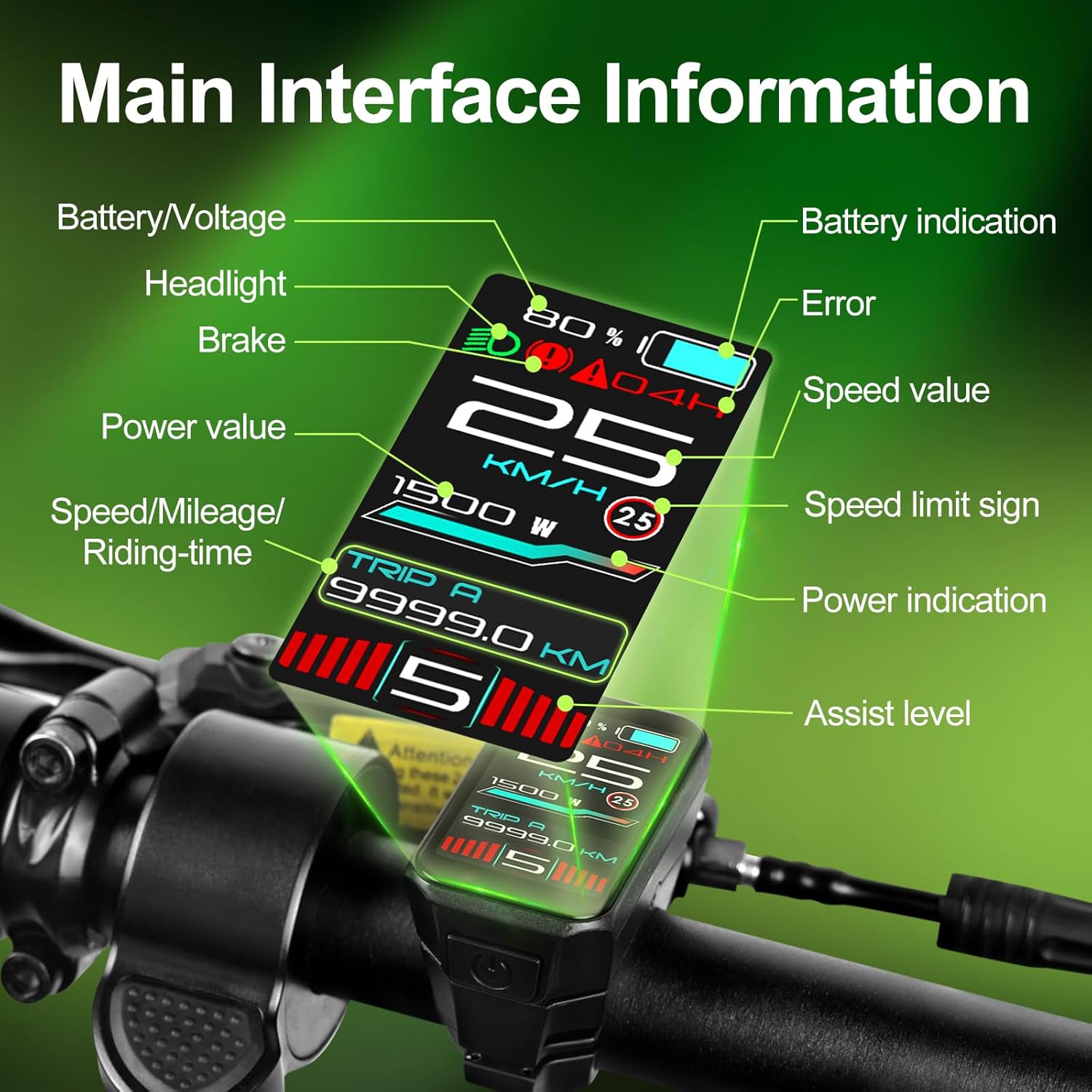
פיגורע 3.1: Main interface layout and data points. This includes battery level, current speed, assist level, power output, trip distance, and error indicators.
- באַטאַרייע / וואָלtage: Indicates current battery charge level and voltage.
- גיכקייַט ווערט: איצטיקע ריידינג גיכקייט.
- הילף מדרגה: Current pedal assist level (0-9 PAS levels).
- מאַכט ווערט: Real-time motor power output.
- Trip A/B: Displays trip distance or riding time.
- טעות ינדיקאַטאָר: Alerts to system malfunctions.
- Headlight/Brake Indicator: Shows status of lights and brake activation.
3.3 נאַוויגירן דעם ריר־עקראַן
The VD18MT features a touch screen for intuitive navigation. Swipe left or right on the screen to switch between different display modes and access setting menus. Tap on icons or menu items to select them.

פיגורע 3.2: Touch screen operation. Swipe gestures allow quick access to various data screens and settings.
3.4 Adjusting Backlight and Units
Access the settings menu by swiping or tapping. From here, you can:
- באַקלייט אַדזשאַסטמענט: Select from 4 levels of backlight intensity to optimize visibility for day or night riding.
- אַפּאַראַט באַשטימען: Change speed and distance units between kilometers (km) and miles (mi).
- Wheel Size Calibration: Input your e-bike's wheel size for accurate speed and distance readings.
- שפּראַך סעלעקציע: Choose from 9 available languages, including English, French, and German.

פיגורע 3.3: Display visibility in day and night conditions, and the brightness adjustment interface.
3.5 קלוגע אַפּ קאָנעקטיוויטי
The display supports Bluetooth connectivity to sync with a dedicated smartphone app. This app allows you to track real-time speed, distance, battery life, and navigation data, turning your rides into data-driven adventures.
- Ensure Bluetooth is enabled on both the display (if applicable in settings) and your smartphone.
- Download and install the official Varstrom e-bike app from your device's app store.
- Follow the in-app instructions to pair your VD18MT display.
4. וישאַלט
The VD18MT display is designed for durability and features an IP67 waterproof rating, making it resistant to dust and water immersion up to 1 meter for 30 minutes. However, proper care will extend its lifespan.

פיגורע 4.1: The VD18MT display is IP67 waterproof, offering protection against water and dust.
- רייניקונג: ווישט דעם עקראַן און קערפּער מיט אַ ווייכן, דamp שטאָף. פֿאַרמײַדט ניצן אַברייסיוו רייניגער אָדער סאָלווענטן וואָס קענען שאַטן דעם עקראַן אָדער קasing.
- סטאָרידזש: When not in use for extended periods, store the e-bike and display in a dry, cool place away from direct sunlight.
- קאַנעקטער זאָרגן: Periodically check the electrical connectors for dirt or corrosion. Keep them clean and dry.
- ויסמיידן פּראַל: While robust, avoid dropping the display or subjecting it to strong impacts.
5. טראָובלעשאָאָטינג
If you encounter issues with your VD18MT display, refer to the following common troubleshooting steps:
- דיספּליי גייט נישט אָן:
- Check if the e-bike battery is charged and turned on.
- Ensure all electrical connections, especially the 5-pin circular connector, are securely seated.
- Verify the display's power button is functioning correctly.
- No Data Displayed (Speed, PAS, etc.):
- Confirm the display is correctly connected to the motor controller via the UART protocol.
- Check for any error codes displayed on the screen and consult the main interface diagram (Figure 3.1) for interpretation.
- Ensure the wheel size is correctly calibrated in the settings.
- ריר סקרין ניט ריספּאַנדאַבאַל:
- Clean the screen surface to remove any dirt or moisture.
- Restart the display by powering it off and on again.
- אויב די אַרויסגעבן בלייַבט, קאָנטאַקט קונה שטיצן.
- בלועטאָאָטה קאַנעקטיוויטי ישוז:
- Ensure Bluetooth is enabled on both the display (if applicable in settings) and your smartphone.
- Make sure the Varstrom app is updated to the latest version.
- פרובירט אפצופּאַרן און ווידער צופּאַרן דעם דעווייס אין די בלוטוט סעטטינגס פון אייער סמאַרטפאָון.
- קאָמפּאַטיביליטי ווארענונג:
- If you experience issues related to motor communication, double-check that your motor is a Bafang UART protocol hub motor (G020, G0900, G062) and not a CAN protocol motor. Incompatible protocols cannot be resolved with adapters.
6. ספּעסאַפאַקיישאַנז
| שטריך | דעטאַל |
|---|---|
| מאָדעל | VD18MT |
| סאָרט | וואַרסטראָם |
| פאַרשטעלן גרייס | 1.45 אינטשעס |
| ווייַז טיפּ | טפט קאָליר לקד |
| קאַמפּאַטאַבילאַטי | Bafang UART Protocol Hub Motors (G020, G062, G0900) |
| Voltage | 24V/36V/48V/52V |
| וואָטערפּרוף רייטינג | IP67 |
| האַנטלבאַר דיאַמעטער | 25.4 מם / 22.2 מם |
| קאַנעקטיוויטי | Bluetooth (for Smart App) |
| אַרייַנגערעכנט קאַמפּאָונאַנץ | ווייַז אַפּאַראַט |
7. וואָראַנטי אינפֿאָרמאַציע
The Varstrom VD18MT Ebike Display comes with a 1 יאָר וואָראַנטי from the date of purchase. This warranty covers manufacturing defects and malfunctions under normal use. It does not cover damage resulting from misuse, accidents, unauthorized modifications, or improper installation.
Please retain your proof of purchase for warranty claims. For warranty service, contact Varstrom customer support.
8. קונה שטיצן
For further assistance, technical support, or inquiries regarding your Varstrom VD18MT Ebike Display, please refer to the official Varstrom website or contact their customer service department. Contact details can typically be found on the product packaging or the Varstrom brand store page.
אָנליין רעסורסן:
- באַזוכן די Varstrom Store on Amazon פֿאַר פּראָדוקט אינפֿאָרמאַציע און דערהייַנטיקונגען.