
הקדמה
The UGREEN USB 3.0 Switch with Gigabit Ethernet (Model 95623) allows two computers to share up to four USB 3.0 devices and a single Gigabit Ethernet connection simultaneously. This device is designed to enhance productivity by enabling seamless switching of peripherals like keyboards, mice, printers, and USB cameras between two systems without the need to constantly unplug and replug cables. It also integrates a high-performance Gigabit network adapter, providing stable and fast internet access for both connected PCs.
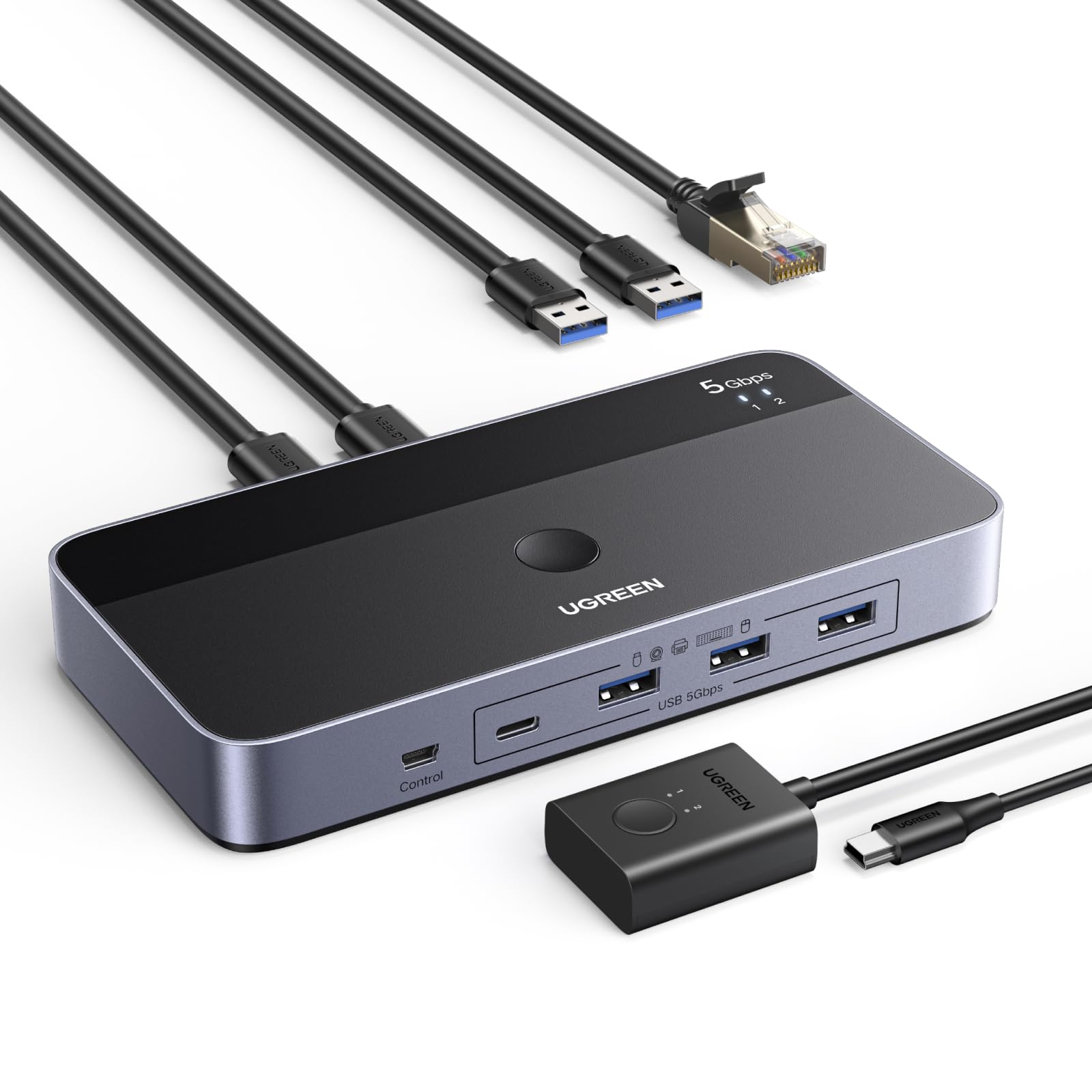
Image: The UGREEN USB 3.0 Switch connected to two laptops, demonstrating its primary function of sharing resources.
פּעקל אינהאַלט
באַשטעטיקט אַז אַלע זאכן וואָס זענען אויסגערעכנט אונטן זענען אַרייַנגערעכנט אין אייער פּעקל:
- 1 x UGREEN USB 3.0 Switcher (L 164 x W 81 mm)
- 2 x USB-A to USB-A 3.0 Cables (5FT / 1.5M each)
- 1 x Remote Control (1.5M / 5FT cable)
- 1 x באַניצער מאַנואַל

Image: Visual representation of the items included in the product packaging.
פּראָדוקט איבערview און פֿעיִקייטן
The UGREEN USB 3.0 Switch is designed for efficiency and convenience, featuring a robust aluminum shell for heat dissipation and durability. It offers multiple connectivity options and dual switching methods.
פּאָרט אויסלייג

בילד: פאָרנט און הינטן view of the UGREEN USB 3.0 Switch, highlighting all input and output ports.
- אַרייַנשרייַב פּאָרץ: 2 x USB-A 3.0 ports (for connecting to two PCs).
- רעזולטאַט פּאָרץ: 3 x USB-A 3.0 ports, 1 x USB-C 3.0 port (for connecting shared peripherals).
- נעץ פּאָרט: 1 x Gigabit Ethernet port (RJ45) for simultaneous internet access.
- מאַכט אַרייַנשרייַב: 1 x USB-C 5V port (for optional external power supply).
- קאָנטראָל פּאָרט: 1 x Port for external remote control.
שליסל פֿעיִקייטן
- Simultaneous Internet Access: Built-in Gigabit Ethernet adapter allows two computers to share a single wired internet connection without manual switching.
- הויך-גיכקייַט דאַטן אַריבערפירן: USB 3.0 ports support data transfer speeds up to 5Gbps, backward compatible with USB 2.0.
- Versatile Device Sharing: Share keyboards, mice, printers, headphones, USB cameras, and other USB devices between two PCs.
- Dual Switching Modes: Switch between connected computers using either the button on the main unit or the included wired remote control.
- צאַפּן און שפּיל: No drivers required for Windows, macOS, Chrome OS, and Linux operating systems.
- אָפּטיאָנאַל מאַכט צושטעלן: USB-C power input for stable operation with high-power devices like external hard drives.

Image: The switch highlighting its Gigabit Ethernet capability, allowing two PCs to be online simultaneously.
סעטאַפּ אינסטרוקציעס
Follow these steps to set up your UGREEN USB 3.0 Switch:
- פֿאַרבינדן זיך צו קאָמפּיוטערס: Use the two provided USB-A to USB-A 3.0 cables. Connect one end of each cable to the "PC Input 1" and "PC Input 2" ports on the rear of the UGREEN switch. Connect the other end of each cable to an available USB-A port on your respective computers (PC1 and PC2).
- פאַרבינדן פּעריפעראַלס: Plug your USB devices (keyboard, mouse, printer, USB camera, etc.) into the USB-A 3.0 and USB-C 3.0 output ports on the front of the switch.
- Connect Ethernet (Optional): If you wish to share a wired internet connection, connect an Ethernet cable from your router or modem to the Gigabit Ethernet port on the rear of the switch. Both connected PCs will then have simultaneous internet access through this connection.
- Connect External Power (Recommended for High-Power Devices): For stable operation, especially when connecting power-hungry devices like external hard drives or multiple peripherals, connect a 5V USB-C power adapter (not included) to the "IN 5V" USB-C port on the front of the switch.
- Connect Remote Control (Optional): Plug the wired remote control into the dedicated "Control" port on the front of the switch. This allows you to switch between computers from a convenient location on your desk.
The switch is plug-and-play, and your operating system should automatically detect and install any necessary drivers.
אַפּערייטינג ינסטראַקשאַנז
The UGREEN USB 3.0 Switch offers two methods for switching between your connected computers:
1. Button Switch on Main Unit
- Press the large circular button located on the top surface of the UGREEN switch.
- Each press will toggle the shared USB devices and Ethernet connection between PC1 and PC2.
- LED indicators (1 and 2) on the switch will illuminate to show which computer is currently active.
2. דראָטיקע ווײַטקאָנטראָל
- If you have connected the wired remote control, press the button on the remote.
- The remote control also features LED indicators (1 and 2) to display the active computer.
- This method is ideal for keeping the main switch unit out of sight for a tidier desk.

Image: Demonstrating the two available methods for switching between connected computers.
וישאַלט
To ensure the longevity and optimal performance of your UGREEN USB 3.0 Switch, follow these maintenance guidelines:
- רייניקונג: ניצט אַ ווייכע, טרוקענע שטאָף צו רייניקן די אויסערלעכע זייט פון דעם אַפּאַראַט. פֿאַרמייַדט ניצן פֿליסיקע רייניקונגס־מיטלען אָדער אַברייסיוו מאַטעריאַלן.
- סטאָרידזש: Store the switch in a cool, dry place away from direct sunlight and extreme temperatures.
- האַנדלינג: פֿאַרמײַדט צו לאָזן דאָס אַפּאַראַט פֿאַלן אָדער עס אויסשטעלן צו שטאַרקע קלאַפּן. פּרוּווט נישט צו צענעמען דאָס אַפּאַראַט, ווײַל דאָס וועט בטל מאַכן די וואָראַנטי.
- קאַבלע פאַרוואַלטונג: זיכער מאַכן אַז די קאַבלען זענען נישט צו געבויגן אָדער צו שטאַרק געשפּאַנט, וואָס קען מיט דער צייט פירן צו שאָדן.
טראָובלעשאָאָטינג
If you encounter issues with your UGREEN USB 3.0 Switch, refer to the following common problems and solutions:
- Devices Not Detected or Disconnecting:
- Ensure all cables are securely connected to both the switch and your computers/peripherals.
- If using high-power devices (e.g., external hard drives), connect an external 5V USB-C power adapter to the switch. Insufficient power is a common cause of disconnections.
- Try connecting the problematic device directly to your computer to rule out the device itself as the issue.
- Test with different USB cables, especially the ones connecting the switch to your computers.
- לאַנגזאַמע דאַטן טראַנספער גיכקייטן:
- Ensure both your computer's USB ports and your connected devices support USB 3.0 for optimal speeds.
- Verify that you are using USB 3.0 compatible cables.
- עטערנעט קאַנעקשאַן פּראָבלעמען:
- Check that the Ethernet cable is firmly connected to both the switch and your network source.
- Confirm that your computer's network settings are configured for DHCP (automatic IP address assignment).
- Note that while the port is Gigabit, actual speeds may vary depending on your network infrastructure and the USB bandwidth available.
- Switching Not Responding:
- Ensure the remote control cable (if used) is properly plugged into the switch.
- Try pressing the button on the main unit directly.
- Disconnect and reconnect the USB cables from the computers to reset the switch.
- קיין ווידעא רעזולטאַט:
- This device is a USB switch and does not support video transmission. It is not a KVM switch for monitors.
ספּעסאַפאַקיישאַנז
| סאָרט | UGREEN |
| מאָדעל נומער | 95623 |
| ייַזנוואַרג צובינד | Ethernet, USB, USB 3.0, USB Type C |
| דאַטאַ אַריבערפירן קורס | 5 Gigabits per second |
| גאַנץ וסב פּאָרץ | 4 (3 x USB-A 3.0, 1 x USB-C 3.0) |
| אַרייַנשרייַב פּאָרץ | 2 x USB-A 3.0 (for PC connection) |
| נעץ פּאָרט | 1 x גיגאַביט עטערנעט (RJ45) |
| מאַכט אַרייַנשרייַב | USB-C 5V (optional) |
| קאַמפּאַטאַבאַל דעוויסעס | Keyboards, Mice, Printers, Headphones, USB Cameras, Computers (PCs), Hard Disk Drives, Network Devices |
| אָפּערייטינג סיסטעם | ווינדאָוס, מאַקאָס, קראָום אָ.עס., לינוקס |
| ספּעציעלע שטריך | צאַפּן און שפּיל |
וואָראַנטי און שטיצן
UGREEN products are designed for reliability and performance. This product comes with a standard manufacturer's warranty. For specific warranty terms and conditions, please refer to the warranty card included in your package or visit the official UGREEN webפּלאַץ.
If you require technical assistance, have questions about product functionality, or need to report a defect, please contact UGREEN customer support through their official website or the contact information provided in your product documentation. Please have your model number (95623) and purchase details ready when contacting support.
פֿאַר מער אינפֿאָרמאַציע, באַזוכן די UGREEN Store on Amazon.