
1. הקדמה און איבערview
This manual provides essential instructions for setting up, operating, maintaining, and troubleshooting your iiyama SENSE INFINITY SENSE-15FH127-i7-UH1X-M laptop. This high-performance notebook features a 15.6-inch Full HD anti-glare display, an Intel Core i7-12650H processor, 16GB of DDR4 RAM, and a 1TB NVMe SSD, running on Windows 11 Home.
Please read this manual thoroughly before using your new laptop to ensure proper operation and to maximize its lifespan.

פיגורע 1.1: פראָנט view of the iiyama SENSE INFINITY laptop with the screen open.
2. סעטאַפּ
2.1 אויספּאַקן די קעסטל און ערשטע דורכקוק
נעמט פֿאָרזיכטיק אַרויס אַלע קאָמפּאָנענטן פֿון דער פּאַקעט. באַשטעטיקט אַז די פֿאָלגנדיקע זאַכן זענען אַרייַנגערעכנט:
- iiyama SENSE INFINITY Laptop
- AC Adapter Set (AC adapter and power cord)
- Various Manuals
- וואָראַנטי קאַרד
Inspect the laptop and accessories for any signs of damage. If any items are missing or damaged, contact your retailer immediately.
2.2 פֿאַרבינדן דעם מאַכט אַדאַפּטער
Before first use, ensure the laptop battery is fully charged. Connect the AC adapter to the power input port on the laptop and then plug the power cord into a wall outlet.

פיגורע 2.1: זייַט view illustrating the power input port and other external terminals.
2.3 ערשטע בוט און ווינדאָוס סעטאַפּ
דריק דעם מאַכט קנעפּל צו אנצינדן דעם לאַפּטאָפּ. פֿאָלג די אינסטרוקציעס אויף דעם עקראַן צו פֿאַרענדיקן דעם Windows 11 Home סעטאַפּ פּראָצעס. דאָס נעמט אַרײַן אויסקלײַבן אײַער ראַיאָן, שפּראַך, פֿאַרבינדן זיך צו אַ נעץ, און שאַפֿן אַ באַניצער חשבון.

Figure 2.2: Laptop displaying the Windows 11 operating system interface.
3. אַפּערייטינג ינסטרוקטיאָנס
3.1 אײַנשטעלן/אויסשטעלן און שלאָף מאָדע
- מאַכט אויף: דריק דעם מאַכט קנעפּל וואָס געפינט זיך אויף דער קלאַוויאַטור דעק.
- מאַכט אַוועק: דריקט דעם סטאַרט קנעפּל אין ווינדאָוס, און דערנאָך סעלעקטירט מאַכט > שאַט דאַון.
- שלאָפן מאָדע: מאַכט צו דעם דעקל פון דעם לאַפּטאָפּ אָדער סעלעקטירט "Power" > "Sleep" פֿון דעם "Start" מעניו.
3.2 ניצן די קלאַוויאַטור און טאָוטשפּאַד
The laptop features a Japanese keyboard layout and a multi-touch compatible touchpad. Refer to the Windows operating system documentation for specific gestures and keyboard shortcuts.
3.3 קאַנעקטינג פונדרויסנדיק דעוויסעס
אייער לאַפּטאַפּ איז אויסגעשטאַט מיט פֿאַרשידענע פּאָרטן פֿאַר פֿאַרבינדן עקסטערנע דעוויסעס:
- וסב פּאָרץ: 2x USB 3.1 (Type-C), 1x USB 3.0, 1x USB 2.0 for connecting peripherals like mice, keyboards, and external storage.
- ווייַז אַוטפּוץ: 1x HDMI, 1x Mini DisplayPort for connecting external monitors or projectors.
- אַודיאָ דזשעקס: 1x Headphone/Speaker Output, 1x Microphone Input for audio devices.
- מיקראָ סד קאָרט לייענער: Insert a micro SD card to access stored data.
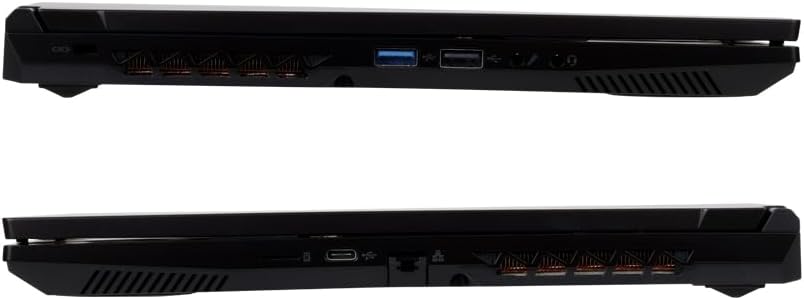
פיגורע 3.1: דעטאַילעד view of the laptop's external ports on both sides.
3.4 נעץ קאָנעקטיוויטי
- ווי-פי: The laptop supports Wi-Fi 6E (IEEE802.11 ax/ac/n/g/b/a). To connect, click the network icon in the taskbar, select your desired Wi-Fi network, and enter the password if prompted.
- ווייערד לאַן: Connect an Ethernet cable to the 1000BASE-T LAN port for a stable wired network connection.
- בלועטאָאָטה: The laptop includes Bluetooth 5 for connecting wireless peripherals such as headphones or speakers.
4. וישאַלט
4.1 רייניקן דעם לאַפּטאָפּ
- פאַרשטעלן: ניצן אַ ווייך, לינט-פֿרייַ שטאָף אַ ביסל דampגעוואשן מיט וואַסער אָדער אַ פאַרשטעלן רייניגער. שפּריצט נישט פליסיקייט גלייך אויף דעם פאַרשטעלן.
- שאַסי און קלאַוויאַטור: ניצט אַ ווייכע, טרוקענע שטאָף. פֿאַר שווערע שמוץ, אַ ביסל טרוקןamp cloth can be used, ensuring no liquid enters the ports or vents.
- ווענץ: ניצט פּעריִאָדיש קאָמפּרעסירטע לופט צו רייניקן שטויב פון די קיל ווענטילאַטאָרן צו האַלטן אָפּטימאַלן לופטפלוס.
4.2 באַטערי קער
צו פאַרלענגערן די באַטאַרייע לעבן:
- פֿאַרמײַדט אָפֿט פֿולשטענדיק אויסצולאָדן די באַטעריע.
- שטעלט נישט אויס דעם לאַפּטאָפּ צו עקסטרעמע טעמפּעראַטורן.
- אויב איר לייגט אפ דעם לעפטאפ פאר א לענגערע צייט, לאדט אויף די באטעריע ביז בערך 50-60% איידער איר מאכט עס אויס.
4.3 ווייכווארג דערהייַנטיקונגען
Regularly update your Windows operating system and drivers to ensure optimal performance, security, and compatibility. Windows Update can be accessed via the Settings menu.
5. טראָובלעשאָאָטינג
This section addresses common issues you might encounter. For more complex problems, refer to the official iiyama support webפּלאַץ אָדער קאָנטאַקט קונה דינסט.
5.1 קיין מאַכט / לאַפּטאָפּ טוט זיך נישט אָן
- זיכער מאַכן אַז דער AC אַדאַפּטער איז זיכער פארבונדן צו ביידע דעם לאַפּטאַפּ און אַ אַרבעטנדיקן עלעקטרישן ווענטיל.
- קאָנטראָלירט צי די עלעקטרישע אַוטלעט אַרבעט דורך אַרײַנשטעקן אַן אַנדער דעוויס.
- אויב די באַטאַרייע איז גאָר אויסגעשעפּט, קען עס נעמען אַ פּאָר מינוט אויפלאָדן איידער דער לאַפּטאָפּ קען זיך אנצינדן.
5.2 ווייַז ישוז
- בלאַנק פאַרשטעלן: Try pressing the function key combination (e.g., Fn + F5 or F7, depending on the model) to toggle the display output.
- External Monitor Not Detected: Ensure the cable is securely connected. Try restarting the laptop.
5.3 נעץ קאָנעקטיוויטי פּראָבלעמען
- ווי-פי: Verify that Wi-Fi is enabled in Windows settings. Restart your router and modem.
- ווייערד לאַן: Check the Ethernet cable connection. Ensure your network adapter drivers are up to date.
5.4 לאַנגזאַמע פאָרשטעלונג
- שליסט אומנייטיקע אַפּליקאַציעס וואָס לויפן אין הינטערגרונט.
- זיכער מאַכן אַז אייער אָפּערייטינג סיסטעם און דרייווערס זענען דערהייַנטיקט.
- קוק פֿאַר מאַלוואַרע אָדער ווירוסן מיט אַ רעספּעקטאַבלן אַנטיווירוס ווייכווארג.
- Ensure adequate free space on your 1TB SSD.
6. ספּעסאַפאַקיישאַנז
The following table details the technical specifications of the iiyama SENSE INFINITY SENSE-15FH127-i7-UH1X-M laptop:
| שטריך | באַשרייַבונג |
|---|---|
| סאָרט | iiyama |
| מאָדעל נומער | SENSE-15FH127-i7-UH1X-M |
| אָפּערייטינג סיסטעם | Windows 11 היים |
| פאַרשטעלן גרייס | 15.6 אינטשעס |
| געבוירן האַכלאָטע | פול HD (1920x1080 פּיקסעלס) |
| ווייַז טיפּ | Anti-glare Color LCD |
| קפּו מאָדעל | Intel Core i7-12650H Processor |
| קפּו ספּיד | אַרויף צו 4.70 גהז |
| גראַפיקס | אינטעל UHD גראַפיקס (אינטעגרירט) |
| אינסטאַלירטע ראַם זכּרון | 16GB DDR4-3200 S.O.DIMM (8GBx2) |
| זכּרון סלאָץ | 2 |
| סטאָרידזש | 1TB NVMe M.2 SSD (PCIe 4.0x4) |
| אָפּטיש דרייוו | ניט יקוויפּט |
| קאָרט רידער | מיקראָ סד קאָרט לייענער |
| אַודיאָ | High Definition Audio subsystem, Built-in Stereo Speakers, Built-in Microphone |
| Webקאַם | קסנומקס מיליאַן פּיקסעלס |
| ווייערד לאַן | 1000BASE-T LAN Port |
| ווירעלעסס קאַנעקטיוויטי | Wi-Fi 6E (IEEE802.11 ax/ac/n/g/b/a), Bluetooth 5 |
| קלאַוויאַטור | Japanese Keyboard |
| פּוינטינג מיטל | Multi-touch compatible Touchpad |
| פונדרויסנדיק פּאָרץ | Headphone/Speaker Output x1, Microphone Input x1, USB 3.1 (Type-C) x2, USB 3.0 x1, USB 2.0 x1, HDMI x1, Mini DisplayPort x1 |
| TPM | TPM2.0 compatible |
| Battery Life (Video Playback) | Approx. 4.3 hours (JEITA3.0) |
| באַטעריע לעבן (נישט אין קראַפט) | Approx. 6.0 hours (JEITA3.0) |
| וואָג | Approx. 2.03 kg (including battery) |
| דימענשאַנז (WxDxH) | Approx. 360mm x 240mm x 27.7mm (including rubber feet) |
7. וואָראַנטי און שטיצן
7.1 Standard Warranty
This iiyama SENSE INFINITY laptop comes with a standard 1 יאָר וואָראַנטי from the date of purchase. Please retain your proof of purchase and the warranty card for any warranty claims.
The warranty covers manufacturing defects and hardware failures under normal use. It does not cover damage caused by misuse, accidents, unauthorized modifications, or natural disasters.
7.2 טעכניש שטיצן
For technical assistance, driver downloads, or further troubleshooting, please refer to the official iiyama support website. You can also find contact information for customer service on your warranty card or the official product page.
When contacting support, please have your laptop's model number (SENSE-15FH127-i7-UH1X-M) and serial number ready.