
הקדמה
The Hunter ZenTech 44-inch smart ceiling fan combines modern design with advanced technology to provide efficient air circulation and adjustable lighting for indoor and covered outdoor spaces. This fan features a slim DC motor for quiet operation and energy efficiency, TrueLight LED technology for customizable lighting, and HunterSMART technology for seamless integration with smart home systems like Amazon Alexa, Google Assistant, and Apple HomeKit.
This manual provides detailed instructions for the safe installation, operation, and maintenance of your ZenTech ceiling fan. Please read all instructions carefully before beginning installation or use.
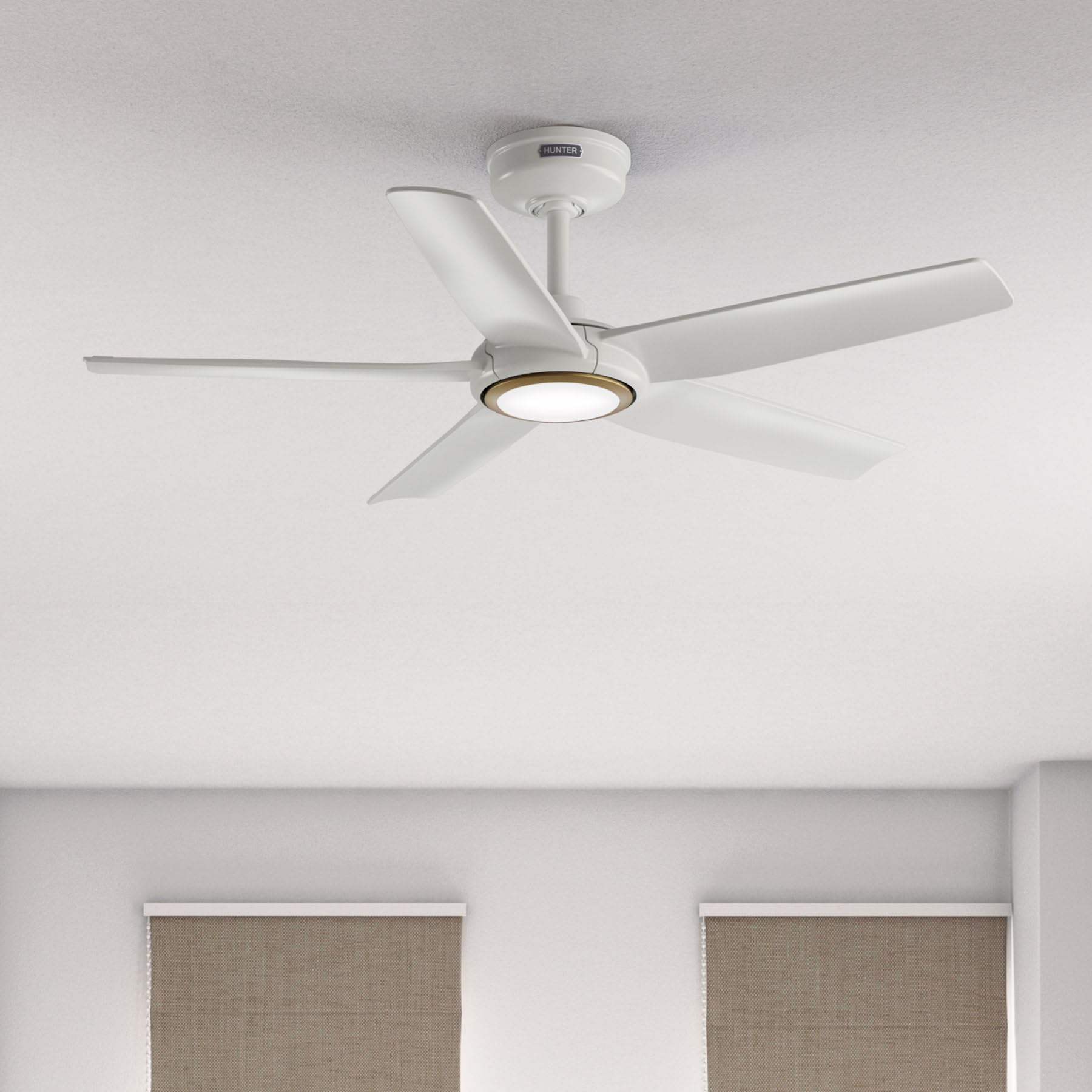
Image: Hunter ZenTech 44-inch ceiling fan in Fresh White, showcasing its sleek design and integrated LED light.
זיכערקייַט אינפֿאָרמאַציע
To reduce the risk of electric shock, fire, or injury to persons, always follow these important safety precautions:
- Read all instructions before installing or using this fan.
- זיכער מאַכן אַז די מאַכט איז אויסגעלאָשן בײַם קרייַז ברעאַקער איידער די אינסטאַלאַציע אָדער סערוויסינג.
- אַלע וויירינג מוזן זיין אין לויט מיט נאַציאָנאַלע און לאָקאַלע עלעקטרישע קאָודז. אויב איר זענט נישט באַקאַנט מיט וויירינג, קאָנסולטירט אַ קוואַליפֿיצירטן עלעקטריקער.
- דער ווענטילאַטאָר מוז זיין מאָנטירט מיט אַ מינימום פון 7 פֿיס (2.1 מעטער) ווייטקייט פון די הינטערשטע ברעג פון די בליידז ביזן שטאָק.
- זיכער מאַכן אַז די מאָנטירונג סטרוקטור קען שטיצן דאָס וואָג פון דעם ווענטילאַטאָר (אומגעפער 13.45 פונט).
- לאָזט נישט אָפּערירן דעם ווענטילאַטאָר מיט צעבראָכענע בליידז אָדער קיין אַנדערע צעבראָכענע קאָמפּאָנענטן.
- דער פאן איז דamp-rated, suitable for indoor use and covered outdoor areas where exposure to moisture may occur. Do not expose to direct water spray.
סעטאַפּ און ינסטאַלירונג
Proper installation is crucial for the performance and safety of your ceiling fan. It is recommended to have a qualified electrician perform the installation.
פאַר-ינסטאַלירונג טשעקס
- באַשטעטיקן אַז אַלע קאָמפּאָנענטן זענען פאַראַן לויט דער פּאַקינג ליסטע.
- Ensure the electrical box is securely mounted and capable of supporting a ceiling fan.
- אויסלעשן די עלעקטריע ביים הויפט קרייז ברעיקער.
מאַונטינג די פאָכער
- Attach the mounting bracket to the ceiling electrical box using the provided screws.
- Assemble the downrod (6 inches included) to the motor housing. Factory-installed wiring and connectors are designed for downrods up to 24 inches. Do not extend or modify.
- פֿאָרזיכטיק הייבט אויף דעם ווענטילאַטאָר און הענגט עס פֿון דער מאַונטינג קלאַמער.
עלעקטריקאַל קאַנעקשאַנז
- Connect the fan's electrical wires to the household wiring according to the wiring diagram in the full instruction manual. Ensure all connections are secure.
- טאַק אַלע ווירעס ניטלי אין די עלעקטריקאַל קעסטל.
אַטאַטשינג בליידז און ליכט קיט
- זיכער באַפעסטיקט די פינף ווענטילאַטאָר בליידז צו די מאָטאָר האָוסינג.
- Install the LED light kit module. The fan includes in-box accessories for a personalized finish, including an interchangeable LED module, a no-light cap, and two trim ring options (one matching the fan finish and one in Luxe Gold).

Image: Hunter ZenTech ceiling fan installed in a modern living room, demonstrating its aesthetic integration into a home environment.

Image: Hunter ZenTech ceiling fan installed on a covered outdoor patio, highlighting its damp-rated suitability for outdoor use.
אַפּערייטינג ינסטראַקשאַנז
Your ZenTech fan offers multiple control options for convenience.
ווייַט קאָנטראָל
A handheld remote control is included for basic fan and light functions:
- פאַן גיכקייַט: Adjust between 6 speeds.
- פאָכער ריכטונג: Reverse the fan direction for summer (downward airflow) or winter (upward airflow) operation.
- ליכט אויף/אַוועק: Turn the LED light on or off.
- ליכט דימינג: סטרויערן די ברייטנאַס פון די געפירט ליכט.
HunterSMART App Control
The HunterSMART app provides advanced control and customization options:
- Download the HunterSMART app from your device's app store.
- Follow the in-app instructions to connect your ZenTech fan to your home Wi-Fi network.
- Once connected, you can control fan speed, light brightness, and color temperature from your smartphone or tablet.
- Access additional features such as scheduling and custom settings.

Image: Diagram illustrating HunterSMART app interface and voice command examples for controlling the ceiling fan.
קול קאָנטראָל
The ZenTech fan is compatible with leading smart home platforms:
- אַמאַזאָן אַלעקסאַ: Enable the Hunter skill in the Alexa app and link your HunterSMART account.
- גוגל אַססיסטאַנט: Link your HunterSMART account through the Google Home app.
- Apple HomeKit: Follow the pairing instructions in the Apple Home app.
Use voice commands such as "Alexa, turn on the living room fan" or "Hey Google, set the bedroom light to warm white."
TrueLight LED Lighting
The integrated TrueLight LED technology allows for fully adjustable lighting:
- Choose from 10 brightness levels to suit your needs.
- Adjust the color temperature between warm and cool tones to create the desired ambiance.

Image: Graphic illustrating the 'Clearly Brighter' TrueLight features, showing 10 levels of light and 10 color temperatures for adjustable LED lighting.
וישאַלט
Regular maintenance ensures the longevity and optimal performance of your ZenTech ceiling fan.
רייניקונג
- Fan Blades: Wipe the blades with a soft, damp cloth. Do not use abrasive cleaners as they may damage the finish.
- מאָטאָר האָוסינג: Dust the motor housing with a soft, dry cloth.
- ליכט קיט: Clean the light diffuser with a soft, lint-free cloth.
Always ensure the power is off at the circuit breaker before cleaning any part of the fan.
אַלגעמיינע ופהאַלטונג
- Periodically check all screws and connections for tightness. Retighten as necessary.
- The fan's DC motor is designed for long-term, maintenance-free operation and does not require lubrication.
טראָובלעשאָאָטינג
If you encounter issues with your ZenTech ceiling fan, refer to the following common problems and solutions:
| פּראָבלעם | מעגלעך סיבה | לייזונג |
|---|---|---|
| פאָכער טוט נישט אָנהייבן | קיין שטראָם צום ווענטילאַטאָר; לויזע דראָט פֿאַרבינדונגען; נידעריקע באַטאַרייע אין דער ווײַטקאָנטראָל. | קאָנטראָלירט דעם קרייז ברעיקער; באַשטעטיקט אַז אַלע דראָט פֿאַרבינדונגען זענען זיכער; פאַרבייטן די באַטאַרייע פֿון דער ווײַט קאָנטראָל. |
| ליכט טוט נישט אַרבעטן | Loose wire connection to light kit; LED module faulty. | Check light kit wiring; Contact customer support for LED module replacement if necessary. |
| פאן װאבלט זיך | Loose blade screws; Improperly balanced blades; Loose mounting bracket. | Tighten all blade screws; Use a blade balancing kit (not included); Ensure mounting bracket is secure. |
| ווייַט קאָנטראָל נישט ארבעטן | באַטעריע נידעריק אָדער טויט; ווייַטקאָנטראָל נישט געפּאָרט מיטן ווענטילאַטאָר. | Replace battery; Refer to the full manual for remote pairing instructions. |
| ווי-פי קאַנעקטיוויטי ישוז | אומרעכט Wi-Fi פּאַראָל; ראַוטער צו ווייט; נעץ שטערונג. | Verify Wi-Fi password; Move router closer or use a Wi-Fi extender; Reduce interference from other devices. |
For more complex issues or if troubleshooting steps do not resolve the problem, please contact Hunter customer support.
ספּעסאַפאַקיישאַנז
| שטריך | דעטאַל |
|---|---|
| סאָרט | הונטער |
| מאָדעל נאָמען | ZenTech |
| מאָדעל נומער | 53641 |
| גרייס | 44 אינטשעס |
| קאָליר | פריש ווייסע |
| פּראָדוקט דימענשאַנז | 44"ד רענטגענ 44"וו רענטגענ 11.78"ה |
| פּונקט וואָג | 13.45 פונט |
| נומער פון בלאַדעס | 5 |
| מאָטאָר טיפּ | DC Motor (43% slimmer) |
| נומער פון ספּידז | 6 |
| ליכט טיפּ | TrueLight LED (Adjustable Brightness & Color Temperature) |
| קאָנטראָל מעטאָד | App Control (HunterSMART), Remote Control, Voice Control |
| סמאַרט היים קאַמפּאַטאַבילאַטי | Amazon Alexa, Google Assistant, Apple HomeKit |
| דרינענדיק / דרויסנדיק באַניץ | אינעווייניק, באדעקט דרויסנדיק (דamp ראַטעד) |
| Voltage | 120 וואלטס |
| וואָסtage | 14 וואטס |
| לופט פלאָו קאַפּאַסיטי | 4493.25 קוביק פֿיס פּער מינוט |
| דאַונראָד לענג | 6 Inches (included), compatible up to 24 inches |
| סערטיפיקאַטיאָנס | ETL, Energy Star, FCC |
וואָראַנטי
The Hunter ZenTech ceiling fan is backed by a limited lifetime motor warranty, reflecting Hunter's commitment to engineering and quality. This warranty covers defects in materials and workmanship of the fan motor for the lifetime of the original purchaser. Specific terms and conditions apply. Please refer to the warranty card included with your product or visit the official Hunter webפּלאַץ פֿאַר פול פרטים.
שטיצן
For technical assistance, warranty claims, or additional information regarding your Hunter ZenTech ceiling fan, please contact Hunter customer support:
- אָנליין שטיצן: Visit the Hunter Fan Company webזייטל פֿאַר אָפֿט געשטעלטע פֿראַגעס, טראָובלעשווטינג גיידס, און קאָנטאַקט פֿאָרמען.
- טעלעפאָן שטיצן: Refer to your product packaging or the Hunter webזייטל פֿאַר די מערסט אַקטועלע קונה סערוויס טעלעפאָן נומער.
ווען איר קאָנטאַקטירט שטיצע, ביטע האַלט אייער מאָדעל נומער (53641) און באַווייַז פון קויפן גרייט.