
הקדמה
This manual provides detailed instructions for the setup, operation, and maintenance of your AT&T DECT 6.0 Cordless Phone, model BL108-3. Please read this guide thoroughly to ensure proper use and to take full advantage of all features, including Smart Call Blocker, Bluetooth Connect to Cell, and the digital answering machine.
פּעקל אינהאַלט
באַשטעטיקן אַז דיין פּעקל כּולל די פאלגענדע זאכן:
- באַזע אַפּאַראַט
- 3 קאָרדלעסס כאַנדסעץ
- 3 מאַכט אַדאַפּטערז
- 2 Chargers (for additional handsets)
- טעלעפאָן ליניע שנור
- 6 באַטערי סעלז
- שנעל אָנהייב גייד
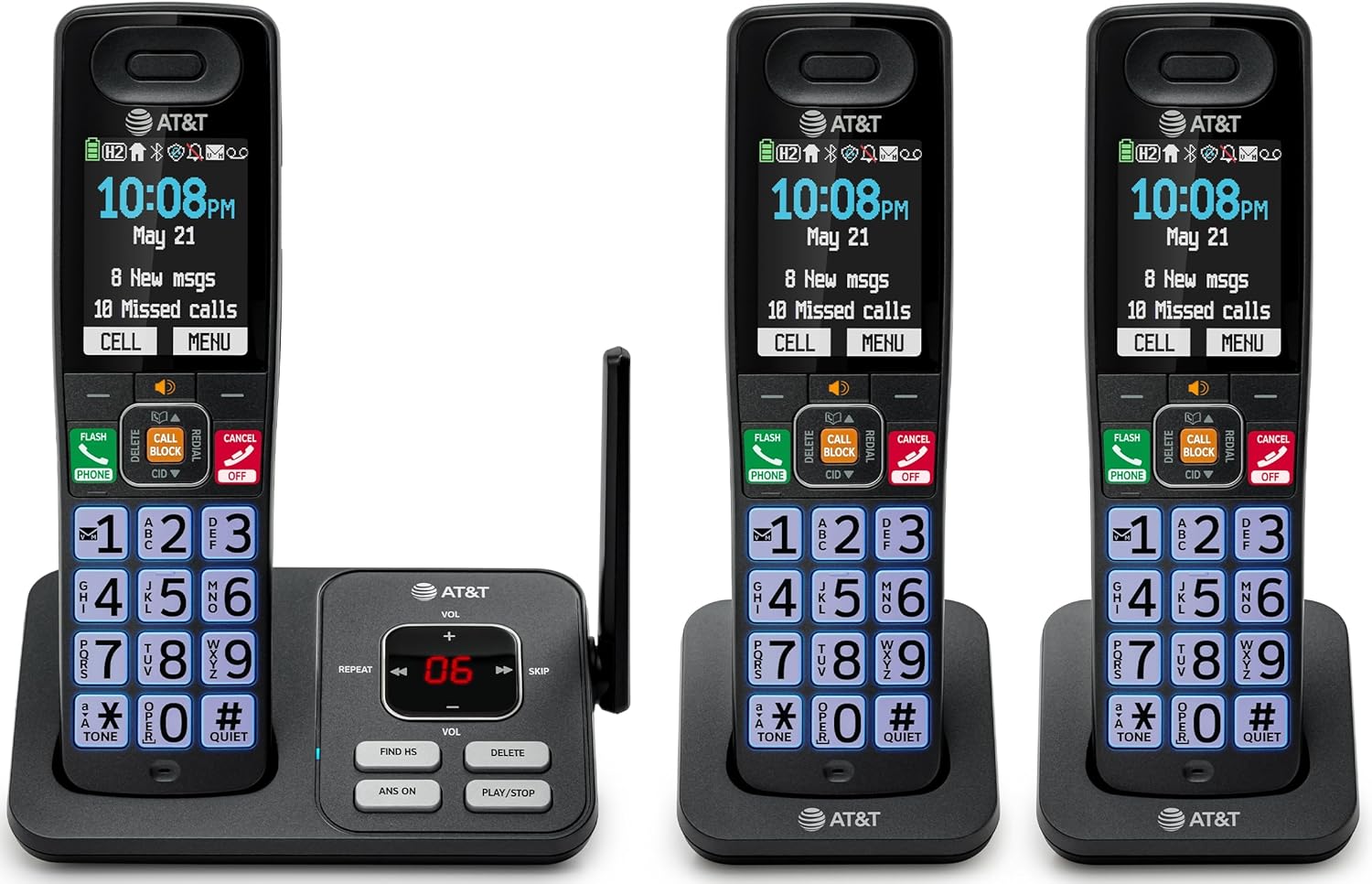
Image: The complete AT&T BL108-3 cordless phone system, showing the base unit and three handsets.
סעטאַפּ
1. Base Unit and Power Connection
- שטעלן די באַזע אַפּאַראַט אויף אַ פלאַך, סטאַביל ייבערפלאַך.
- פֿאַרבינדט איין עק פֿון דער טעלעפֿאָן ליניע שנור צום TEL LINE דזשעק אויף דער באַזע אַפּאַראַט.
- פֿאַרבינדט דעם אַנדערן עק פֿון דער טעלעפֿאָן ליניע שנור צו אַ טעלעפֿאָן וואַנט דזשעק.
- Plug one power adapter into the POWER jack on the base unit.
- Plug the other end of the power adapter into an electrical outlet not controlled by a wall switch.
2. האַנדסעט באַטאַרייע אינסטאַלירן און טשאַרדזשינג
- עפֿנט דעם דעקל פֿונעם באַטעריע־אָפּטייל אויף דער הינטערשטער זײַט פֿון יעדן האַנטסעט.
- Insert the provided battery cells, ensuring correct polarity (+ and -).
- נאָענט די דעקן פון די באַטאַרייע אָפּטייל.
- Place each handset in its respective charger or the base unit cradle. The CHARGE light on the handset will illuminate.
- לאָזט די הענט־טעלעפאָנען זיך אויפלאָדן פֿאַר מינדעסטנס 10 שעה איידערן ערשטן באַנוץ.
3. Additional Charger Setup
- Plug the power adapters for the additional chargers into electrical outlets not controlled by a wall switch.
- Place the additional handsets into these chargers to charge.
אַפּערייטינג ינסטראַקשאַנז
מאַכן און באַקומען קאַללס
- צו מאַכן אַ רוף: דריק טעלעפאָן, דערנאָך דרײַלט די נומער.
- צו ענטפֿערן אַ רוף: דריק טעלעפאָן אָדער קיין דיאַלינג שליסל.
- צו ענדיקן אַ רופן: דריקן OFF/CANCEL אדער לייגט דעם האנטסעט אין דער וויגעלע.
סמאַרט קאַלל בלאַקער
The Smart Call Blocker feature automatically filters out robocalls. You can also manually block unwanted numbers.
- To block a number during a call: Press the dedicated רופן בלאָק שליסל.
- The block directory can store up to 1,000 entries.

Image: A close-up of the handset displaying the "Smart Call Block" screen, with the "CALL BLOCK" button highlighted on the base unit.
בלועטוט פארבינדן זיך צו סעל
Pair your smartphone with the BL108-3 system to make and receive mobile calls through any of the cordless handsets.
- אויף די באַזע אַפּאַראַט, דריקן MENU, then navigate to "Bluetooth" and select "Pair Cell".
- געבן בלועטאָאָטה אויף דיין סמאַרטפאָנע און זוכן פֿאַר בנימצא דעוויסעס.
- Select the AT&T phone from the list on your smartphone to pair.
- Once paired, mobile calls can be made and received using the cordless handsets.

Image: A visual representation of the "Connect to Cell" feature, showing a handset on a nightstand wirelessly connected to a smartphone.
Video: Demonstrates the seamless Bluetooth connection to a cell phone, allowing calls to be made and received through the AT&T cordless handset.
דיגיטאַל אַנסווערינג מאַשין
The integrated digital answering system records up to 22 minutes of messages.
- צו שפּילן מעסעדזשעס: דריק שפּיל / האַלטן אויף דער באַזע אַפּאַראַט אָדער האַנדסעט.
- To skip messages: Press SKIP.
- To delete messages: Press ויסמעקן.

Image: The phone's base unit and handset displaying an incoming message on the answering system, with a visual of a message being left.
קאַללער אידענטיפיקאַציע מעלדן
The handset speaks the caller's name aloud, allowing you to screen calls without picking up the phone.
- Ensure Caller ID service is subscribed through your telephone service provider.
- The feature is active by default.

Image: The handset and base unit showing a call coming in, with a speech bubble indicating "Call from Johnson" to illustrate the Caller ID Announce feature.
אינטערקאם צווישן הענטסעטס
You can use the handsets to communicate with each other, or transfer calls.
- To initiate an intercom call: Press INTERCOM on a handset, then select the desired handset number.
- To transfer a call: During an external call, press INTERCOM, select the handset, and then hang up after the other handset answers.

Image: Two handsets, one on the base and one on a charger, with arrows indicating communication between them, illustrating the intercom feature.
טעלעפאָן בוך וועגווייַזער
לייגט אריין ביז 1500 נעמען און נומערן אין טעלעפאן בוך פאר שנעלע רופן.
- To add an entry: Press MENU, navigate to "Phonebook", then "Add New Entry".
- To dial from phonebook: Press טעלעפאָן, דעמאלט DIR, select the entry, and press טעלעפאָן ווידער.

Image: The handset screen showing a phonebook list with alphabetical navigation, demonstrating the phonebook directory feature.
פול-דופּלעקס האַנדסעט רעדנערפאָון
Allows both parties to speak and be heard simultaneously during a speakerphone call.
- To activate speakerphone during a call: Press רעדנער.
- To switch back to handset mode: Press טעלעפאָן.

Image: A person using the handset in speakerphone mode while working on a laptop, with speech bubbles indicating a two-way conversation.
שטיל מאָדע
Temporarily silences all handset and base unit ringers for a set period.
- To activate: Press and hold # QUIET אויף די כאַנדסעט.
- צו דיאַקטיווייט: דריקן און האַלטן # QUIET ווידער.

Image: The handset screen showing "Quiet mode on" with a sleeping person in the background, illustrating the Quiet Mode feature.
עקאָ מאָדע
Reduces power consumption for optimal battery performance.
- ECO mode is typically enabled by default to conserve energy.
- Refer to the full user manual for options to adjust or disable this feature if needed.

Image: The handset and base unit in a setting with wind turbines in the background, and the screen showing "ECO mode", symbolizing energy efficiency.
געבויט-אין פלאַשליגהט
For safety at night or in emergencies, the handset includes a built-in flashlight.
- To activate the flashlight: Locate the flashlight button on the side of the handset and press it.

Image: A close-up of the handset's side, showing the flashlight beam and the "FLASHLIGHT" label, indicating its location and function.
וישאַלט
- רייניקונג: רייניקט דעם טעלעפאָן און באַזע אַפּאַראַט מיט אַ ווייכן, דamp טוך. ניצט נישט רייניקונג שפרייען אדער שארף כעמיקאלן.
- באַטערי זאָרגן: For optimal battery life, fully charge the handsets for 10 hours before first use. If the phone will be unused for an extended period, remove the batteries.
- ינווייראַנמענאַל טנאָים: פֿאַרמײַדט אויסשטעלן דעם טעלעפֿאָן צו עקסטרעמע טעמפּעראַטורן, דירעקטע זונשײַן, אָדער פֿײַכטקייט.
טראָובלעשאָאָטינג
| פּראָבלעם | לייזונג |
|---|---|
| קיין רעדל טאָן |
|
| האַנדסעט לאָדט זיך נישט אויף |
|
| שלעכטע רוף קוואַליטעט אָדער סטאַטיק |
|
| Cannot make/receive Bluetooth calls |
|
ספּעסאַפאַקיישאַנז
| שטריך | דעטאַל |
|---|---|
| סאָרט | AT&T |
| מאָדעל נומער | BL108-3 |
| טיפּ פון טעלעפאָן | שנורלאָז (DECT 6.0) |
| קאָליר | שוואַרץ |
| הענדסעטס אַרייַנגערעכנט | 3 |
| ווייַז | 2.4" Color Backlit Display |
| ענטפער סיסטעם טיפּ | דיגיטאַל (ביז 22 מינוט רעקאָרדינג צייט) |
| רופן בלאַקער | Smart Call Blocker (up to 1,000 entries) |
| בלועטאָאָטה | Connect to Cell (smartphone pairing) |
| טעלעפאָן סטענדביי צייט | 6 טעג |
| קאַללער שייַן | Yes, with Announce feature |
| פאָנעבאָאָק קאַפּאַציטעט | Up to 1500 names and numbers |
| ספּיקערז | פול-דופּלעקס האַנדסעט רעדנערפאָון |
| דימענסיעס (באַזע איינהייט) | 5.63 X 2.99 X 7.4 אינטשעס (L X W X H) |
| מאַכט מקור | קאָרדעד עלעקטריק |
| מאַטעריאַל | פּלאַסטיק |
| UPC | 650530034121 |

Image: Diagram showing the dimensions of the AT&T BL108-3 base unit and a handset.
וואָראַנטי אינפֿאָרמאַציע
Your AT&T BL108-3 Cordless Phone comes with a 1-יאָר לימיטעד וואָראַנטי. Please retain your purchase receipt as proof of purchase. For detailed warranty terms and conditions, refer to the full user manual or contact AT&T customer support.
שטיצן
For further assistance, technical support, or to order replacement parts, please visit the official AT&T support website or contact their customer service. You can often find FAQs and additional resources online.
- אָנליין שטיצן: באַזוכן AT&T Wireless Support (or search for AT&T Landline Phone Support).
- קונה סערוויס: Refer to your Quick Start Guide for specific contact numbers.