
1. הקדמה
This manual provides essential instructions for the safe and efficient use of your DATOUBOSS FBM-JC-6232-EU-3 Home Energy Storage System. This all-in-one unit integrates a powerful 48V 6200W hybrid inverter with a 48V 628Ah Lithium Iron Phosphate (LiFePO4) battery, offering a total capacity of 32.15 kWh. Designed for home energy storage, off-grid solar systems, and backup power applications, this system simplifies installation by combining components into a single, movable unit.
The system features a base equipped with movable pulleys, allowing for easy relocation after unpacking without manual installation. Its integrated design eliminates the need for separate inverter and battery purchases, reducing complex wiring and communication setups.

2. זיכערקייַט אינפֿאָרמאַציע
Read all safety instructions carefully before installation, operation, or maintenance. Failure to follow these instructions may result in electric shock, fire, serious injury, or property damage.
2.1 אַלגעמיינע זיכערקייַט פּריקאָשאַנז
- קוואַלאַפייד פּערסאַנעל: Installation and maintenance must be performed by qualified personnel familiar with electrical systems and battery storage.
- דיסקאַנעקט מאַכט: Always disconnect all power sources (AC grid, PV input, battery) before performing any service or maintenance.
- גראָונדינג: Ensure the system is properly grounded according to local electrical codes.
- ווענטילאַטיאָן: Install the system in a well-ventilated area to prevent overheating. Do not block ventilation openings.
- וואָג: The unit weighs approximately 526 pounds (239 kg). Use appropriate lifting equipment and techniques to prevent injury during unpacking and placement.
- סוויווע: Do not expose the unit to rain, snow, liquids, or excessive dust. Operate within specified temperature and humidity ranges.
2.2 באַטערי זיכערקייַט
The integrated LiFePO4 battery includes a Battery Management System (BMS) for protection. However, observe the following precautions:
- קיין דיסאַסעמבאַל: Do not attempt to open or disassemble the battery pack or the system unit. There are no user-serviceable parts inside.
- ויסמיידן קורץ קרייַז: Ensure all connections are secure and prevent any possibility of short circuits.
- טעמפּעראַטור: The BMS protects against overheating and low temperatures. However, avoid installing the unit in environments with extreme temperatures outside the operating range (-10°C to 50°C).
- שעדיקן: If the battery or unit appears damaged, do not operate it. Contact customer service immediately.
3. פּראָדוקט איבערview
The DATOUBOSS Home Energy Storage System is an all-in-one solution featuring a hybrid inverter, a high-capacity LiFePO4 battery, and an integrated Battery Management System (BMS). It is designed for ease of use and monitoring through its touch color LCD display.
3.1 הויפּט קאַמפּאָונאַנץ
- היבריד ינווערטער: 48V 6200W capacity, managing power flow between solar panels, battery, grid, and loads.
- LiFePO4 באַטעריע: 48V 628Ah (32.15 kWh) for stable and long-lasting energy storage.
- באַטעריע פאַרוואַלטונג סיסטעם (BMS): Built-in protection against overcharging, over-discharging, over-current, short circuits, overheating, and low temperatures.
- Touch Color LCD Display: For monitoring system status and configuring settings.
- Movable Casters: 360° swivel casters for easy mobility of the unit.
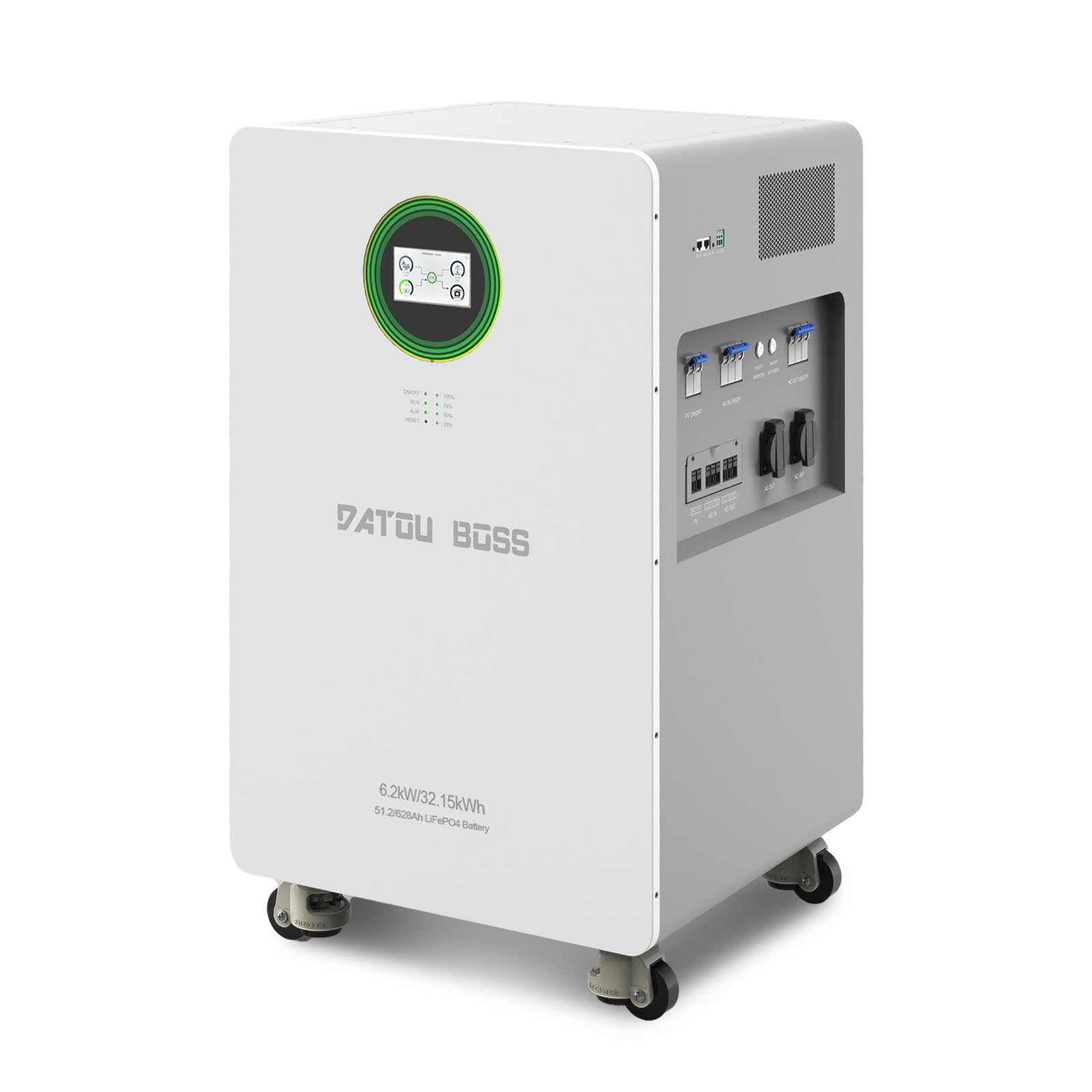
3.2 Front Panel and Connections
The front panel provides access to the touch screen, indicator lights, and control buttons. The lower section houses the various input and output ports.

- ריר סקרין: Main interface for monitoring and control.
- ינדיקאַטאָר לייץ: RUN (operation status), ALM (alarm), RESET (system reset).
- באַטערי ינדיקאַטאָר ליכט: Shows charge level (100%, 75%, 50%, 25%).
- AC IN ON/OFF Switch: Controls the AC grid input.
- ON/OFF Inverter Switch: Controls the inverter operation.
- ON/OFF באַטאַרייע באַשטימען: Controls the battery power.
- AC OUT ON/OFF Switch: Controls the AC output to loads.
- PV ON/OFF Switch (x2): Controls the solar panel inputs.
- PV Interface (x2): Connects to solar panels.
- AC אַרייַנשרייַב: פֿאַרבינדט זיך צום נוצן־גריד.
- AC אַרויסגאַנג (x2): Provides power to household loads.

4. סעטאַפּ
4.1 אַנפּאַקינג און פּלייסמאַנט
The DATOUBOSS system is shipped in a protective crate. Due to its significant weight (approximately 526 pounds / 239 kg), ensure adequate personnel or lifting equipment is available for safe handling.
- קערפאַלי אַראָפּנעמען די אַפּאַראַט פון זייַן פּאַקקאַגינג.
- Utilize the integrated movable pulleys to position the unit in its desired location.
- Ensure the installation area is well-ventilated, dry, and free from direct sunlight or heat sources. Maintain adequate clearance around the unit for airflow.
- The ambient operating temperature range is -10°C to 50°C.
4.2 עלעקטריקאַל קאַנעקשאַנז
All electrical connections must be performed by a qualified electrician in accordance with local and national electrical codes.
- PV אַרייַנגאַנג קאַנעקשאַן: Connect your solar panel arrays to the PV Interface ports. Ensure correct polarity (+/-) and that the PV input voltage and current are within the system's specifications (Max PV input power: 8500W, MPPT tracking range: 60-500VDC, Max PV input voltage: 500VDC, Max PV input current: 27A).
- AC אַרייַנשרייַב קאַנעקשאַן: Connect the utility grid power to the AC Input port.
- AC אַרויסגאַנג קאַנעקשאַן: Connect your household loads or distribution panel to the AC Output ports.
- גראָונדינג: ענשור אַז די סיסטעם איז רעכט גראָונדעד.
4.3 ערשט מאַכט-אַרויף
After all connections are securely made and verified:
- קער אויף די ON/OFF Battery Switch.
- קער אויף די ON/OFF Inverter Switch.
- If connecting to the grid, turn on the AC IN ON/OFF Switch.
- If connecting solar panels, turn on the PV ON/OFF Switches.
- צום סוף, צינד אן די AC OUT ON/OFF Switch to supply power to your loads.
5. אָפּעראַציע
The DATOUBOSS system features a color touch LCD display for intuitive monitoring and control.
5.1 טאָוטש סקרין צובינד
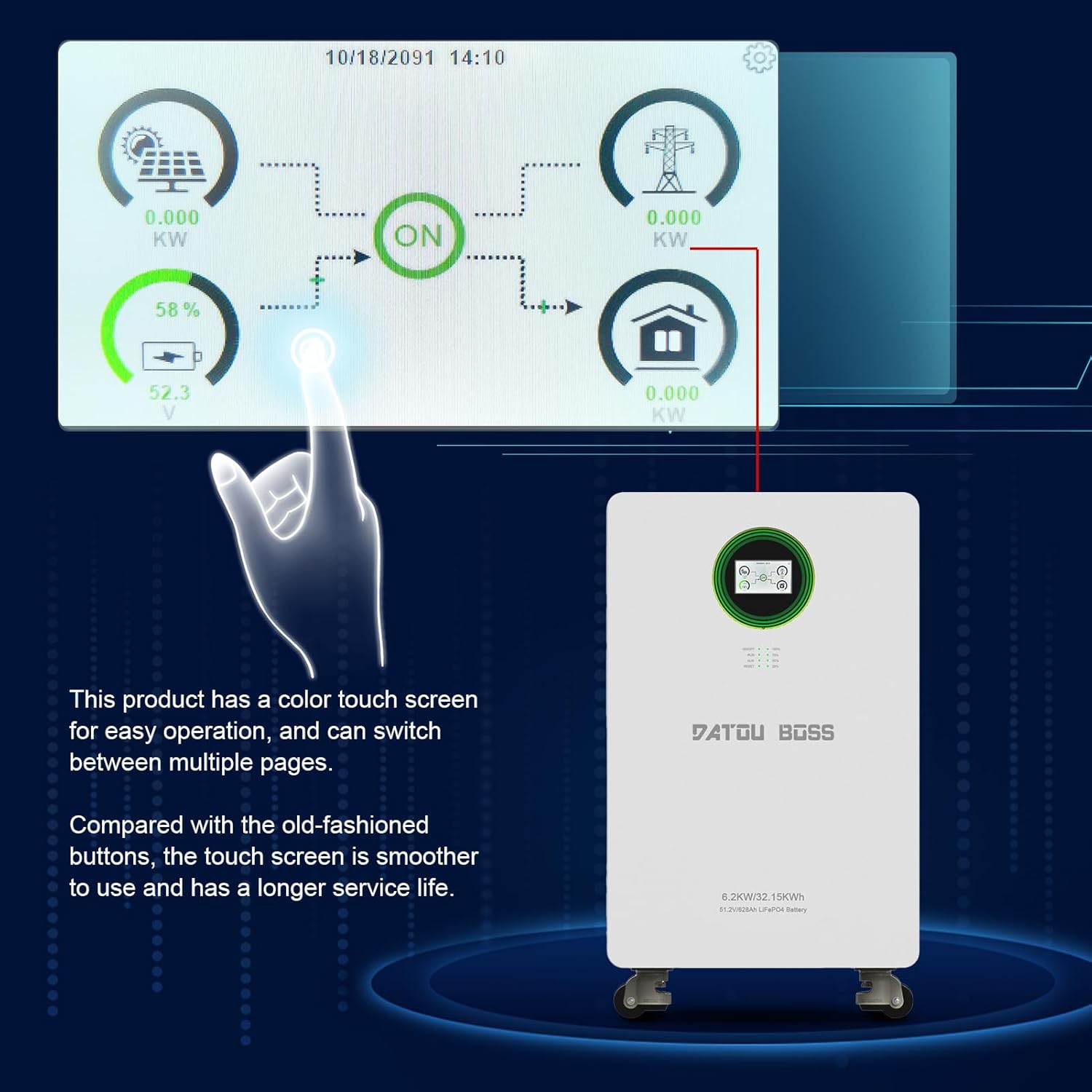
- מאָניטאָרינג: The display allows you to monitor real-time information such as PV input power, grid status, battery charge level, and power output to loads.
- נאַוויגאַציע: Swipe or tap on the screen to navigate between different pages and view detailed system information.
- סעטטינגס: Access system settings for configuration, including 'Battery Setting', 'System Work Mode', 'Grid Setting', 'Charge Setting', 'Basic Setting', 'Advanced Function', and 'Device Info'. Refer to the detailed electronic manual for specific setting adjustments.
5.2 ינדיקאַטאָר לייץ
- לויפן: Indicates normal system operation.
- ALM (Alarm): Illuminates when a warning or error condition is detected. Check the LCD display for specific codes.
- באַשטעטיק: Used to reset the system in case of certain errors or for troubleshooting.
- באַטערי ינדיקאַטאָר: Provides a quick visual reference of the battery's state of charge.
6. וישאַלט
Regular maintenance ensures the longevity and optimal performance of your DATOUBOSS Home Energy Storage System.
- רייניקונג: Periodically clean the exterior of the unit with a dry, soft cloth. Do not use liquid cleaners or solvents. Ensure ventilation openings are free from dust and debris.
- קשר טשעק: Annually, or as needed, inspect all electrical connections (PV, AC input, AC output) to ensure they are tight and free from corrosion.
- ינווייראַנמענאַל טנאָים: Monitor the ambient temperature and humidity to ensure they remain within the specified operating ranges. Extreme conditions can affect performance and lifespan.
- ווייכווארג דערהייַנטיקונגען: Check for any available firmware updates through the manufacturer's support channels to ensure optimal system performance and feature enhancements.
7. טראָובלעשאָאָטינג
The system's touch screen display will show warning or error codes if an issue arises. Refer to the detailed electronic manual for a comprehensive list of error codes and their solutions. Below are general troubleshooting steps for common issues.
7.1 פּראָסט ישוז און סאַלושאַנז
- קיין מאַכט רעזולטאַט:
- Check if the AC OUT ON/OFF Switch is in the 'ON' position.
- Verify that the ON/OFF Inverter Switch and ON/OFF Battery Switch are 'ON'.
- Check the battery charge level on the display. If low, the system may not output power.
- Inspect circuit breakers for any trips.
- באַטאַרייע ניט טשאַרדזשינג:
- Ensure PV ON/OFF Switches are 'ON' and solar panels are receiving sunlight.
- Verify AC IN ON/OFF Switch is 'ON' if charging from the grid.
- טשעק PV אריינגאנג באַנדtage and current on the display to ensure solar panels are producing power.
- Look for any alarm codes on the display that might indicate a charging fault.
- System Alarm (ALM light on):
- Check the touch screen display for the specific error or warning code.
- Consult the electronic manual for the meaning of the code and recommended actions.
- If the issue persists after following manual instructions, contact customer support.
If you are unable to resolve an issue, do not attempt further repairs. Contact DATOUBOSS professional technicians for assistance.
8. ספּעסאַפאַקיישאַנז
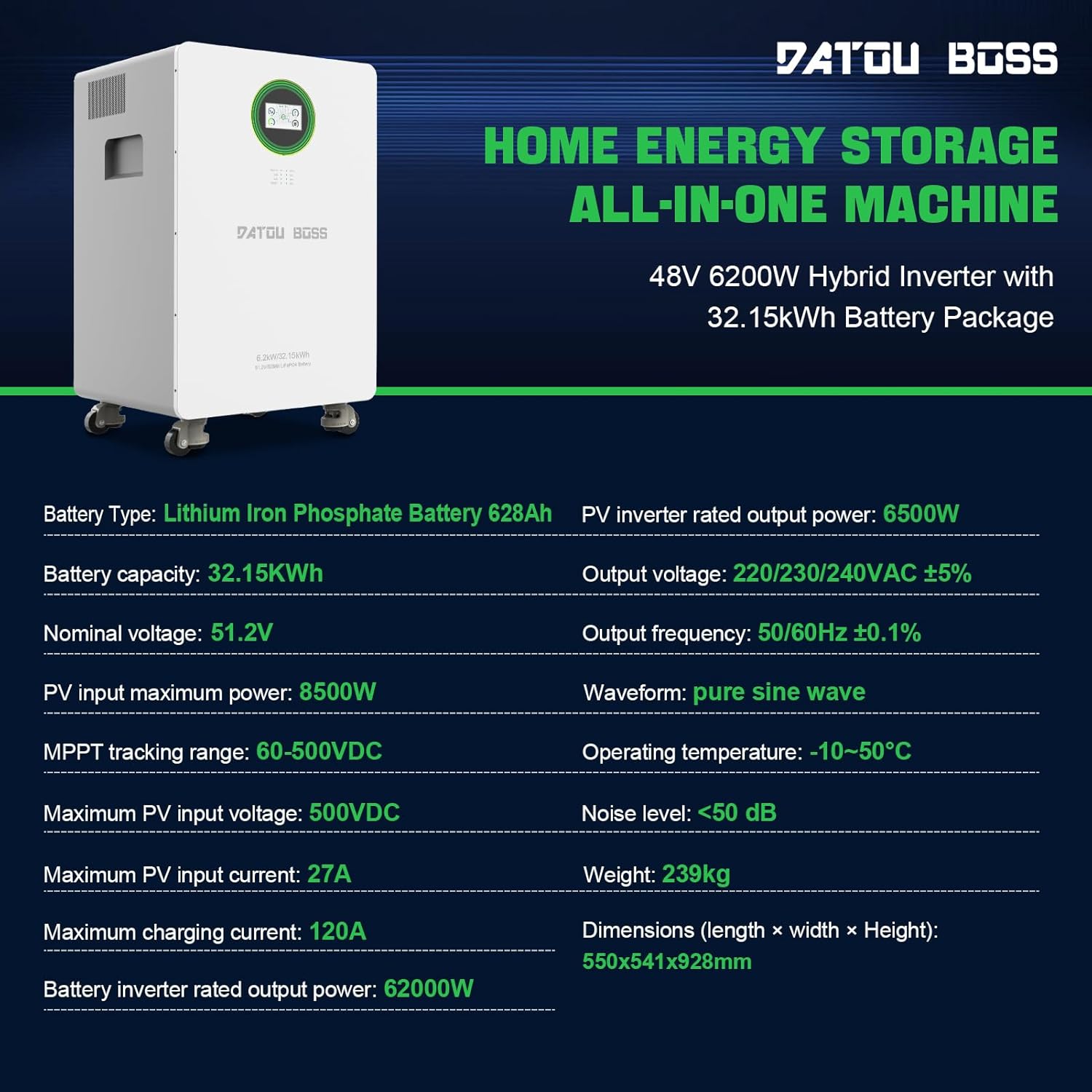
The following table details the technical specifications of the DATOUBOSS FBM-JC-6232-EU-3 Home Energy Storage System.
| שטריך | באַשרייַבונג |
|---|---|
| מאָדעל נומער | FBM-JC-6232-EU-3 |
| באַטערי טיפּ | ליטהיום אייַזן פאָספאַטע (LiFePO4) |
| באַטאַרייע קאַפּאַציטעט | 628Ah (32.15 kWh) |
| נאָמינאַל חלקtage | 51.2V |
| Hybrid Inverter Power | 6200 וו (48 וו) |
| PV Inverter Rated Output Power | 6500 וו |
| מאַקסימום פּוו ינפּוט מאַכט | 8500 וו |
| MPPT טראַקינג ראַנגע | 60-500VDC |
| מאַקסימום פּוו ינפּוט וואָלtage | 500VDC |
| מאַקסימום פּוו ינפּוט קראַנט | 27 א |
| מאַקסימום טשאַרדזשינג קראַנט | 120 א |
| רעזולטאַט חלקtage | 220/230/240VAC ±5% |
| רעזולטאַט אָפטקייַט | 50/60 הז ± 0.1% |
| וואַוועפאָרם | ריין סיין וואַווע |
| אַפּערייטינג טעמפּעראַטור | -10°C צו 50°C |
| ראַש מדרגה | <50 dB |
| פּראָדוקט דימענשאַנז (L x W x H) | 21.65 X 21.3 X 36.54 אינטשעס (550 X 541 X 928 מם) |
| פּונקט וואָג | 526 פונט (239 קג) |
| קאָמוניקאַציע ינטערפייסיז | רס 232, רס 485 |
9. וואָראַנטי און שטיצן
DATOUBOSS stands behind the quality of its products. This all-in-one home energy storage system comes with a 5 יאָר וואָראַנטי.
9.1 קונה סערוויס
For any product-related questions, technical assistance, or warranty claims, please contact DATOUBOSS customer service. Our professional customer service team is available 24 hours a day to provide friendly and patient support.
- קאָנטאַקט מעטאָד: Please reach out via the Amazon messaging system or through the contact information provided with your purchase.
9.2 Multilingual User Manuals
An English printed user manual is included in the product packaging. If you require a manual in a different language or an electronic version, please contact us via Amazon messaging. We can provide electronic manuals for various countries upon request.