
1. הקדמה
Thank you for choosing the MCombo M7632 3-Motor Power Lift Recliner. This manual provides essential information for the safe assembly, operation, and maintenance of your new recliner. Please read these instructions thoroughly before use and retain them for future reference.

Image 1.1: The MCombo M7632 Power Lift Recliner in Coffee color.
2. זיכערקייַט אינסטרוקציעס
- Ensure all connections are secure before operating the recliner.
- האַלט קינדער און חיות אַוועק פון די באַוועגלעכע טיילן פון דעם ריקליינער.
- דו זאלסט נישט לאָזן קינדער צו שפּילן מיט די ווייַט קאָנטראָל.
- Avoid placing hands or feet near the mechanism when operating the chair.
- Do not sit on the footrest when it is extended.
- נעמט ארויס דעם ריקליינער פון דער עלעקטרישער אַוטלעט איידער רייניקונג אדער וישאַלט.
- Do not use the recliner if any part is damaged or malfunctioning. Contact customer support immediately.
- Maximum weight recommendation: 158.76 kg (350 lbs). Do not exceed this limit.
3. פּעקל אינהאַלט
באַשטעטיקט אַז אַלע קאָמפּאָנענטן זענען פאַראַן איידער איר הייבט אָן צוזאַמענשטעלן. דער פּעקל כולל געוויינטלעך:
- באַקרעסט
- באַזע
- לינקס אַרמרעסט
- רעכט אַרמרעסט
- לאַמבאַר קישן
- מאַכט אַדאַפּטער און קאַבלעס
- Remote Controls (for recline/lift and massage/heat)
- באַניצער מאַנואַל

Image 3.1: Illustration of the recliner components and their packaging.
4. אַסעמבלי אינסטרוקציעס
Assembly is designed to be straightforward and typically requires no tools. It can be completed in approximately 20 minutes for a novice.
- Attach Armrests to Base: Slide the left and right armrests onto the metal brackets on the chair base. Ensure they are fully seated and locked into place.
- אינסטאַלירן באַקשטיצע: Align the backrest with the receiving brackets on the chair base and slide it down until it clicks securely into position.
- פאַרבינדן וויירינג: Locate the various cables extending from the backrest and base. Connect them according to the color-coded or shape-matched connectors. Ensure all connections are firm.
- פאַרבינדן מאַכט אַדאַפּטער: שטעקט אריין דעם מאַכט אַדאַפּטער אין דעם שטול'ס מאַכט אַרייַנגאַנג, און דערנאָך שטעקט אריין דעם אַדאַפּטער אין אַ וואַנט ווענטיל.

Image 4.1: Attaching the armrests to the chair base.

Image 4.2: Installing the backrest.

Image 4.3: Electrical wiring connections.
5. אַפּערייטינג ינסטרוקטיאָנס
Your MCombo M7632 recliner features a triple motor system allowing independent adjustment of the headrest, backrest, and footrest, along with massage and heat functions.
5.1 Recline and Lift Functions
Use the primary remote control to adjust the chair's position. This remote typically has directional arrows for movement and dedicated buttons for specific functions.

Image 5.1: Primary remote control for recline and lift functions.
- מאַכט קאָפּשטיצע: Use the dedicated headrest buttons to tilt the headrest forward or backward for optimal neck support.
- Backrest and Footrest: The triple motor allows independent adjustment. Use the backrest and footrest controls to find your desired position, from upright to a full lay-flat or zero-gravity position.
- ליפט פונקציע: Press the "Lift Up" button to gently raise the chair, assisting you in standing up.
- פארלענגערטע פוסשטיצע: The 4.7-inch extended footrest provides full leg support, preventing feet from dangling.

Image 5.2: Independent adjustment of chair components.

Image 5.3: Extended footrest for full leg support.
5.2 מאַסאַזש און היץ פונקציעס
The secondary remote controls the massage and heating features. These functions operate independently of the recline mechanism.
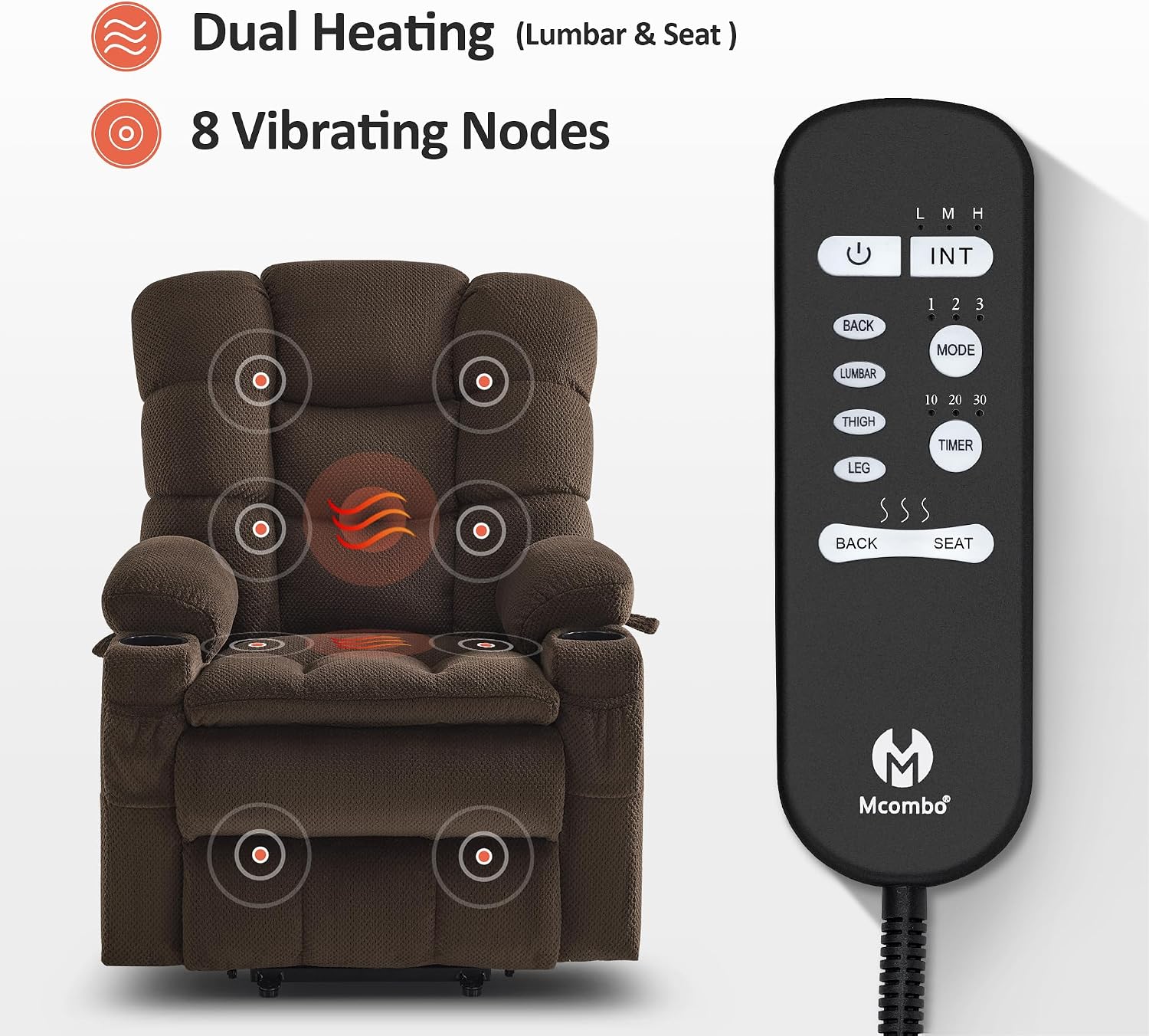
Image 5.4: Secondary remote control for massage and heat functions.
- Dual Heating: Activate heating for the lumbar and seat areas separately using the designated buttons.
- 8 Vibrating Modes: Select from various massage modes and intensity levels for different body zones (back, lumbar, thigh, leg).
- טיימער פֿונקציע: Set a timer for the massage and heat functions to automatically turn off.
5.3 באַקוועמע פֿעיִקייטן
- USB און טיפּ-C פּאָרטן: Located on the side, these ports allow you to charge your electronic devices.
- גלעזל האָלדערס: Two 3.9-inch deep cup holders are integrated into the armrests.
- סטאָרידזש פּאַקאַץ: Multiple side and front pockets provide convenient storage for remotes, magazines, or other small items.

Image 5.5: Convenient features including USB ports, cup holders, and pockets.
6. וישאַלט
- רייניקונג: Spot clean the fabric upholstery as needed. Use a mild detergent and a damp cloth. Do not saturate the fabric.
- דורכקוק: Regularly inspect all electrical cords and connections for any signs of damage.
- באַוועגן דעם שטול: When moving the recliner, ensure it is in the upright, closed position and unplugged. Lift the chair rather than dragging it to prevent damage to the base or flooring.
7. טראָובלעשאָאָטינג
- דער פֿאָרזיצער ענטפֿערט נישט: Check if the power cord is securely plugged into both the chair and the wall outlet. Ensure the wall outlet is functional. Verify all internal wiring connections are secure (refer to Image 4.3).
- מאַסאַזש/היץ אַרבעט נישט: Confirm the secondary remote is powered on and its cable is properly connected. Check for any loose connections specific to the massage and heat unit.
- ומגעוויינטלעך נויזיז: If you hear grinding or unusual noises, discontinue use and inspect the mechanism for any obstructions. Do not attempt to force movement.
- ינטערמיטאַנט פאַנגקשאַנאַליטי: This may indicate a loose connection. Re-check all wiring as per assembly instructions.
If issues persist after troubleshooting, please contact MCombo customer support.
8. ספּעסאַפאַקיישאַנז
| שטריך | דעטאַל |
|---|---|
| סאָרט | מקאָמבאָ |
| מאָדעל נאָמען | M7632 (6160-7634) |
| קאָליר | קאַווע |
| מאַטעריאַל | Textile (Fabric), Foam (Fill) |
| פּראָדוקט דימענשאַנז (ד רענטגענ וו רענטגענ ה) | 94D x 88.4W x 113H centimetres (37D x 34.8W x 44.5H inches) |
| פּונקט וואָג | 38.56 קג (85 לבס) |
| מאַקסימום וואָג רעקאָממענדאַטיאָן | 158.76 קג (350 לבס) |
| ראַם מאַטעריאַל | Wood (FSC Certified) |
| ספּעציעלע פֿעיִקייטן | Adjustable Backrest, Adjustable Headrest, Cup Holders, Power Lift, Power Recliner, Massage, Heat |
| ריקליינינג שטעלע גראף | Infinite Position |
| רעקאַמענדיד הייך | 5'1"-5'9" |
| מאַכט מקור | קאָרדעד עלעקטריק |

Image 8.1: Product dimensions and maximum load capacity.
9. וואָראַנטי אינפֿאָרמאַציע
MCombo גיט א 2-יאָר לימיטעד מאַנופאַקטורער וואָראַנטי פֿאַר דעם פּראָדוקט. די וואָראַנטי דעקט:
- ריקליינינג און ליפט מעקאַניזאַם
- עלעקטריקאַל פּאַרץ
- אַפּאָולסטערי מאַטעריאַל
- קישן
- האָלץ און מעטאַל ראַם
Please retain your proof of purchase for warranty claims. For detailed terms and conditions, refer to the warranty card included with your product or contact MCombo customer service.
10. קאָנטאַקט אינפֿאָרמאַציע
For customer support, technical assistance, or warranty inquiries, please contact MCombo directly:
- פאַבריקאַנט: מקאָמבאָ
- קאָנטאַקט אַדרעס: 13515 STREAMSIDE DR LAKE OSWEGO OR 97035-1386 US
- Webפּלאַץ: MCombo קראָם אויף עמעזאן