
1. הקדמה
א דאנק פארן קויפןasing the OXS Thunder Duo Speaker System. This manual provides essential information for the safe and efficient use of your new speaker system. Please read this manual thoroughly before operating the device and retain it for future reference.
The OXS Thunder Duo is a 3.1.2 channel bookshelf speaker system designed for an immersive audio experience, compatible with various devices including TVs, PCs, gaming consoles, and mobile devices.
2. זיכערקייַט אינפֿאָרמאַציע
- מאַכט מקור: ניצט נאָר דעם צוגעשטעלטן מאַכט אַדאַפּטער. זיכערט זיך אַז דער וואָלומען איזtage שוועבעלעך דיין היגע מאַכט צושטעלן.
- אָרט: Place the speakers on a stable, flat surface. Avoid placing near heat sources, direct sunlight, or in areas with high humidity or dust.
- ווענטילאַטיאָן: Do not block any ventilation openings. Ensure adequate space around the speakers for proper airflow.
- וואַסער און נעץ: Do not expose the device to water, rain, or moisture. This product is not waterproof.
- רייניקונג: Disconnect from power before cleaning. Use a soft, dry cloth. Do not use liquid cleaners or aerosols.
- סערוויס: פרובירט נישט צו פאררעכטן אדער צענעמען דעם איינהייט אליין. לאָזט איבער אלע סערוויסעס צו קוואַליפֿיצירטע פּערסאָנעל.
- באַטעריז: The remote control uses AAA batteries. Ensure correct polarity when inserting. Do not mix old and new batteries.
3. פּעקל אינהאַלט
באַשטעטיקט אַז אַלע זאכן וואָס זענען אויסגערעכנט אונטן זענען אַרייַנגערעכנט אין אייער פּעקל:
- OXS Thunder Duo Speakers (2 units)
- ווײַטקאָנטראָל (מיט 2 AAA באַטעריעס אַרײַנגערעכנט)
- HDMI קאַבלע
- אָפּטיש קאַבלע
- מאַכט אַדאַפּטער
- באַניצער מאַנואַל (דעם דאָקומענט)
4. פּראָדוקט איבערview
The OXS Thunder Duo speaker system consists of two bookshelf speakers designed for tabletop placement. Below is a general representation of the product and its typical components.
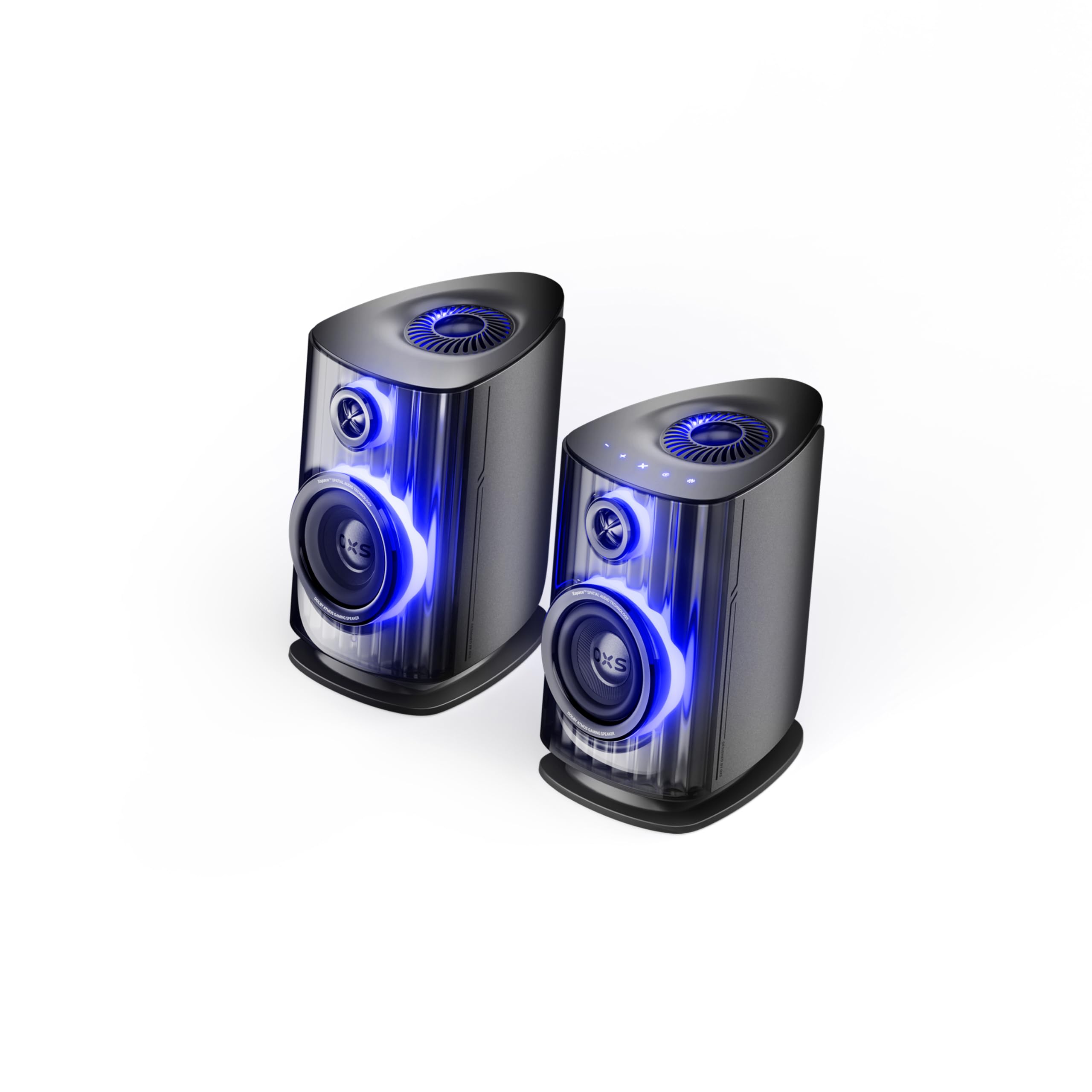
Image: OXS Thunder Duo Speaker System. This image shows the two main speaker units, typically placed on a tabletop. The design features a sleek, modern aesthetic with speaker grilles visible on the front.
4.1. רעדנער קאָמפּאָנענטן
- הויפּט רעדנער אַפּאַראַט: Houses the primary audio drivers and control circuitry.
- Satellite Speaker Unit: Connects to the main unit to provide a wider soundstage.
- מאַכט אַרייַנשרייַב: פֿאַר קאַנעקטינג די מאַכט אַדאַפּטער.
- אַודיאָ ינפּוץ: HDMI IN, USB-C, eARC, Optical for various source connections.
4.2. רימאָוט קאָנטראָל
The included remote control allows for convenient operation of the speaker system from a distance. It typically includes buttons for:
- מאַכט אויף / אַוועק
- באַנד אַרויף / אַראָפּ
- Input Source Selection (HDMI, USB-C, eARC, Optical)
- שטום
- Audio Mode Selection (e.g., Surround)
5. סעטאַפּ
5.1. רעדנער פּלייסמאַנט
Place the OXS Thunder Duo speakers on a stable, flat tabletop surface. For optimal sound, position them equidistant from your listening position and at ear level. Ensure there are no obstructions between the speakers and your listening area.
5.2. מאַכט קאַנעקשאַן
- Connect the power adapter to the power input port on the main speaker unit.
- צאַפּן די מאַכט אַדאַפּטער אין אַ וואַנט ווענטיל.
- The power indicator on the speaker will illuminate, indicating it is in standby mode.
5.3. קאַנעקטינג אַודיאָ קוואלן
The OXS Thunder Duo offers multiple connectivity options:
- HDMI (eARC): For connecting to TVs with an HDMI eARC/ARC port. Use the provided HDMI cable. This connection supports high-quality audio and allows TV remote control of speaker volume.
- HDMI ין: For connecting other HDMI-enabled devices like gaming consoles or Blu-ray players.
- אָפּטיש: For connecting to TVs or other devices with an optical audio output. Use the provided optical cable.
- וסב- C: For connecting to PCs, laptops, or compatible mobile devices.
Connect your desired audio source to the corresponding input port on the main speaker unit.
6. אַפּערייטינג ינסטרוקטיאָנס
6.1. פּאָווערינג אויף / אויסגעלאשן
Press the Power button on the remote control or the main speaker unit to turn the system on or off. The power indicator will change status accordingly.
6.2. אויסקלייבן די איינגאבע מקור
Press the 'Input' or dedicated source buttons (e.g., HDMI, Optical, USB-C) on the remote control to switch between connected audio sources. The current input source will typically be indicated by an LED or display on the main speaker unit.
6.3. באַנד קאָנטראָל
Use the 'Volume Up' (+) and 'Volume Down' (-) buttons on the remote control to adjust the audio level. Press the 'Mute' button to temporarily silence the audio.
6.4. אַודיאָ מאָדעס
The OXS Thunder Duo supports surround sound audio output. Use the 'Mode' button on the remote control to cycle through available audio modes, if applicable, to optimize your listening experience for different content types.
7. קאַנעקטיוויטי
The OXS Thunder Duo offers versatile connectivity for a wide range of devices:
- HDMI ין: Connects to various HDMI-enabled devices.
- וסב- C: Ideal for direct digital audio connection to computers (PC), laptops, and mobile devices running Windows, Android, or iOS.
- eARC (פאַרבעסערט אַודיאָ צוריקקער קאַנאַל): Connects to compatible TVs for high-fidelity audio transmission and simplified control.
- אָפּטיש: Provides a digital audio connection for TVs, game consoles (PlayStation, XBOX, Switch), and other devices with an optical output.
8. וישאַלט
Proper maintenance ensures the longevity and performance of your OXS Thunder Duo speaker system.
- רייניקונג: Regularly wipe the speaker surfaces with a soft, dry, lint-free cloth. Do not use abrasive cleaners, waxes, or solvents.
- שטויב: Keep the speaker grilles free from dust accumulation. Use a soft brush or a vacuum cleaner with a brush attachment on a low setting.
- סטאָרידזש: אויב איר לייגט די רעדנערס אויף פאר א לענגערע צייט, שטעלט זיי אפ פון עלעקטריציטעט און לייגט זיי אויף אין א קילן, טרוקענעם ארט, בעסער אין זייער אריגינעלער פארפאקונג.
9. טראָובלעשאָאָטינג
If you encounter issues with your OXS Thunder Duo, refer to the following common problems and solutions:
| פּראָבלעם | מעגלעך סיבה | לייזונג |
|---|---|---|
| קיין מאַכט | Power cable not connected; Power outlet not active; Speaker is off. | Ensure power cable is securely connected. Test the outlet with another device. Press the Power button on the remote or speaker. |
| קיין געזונט | Incorrect input source selected; Volume too low or muted; Audio cable not connected properly; Source device not outputting audio. | Select the correct input source. Increase volume and check if muted. Reconnect audio cables. Check audio settings on your source device. |
| ווייַט קאָנטראָל נישט ארבעטן | Batteries are dead or incorrectly inserted; Obstruction between remote and speaker. | Replace batteries, ensuring correct polarity. Remove any obstructions. Ensure remote is pointed at the main speaker unit. |
| פאַרקרימט געזונט | קול צו הויך; שלעכטע קוואַליטעט פון דער אַודיאָ מקור; לויזער קאַבל פֿאַרבינדונג. | Lower the volume. Check the audio quality from the source. Ensure all cables are securely connected. |
If the problem persists after trying these solutions, please contact OXS customer support.
10. ספּעסאַפאַקיישאַנז
| שטריך | באַשרייַבונג |
|---|---|
| סאָרט | OXS |
| מאָדעל נומער | Thunder DUO |
| רעדנער מאַקסימום רעזולטאַט | 220 וואטס |
| אָפטקייַט ענטפער | 20 KHz |
| קאַנעקטיוויטי טעכנאָלאָגיע | HDMI IN, USB-C, eARC, Optical |
| אַודיאָ רעזולטאַט מאָדע | אַרומרינגלען |
| מאַונטינג טיפּ | טאַבלעטאָפּ בארג |
| Product Exterior Material | ABS & PVC |
| רעדנער טיפּ | ביכערשעלף |
| רעקאָממענדעד ניצט | Computer, TV, Gaming Consoles |
| קאָליר | טיטאַן |
| וואָטערפּרוף | פאַלש |
| וואָראַנטי טיפּ | לימיטעד וואָראַנטי |
| רעדנער גרייס | 1.5 אינטשעס |
| Speaker Channel Configuration | 3.1.2 |
| S/N פאַרהעלטעניש | 96 דב |
| באַטעריז | 2 AAA באַטעריעס (אַרייַנגערעכנט פֿאַר ווייַטקאָנטראָל) |
| נומער דימענשאַנז (ד רענטגענ וו רענטגענ ה) | 17.8 X 21.5 X 27.6 סענטימעטער |
| פּונקט וואָג | 11.02 פונט |
| קאַמפּאַטאַבאַל דעוויסעס | TV, PC, PlayStation, XBOX, Mobile devices (Windows, Android, iOS), Switch |
| UPC | 199284067936 |
| ASIN | B0GDFVBVB3 |
11. וואָראַנטי און שטיצן
The OXS Thunder Duo Speaker System comes with a Limited Warranty. Please refer to the warranty card included in your package for specific terms and conditions, including the duration and coverage details.
For technical support, troubleshooting assistance, or warranty claims, please contact OXS customer service through the contact information provided on the official OXS website or your purchase documentation. Please have your model number (Thunder DUO) and proof of purchase ready when contacting support.