
1. הקדמה
Thank you for choosing the DATOUBOSS 48V 6000W Pure Sine Wave Hybrid Solar Inverter. This manual provides essential information for the safe and efficient installation, operation, and maintenance of your inverter. Please read this manual thoroughly before installation and keep it for future reference. This inverter is designed for off-grid solar systems, reliably converting 48V DC to 230V/50Hz pure sine wave AC, suitable for sensitive electronic equipment.
2. זיכערקייַט אינסטרוקציעס
ביטע באַמערקן די פאלגענדע זיכערהייט מיטלען בעת די אינסטאַלאַציע, אָפּעראַציע און וישאַלט פון די ינווערטער:
- קוואַלאַפייד פּערסאַנעל: אינסטאַלאַציע און וישאַלט זאָל נאָר דורכגעפירט ווערן דורך קוואַליפֿיצירטע פּערסאָנעל.
- דיסקאַנעקט מאַכט: Always disconnect all power sources (PV array, battery, utility grid) before performing any wiring or maintenance.
- געהעריק גראָונדינג: זיכער מאַכן אַז דער ינווערטער איז ריכטיק געערדט צו פאַרמייַדן עלעקטרישע קלאַפּ.
- ווענטילאַטיאָן: אינסטאלירט דעם אינווערטער אין א גוט-ווענטילירטן ארט צו פארמיידן איבערהיצונג.
- ינווייראַנמענאַל טנאָים: Avoid exposure to rain, snow, or excessive dust. The inverter features integrated lightning and water protection, but proper installation environment is crucial.
- באַטערי זיכערקייַט: Work with batteries carefully. Wear eye protection and remove jewelry. Do not short-circuit battery terminals.
- קיין דיסאַסעמבאַל: פרובירט נישט צו צענעמען אדער פאררעכטן דעם אינווערטער אליין. ווענדט זיך צו קוואַליפֿיצירטע סערוויס פּערסאָנעל.
The inverter includes a comprehensive safety system with protection against overload, overvoltage, short circuit, and overheating. It also supports Battery Management System (BMS) to prevent overcharge and deep discharge, extending battery life.
3. פּראָדוקט איבערview
3.1 שליסל פֿעיִקייטן
- פּורע סינע וואַווע רעזולטאַט: Provides stable, grid-quality AC power for sensitive electronics.
- אינטעגרירטע MPPT טשאַרדזש קאָנטראָללער: 120A MPPT controller for efficient solar charging.
- הויך PV אינפוט קייפּאַביליטי: Supports PV arrays up to 8000W with a maximum open circuit voltagE פון 500 וו דק.
- פלעקסיבלע אפעראציע: Can operate with or without batteries.
- פולשטענדיק שוץ: Built-in surge, lightning, and waterproofing protection.
- LCD ווייַז: Clear display for real-time system status, voltage, power, and battery information.
- ברייט קאַמפּאַטאַבילאַטי: Compatible with 48V lead-acid (sealed, AGM, Gel, flooded) and lithium batteries.
- ווערסאַטאַל מאָדעס: Multiple selectable charging and output priority modes.
3.2 Inverter Components and Interfaces

פיגורע 1: פראָנט view of the DATOUBOSS Hybrid Solar Inverter highlighting key technical parameters.
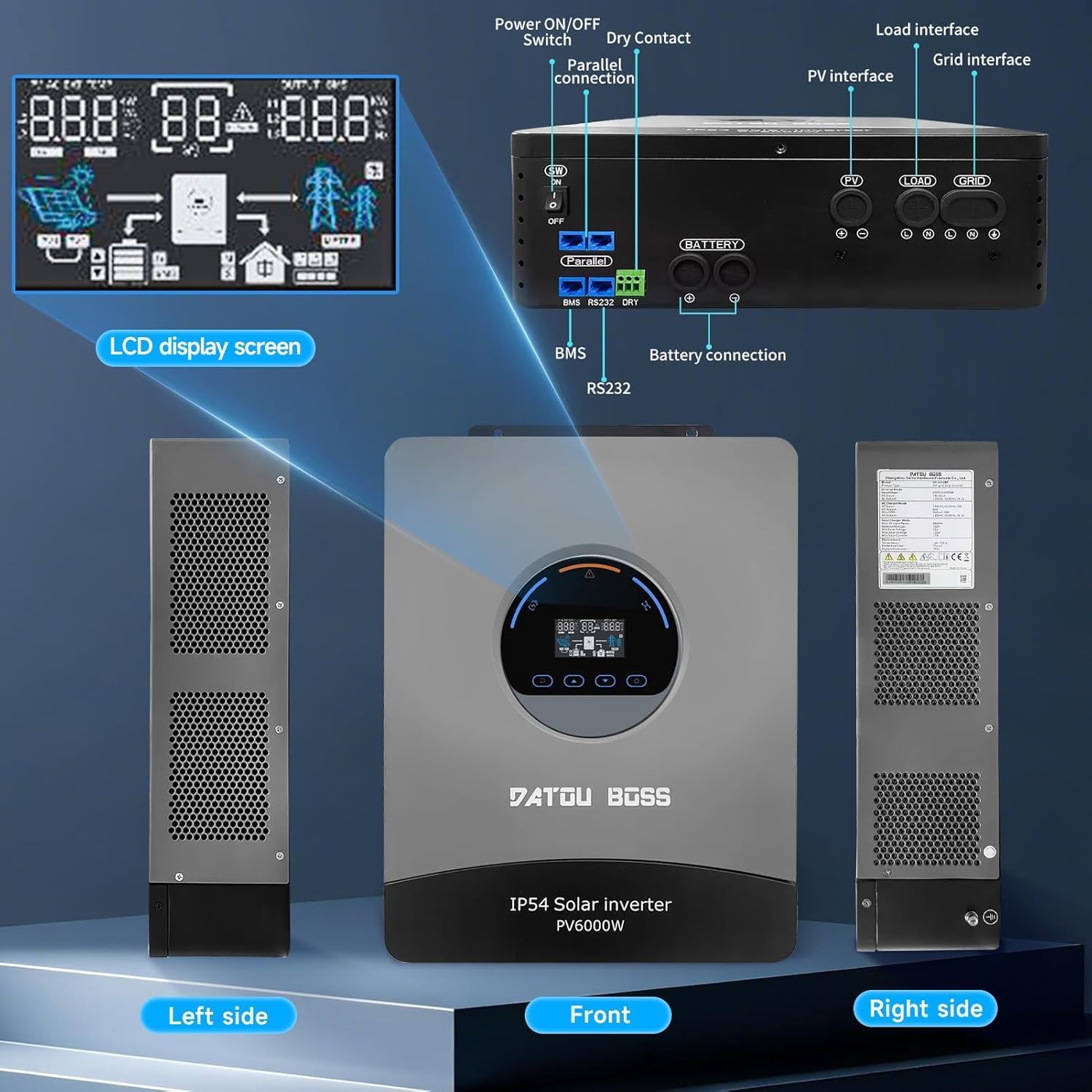
פיגורע 2: איבערview of the inverter's physical layout, including the LCD display, power switch, parallel connection ports, dry contact, PV interface, load interface, grid interface, BMS, RS232, and battery connection terminals.
4. ייַנמאָנטירונג און סעטאַפּ
4.1 וואָס איז אין דער קעסטל
ביים אויספּאַקן, זיכער מאַכן אַז אַלע זאכן זענען פאַראַן און נישט געשעדיגט:
- 1 x DATOUBOSS 48V 6000W Hybrid Solar Inverter
- באַניצער מאַנואַל (דעם דאָקומענט)
- מאָנטירונג אַקסעסאָריעס (אויב אָנווענדלעך)
4.2 מאַונטינג די ינווערטער
- Choose a suitable mounting location that is dry, well-ventilated, and protected from direct sunlight and moisture.
- זיכער מאַכן גענוג פּלאַץ אַרום דעם ינווערטער פֿאַר געהעריק לופטפֿלוס און היץ פֿאַרשפּרייטונג.
- מאָנטירן דעם ינווערטער ווערטיקאַל אויף אַ שטאַרקער ייבערפלאַך מיט פּאַסיקע פאַסטנערס.
4.3 פֿאַרבינדונג גיידליינז
Follow these steps for connecting the inverter. Refer to Figure 2 for port locations.
- באַטערי קשר: Connect the 48V battery bank to the battery terminals. Ensure correct polarity (+ to + and - to -).
- PV אַרעי קאַנעקשאַן: Connect the solar panel array to the PV input terminals. Observe maximum voltagE און קראַנט רייטינגז.
- AC Input (Grid) Connection: Connect the utility grid power to the AC input terminals.
- AC אַרויסגאַנג (לאָוד) פֿאַרבינדונג: Connect your AC loads (appliances) to the AC output terminals.
- גראָונדינג: Connect the inverter's grounding terminal to a reliable earth ground.
- קאָמוניקאַציע פּאָרץ: Connect BMS, RS232, or parallel communication cables if applicable for your system configuration.
באַטערי-פריי אָפּעראַציע: This inverter supports operation without a battery. In grid-tied or PV-only modes, loads can be powered directly from the grid or solar panels, offering flexible installation options.
5. אַפּערייטינג ינסטרוקטיאָנס
5.1 לקד ווייַז
The inverter features a clear LCD screen that provides real-time information about the system's operation. You can monitor:
- אַרייַנשרייַב און רעזולטאַט וואָלtage
- מאַכט קאַנסאַמשאַן
- באַטאַרייע סטאַטוס (וואָלtage, charge level)
- System operational status
- Error codes for quick troubleshooting
5.2 אַפּערייטינג מאָדעס
The inverter offers versatile charging and output priority modes to suit different energy management needs:
Charging Modes (Selectable)
- זונ - פּריאָריטעט: Solar power is prioritized for charging the battery.
- נוצלעכקייט פּריאָריטעט: Utility grid power is prioritized for charging the battery.
- זונ - און נוצן כייבריד: ניצט ביידע זונ - און יוטיליטי ענערגיע פֿאַר טשאַרדזשינג.
- בלויז זונשייַן: Only solar power is used for charging.
Output Modes (Adjustable)
- PV פּריאָריטעט: Solar power is prioritized to supply loads.
- גריד פּריאָריטעט: Utility grid power is prioritized to supply loads.
- ינווערטער פּריאָריטעט: Inverter (battery/PV) power is prioritized to supply loads, switching to grid only when necessary.
6. וישאַלט
רעגולערע אויפהאלטונג גאראנטירט די לאנגעוויטי און אפטימאלע פערפארמאנס פון אייער אינווערטער:
- ריינקייַט: האַלט דעם ינווערטער ריין און פריי פון שטויב און שמוץ. ניצט אַ טרוקענעם שטאָף פֿאַר רייניקונג.
- ווענטילאַטיאָן: ענשור אַז ווענטאַליישאַן אָופּאַנינגז זענען נישט אפגעשטעלט.
- קשר טשעקס: קאָנטראָלירט פּעריִאָדיש אַלע עלעקטרישע פֿאַרבינדונגען פֿאַר שטרענגקייט און וואונדער פֿון קעראָוזיע.
- קאַבלע אָרנטלעכקייַט: קאָנטראָלירט די קאַבלען פֿאַר יעדן שאָדן אָדער טראָגן.
- ענוויראָנמענטאַל קאָנטראָל: זיכער מאַכן אַז די אינסטאַלאַציע סביבה בלייבט אין די ספּעציפֿישע טעמפּעראַטור און הומידיטי ריינדזשאַז.
7. טראָובלעשאָאָטינג
The LCD display will show error codes to assist in diagnosing issues. Refer to the table below for common problems and their solutions. For persistent issues or error codes not listed, please contact customer support.
| פּראָבלעם | מעגלעך סיבה | לייזונג |
|---|---|---|
| אינווערטער טוט זיך נישט אן | No battery power, PV input too low, or AC input missing. | Check battery connections and charge level. Verify PV array output. Ensure AC input is present. |
| קיין AC רעזולטאַט | Overload, short circuit, or inverter fault. | Reduce load. Check for short circuits in wiring. Restart inverter. |
| די באַטאַרייע איז נישט טשאַרדזשינג | PV input issue, charger fault, or battery connection problem. | Check PV array connections and output. Verify charging mode settings. Inspect battery cables. |
| אָוווערכיטינג ווארענונג | Blocked ventilation or excessive ambient temperature. | Ensure clear airflow around the inverter. Relocate to a cooler environment if necessary. |
8. טעכניש ספּעסאַפאַקיישאַנז
The following table details the technical parameters of the DATOUBOSS 48V 6000W Hybrid Solar Inverter:

Figure 3: Detailed technical parameters for the DATOUBOSS Hybrid Solar Inverter.
| פּאַראַמעטער | ווערט |
|---|---|
| מאָדעל | DT-4860BF-A-EU |
| רייטאַד מאַכט | 6000 וו |
| דק אַרייַנשרייַב חלקtage | 48V |
| אַק רעזולטאַט וואָלtage | 230V AC |
| אַק רעזולטאַט אָפטקייַט | 50 הז |
| וואַוועפאָרם | ריין סיין וואַווע |
| מאַקס. פּוו אַרייַנשרייַב מאַכט | 8000 וו |
| מאַקס. PV Open Circuit Voltage | 500V DC |
| Rated PV Input Current | 27 א |
| MPPT טשאַרדזש קאָנטראָללער קראַנט | 120 א |
| ינגרעסס פּראַטעקשאַן | IP54 |
| אַפּערייטינג טעמפּעראַטור | -10°C צו 55°C |
| קאָמפּאַטיבלע באַטערי טייפּס | 48V Lead-acid (sealed, AGM, Gel, flooded), Lithium |
| UPC | 740684063723 |
9. וואָראַנטי און שטיצן
DATOUBOSS is committed to providing high-quality products and customer satisfaction.
- וואָראַנטי: דער פּראָדוקט קומט מיט אַ 24-חודש וואָראַנטי פון די דאַטע פון קויפן.
- קערט: מיר פאָרשלאָגן אַ 30-day unconditional return guarantee.
- קונה שטיצן: For any questions, technical assistance, or warranty claims, please contact our 7x24 customer support.

Figure 4: DATOUBOSS customer service and warranty information.