
1. הקדמה
א דאנק פארן קויפןasing the Sharp PS-916 Bluetooth Party Speaker System. This system includes two identical portable Bluetooth speakers designed to deliver powerful audio with versatile connectivity options. Please read this manual carefully before using the product to ensure proper operation and to maximize your listening experience.
פּעקל אינהאַלט:
- 2 x Sharp PS-916 Party Speakers
- 1 x טשאַרדזשינג קאַבלע
- 1 x רימאָוט קאָנטראָל
- 1 x באַניצער מאַנואַל

Image: The Sharp PS-916 system includes two speakers for a complete stereo experience.
2. סעטאַפּ
2.1 אויפלאָדן די רעדנערס
The PS-916 speakers are equipped with rechargeable batteries, providing up to 12 hours of playback. Before initial use, fully charge both speakers.
- Connect the charging cable to the DC IN port on the rear of each speaker.
- Plug the other end of the charging cable into a suitable power adapter (not included) or USB power source.
- די טשאַרדזשינג אינדיקאַטאָר ליכט וועט זיך אָנצינדן. עס וועט טוישן קאָליר אָדער זיך אויסלעשן אַמאָל די טשאַרדזשינג איז פֿאַרטיק.
2.2 פּאַוערינג אויף / אַוועק
To power on or off each speaker, press and hold the ON/STAND BY INPUT קנעפּל ליגן אויף די קאָנטראָל טאַפליע.
2.3 בלועטוט פארבינדונג (איין רעדנער)
- Ensure the speaker is powered on and in Bluetooth mode. The Bluetooth indicator will flash, indicating it is ready for pairing.
- אויף דיין רירעוודיק מיטל, געבן בלועטאָאָטה און זוכן פֿאַר בנימצא דעוויסעס.
- Select "Sharp PS-916" from the list of devices.
- אַמאָל פארבונדן, וועט דער בלועטוט אינדיקאַטאָר אויפהערן צו בלינקען און בלייבן פעסט.
2.4 True Wireless Stereo (TWS) Pairing (Two Speakers)
TWS allows you to connect two PS-916 speakers wirelessly for a stereo sound experience.
- Power on both PS-916 speakers.
- Ensure neither speaker is currently connected to a Bluetooth device.
- אויף איינעם פון די רעדנערס (דאָס וועט זיין דער הויפּט רעדנער), דריק די TWS button. The speaker will enter TWS pairing mode.
- The primary speaker will automatically search for the secondary speaker. Once connected, you will hear an audible confirmation, and the TWS indicator lights on both speakers will illuminate.
- Now, connect your mobile device to the primary speaker via Bluetooth as described in section 2.3. Audio will play through both speakers in stereo.
3. אָפּערייטינג
3.1 קאָנטראָל פּאַנעל איבערview

Image: Main control panel for the Sharp PS-916 speaker.
- ON/STAND BY INPUT: Power on/off, switch input modes (Bluetooth, USB, TF, AUX, FM).
- PLAY/PAUSE (►/∕∕): שפּילן אָדער פּויזירן אַודיאָ ווידערשפּיל.
- PREVIOUS (◀◀): האָפּקען צו די פריערדיקע שפּור.
- NEXT (▶▶): האָפּקען צו דער ווייַטער שפּור.
- וואָלום קנופּ: דריי צו סטרויערן די הויפּט באַנד.
- TWS: Initiate or disconnect True Wireless Stereo pairing.
- EQUALIZER: Cycle through preset equalizer modes.
- באַס: Activate or deactivate bass boost.
- ליכט: Change or turn off the LED light effects.
- MIC CONTROL: Adjust microphone volume or echo (if applicable).
3.2 אַרייַנשרייַב פּאָרץ
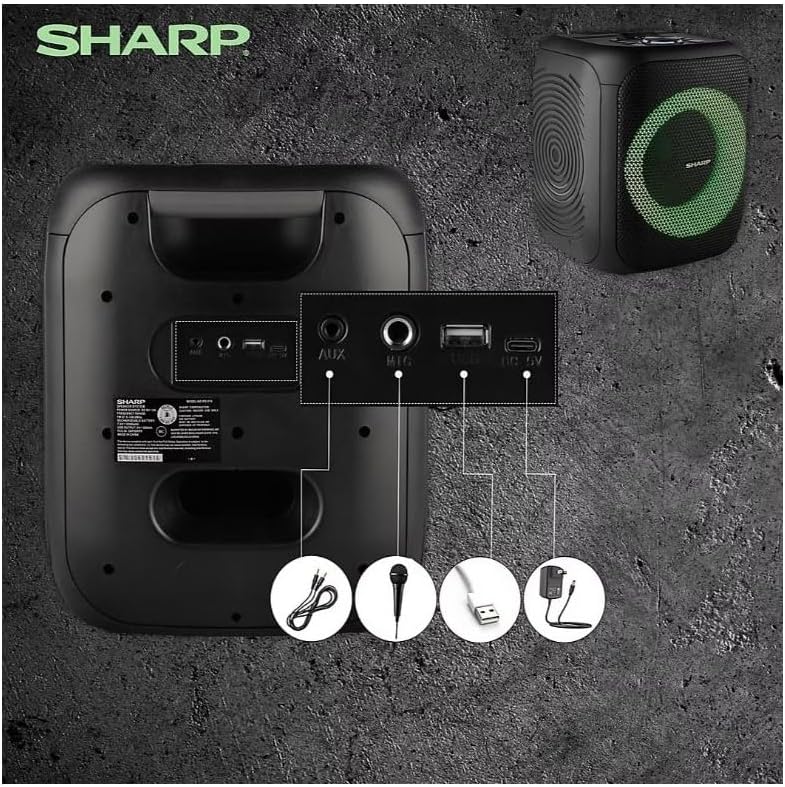
Image: Rear panel with various input and charging ports.
- AUX IN: פֿאַרבינדט עקסטערנע אַודיאָ דעוויסעס מיט אַ 3.5 מם אַודיאָ קאַבל.
- MIC אין: Connect a microphone (sold separately) for karaoke or announcements.
- וסב: אַרײַנשטעלן אַ USB פלאַש דרייוו פֿאַר אַודיאָ ווידערשפּיל.
- TF קאָרט: Insert a TF (microSD) card for audio playback.
- דק אין: Connect the charging cable to power and charge the speaker.
3.3 Playing Audio from USB/TF Card
- Insert a USB flash drive or TF card into the corresponding port.
- דרוק די ON/STAND BY INPUT button repeatedly until the display shows the USB or TF mode.
- ווידערשפּיל וועט אָנהייבן אויטאָמאַטיש. ניצט די שפּיל / פּויזע, פרייַערדיק, און NEXT קנעפּלעך צו קאָנטראָלירן פּלייבאַק.
3.4 ניצן AUX אריינגאנג
- Connect one end of a 3.5mm audio cable to the AUX IN port on the speaker.
- פֿאַרבינדט דעם אַנדערן עק צום כעדפאָון דזשעק אָדער אַודיאָ אַרויסגאַנג פֿון אייער עקסטערנעם מיטל.
- דרוק די ON/STAND BY INPUT button repeatedly until the display shows AUX mode.
- קאָנטראָליר ווידערשפּיל און באַנד פֿון דיין עקסטערנעם מיטל.
3.5 FM ראַדיאָ אָפּעראַציע

Image: The PS-916 features an integrated FM Tuner.
- דרוק די ON/STAND BY INPUT button repeatedly until the display shows FM mode.
- דריקן און האַלטן די שפּיל / פּויזע קנעפּל צו אויטאָמאַטיש סקענען און ראַטעווען פאַראַן FM סטאנציעס.
- ניצן די פרייַערדיק און NEXT קנעפּלעך צו נאַוויגירן דורך געראטעוועט סטיישאַנז.
3.6 LED Light Effects
דרוק די ליכט button to cycle through different LED light modes or to turn the lights off.
4. וישאַלט
4.1 רייניקונג
- Always power off the speaker and disconnect it from the power source before cleaning.
- ניצט אַ ווייכן, טרוקענעם שטאָף צו ווישן די אויסערלעכע ייבערפלאַכן.
- ניצט נישט פליסיקע רייניגער, אַעראָסאָלן אדער סאָלווענטן, ווײַל די קענען שעדיקן די ענדיקונג אדער אינעווייניקסטע קאָמפּאָנענטן.
4.2 סטאָרידזש
- האַלט די רעדנערס אין אַ קיל, טרוקן אָרט אַוועק פון דירעקט זונשייַן און עקסטרעמע טעמפּעראַטורן.
- אויב איר לייגט עס אויף פאר א לענגערע צייט, לאדט אויף די באטעריע ביז בערך 50% יעדע פאר חדשים כדי צו אויפהאלטן די געזונטהייט פון די באטעריע.
5. טראָובלעשאָאָטינג
If you encounter issues with your Sharp PS-916 speakers, please refer to the following common problems and solutions:
| פּראָבלעם | מעגלעך לייזונג |
|---|---|
| דער רעדנער גייט נישט אן. | זיכער מאַכן אַז די באַטאַרייע איז אויפגעלאָדן. פֿאַרבינדט דעם טשאַרדזשינג קאַבל און פּרוּווט ווידער. |
| קיין געזונט פון די רעדנער. | קאָנטראָלירט דעם וואָלומען לעוועל אויף ביידע דעם רעדנער און אייער פֿאַרבונדענעם מיטל. זיכערט זיך אַז דער ריכטיקער אַרייַנגאַנג מאָדע איז אויסגעקליבן. |
| בלועטוט דעווייס קען נישט פארבינדן. | Ensure the speaker is in Bluetooth pairing mode (indicator flashing). Move your device closer to the speaker. Disconnect from other Bluetooth devices. |
| TWS פּאָרינג פיילז. | Ensure both speakers are powered on and not connected to any other Bluetooth devices. Try initiating TWS pairing again. |
| פאַרקרימט געזונט. | Reduce the volume on both the speaker and your connected device. Ensure the audio source is not distorted. |
6. ספּעסאַפאַקיישאַנז
| שטריך | דעטאַל |
|---|---|
| סאָרט | שאַרף |
| מאָדעל נאָמען | PS-916 |
| רעדנער קאָנפיגוראַטיאָן | 8" Woofer, 1" Tweeter (per speaker) |
| שפּיץ רעזולטאַט מאַכט | 400 Watts (per speaker) |
| רמס רעזולטאַט מאַכט | 40 Watts (per speaker) |
| קאַנעקטיוויטי טעכנאָלאָגיע | בלועטאָאָטה |
| נאָך ינפּוץ | USB, TF Card, 3.5mm AUX, Microphone Input |
| באַטערי לעבן | אַרויף צו 12 שעה |
| ספּעציעלע פֿעיִקייטן | True Wireless Stereo (TWS) Pairing, Bass Boost, LED Light Effects, FM Tuner |
| קאָליר | שוואַרץ |
| פּונקט וואָג | 6.5 פונט (פּער רעדנער) |
| UPC | 728434122111 |
| GTIN | 728434122111 |
7. וואָראַנטי & שטיצן
7.1 וואָראַנטי אינפֿאָרמאַציע
This Sharp PS-916 product comes with a 90-day limited warranty. This warranty covers manufacturing defects under normal use. It does not cover damage caused by misuse, accidents, unauthorized modifications, or normal wear and tear.
7.2 קונה שטיצן
For technical assistance, warranty claims, or further inquiries, please refer to the contact information provided with your purchase documentation or visit the official Sharp support webפּלאַץ.


