
1. הקדמה
Thank you for choosing the TOPTRO TP3 4K Google TV Portable Projector. This manual provides essential information for setting up, operating, and maintaining your projector. Please read it thoroughly before use to ensure optimal performance and safety.
The TOPTRO TP3 is designed to deliver a versatile and immersive viewing experience, featuring integrated Google TV, AI-powered image adjustments, and comprehensive connectivity options. Enjoy your content at home, outdoors, or on the go.
2. פּראָדוקט איבערview
2.1 שליסל פֿעיִקייטן
- Integrated Google TV: Access over 10,000 official streaming applications, including Netflix, Prime Video, and YouTube, without additional devices.
- Google Voice Control: Use the remote control's voice assistant button to search for content, adjust settings, and control playback hands-free.
- AI-Powered Image Adjustment: Features automatic focus, automatic keystone correction, obstacle avoidance, and automatic screen adjustment for a perfectly aligned and clear image within seconds.
- Native 1080P Resolution with 4K Decoding: Delivers sharp, detailed images and natural colors, supporting 4K video decoding.
- Short Throw Ratio (0.8:1): Projects a 60-inch image from just one meter distance, ideal for small spaces.
- 90-Degree Rotating Stand: Allows for flexible projection angles, including ceiling projection.
- אַוואַנסירטע קאַנעקטיוויטי: Equipped with dual-band WiFi 6, Bluetooth 5.3, HDMI ARC, USB, and a 3.5mm audio jack for wide device compatibility.
- פּאָרטאַטיוו פּלאַן: Weighing only 1.2 kg (2.6 lbs) with a hidden carry handle, making it easy to transport.
2.2 פּעקל אינהאַלט
זיכער מאַכן אַז אַלע זאכן זענען פאַראַן אין פּעקל:
- טאָפּטראָ TP3 פּראָיעקטאָר
- ווייַט קאָנטראָל
- HDMI קאַבלע
- מאַכט אַדאַפּטער
- באַניצער מאַנואַל
3. סעטאַפּ
3.1 ערשטע פּלאַצירונג
Place the projector on a stable, flat surface. The 90-degree rotating stand allows for various projection angles, including wall, ceiling, or tabletop. For optimal image quality, ensure the projection surface is smooth and light-colored.

Image: The TOPTRO TP3 projector can be used in diverse environments, from living rooms to outdoor camping, showcasinג זײַן אַדאַפּטאַביליטי.
3.2 מאַכט קאַנעקשאַן
- Connect the power adapter to the projector's power input.
- Plug the power adapter into a suitable electrical outlet (220V).
- דריק דעם מאַכט קנעפּל אויף דעם פּראָיעקטאָר אָדער ווײַטקאָנטראָל צו עס אנצינדן.
3.3 נעטוואָרק קאַנעקשאַן
Upon first startup, follow the on-screen prompts to connect to your Wi-Fi network. The projector supports dual-band WiFi 6 for a fast and stable connection.
3.4 גוגל טיווי סעטאַפּ
After connecting to Wi-Fi, sign in with your Google account to access Google TV and download applications from the Google Play Store. This step is crucial for utilizing the integrated streaming services.

Image: The projector's interface showing integrated Google TV with direct access to popular streaming applications.
4. אַפּערייטינג ינסטרוקטיאָנס
4.1 יקערדיק אָפּעראַציע
- מאַכט אויף / אַוועק: דריק דעם מאַכט קנעפּל אויף דער ווייַטקאָנטראָל אָדער פּראָיעקטאָר.
- נאַוויגאַציע: Use the directional buttons on the remote to navigate menus.
- סעלעקציע: Press the 'OK' button to confirm selections.
- באַנד קאָנטראָל: Use the volume buttons on the remote.
4.2 בילד אַדזשאַסטמאַנט
The TOPTRO TP3 features AI-powered automatic image adjustments:
- אַוטאָ פאָקוס: דער פּראָיעקטאָר אַדזשאַסטירט אויטאָמאַטיש די קלעריטי פון דעם בילד.
- אַוטאָ קיסטאָנע קערעקשאַן: קארעקטירט אויטאָמאַטיש פארדרייטע בילדער צו אַ רעכטעקיקע פֿאָרעם.
- ויסמיידן מכשול: Detects and adjusts the image to avoid objects on the projection surface.
- Auto Screen Adjustment: אָפּטימיזירט דאָס בילד צו פּאַסן צום עקראַן־שטח.
These adjustments occur automatically within seconds of powering on or repositioning the projector. Manual digital zoom (80-100%) is also available for fine-tuning image size.

Image: Visual representation of the projector's AI-powered automatic image adjustment features, ensuring a clear and aligned picture.
4.3 Google Voice Control
Press the dedicated voice assistant button on your remote control and speak your command. For example, say "Open YouTube" or "Play music." The projector will respond to your voice commands for quick access to functions and content.
4.4 Screen Mirroring (Google Cast)
Utilize Google Cast technology to wirelessly mirror content from your smartphone or tablet to the projector. For iPhone users, download the "AirScreen" application from the Google Play Store on the projector for wireless screen mirroring.
4.5 Rotating Stand Usage
The integrated 90-degree rotating stand allows you to easily adjust the projection angle. Simply pivot the projector to direct the image onto a wall, screen, or ceiling. This feature is particularly useful for bedroom viewing or creative setups.
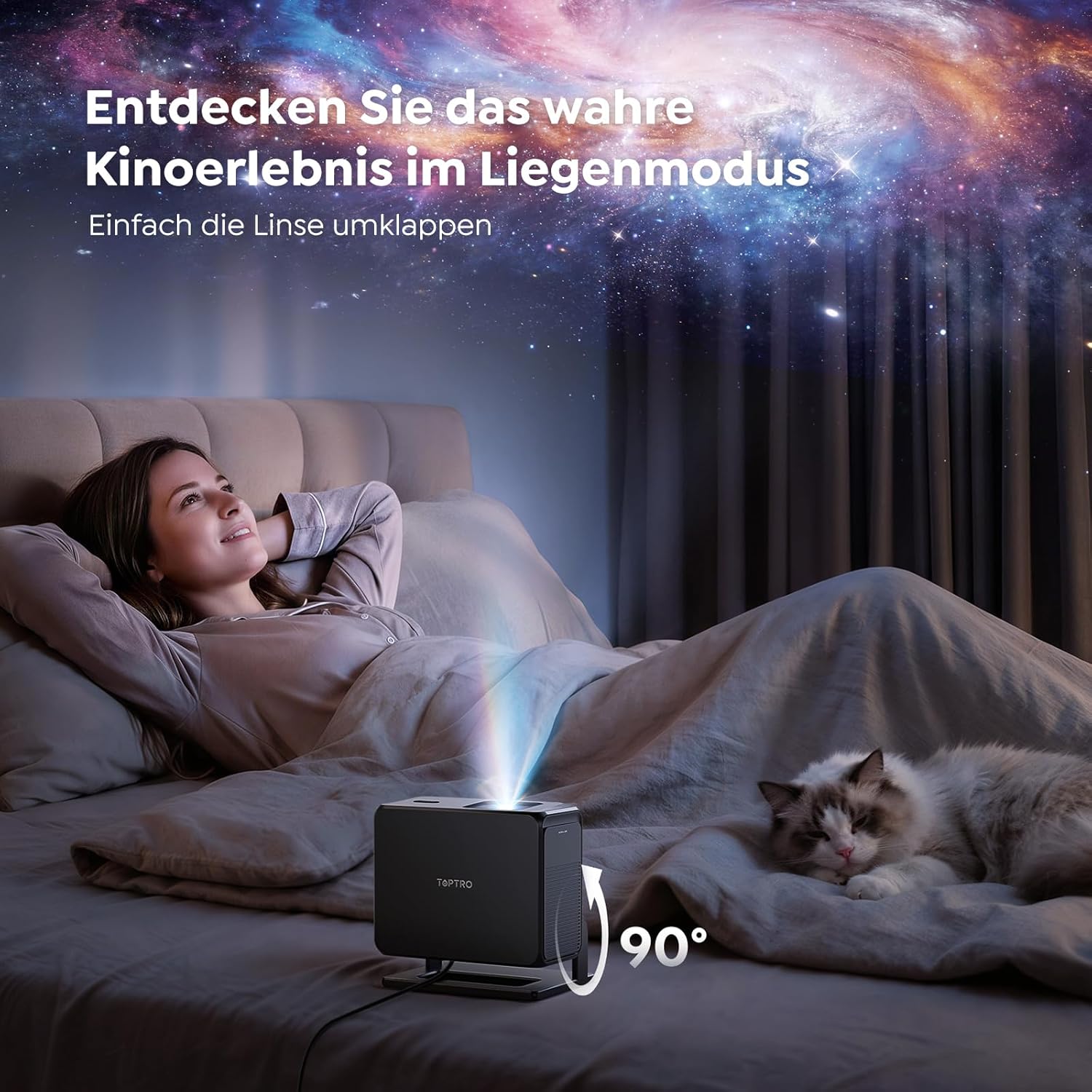
Image: The TOPTRO TP3 projector rotated 90 degrees to project content onto a bedroom ceiling, offering a unique viewינג דערפאַרונג.
5. קאַנעקטיוויטי
5.1 ווייערד קאַנעקשאַנז
- HDMI ARC/CEC: Connect external devices like laptops, gaming consoles (Xbox/PlayStation 5), or Blu-ray players. The ARC feature allows audio to be sent back to a compatible sound system.
- וסב: פֿאַרבינדט USB דרייווז פֿאַר מעדיע ווידערשפּיל.
- 3.5 מם אַודיאָ דזשאַק: פֿאַרבינדט עקסטערנע דראָטיקע רעדנערס אָדער כעדפאָונז.
5.2 ווירעלעסס קאַנעקשאַנז
- Wi-Fi 6: Provides faster and more stable wireless connectivity for streaming and online content.
- בלועטאָאָטה 5.3: פֿאַרבינדט בלוטוט כעדפאָונז אָדער רעדנערס פֿאַר אַ פֿאַרבעסערטע אַודיאָ דערפאַרונג.
6. וישאַלט
6.1 רייניקן די לינז
Gently clean the projector lens with a soft, lint-free cloth designed for optical surfaces. Avoid using abrasive cleaners or excessive force, as this can scratch the lens.
6.2 אַלגעמיינע רייניקונג
ווישט אָפּ די אויסערלעכע זייט פון פּראָיעקטאָר מיט אַ ווייכן, טרוקענעם שטאָף. ניצט נישט פליסיקע רייניקונגסמיטלען גלייך אויף דעם אַפּאַראַט.
6.3 סטאָרידזש
When not in use, store the projector in a cool, dry place, away from direct sunlight and extreme temperatures. Use the original packaging or a protective case to prevent dust accumulation and damage.
7. טראָובלעשאָאָטינג
7.1 קיין בילד נישט געוויזן
- זיכער מאַכן אַז דער פּראָיעקטאָר איז אנגעצינדן און פארבונדן צו אַ מאַכט מקור.
- Check all cable connections (HDMI, USB) to external devices.
- Verify the input source selected on the projector matches the connected device.
- Confirm the lens cap is removed.
7.2 פארשוואָמענע בילד
- Allow the auto-focus function to complete its adjustment.
- זיכער מאַכן אַז די פּראָיעקציע־איבערפֿלאַך איז גלאַט און דער פּראָיעקטאָר איז סטאַביל.
- Clean the projector lens if smudges or dust are visible.
7.3 קיין געזונט
- קאָנטראָלירט דעם וואָלומען לעוועל אויף ביידע דעם פּראָיעקטאָר און דעם פֿאַרבונדענעם מקור מיטל.
- Ensure external speakers or headphones are properly connected (wired or Bluetooth).
- If using HDMI ARC, verify your sound system is compatible and correctly configured.
7.4 ווײַטקאָנטראָל אַרבעט נישט
- פאַרבייַטן די באַטעריז אין די ווייַט קאָנטראָל.
- זיכער מאַכן אַז עס זענען נישטאָ קיין שטערונגען צווישן דעם ווײַטקאָנטראָל און דעם פּראָיעקטאָר'ס IR ופנעמער.
For further assistance, refer to the detailed troubleshooting section in the full user manual or contact customer support.
8. ספּעסאַפאַקיישאַנז
| שטריך | באַשרייַבונג |
|---|---|
| סאָרט | TOPTRO |
| מאָדעל נאָמען | TP3 |
| געבוירן האַכלאָטע | 1920 רענטגענ 1080 (1080 פּ) |
| Video Decoding Support | 4K |
| ווייַז טיפּ | געפירט |
| ספּעציעלע פֿעיִקייטן | Auto Focus, Auto Keystone Correction, Obstacle Avoidance, Auto Screen Adjustment, Google TV, Google Voice Control |
| קאַנעקטיוויטי טעכנאָלאָגיע | HDMI, USB, Bluetooth 5.3, Wi-Fi 6 |
| ייַזנוואַרג צובינד | HDMI ARC/CEC, USB, 3.5mm Audio |
| פּראָדוקט דימענשאַנז (LxWxH) | 19.4 X 15.8 X 14.1 סענטימעטער |
| פּונקט וואָג | 1.2 קג |
| פאָרם פאַקטאָר | פּאָרטאַטיוו |
| מאַונטינג טיפּ | Ceiling Mount, Tabletop, Wall |
| מינימום בילד גרייס | 40 אינטשעס |
| מאַקסימום בילד גרייס | 120 אינטשעס |
| מאַקסימום וואַרפן דיסטאַנסע | 2.13 מעטער |
| Voltage | 220 וואלטס |
| אַרייַנגערעכנט קאַמפּאָונאַנץ | HDMI קאַבלע |
| קאָליר | שוואַרץ |
| קאָנטראָללער טיפּ | ווייַט קאָנטראָל |
| קאַמפּאַטאַבאַל דעוויסעס | Xbox/PlayStation 5, Smartphone, Tablet, Laptop, Speaker, Notebook |
| רעקאָממענדעד ניצט | Gaming, Business, Home Cinema, Education |
9. וואָראַנטי און שטיצן
9.1 וואָראַנטי אינפֿאָרמאַציע
ביטע זעט די וואָראַנטי קאַרטל וואָס איז אַרייַנגערעכנט מיט אייער פּראָדוקט פֿאַר ספּעציפֿישע וואָראַנטי טערמינען און באַדינגונגען. האַלט אייער קויף באַווייַז פֿאַר וואָראַנטי קליימז.
9.2 קונה שטיצן
If you encounter any issues or have questions regarding your TOPTRO TP3 projector, please contact our customer service team. We provide prompt, professional, and effective support to ensure a smooth user experience.
Contact details can typically be found on our official webזייטל אדער אויף דער וואָראַנטי קאַרטל.