
1. פּראָדוקט איבערview
The GODIYMODULES 12x12mm Big Key Module Button Light Touch Switch is a versatile input component designed for various microcontroller platforms, including Arduino, SCM, ARM, and Raspberry Pi. This module provides a simple digital output, signaling a high level when pressed and a low level when released. It features a 3-pin interface for easy connection.
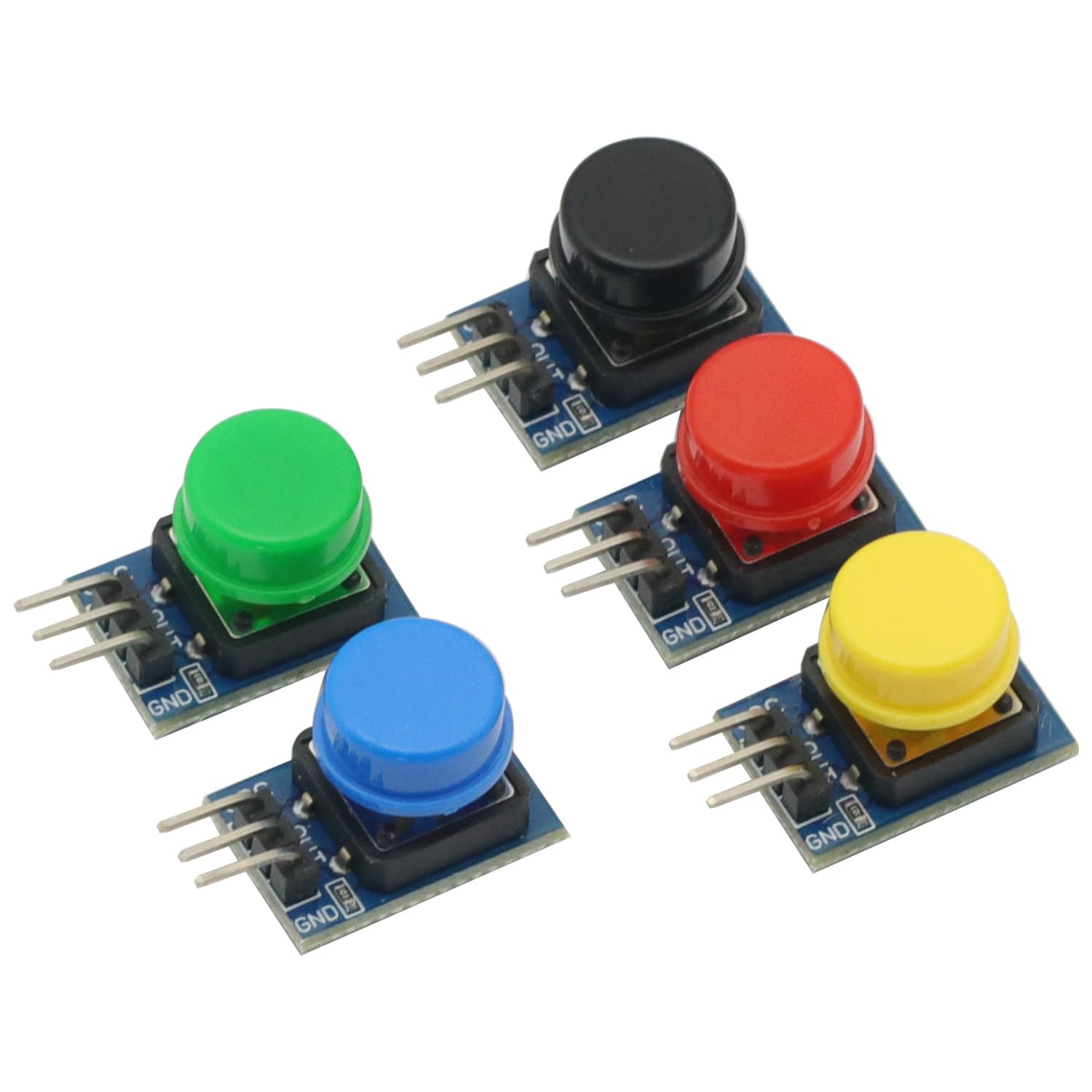
פיגורע 1: איבערview of the 5-piece 12x12mm Big Key Module Button set. Each button is mounted on a small PCB segment, connected in a row, featuring distinct colors.
פּעקל אינהאַלט:
- 5 x 12x12mm Big Key Module Button Light Touch Switches (one each of Black, Blue, Yellow, Red, Green)
2. סעטאַפּ און קאַנעקשאַן
This section details the steps required to correctly connect the Big Key Module Button to your development board.
2.1 פּינאָוט באַשרייַבונג
Each button module features a 3-pin interface. Understanding these pins is crucial for proper connection.
- VCC: מאַכט צושטעלן אַרייַנגאַנג (3.5V צו 5V DC).
- GND: ערד קשר.
- אויס: Digital output pin.

פיגורע 2: Pinout labels for the VCC, OUT, and GND connections on each button module.
2.2 קאַנעקשאַן סטעפּס
- פאַרבינדן די VCC pin of the button module to the 3.3V or 5V power supply output of your development board (e.g., Arduino, Raspberry Pi).
- פאַרבינדן די GND pin of the button module to the Ground (GND) pin of your development board.
- פאַרבינדן די OUT pin of the button module to a digital input pin on your development board.
- Ensure all connections are secure and correctly aligned to prevent damage to the module or development board.

פיגורע 3: זייַט view illustrating the 3-pin headers for connection.
3. אַפּערייטינג ינסטרוקטיאָנס
The Big Key Module Button operates as a simple digital input device.
- When the button is געדריקט, די OUT pin will output a High Digital Level (typically 3.3V or 5V, depending on VCC).
- When the button is באפרייט, די OUT pin will output a Low Digital Level (typically 0V).
You can read the state of the button using the digital read function on your microcontroller. For example, in Arduino, you would use digitalRead(pinNumber) to get the current state.
4. וישאַלט
To ensure the longevity and reliable operation of your Big Key Module Buttons, follow these maintenance guidelines:
- רייניקונג: Keep the modules free from dust and debris. Use a soft, dry cloth for cleaning. Avoid using liquids or abrasive materials.
- סטאָרידזש: Store the modules in a dry, cool environment, away from direct sunlight and extreme temperatures.
- האַנדלינג: Handle the modules by their PCB edges to avoid touching the electronic components or bending the pins.
5. טראָובלעשאָאָטינג
If you encounter issues with your Big Key Module Button, refer to the following troubleshooting tips:
- No Output/Incorrect Output:
- Verify that VCC and GND connections are correct and secure.
- פאַרזיכערן די מאַכט צושטעלן וואָלtage is within the specified range (3.5V - 5V).
- Check the connection of the OUT pin to your microcontroller's digital input.
- Test with a different digital input pin on your microcontroller.
- Inspect the module for any visible damage or bent pins.
- קנעפּל ניט ריספּאַנדינג:
- Ensure the button is fully pressed and released.
- Check for any physical obstructions preventing the button from moving freely.
6. ספּעסאַפאַקיישאַנז
| שטריך | באַשרייַבונג |
|---|---|
| פּראָדוקט נאָמען | שליסל מאָדולע |
| מאָדולע גרייס | 11 רענטגענ 22 מם |
| קנעפּל גרייס | 12 רענטגענ 12 מם |
| אַפּערייטינג וואָלtage | גלייכשטראָם 3.5V - 5V |
| רעזולטאַט טיפּ | Digital Level (Press High, Release Low) |
| צובינד | 3P Interface (VCC, GND, OUT) |
| קאַמפּאַטאַבאַל פּלאַטפאָרמס | Arduino, SCM, ARM, Raspberry Pi |
| פּעקל אינהאַלט | 5PCS Big Key Module Button Light Touch Switch (Assorted Colors) |
| פּונקט וואָג | 0.704 ounces (approx. 20g for 5PCS) |
| פּעקל דימענשאַנז | 3.94 X 1.97 X 0.39 אינטשעס |
7. וואָראַנטי און שטיצן
For specific warranty information or technical support, please refer to the retailer or manufacturer's official webזייטל. האַלט אייער קויף קוויטל פֿאַר קיין וואָראַנטי קליימז.