
1. הקדמה
The DNT Optics Zulus 4K 3-24X Digital Day Night Vision Scope is an advanced optical system designed for versatile use in various lighting conditions. Featuring a Sony 4K STARVIS 2 CMOS sensor, a 50mm f/1.8 ED glass lens, and an integrated laser rangefinder with DNT Ballistic Engine, this scope delivers high-resolution imaging and precise targeting capabilities for both day and night operations.
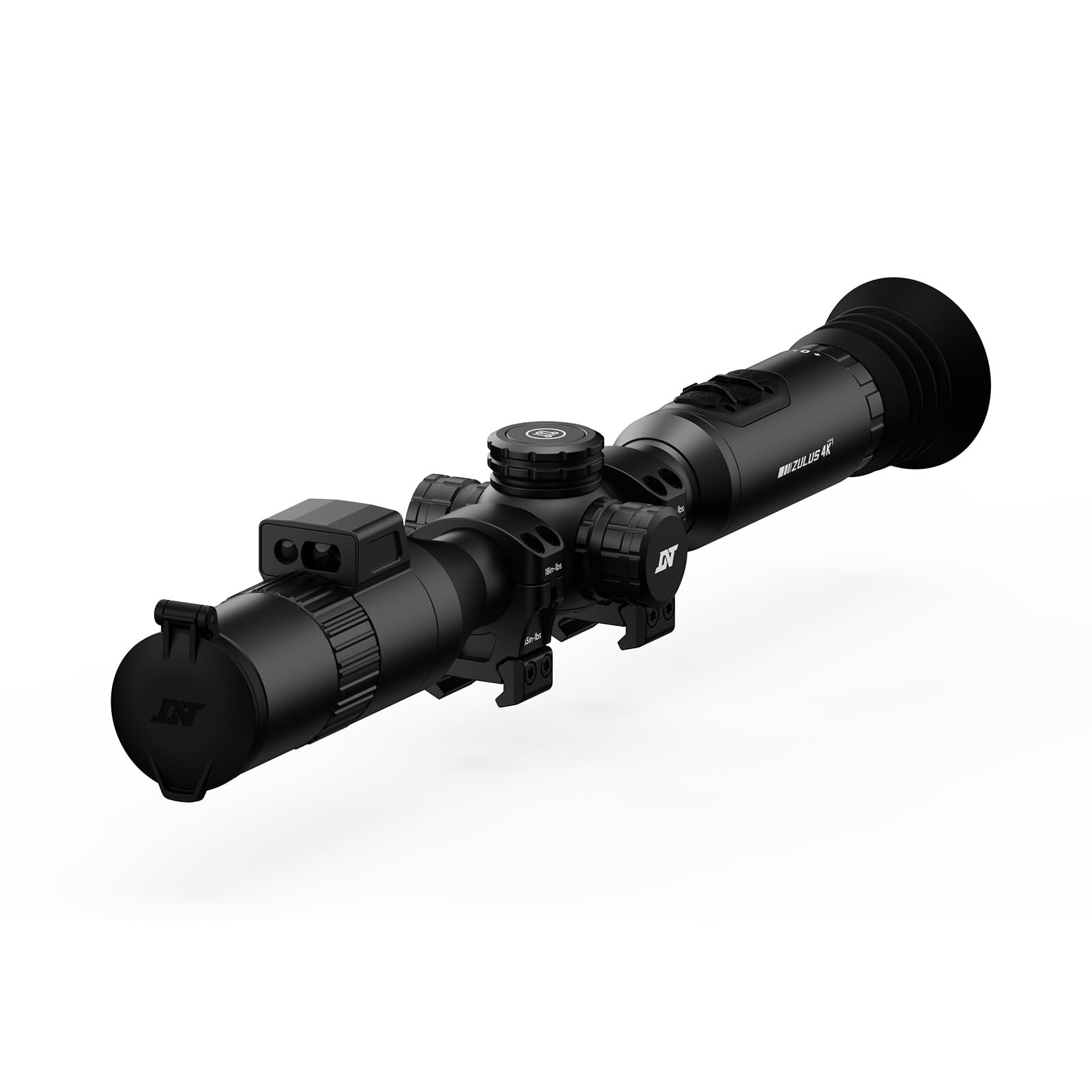
Image: The DNT Optics Zulus 4K Digital Day Night Vision Scope, showcasinג זײַן גלאַטן, שוואַרצן דיזײַן.
2. פּעקל אינהאַלט
Upon opening your DNT Optics Zulus 4K package, ensure all items listed below are present and in good condition. If any items are missing or damaged, please contact DNT Optics customer support.
- Zulus 4K Digital Day Night Vision Scope (x1)
- 30mm Scope Rings (x2)
- Sunshade (x1)
- Flip Up Cover (x1)
- Eye Cup (x1)
- לינז רייניקונג שטאָף (x1)
- באַניצער מאַנואַל (x1)
- שנעל אָנהייב גייד (קס 1)
- Data Cable (USB-C) (x1)
- 21700 Battery Pack (x1)
Video: An unboxing video demonstrating the contents of the DNT Optics Zulus 4K package, including the scope, accessories, and documentation.
3. סעטאַפּ
3.1. באַטאַרייע ייַנמאָנטירונג
- Locate the battery compartment cap, typically on the side or top of the scope.
- שרויפט אַראָפּ דעם דעקל קעגן דעם זייגער.
- Insert the provided 21700 flat-top battery, ensuring correct polarity.
- שרויפט צוריק דעם דעקל אויף מיט זייגער-ווייז ביז עס איז זיכער.
3.2. מאָנטירן דעם טעלעסקאָפּ
The Zulus 4K is designed to fit standard 30mm mounting setups. Use the included 30mm scope rings for installation.
- Attach the scope rings to your rifle's Picatinny rail or compatible mounting system.
- Place the Zulus 4K scope into the rings, ensuring proper eye relief and alignment.
- Secure the top halves of the scope rings, tightening screws evenly to the manufacturer's recommended torque specifications (35 in-lbs indicated on rings).

Image: The DNT Optics Zulus 4K Digital Day Night Vision Scope securely mounted on a rifle, ready for use.
3.3. Attaching Sunshade and Eye Cup
- זונשייַן: Thread the sunshade onto the objective lens (front) of the scope.
- אויג קאַפּ: Thread the eye cup onto the eyepiece (rear) of the scope.
- Ensure both accessories are securely attached to prevent accidental detachment during use.

Image: The DNT Optics Zulus 4K scope with its sunshade and eye cup attached, enhancing usability and protection.
4. אָפּעראַציע
4.1. Powering On/Off & Standby
- מאַכט אויף / אַוועק: Long press the Power button to turn the unit on or off.
- סטאַנדביי מאָדע: Short press the Power button to enter or exit standby mode, conserving battery life when not actively in use.
4.2. טאָג און נאַכט מאָדעס
The Zulus 4K offers seamless transition between day and night vision modes.
- באַשטימען מאָדעס: Long press the Day/Night button to switch between day and night vision modes.
- ברייטנאַס אַדזשאַסטמאַנט: Short press the Day/Night button to adjust screen brightness levels.

Image: Visual representation of the Zulus 4K's performance, showcasing clear imaging in both bright daylight and low-light moonlight conditions.
4.3. Magnification and Digital Zoom
The scope features 3-24x magnification with up to 6x lossless digital zoom for precise targeting.
- אַדזשאַסטינג מאַגנאַפאַקיישאַן: Rotate the Magnification Ring to zoom in or out.
- 4K-30FPS Mode: Provides over 8 million pixels for detailed viewing with 3-24x zoom.
- 1080P-60FPS Mode: Offers smooth, high-speed footage with 3-12x zoom for tracking fast-moving targets.
4.4. Laser Rangefinder and Ballistic Engine
The integrated Laser Rangefinder (LRF) provides instant, precise ranging from 5 to 1300 yards. The DNT Ballistic Engine resolves complex trajectories and projects the ballistic solution directly into your view.
- Activating LRF: Short press the Ranging button to activate the laser rangefinder and display distance.
- Ballistic Solution: With ballistic data synced via the DNT App, the scope will display the holdover point on the reticle.

Image: A hunter using the DNT Optics Zulus 4K, highlighting the active laser rangefinder beam for precise distance measurement.
4.5. Recording and Picture-in-Picture (PIP)
- מאַנואַל רעקאָרדינג: Short press the Record button to start/end video recording.
- Recoil Activated Recording (RAV): Long press the Record button to activate RAV. The scope will automatically record video when recoil is detected.
- בילד-אין-בילד: Access PIP settings via the menu to display a magnified view in a smaller window on the screen.
4.6. מעניו נאַוויגאַציע און סעטטינגס
- אַקסעס מעניו: Long press the Menu button to enter the settings menu.
- נאַוויגירן: Use the Magnification Ring to scroll through menu options.
- Select/Confirm: Short press the Menu button to select an option.
- אַרויסגאַנג: Long press the Menu button to exit the menu.
- Reticle Settings: Customize reticle type and color within the menu.
- זעראָינג פּראָfiles: Set and save multiple zeroing profiles for different firearms or ammunition types.
5. וישאַלט
5.1. רייניקן די לענסעס
Regularly clean the lenses to ensure optimal image clarity.
- Use the provided lens cleaning cloth or a soft, lint-free cloth.
- Gently wipe the lens surfaces to remove dust and smudges. Avoid abrasive materials or harsh chemicals.
5.2. ענוויראָנמענטאַל פּראַטעקשאַן
The Zulus 4K is built for durability in challenging conditions.
- IP67 שאַץ: The scope is IP67 waterproof and dustproof, providing protection against immersion in water up to 1 meter for 30 minutes and complete dust ingress.
- Recoil Rating: Recoil-rated up to .50 BMG, ensuring robust performance with high-caliber firearms.
6. טראָובלעשאָאָטינג
If you encounter issues with your DNT Optics Zulus 4K, refer to the following common troubleshooting steps:
| פּראָבלעם | מעגלעך סיבה | לייזונג |
|---|---|---|
| די מיטל טוט נישט מאַכט אויף | Low or depleted battery; Incorrect battery installation | Charge the battery using the provided USB-C cable. Ensure the battery is inserted with correct polarity. |
| נעבעך בילד קוואַליטעט | Dirty lenses; Incorrect focus; Extreme environmental conditions | Clean lenses with the provided cloth. Adjust the focus ring. Ensure proper day/night mode is selected for current lighting. |
| Laser Rangefinder not working | Obstruction in front of LRF; Out of range; Software glitch | Ensure LRF is clear of obstructions. Confirm target is within 5-1300 yard range. Restart the device. |
| DNT App connectivity issues | Wi-Fi disabled on scope or phone; Incorrect password | Ensure Wi-Fi is enabled on both devices. Verify the correct Wi-Fi password. Restart both devices. |
7. ספּעסאַפאַקיישאַנז
- סענסאָר: Sony 1/1.8" 4K STARVIS 2 CMOS
- לענס: 50mm f/1.8 ED (Extra-low Dispersion) glass
- פאַרגרעסערונג: 3-24x
- דיגיטאַל פארגרעסער: Up to 6x lossless
- ווידעא האַכלאָטע: 4K-30FPS, 1080P-60FPS
- אינערלעכער סטאָרידזש: 64 גיגאבייט
- באַטערי: Replaceable 21700 flat-top battery (up to 6 hours operation)
- Laser Rangefinder Range: 5-1300 יאַרדס
- רער דיאַמעטער: 30 מם
- וואָג: 24.3 אונס
- וואָטערפּרוף / דוסטפּראָאָף שאַץ: IP67
- Recoil Rating: Up to .50 BMG
- אויג רעליעף: 65 מ״מ (2.6 אינטש)
- קאַמפּאַטאַבאַל דעוויסעס: Rifle, Shotgun
8. וואָראַנטי & שטיצן
8.1. וואָראַנטי אינפֿאָרמאַציע
The DNT Optics Zulus 4K comes with a 2-יאָר מאַנופאַקטורער וואָראַנטידי וואָראַנטי דעקט חסרונות אין מאַטעריאַלן און אַרבעט אונטער נאָרמאַל נוצן. ביטע האַלטן דיין קויפן באַווייַז פֿאַר וואָראַנטי קליימז.
8.2. קונה שטיצן
For technical assistance, warranty claims, or general inquiries, please contact DNT Optics customer support. You can also utilize the DNT App to sync ballistic data, view live video feeds, manage your album, and share your adventures.
- DNT App: Available for download on your smartphone.
- אָנליין רעסורסן: Visit the official DNT Optics website for FAQs, updated manuals, and support contact information.

Image: A smartphone displaying the DNT App interface, connected to the Zulus 4K scope for enhanced control and data management.


