
Ulefone RugKing Pad Pro
Ulefone RugKing Pad Pro Android 16 Rugged Tablet User Manual
Model: RugKing Pad Pro | Brand: Ulefone
1. הקדמה
This manual provides essential instructions for setting up, operating, and maintaining your Ulefone RugKing Pad Pro rugged tablet. Please read this manual thoroughly before using the device to ensure proper function and longevity.
2. פּעקל אינהאַלט
באַשטעטיקט אַז אַלע זאכן זענען פאַראַן אין אייער פּראָדוקט פּאַקעט:
- Ulefone RugKing Pad Pro Tablet x 1
- AC Charger (100~240V) x 1
- Type-C Data Cable (100 cm) x 1
- Protective Film (Pre-installed) x 1
- Metal Pry Opener x 1
- Portable Strap x 1
- סקרוז X 2
- Multilingual User Manual x 1
- Charging Instruction Card x 1
- Safety Warning Declaration x 1

Figure 2.1: Contents of the Ulefone RugKing Pad Pro package.
3. פּראָדוקט איבערview
The Ulefone RugKing Pad Pro is a rugged tablet designed for durability and performance. Familiarize yourself with its physical components.
3.1 פיזישע קאָמפּאָנענטן
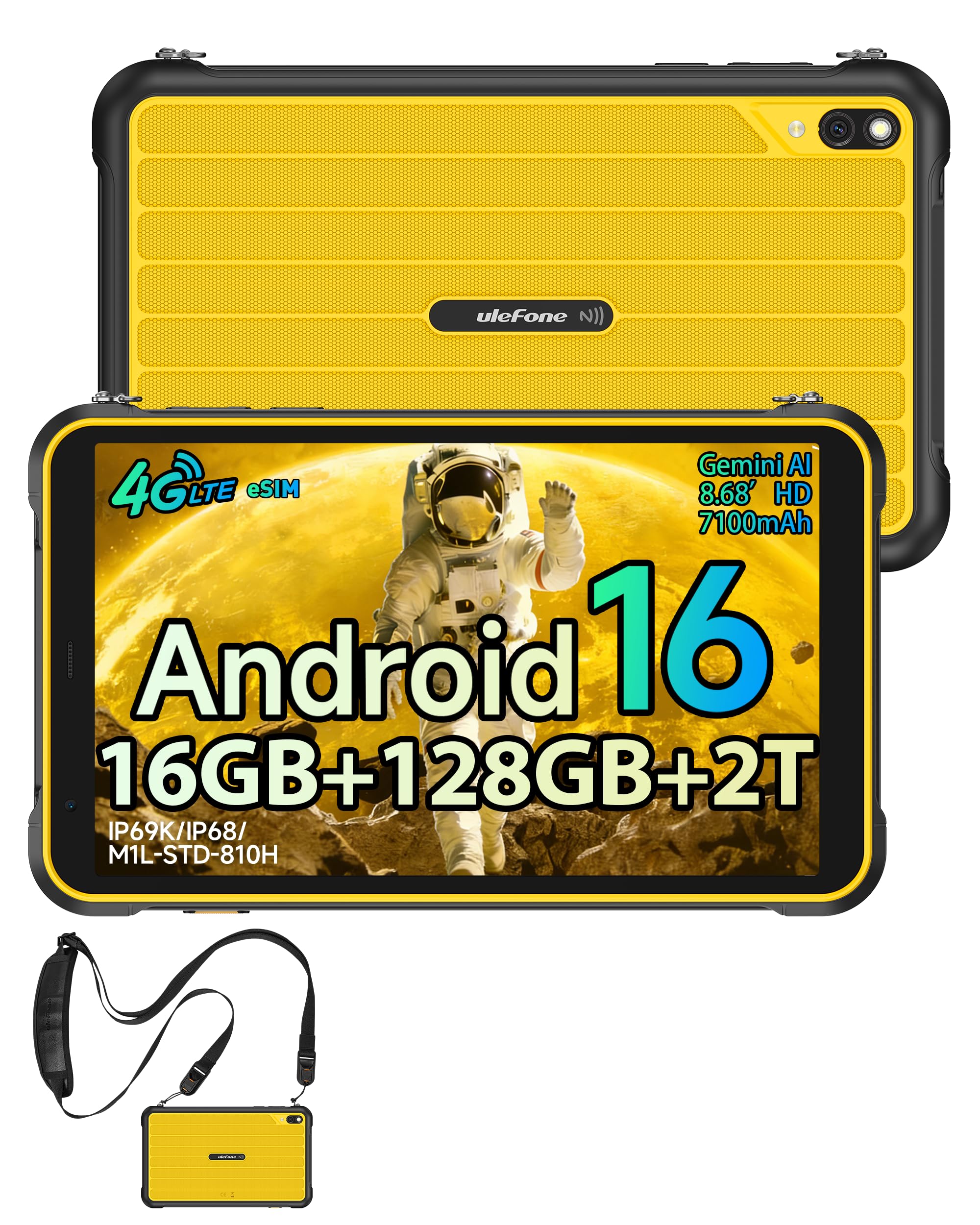
פיגורע 3.1: פראָנט view of the Ulefone RugKing Pad Pro.

פיגורע 3.2: זייַט view with buttons and ports.
- ווייַז: 8.68-inch, 90Hz refresh rate, Corning Gorilla Glass.
- מאַכט קנעפּל: געפינען זיך אויף דער זייט, גענוצט צו אנצינדן/אויסלעשן אדער אויפוועקן/שלאפן דעם אפאראט.
- באַנד קנעפּלעך: אַדזשאַסטירן אַודיאָ לעוועלס.
- וסב טיפּ-C פּאָרט: פֿאַר טשאַרדזשינג און דאַטן אַריבערפירן.
- רעדנער גרילז: צוויי סטערעאָ רעדנערס פֿאַר אַודיאָ אַרויסגאַנג.
- אַפּאַראַט: 16MP rear camera, 8MP front camera.
- פלאַשליגהט: Integrated 133 lumen Super Torch.
- סים/מיקראָסד קאַרטל שפּאַלט: Supports dual SIM and up to 2TB microSD expansion.
- uSmart Expansion Connector: For compatible peripherals like endoscopes.
- 3.5 מם כעדפאָון דזשאַק: For audio accessories.
4. סעטאַפּ
4.1 ערשט מאַכט אויף
- דריקן און האַלטן די מאַכט קנעפּל until the Ulefone logo appears.
- פֿאָלגט די אינסטרוקציעס אויף דעם עקראַן צו אויסקלײַבן אײַער שפּראַך, ראַיאָן און זיך פֿאַרבינדן צו אַ Wi-Fi נעץ.
- לאָג אַרײַן מיט אײַער גוגל אַקאַונט אָדער שאַפֿט אַ נײַעם צו צוטריטן דעם גוגל פּליי סטאָר און אַנדערע סערוויסעס.
4.2 SIM Card and eSIM Setup
The RugKing Pad Pro supports dual physical SIM cards and eSIM functionality for 4G LTE connectivity.

Figure 4.1: Triple card slot for SIM and MicroSD.
4.2.1 Physical SIM Card Installation
- געפינט די סים קארטל טאַץ אויף דער זייט פון דער טאַבלעט.
- Use the provided metal pry opener to eject the tray.
- Place your Nano-SIM cards into the designated slots.
- פֿאָרזיכטיק צוריקשטעלט דעם טאַץ אין דער טאַבלעט.
4.2.2 eSIM אקטיווירונג
To activate eSIM, navigate to סעטטינגס > נעץ און אינטערנעט > סימס and follow the instructions to add a new mobile plan. You will typically need a QR code or activation code from your network provider.

Figure 4.2: eSIM connectivity feature.
5. אַפּערייטינג ינסטרוקטיאָנס
5.1 אַנדרויד 16 אָפּערייטינג סיסטעם
The RugKing Pad Pro runs on Android 16, offering a dynamic and fluid user interface with enhanced security and usability features. Enjoy desktop-like window views for multitasking and smarter notification management.

פיגור 5.1: אַנדרויד 16 באַניצער צובינד.
5.2 אויסשטעלונג און אינטעראקציע
The 8.68-inch display with a 90Hz refresh rate provides smooth navigation and streaming. With 860 nits peak brightness, the screen is readable even in bright sunlight. Corning Gorilla Glass offers enhanced scratch resistance.

Figure 5.2: Display features including 90Hz refresh rate and Gorilla Glass.
5.2.1 הענטשקע מאָדע
For use in cold environments or industrial settings, enable Glove Mode in settings to allow touch input while wearing gloves. Note that some leather gloves may not be compatible due to material differences.

Figure 5.3: Tablet operation with gloves enabled.
5.3 Camera and Flashlight
The tablet features a 16MP rear camera for clear photos and document scanning, and an 8MP front camera for video calls. The integrated 133 lumen Super Torch provides bright illumination in low-light conditions.

Figure 5.4: Camera and Super Torch features.
5.4 קאָנעקטיוויטי און נאַוויגאַציע
- 4G LTE: Stay connected with dual SIM or eSIM.
- NFC: Supports Google Pay and other NFC functions for identification and authentication.
- גפּס: Integrated GPS, GLONASS, BeiDou, and Galileo for accurate navigation.
- ווי-פי: Supports 802.11b/g/n standards.
- בלועטאָאָטה: פֿאַר פֿאַרבינדן וויירלעס אַקסעסאָריעס.

Figure 5.5: NFC enabled device for various applications.

Figure 5.6: GPS navigation in a vehicle.
5.5 ספּעציעלע פֿעיִקייטן
- מנהג שליסל: Assign specific functions to a programmable key for quick access.
- Face ID: עפֿנט אײַער דעווײַס ניצנדיק פֿאַציאַל דערקענונג.
- עפעם ראַדיאָ: Listen to FM radio without headphones.
- uSmart Expansion Connector: Connect compatible external peripherals such as endoscopes (uSmart E01, E02) or digital microscopes (uSmart C01).

Figure 5.7: uSmart expansion connector and peripherals.
6. האַלטבאַרקייט פֿעיִקייטן
The RugKing Pad Pro is built to withstand extreme conditions, certified with IP68, IP69K, and MIL-STD-810H standards.
- IP68: Dustproof and resistant to continuous immersion in water up to 2 meters for 30 minutes.
- IP69K: Protected against high-pressure, high-temperature jet sprays.
- MIL-STD-810H: Military-grade standard ensuring reliable resistance to shocks, vibrations, and extreme temperatures.

Figure 6.1: Rugged design and certifications.

Figure 6.2: Dust, water, and drop resistance tests.
7. באַטערי מאַנאַגעמענט
The RugKing Pad Pro is equipped with a 7100 mAh battery, offering extended usage. It supports 492 hours of standby time or 10 hours of video playback on a single charge.
7.1 טשאַרדזשינג
- נאָרמאַל טשאַרדזשינג: Connect the provided Type-C cable and AC charger to the tablet.
- Pogo Pin Charging: The tablet is compatible with Pogo Pin charging docks (sold separately) for convenient charging.
- Reverse Charging (OTG): Use the tablet as a power bank to charge other devices via an OTG cable (sold separately).

Figure 7.1: Battery capacity and charging methods.
8. סטאָרידזש און פאָרשטעלונג
Powered by an Unisoc T7250 Octa-core processor, the RugKing Pad Pro handles complex applications and demanding tasks efficiently. It comes with 16GB RAM (8GB physical + 8GB virtual) and 128GB internal storage, expandable up to 2TB via microSD card.

Figure 8.1: Octa-core processor for uninterrupted flow.

Figure 8.2: Memory and storage specifications.
*MicroSD card is sold separately for storage expansion. Dynamic RAM activation is user-configurable in Settings.
9. וישאַלט
9.1 רייניקונג די מיטל
- ניצט אַ ווייכן, לינט-פֿרייע שטאָף צו רייניקן דעם עקראַן און קערפּער.
- פֿאַר שווערן שמוץ, אַ ביסל דampשווענק דעם שטאָף מיט וואַסער. פֿאַרמייַדט שטרענגע כעמיקאַלן אָדער אַברייסיוו מאַטעריאַלן.
- Ensure all port covers are securely closed before cleaning with liquids to maintain water resistance.
9.2 ווייכווארג דערהייַנטיקונגען
Regularly check for software updates to ensure optimal performance, security, and access to new features. Navigate to סעטטינגס > סיסטעם > סיסטעם דערהייַנטיקונג צו קאָנטראָלירן און ינסטאַלירן בנימצא דערהייַנטיקונגען.
9.3 סטאָרידזש פאַרוואַלטונג
פּיריאַדיקלי שייַעךview דיין געשפּאָרענע files and applications. Delete unnecessary data to free up space and maintain device speed. Utilize the microSD card slot for large media files.
10. טראָובלעשאָאָטינג
| פּראָבלעם | לייזונג |
|---|---|
| די מיטל טוט נישט מאַכט אויף. | זיכער מאַכן אַז די באַטאַרייע איז אויפגעלאָדן. פֿאַרבינדט דעם טשאַרדזשער און וואַרט אַ פּאָר מינוט איידער איר פּרוּווט ווידער אָנצוצינדן. |
| די פאַרשטעלן איז ניט ריספּאַנדאַבאַל. | Perform a forced restart by holding the Power button for 10-15 seconds. If the issue persists, ensure Glove Mode is not causing interference if not needed. |
| קענען ניט פאַרבינדן צו ווי-פי. | קוק אויב Wi-Fi איז ענייבאַלד אין סעטטינגס. ריסטאַרט דיין ראַוטער און די טאַבלעט. וועריפיצירן די Wi-Fi פּאַראָל. |
| סים קאָרט ניט דיטעקטאַד. | Ensure the SIM card is correctly inserted into the tray. Restart the tablet. Check if the SIM card is active with your carrier. |
| באַטאַרייע דריינז געשווינד. | Reduce screen brightness, close unused apps, disable unnecessary connectivity features (Bluetooth, GPS, Wi-Fi) when not in use. Check for background app activity. |
11. ספּעסאַפאַקיישאַנז
| שטריך | דעטאַל |
|---|---|
| מאָדעל נאָמען | Ulefone RugKing Pad Pro |
| אָפּערייטינג סיסטעם | אַנדרויד 16 |
| פּראַסעסער | יוניסאָק ט7250 אָקטאַ-קאָר |
| באַראַן | 16 גיגאבייט (8 גיגאבייט פיזיש + 8 גיגאבייט ווירטועל) |
| אינערלעכער סטאָרידזש | 128 גיגאבייט |
| יקספּאַנדאַבאַל סטאָרידזש | Up to 2 TB via microSD |
| ווייַז גרייס | 8.68 אינטשעס |
| ווייַז האַכלאָטע | 1400x800 פּיקסעלס (HD+) |
| דערפרישן קורס | 90 הז |
| ווייַז פּראַטעקשאַן | קאָרנינג גאָריללאַ גלאז |
| דערציען אַפּאַראַט | 16 מפּ |
| פראָנט אַפּאַראַט | 8 מפּ |
| ווידעא רעקאָרדינג | FHD 1080 פּ |
| באַטאַרייע קאַפּאַציטעט | 7100 mAh (ליטיום פּאָלימער) |
| באַטעריע לעבן (דורכשניטלעך) | 13 Days (standby), 10 Hours (video playback) |
| קאַנעקטיוויטי | 4G LTE (Dual SIM, eSIM), Wi-Fi (802.11b/g/n), Bluetooth, NFC |
| נאַוויגאַציע | גפּס, GLONASS, BeiDou, Galileo |
| האַלטבארקייט רייטינגז | IP68, IP69K, MIL-STD-810H |
| זיכערהייַט פֿעיִקייטן | Face ID |
| דימענסיעס (L x B x T) | 20 X 10 X 1 סענטימעטער |
| וואָג | 450 גראַמז |
12. וואָראַנטי און שטיצן
12.1 וואָראַנטי אינפֿאָרמאַציע
The Ulefone RugKing Pad Pro comes with a 2-יאָר פאַבריקאַנט ס וואָראַנטידי וואָראַנטי דעקט חסרונות אין מאַטעריאַלן און אַרבעט אונטער נאָרמאַל נוצן. ביטע האַלטן דיין קויפן באַווייַז פֿאַר וואָראַנטי קליימז.


Figure 12.1: Ulefone brand and 2-year warranty indication.
12.2 קונה שטיצן
For technical assistance, warranty claims, or further inquiries, please contact Ulefone customer support. A service center is available in Europe.
- Refer to the official Ulefone webפּלאַץ פֿאַר קאָנטאַקט דעטאַילס.
- Consult the "Multilingual User Manual" included in your package for additional information.
- The tablet includes a "Service Center 2.0" application for intelligent support.
Ask a question about this manual
Ask about setup, troubleshooting, compatibility, parts, safety, or missing instructions. Manuals+ will review the question and use this page’s manual context to help answer it.