
הקדמה
Thank you for choosing the Beuiouer I19 Pro Mini Mobile Phone. This manual provides essential information for setting up, operating, and maintaining your device. Please read it carefully to ensure proper use and to maximize the performance of your phone.
פּעקל אינהאַלט
ביים אויספּאַקן, ביטע באַשטעטיקן אַז אַלע זאכן וואָס זענען ליסטעד אונטן זענען פאַראַן און אין גוטן צושטאַנד:
- 1 x Beuiouer I19 Pro Slide-cover Mini Phone
- קסנומקס רענטגענ דאַטאַ קאַבלע
- 1 x Li-battery (1050 mAh)
Note: Other products shown in promotional images are not included.
פּראָדוקט איבערview
Familiarize yourself with the key components of your Beuiouer I19 Pro phone.
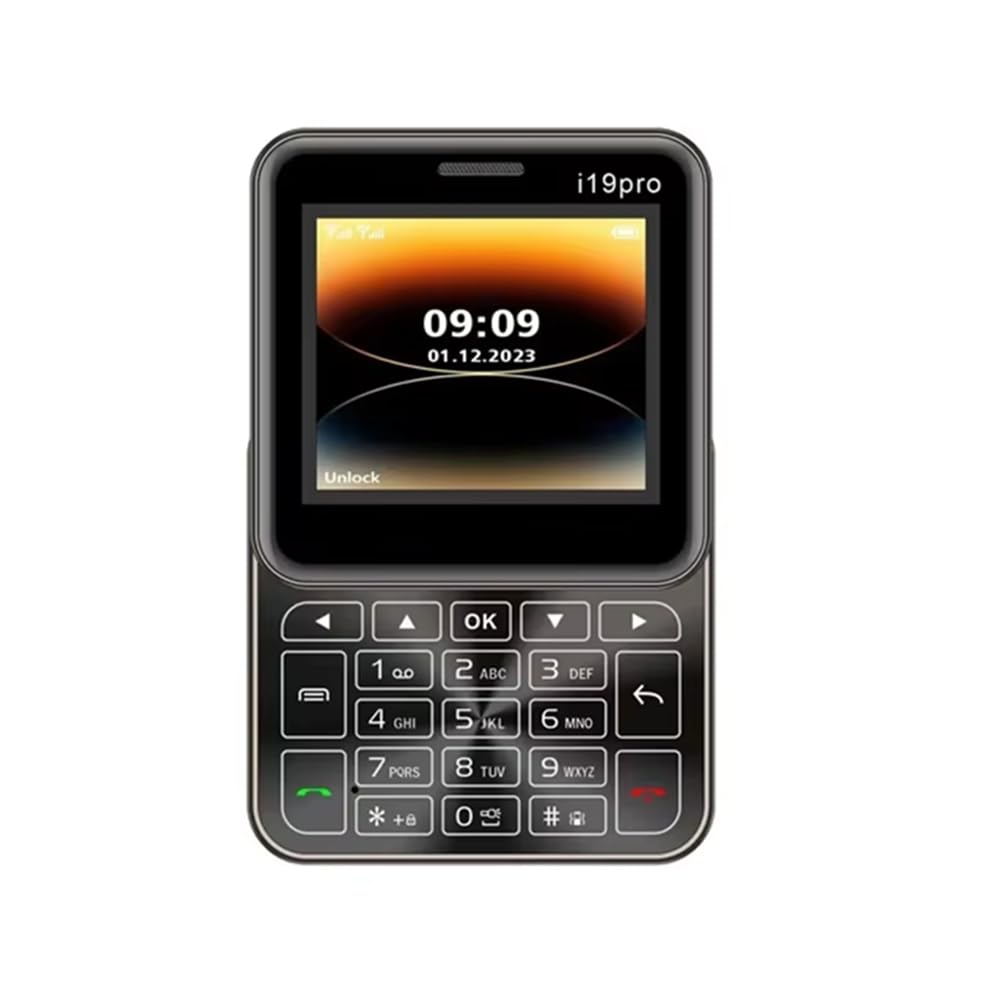
פיגורע 1: מולטי-ווינקל view of the Beuiouer I19 Pro Mini Mobile Phone, showing the front display with keypad, side profiles, and top/bottom edges.

פיגורע 2: פראָנט view of the Beuiouer I19 Pro Mini Mobile Phone with the slide mechanism open, revealing the full keypad and display.

פיגורע 3: פראָנט און דערציען view of the Beuiouer I19 Pro Mini Mobile Phone, highlighting the display, keypad, and the rear camera module.

פיגורע 4: דנאָ view of the Beuiouer I19 Pro Mini Mobile Phone, showing the charging port.
סעטאַפּ
1. אריינשטעלן סים קארטל(ן) און באטעריע
- עפֿנט דעם הינטערשטן דעקל: Gently slide or pry open the back cover of the phone.
- אַרײַנשטעלן סים קאַרטל(ן): Locate the SIM card slots. This phone supports dual SIM cards. Carefully insert your 2G GSM SIM card(s) into the designated slots with the gold contacts facing down.
- אַרייַנלייגן באַטערי: Place the 1050 mAh Li-battery into the battery compartment, ensuring the contacts align correctly.
- פֿאַרמאַכן הינטערשטן דעקל: לייג צוריק דעם הינטערשטן דעקל ביז עס קליקט זיכער אריין אין פלאץ.
2. טשאַרדזשינג די באַטערי
- Connect the provided data cable to the charging port at the bottom of the phone (refer to Figure 4).
- Connect the other end of the data cable to a compatible USB power adapter (not included) or a computer's USB port.
- Allow the phone to charge fully before initial use. The battery indicator on the screen will show charging status.
3. פּאָווערינג אויף / אויסגעלאשן
- צו מאַכט אויף: Press and hold the Power/End Call button (usually marked with a red phone icon) until the screen lights up.
- צו מאַכט אַוועק: Press and hold the Power/End Call button until the power-off options appear, then select "Power Off" or confirm.
אַפּערייטינג ינסטראַקשאַנז
1. יקערדיק פאַנגקשאַנז
- מאַכן קאַללס: Enter the phone number using the keypad and press the Call button (green phone icon).
- ענטפֿערן קאַללס: When an incoming call rings, press the Call button (green phone icon) to answer.
- שיקן SMS: Navigate to the "Messages" menu, select "New Message," enter the recipient's number and your message, then send.
- נאַוויגאַציע: Use the directional keys (up, down, left, right) and the "OK" button to navigate through menus and select options.
2. אַפּאַראַט
The phone features a rear 0.08MP camera.
- צוטריט צו קאַמעראַ: From the main menu, select the "Camera" application.
- גענומען פאָטאָס: Frame your shot and press the "OK" button to capture an image.
3. בלועטאָאָטה
Connect your phone to other Bluetooth-enabled devices such as headsets or other phones.
- גיי צו "סעטטינגס" > "בלוטוט".
- אַקטיווירן בלועטוט "אויף".
- זוכן פֿאַר available devices and select the device you wish to pair with.
- Enter the passkey if prompted.
4. עפעם ראַדיאָ
הנאה האָבן פון אייערע באַליבטע ראַדיאָ סטאַנציעס אויפן וועג.
- Plug in a wired headset (acts as an antenna).
- Navigate to the "FM Radio" application from the main menu.
- Use the navigation keys to scan for stations or manually tune.
5. mp3 פּלייַער
שפּילט אייערע געשפּאָרטע מוזיק files.
- זייט זיכער אז איר האט מוזיק files stored on a TF card (if inserted) or the phone's internal memory.
- Access the "MP3 Player" from the main menu.
- Browse and select your desired music files פֿאַר פּלייבאַק.
וישאַלט
1. באַטערי קער
- ויסמיידן יקספּאָוזינג די באַטאַרייע צו עקסטרעם טעמפּעראַטורעס.
- נישט דורכשטעכן, צענעמען אדער מאדיפיצירן די באטעריע.
- Use only the provided data cable for charging.
- If the phone will not be used for an extended period, charge it to about 50% and store it in a cool, dry place.
2. רייניקן דיין טעלעפאָן
- ניצט אַ ווייכן, לינט-פֿרייע שטאָף צו ווישן דעם עקראַן און קערפּער פֿון טעלעפֿאָן.
- פֿאַרמײַדן די נוצן פֿון שאַרפֿע כעמיקאַלן, רייניקונגס־סאָלווענטן, אָדער אַברייסיוו מאַטעריאַלן.
- Keep the charging port free from dust and debris.
טראָובלעשאָאָטינג
- טעלעפאָן טוט זיך נישט אָן: Ensure the battery is properly inserted and charged. Try charging for at least 30 minutes before attempting to power on again.
- קיין נעץ סיגנאַל: Check if the SIM card is correctly inserted. Ensure you are in an area with 2G GSM network coverage.
- קען נישט מאַכן/באַקומען רופן: Verify SIM card activation and sufficient balance (for prepaid). Check network settings.
- בלוטוט פּאָרינג פּראָבלעמען: Ensure both devices are in pairing mode and within range. Check if the correct passkey is entered.
- Phone freezes or becomes unresponsive: אַרויסנעמען די באַטאַרייע, וואַרטן אַ פּאָר סעקונדעס, און צוריקשטעלן עס צו דורכפירן אַ ווייכן ריסעט.
ספּעסאַפאַקיישאַנז
| מאָדעל | I19 פּראָ |
| נעץ | 2G, GSM 850/900/1800/1900MHz |
| קפּו | MTK6261D |
| סים שטיצן | Dual SIM card dual standby |
| ווייַז | 2.4 Inch TFT screen, 128*160px |
| זכּרון | RAM 32MB + ROM 32MB (Supports TF Card) |
| אַפּאַראַט | Rear 0.08MP |
| באַטערי | 1050 mAh Li-battery |
| פֿעיִקייטן | Bluetooth, MP3, FM Radio, Torch |
| מאַטעריאַל | פּלאַסטיק |
| דימענסיעס (פּאַקעט) | 10 X 10 X 5 סענטימעטער |
| וואָג (פּאַקעט) | 184 ג |
| לאַנד פון אָריגין | כינע |
וואָראַנטי און שטיצן
פֿאַר וואָראַנטי אינפֿאָרמאַציע און קונה שטיצע, ביטע זען די דאָקומענטאַציע וואָס איז צוגעשטעלט געוואָרן מיט אייער קויפן אָדער קאָנטאַקט אייער הענדלער. האַלט אייער באַווייַז פון קויפן פֿאַר קיין וואָראַנטי קליימז.
Manufacturer: Beuiouer
Manufacturer Contact Information: Beuiouer