
הקדמה
Thank you for choosing the RedThunder K75 Wireless Mechanical Keyboard. This manual provides detailed instructions for setting up, operating, and maintaining your keyboard. Please read this manual thoroughly to ensure proper use and to maximize your experience with the K75 keyboard.

בילד: איבערview of the RedThunder K75 Mechanical Keyboard highlighting its main features.
וואָס איז אין די קעסטל
באַשטעטיקן אַז אַלע זאכן זענען פאַראַן אין פּעקל:
- ק 75 קיבאָרד
- וסב קאַבלע
- Spare Switches (4 pieces)
- באַניצער מאַנואַל
- קייקאַפּ פּולער
- 2.4G דאָנגלע

Image: All components included in the RedThunder K75 package.
סעטאַפּ
קאַנעקטיוויטי מאָדעס
The RedThunder K75 supports three connection modes: USB-C Wired, 2.4GHz Wireless, and Bluetooth (BT). Ensure the system switch (Win/Mac) and connection mode switch are in the correct positions before use.
- יו-עס-בי-סי ווייערד: Connect the keyboard to your device using the provided USB-C data cable.
- 2.4GHz ווירעלעסס: Insert the 2.4G dongle into your device's USB port. The keyboard will connect automatically.
- בלועטאָאָטה (BT): דרוק FN+Q/W/E to switch between BT1, BT2, or BT3 devices.

Image: Illustration of the three multi-device connection modes available on the K75 keyboard.
דרייווער אינסטאַלאַציע (נאָר ווינדאָוס)
To access comprehensive programmability and customization options, download and install the K75-US driver. This software is compatible with Windows operating systems and functions when the keyboard is connected via 2.4G wireless or wired mode.
Steps for Driver Download:
- Ensure the system switch on the keyboard is set to "Win".
- Connect the keyboard to your Windows PC using the original USB-C data cable.
- Visit the official RedThunder website or use the provided short link (if available in your product documentation) to download the K75-US driver.
- גיי די ינסטראַקשאַנז אויף דעם עקראַן צו פאַרענדיקן די ינסטאַלירונג.
Video: Instructions on how to download and install the K75 driver for Windows.
אַפּערייטינג ינסטראַקשאַנז
Multi-function CNC Knob
The CNC knob provides versatile control for both gaming and office modes:
- באַשטימען מאָדעס: Long press the knob for approximately 5 seconds to switch between Gaming Mode and Office Mode.
- גיימינג מאָדע: דרייט דעם קנעפּל צו סטרויערן די ברייטקייט פון דער הינטערליכט. דריקט דעם קנעפּל צו דורכגיין די ליכט-עפעקטן.
- אָפיס מאָדע: Rotate the knob to adjust system volume. Click the knob to play or pause media.

Image: Detailed functions of the CNC knob and indicator lights.
RGB באַקלייטונג קאָנטראָל
The K75 keyboard features full RGB backlighting with 1.68 million colors. Adjust lighting effects using FN key combinations or the dedicated software.
- סטרויערן די ברייטנאַס פון די באַקלייט: דרוק FN + ↑ / ↓.
- סטרויערן די באַקלייט גיכקייַט: דרוק פן + ← / →.
- Switch Side Lighting Modes: דרוק FN + טאַב.
- באַשטימען באַקלייט מאָדע: דרוק פן + \|.
- באַשטימען באַקלייט קאָליר: דרוק FN + PU.
- Self-set Game Lighting: דרוק FN + PD once to activate, press twice to start customized game lighting.
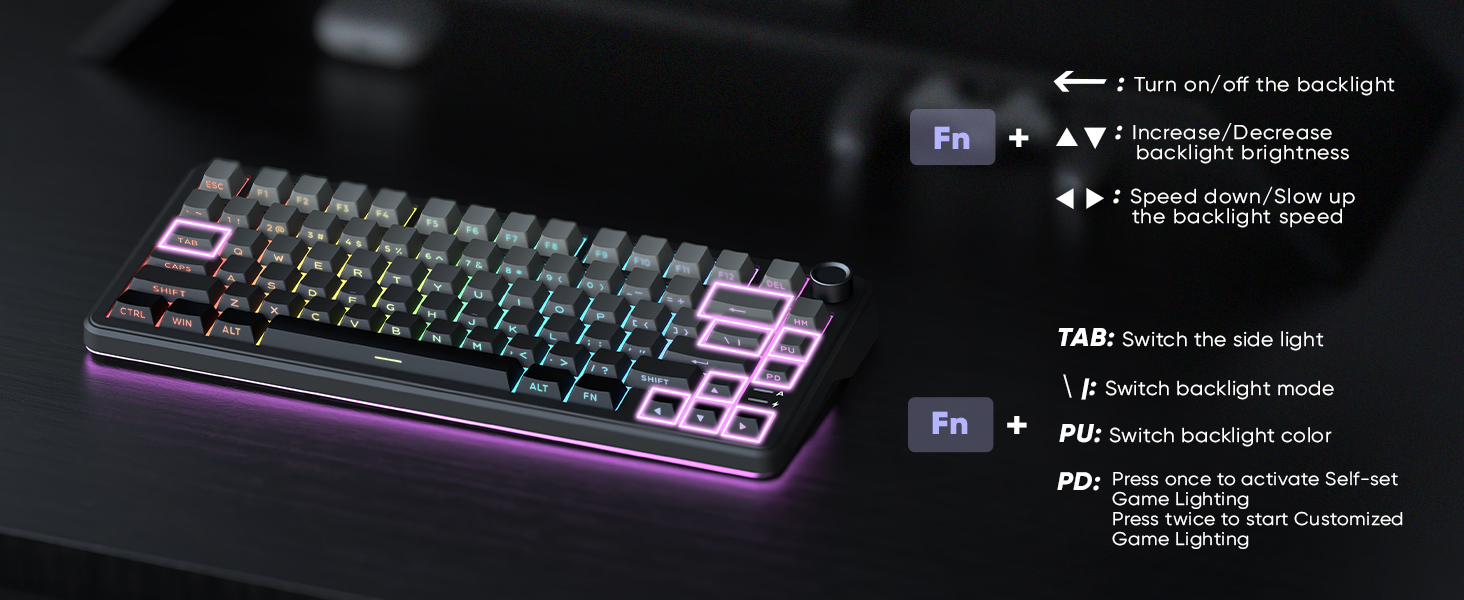
Image: The K75 keyboard displaying its vibrant RGB lighting.
הייס-סוואַפּפּאַבלע סוויטשיז
The K75 features a hot-swappable PCB, allowing you to easily replace 3-pin or 5-pin mechanical switches without soldering. This enables customization of your typing feel.
- Use the included keycap puller to remove keycaps.
- Use the included switch puller to carefully remove the switch.
- גלייכט אויס די שטיפטלעך פון דעם נייעם סוויטש מיט די סאָקעטס אויף דער פּקב און דריקט פעסט ביז עס קליקט אריין אין פּלאַץ.
- פֿאַרבײַטן די קלאַוויאַטור.

Image: Hot-swappable switches and components of the K75 keyboard.
באַטערי אינפֿאָרמאַציע
The keyboard is equipped with a rechargeable 4000mAh lithium-ion battery. A charging indicator light shows the power status:
- נידעריק באַטערי: פלאַשט רויט.
- טשאַרדזשינג: Stays red.
- גאָר באפוילן: Green/Off.
For optimal charging, use the original charging cable or a qualified data-capable cable connected to a computer's USB port (DC: 5V).

Image: Battery capacity and estimated usage times for the K75 keyboard.
פּראָגראַממאַבלע ווייכווארג
The K75-US driver software (Windows only, 2.4G wireless or wired mode) allows for extensive customization:
- שליסל מאַפּינג: Reassign keys to suit your workflow.
- מאַקראָ דעפֿיניציע: Create complex sequences of commands.
- באַקלייט יפעקץ: Adjust RGB lighting, including music rhythm backlights.
- Sensitivity & Debounce: Fine-tune keyboard response.
- שלאָף צייט: קאַנפיגיער מאַכט-שפּאָרן סעטטינגס.

Image: The K75 programmable software interface for customization.
Video: Demonstration of the RedThunder K75 Gaming Keyboard's features and lighting.
וישאַלט
רייניקונג
Regular cleaning helps maintain keyboard performance and appearance:
- טרענט אפ די קלאַוויאַטור פון אַלע מאַכט קוועלער איידער רייניקונג.
- ניצן אַ ווייך, לינט-פֿרייַ שטאָף אַ ביסל דampאָפּגעווישט מיט וואַסער אָדער אַ מילדער רייניקונג לייזונג צו ווישן די קלאַוויאַטורן און שאַסי.
- פֿאַר שטויב און שמוץ צווישן שליסלען, ניצט קאָמפּרעסירטע לופט אָדער אַ קליין באַרשט.
- ויסמיידן ניצן האַרב קעמיקאַלז אָדער אַברייסיוו מאַטעריאַלס.
באַשטימען פאַרבייַט
As the K75 is hot-swappable, switches can be replaced if they become faulty or if you wish to change the typing feel. Refer to the "Hot-Swappable Switches" section for detailed instructions.
טראָובלעשאָאָטינג
If you encounter issues with your RedThunder K75 keyboard, please refer to the following common solutions:
- קאַנעקטיוויטי ישוז: Ensure the keyboard is fully charged. Check that the system switch (Win/Mac) and connection mode switch (Wired/2.4G/BT) are correctly set. For Bluetooth, ensure your device's Bluetooth is enabled and the keyboard is paired.
- קנעפּלעך רעאַגירן נישט: Try reconnecting the keyboard. If using wireless, ensure the dongle is properly inserted or Bluetooth is paired. If a specific key is not working, consider replacing the switch as the keyboard is hot-swappable.
- Backlight Problems: Check backlight brightness settings using FN + ↑. Ensure the keyboard is not in a mode where backlighting is disabled. If using the software, verify settings there.
- ווייכווארג דעטעקטירט נישט קלאַוויאַטור: Ensure the keyboard is connected via USB-C wired or 2.4G wireless mode and the system switch is set to "Win". Restart the software and/or your computer.
- באַטאַרייע ניט טשאַרדזשינג: Use the original USB-C cable and connect to a reliable power source, preferably a computer's USB port. Check the charging indicator light.
If problems persist, please contact RedThunder customer support for further assistance.
ספּעסאַפאַקיישאַנז
| מאָדעל נומער | K75 |
| סאָרט | RedThunder |
| דימענשאַנז | 14 X 7 X 1.9 אינטשעס (35.56 X 17.78 X 4.83 סענטימעטער) |
| פּונקט וואָג | 1.98 פונט (0.9 קג) |
| קאַנעקטיוויטי | 2.4G Wireless, Bluetooth, USB-C |
| באַטערי | 4000mAh ליטהיום יאָן (אַרייַנגערעכנט) |
| סוויטשיז | Hot-Swappable (3-pin/5-pin compatible) |
| באַקלייט | Full RGB |
| קייקאַפּס | Dual-color PBT |
| ספּעציעלע פֿעיִקייטן | CNC Knob, Programmable Keys, Gasket Structure, Two-stagפֿוס שטיצע |
וואָראַנטי און שטיצן
For warranty information or technical support, please refer to the documentation included with your product or visit the official RedThunder website. You may also contact RedThunder customer service directly for assistance with product issues or inquiries.