
וויכטיק סאַפעטי אינסטרוקציעס
Please read these instructions carefully before operating the unit and retain them for future reference. Adhere to all warnings and instructions provided.
- וואַסער און נעץ: דו זאלסט נישט נוצן דעם אַפּאַראַט לעבן וואַסער.
- רייניקונג: ריין בלויז מיט אַ טרוקן שטאָף.
- ווענטילאַטיאָן: בלאָקירט נישט קיין ווענטילאַציע עפענונגען. אינסטאַלירט לויט די אינסטרוקציעס פונעם פאַבריקאַנט.
- היץ: דו זאלסט נישט ינסטאַלירן לעבן קיין היץ קוואלן אַזאַ ווי ראַדיאַטאָרס, היץ רעדזשיסטערז, סטאָוווז אָדער אנדערע אַפּאַראַט (אַרייַנגערעכנט ampליפיערס) וואָס פּראָדוצירן היץ.
- מאַכט שנור: באַשיצן די מאַכט שנור פון גיין אויף אָדער פּינטשט, ספּעציעל אין די פּלאַגז, קאַנוויניאַנס רעסאַפּיז און די פונט ווו זיי אַרויסגיין פון די אַפּאַראַט.
- אַטאַטשמאַנץ / אַקסעסעריז: ניצן בלויז אַטאַטשמאַנץ / אַקסעסעריז ספּעסיפיעד דורך דער פאַבריקאַנט.
- סערוויס: אָפּשיקן אַלע סערוויסעס צו קוואַלאַפייד סערוויס פּערסאַנעל. סערוויס איז פארלאנגט ווען דער אַפּאַראַט איז דאַמידזשד אין קיין וועג, אַזאַ ווי מאַכט צושטעלן שנור אָדער צאַפּן איז דאַמידזשד, פליסיק איז ספּילד אָדער אַבדזשעקץ זענען געפאלן אין די אַפּאַראַט, דער אַפּאַראַט איז יקספּאָוזד צו רעגן אָדער נעץ, אַרבעט נישט נאָרמאַלי , אָדער האט שוין דראַפּט.
פּראָדוקט איבערview
The Supersonic SC-726BT is a portable audio system featuring a top-loading CD player, AM/FM radio, Bluetooth connectivity, and an auxiliary input. It is designed for versatile audio playback at home or on the go.
שליסל פֿעיִקייטן:
- Top-Loading CD Player (CD/CD-R/CD-RW compatible)
- AM/FM ראַדיאָ טונער
- בלועטאָאָטה ווירעלעסס קאַנעקטיוויטי
- 3.5 מם AUX אַרייַנשרייַב
- LED Track Display
- געבויט-אין סטערעאָ ספּיקערז
- Programmable Memory for CD Tracks
- Repeat Playback Modes
- ינטעגראַטעד קאַררי האַנדלע
- AC/DC Power Options
קאָנטראָלס און קאַמפּאָונאַנץ:
Familiarize yourself with the various controls and ports on your unit.
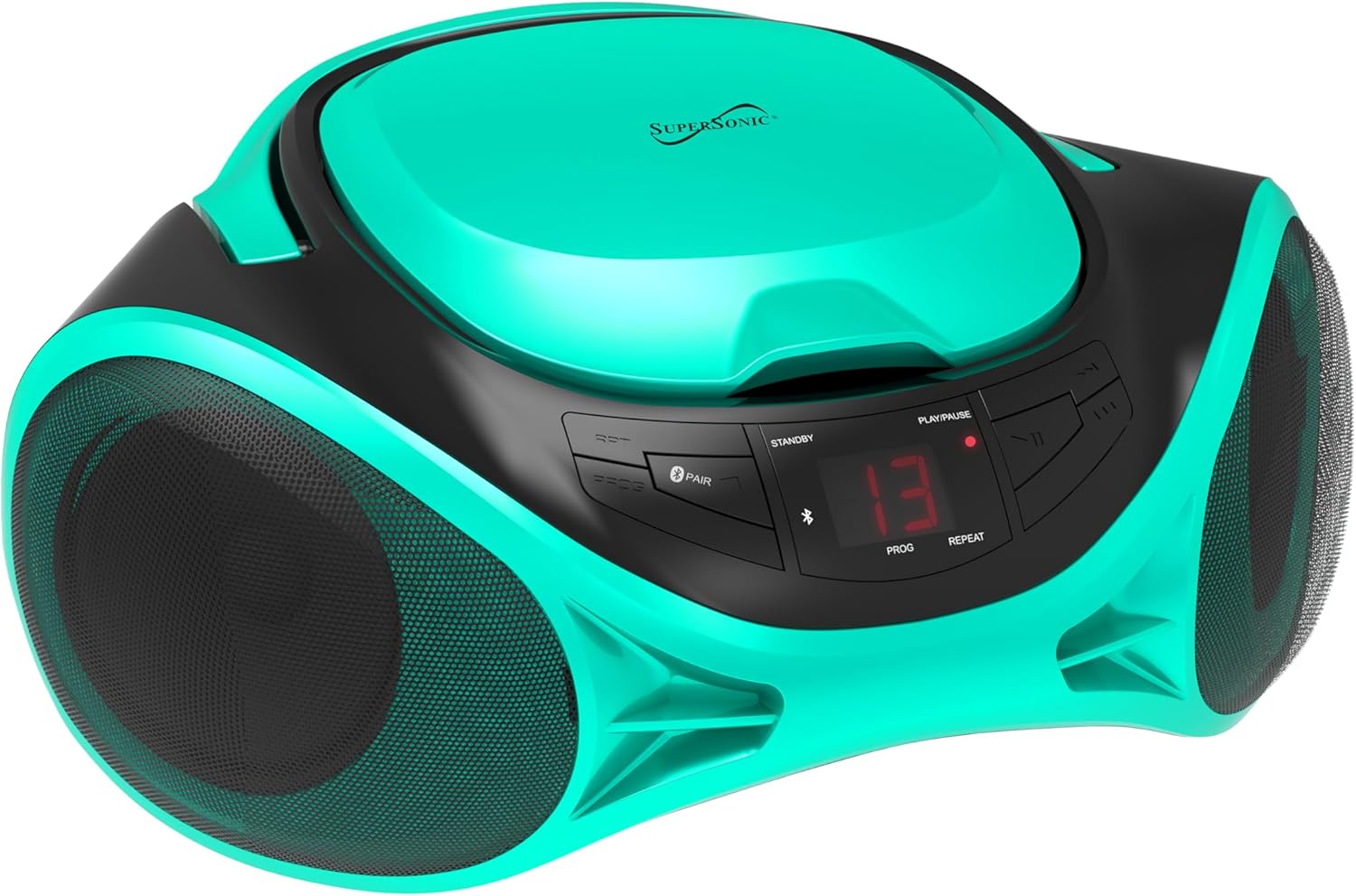
בילד: פראָנט view of the SC-726BT unit, highlighting the central control panel with buttons for playback, mode selection, and the LED display, flanked by two speaker grilles.
- מאַכט קנעפּל: טורנס די אַפּאַראַט אויף אָדער אַוועק.
- מאָדע קנעפּל: Switches between CD, AM/FM Radio, Bluetooth, and AUX modes.
- שפּיל / פּויזע קנעפּל: הייבט אָן אָדער פּויזירט סי-די ווידערשפּיל.
- האַלטן קנעפּל: סטאַפּס קאָמפּאַקטדיסק פּלייבאַק.
- איבערשפרינגען/זוכן קנעפלעך (◀◀ / ▶▶): Skips tracks on CD or searches within a track.
- פּראָגראַם קנעפּל: Used to program CD playback order.
- איבערחזרן קנעפּל: Cycles through repeat modes (e.g., repeat one, repeat all).
- בלועטאָאָטה פּאָר קנעפּל: הייבט אן בלועטוט פארבינדונג.
- באַנד קנעפּל: אַדזשאַסץ די אַודיאָ רעזולטאַט מדרגה.
- טונינג קנעפּל: Tunes radio frequencies in AM/FM mode.
- AM/FM Band Switch: Selects between AM and FM radio bands.
- טעלאַסקאָפּיק אַנטענע: פֿאַר FM ראַדיאָ אָפּנאַם.
- AUX IN דזשאַק: 3.5 מ״מ אַרײַנגאַנג פֿאַר עקסטערנע אַודיאָ דעוויסעס.
- אַק מאַכט אַרייַנשרייַב: Connects to the AC power cord.
- באַטערי אָפּטייל: Holds C-size batteries for portable use.
סעטאַפּ
מאַכט די אַפּאַראַט
The SC-726BT can be powered by either AC household current or DC batteries.
AC מאַכט:
- מאַכן זיכער אַז די אַפּאַראַט איז אויסגעדרייט אַוועק.
- Connect the supplied AC power cord to the AC power input jack on the back of the unit.
- Plug the other end of the AC power cord into a standard AC wall outlet (120V ~ 60Hz).
גלייכשטראָם באַטעריע מאַכט:
פֿאַר פּאָרטאַטיוו נוצן, דאַרף די אַפּאַראַט 6 x 'C' גרייס באַטעריעס (נישט אַרייַנגערעכנט).
- זיכער מאַכן אַז די אַפּאַראַט איז אויסגעלאָשן און אָפּגעטיילט פֿון AC מאַכט.
- עפֿענען די דעקן פון די באַטאַרייע אָפּטייל אויף די דנאָ פון די אַפּאַראַט.
- Insert 6 'C' size batteries, observing the correct polarity (+/-) as indicated inside the compartment.
- פאַרמאַכן די באַטאַרייע אָפּטייל דעקן סיקיורלי.

בילד: הינטערשטע view of the SC-726BT unit, displaying the AC power input port and the telescopic FM antenna in its retracted position.
אַנטענע אַדזשאַסטמאַנט
פֿאַר אָפּטימאַלער ראַדיאָ אָפּנאַם:
- FM אויפנאַם: Fully extend the telescopic antenna. Adjust its position and angle for the best signal.
- פארמיטאג אויפנאמע: The unit has a built-in AM antenna. Rotate the entire unit for the best AM reception.
אַפּערייטינג ינסטראַקשאַנז
אַלגעמיינע אָפּעראַציע
- דרוק די מאַכט קנעפּל צו קער די אַפּאַראַט אויף.
- דרוק די מאָדע button repeatedly to select your desired function: CD, AM/FM Radio, Bluetooth, or AUX.
- סטרויערן די באַנד קנעפּל to your preferred listening level.
- דרוק די מאַכט קנעפּל ווידער צו קער די אַפּאַראַט אַוועק.
קאָמפּאַקטדיסק פּלייַבאַקק
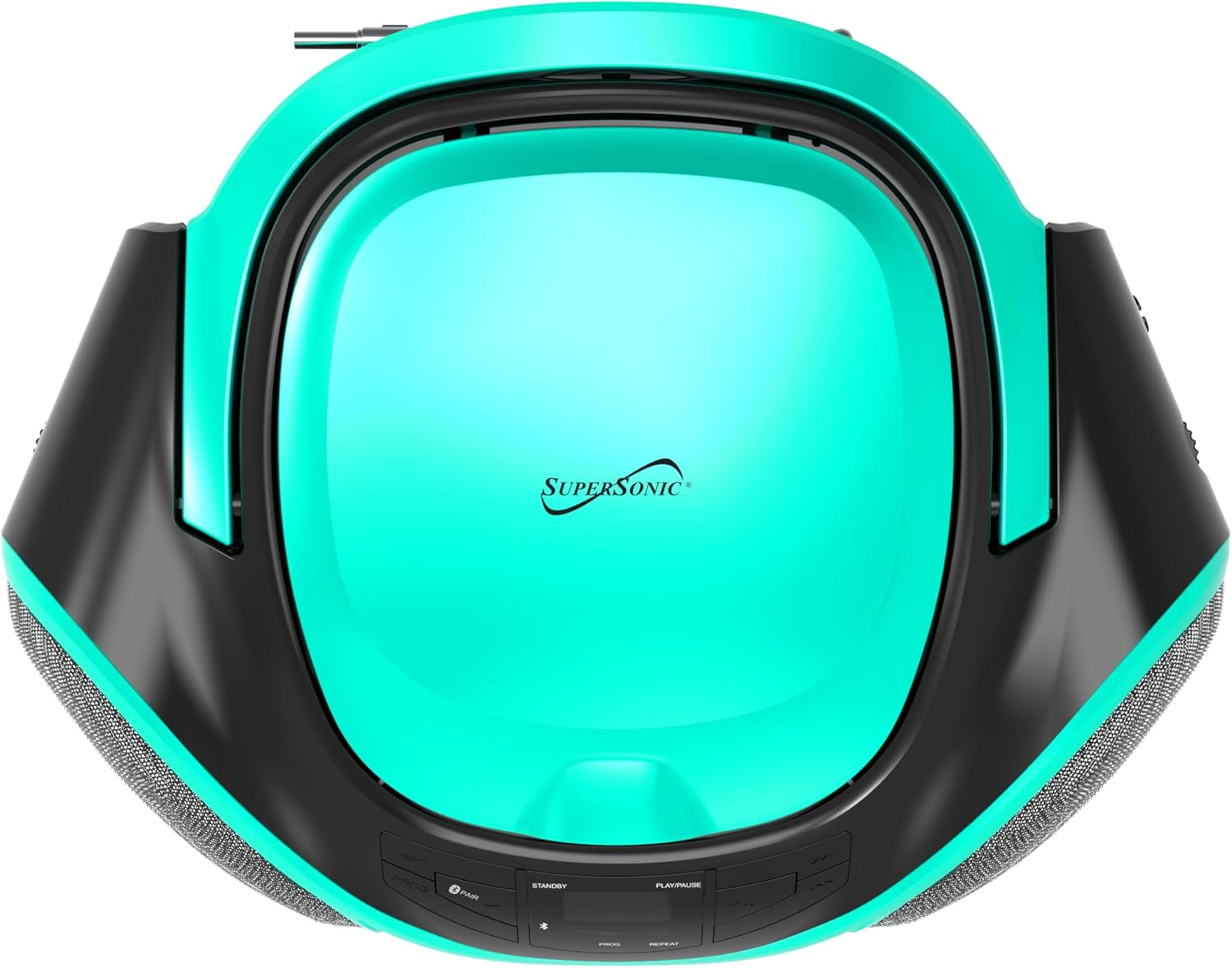
בילד: פון אויבן אַראָפּ view of the SC-726BT, showing the circular top-loading CD compartment with the Supersonic logo.
- דרוק די מאָדע button to select CD mode. The LED display will show "CD".
- עפֿנט דעם דעקל פֿון דעם סי-די אָפּטייל דורך עס לײַכט אויפֿהייבן.
- Place a CD (CD/CD-R/CD-RW) onto the spindle with the label side facing up.
- Close the CD compartment cover firmly until it clicks.
- The unit will read the CD, and the total number of tracks will be displayed.
- דרוק די שפּיל / פּויזע קנעפּל (▶/██) צו אָנהייבן ווידערשפּילן. די איצטיקע ליד נומער וועט ווערן געוויזן.
- צו פּויזע פּלייבאַק, דריקן די שפּיל / פּויזע קנעפל. דריק עס נאכאמאל צו ווייטערגיין.
- צו האַלטן פּלייבאַק דריקן די האַלטן קנעפּל (■).
- צו האָפּקען צו דער ווייַטער שפּור, דריקן די האָפּקען פאָרויס קנעפּל (▶▶).
- צו האָפּקען צו די פריערדיקע שפּור, דריקן די האָפּקען צוריק קנעפּל (◀◀).
- To search rapidly within a track, press and hold the האָפּקען פאָרויס or האָפּקען צוריק button during playback. Release to resume normal playback.
פּראָגראַם שפּיל:
איר קענט פּראָגראַמירן ביז 20 טראַקס צו שפּילן אין אַ ספּעציפֿישער סדר.
- אין CD סטאָפּ מאָדע, דריקן די פּראָגראַם button. "P01" will flash on the display.
- ניצן די האָפּקען פאָרויס or האָפּקען צוריק buttons to select the desired track number for the first program slot.
- דרוק די פּראָגראַם button again to confirm the selection. "P02" will flash.
- Repeat steps 2 and 3 to program additional tracks.
- נאכדעם וואס איר האט פראגראמירט אלע געוואונטשענע לידער, דריקט דעם שפּיל / פּויזע button to start programmed playback.
- צו אויסמעקן די פּראָגראַם, דריק די האַלטן קנעפּל צוויי מאָל.
Repeat Modes:
בעת סי-די ווידערשפּיל, דריק די איבערחזרן קנעפּל צו גיין דורך די פאלגענדע מאָדעס:
- איבערחזרן איין: ריפּיץ די קראַנט שפּור.
- איבערחזרן אַלע: Repeats all tracks on the CD.
- איבערחזרן אַוועק: Disables repeat function.
AM / FM ראַדיאָ אָפּעראַציע
- דרוק די מאָדע קנעפּל צו אויסקלייבן ראַדיאָ מאָדע.
- רוק די AM/FM Band Switch to select either AM or FM band.
- פארלענגערט די טעלעסקאָפּישע אַנטענע פֿאַר FM אָפּנאַם. פֿאַר AM, דרייט דעם אַפּאַראַט פֿאַר בעסטן אָפּנאַם.
- דרייען די טונינג קנופּ to select your desired radio station.
בלועטאָאָטה אָפּעראַציע
- דרוק די מאָדע button to select Bluetooth mode. The LED display will show "BT" and flash, indicating it is in pairing mode.
- געבן בלועטאָאָטה אויף דיין פונדרויסנדיק מיטל (למשל, סמאַרטפאָנע, טאַבלעט).
- זוכן פֿאַר Bluetooth devices and select "SC-726BT" from the list.
- Once paired, the "BT" indicator on the display will stop flashing and remain solid.
- You can now play audio from your Bluetooth device through the SC-726BT. Control playback (play/pause, skip) from your connected device.
AUX אַרייַנשרייַב אָפּעראַציע
- Connect one end of a 3.5mm audio cable (not included) to the AUX IN jack on the SC-726BT.
- Connect the other end of the audio cable to the headphone jack or audio output of your external audio device (e.g., MP3 player, smartphone).
- דרוק די מאָדע button to select AUX mode. The LED display will show "AUX".
- Start playback on your external device. The audio will be played through the SC-726BT speakers.
- סטרויערן די באַנד ניצן די באַנד קנעפּל on the SC-726BT and/or your external device.
וישאַלט
רייניקונג די אַפּאַראַט
- שטענדיק אָפּשטעקן די אַפּאַראַט פון די מאַכט מקור איידער רייניקונג.
- ניצט אַ ווייכן, טרוקענעם שטאָף צו רייניקן די אויסערלעכע ייבערפלאַכן.
- ניצט נישט קיין שרײַבנדיקע רייניגער, וואַקסן אדער סאָלווענטן, ווײַל זיי קענען שאַטן די ענדיקונג.
- For the CD lens, use a specialized CD lens cleaner disc (not included) or a soft, lint-free cloth specifically designed for optical lenses.
סטאָרידזש
- If the unit will not be used for an extended period, remove the batteries to prevent leakage and corrosion.
- האַלט דעם אַפּאַראַט אין אַ קיל, טרוקן אָרט, אַוועק פון דירעקט זונשייַן און עקסטרעמע טעמפּעראַטורן.
טראָובלעשאָאָטינג
Review the following common issues and their solutions before seeking service.
| פּראָבלעם | מעגלעך סיבה | לייזונג |
|---|---|---|
| קיין מאַכט | AC שנור נישט פארבונדן; באַטעריעס אויסגעשעפט אדער נישט ריכטיג אריינגעשטעלט. | זיכער מאַכן אַז די AC שנור איז זיכער איינגעשטעקט. פאַרבייַטן באַטעריעס אָדער קאָנטראָלירן די פּאָלאַריטי. |
| קיין געזונט | Volume too low; Incorrect mode selected; AUX cable loose. | Increase volume. Press Mode button to select correct source. Reconnect AUX cable. |
| סי-די שפּילט נישט | CD inserted incorrectly; CD is dirty or scratched; CD compartment not closed. | Insert CD with label side up. Clean CD with a soft cloth. Close compartment firmly. Try another CD. |
| נעבעך ראַדיאָ אָפּטראָג | Antenna not extended/adjusted; Unit position. | Extend and adjust FM telescopic antenna. Rotate unit for better AM reception. |
| בלועטאָאָטה איז נישט קאַנעקטינג | Unit not in pairing mode; Device Bluetooth off; Out of range. | Ensure unit is in Bluetooth mode and "BT" is flashing. Enable Bluetooth on your device. Move device closer to the unit. |
ספּעסאַפאַקיישאַנז
| סאָרט | סופּערסאַניק |
| מאָדעל נאָמען | סק-726בט |
| קאַנעקטיוויטי טעכנאָלאָגיע | Bluetooth, 3.5mm Jack (AUX) |
| מעדיע פֿאָרמאַט טיפּ | Audio CD (CD, CD-R, CD-RW) |
| שטיצט אַודיאָ פֿאָרמאַט | mp3 |
| מאַכט מקור | AC Power Cord (included), 6 x 'C' Batteries (not included) |
| ספּיקערז | Built-in Stereo (2 x 1.5W RMS) |
| פּונקט וואָג | 3.1 פונט |
| דימענסיעס (בעערעך) | Not specified in data, compact portable design |
וואָראַנטי אינפֿאָרמאַציע
This Supersonic SC-726BT unit comes with a 90-טאָג וואָראַנטי פֿון דעם קויפֿדאַטום. די וואָראַנטי דעקט פֿאַבריקאַציע־דעפֿעקטן אין מאַטעריאַלן און אַרבעט אונטער נאָרמאַלן באַנוץ.
The warranty does not cover damage caused by misuse, accident, unauthorized modifications, or normal wear and tear. Please retain your proof of purchase for warranty claims.
קונה שטיצן
If you encounter any issues not covered in the troubleshooting section or require further assistance, please contact Supersonic customer support. Refer to the product packaging or the official Supersonic webזייטל פֿאַר די מערסט אַקטועלע קאָנטאַקט אינפֿאָרמאַציע.