
1. הקדמה
This manual provides essential information for the safe and efficient operation of your THOMSON Go TV HD (Google OS) portable smart television. Please read it thoroughly before using the device and retain it for future reference.
The THOMSON Go TV HD offers a comfortable and flexible viewing experience with its 32-inch HD display. Powered by Google TV 5.0, it integrates content from your streaming applications and subscriptions into an intuitive interface. Create personalized user profiles and receive tailored recommendations. With access to over 400,000 movies and series, plus Google Cast for wireless content streaming, your entertainment is always accessible. The integrated battery provides up to 4 hours of enjoyment without needing a power connection. Its base wheels allow for easy movement, and adjustable height, tilt, and rotation customize your viewing angle. Enjoy high-quality sound with Dolby Audio and 16W speakers.
2. זיכערקייַט אינפֿאָרמאַציע
שטענדיק אָבסערווירן די פאלגענדע זיכערהייט מיטלען צו פאַרמייַדן עלעקטרישע קלאַפּ, פייַער אָדער שאָדן:
- דו זאלסט נישט ויסשטעלן די טעלעוויזיע צו רעגן אָדער נעץ.
- עפֿנט נישט דעם טעלעוויזאָרasinג; רעפֿערירט אַלע סערוויסינג צו קוואַליפֿיצירטע פּערסאָנעל.
- ענשור געהעריק ווענטאַליישאַן אַרום די טעלעוויזיע.
- ניצן בלויז די צוגעשטעלט מאַכט אַדאַפּטער.
- האַלט דעם טעלעוויזאָר אַוועק פון היץ קוועלער און דירעקט זונשייַן.
- Handle the TV with care, especially when moving it, to avoid damage.
3. וואָס איז אין דער קעסטל
פֿאָרזיכטיק אויספּאַקן די קעסטל און זיכער מאַכן אַז אַלע זאַכן זענען דאָרט:
- THOMSON Go TV HD (Google OS) 32-inch Portable Smart TV
- מאַכט אַדאַפּטער
- ווייַט קאָנטראָל
- באַניצער מאַנואַל (דעם דאָקומענט)
- וואָראַנטי קאַרד
4. פּראָדוקט איבערview
4.1. TV Dimensions and Adjustability

בילד: פראָנט, זײַט, און הינטן views of the THOMSON Go TV with detailed dimensions (734mm width, 429mm height, 1323mm max height, 227mm depth).

Image: The THOMSON Go TV demonstrating its adjustable tilt and rotation features for optimal viewאין טרייסט.
The THOMSON Go TV features a robust stand with wheels for easy mobility. The screen can be adjusted in height, tilted, and rotated to achieve the perfect viewing angle in any room.
4.2. דערציען פּאַנעל קאַנעקשאַנז
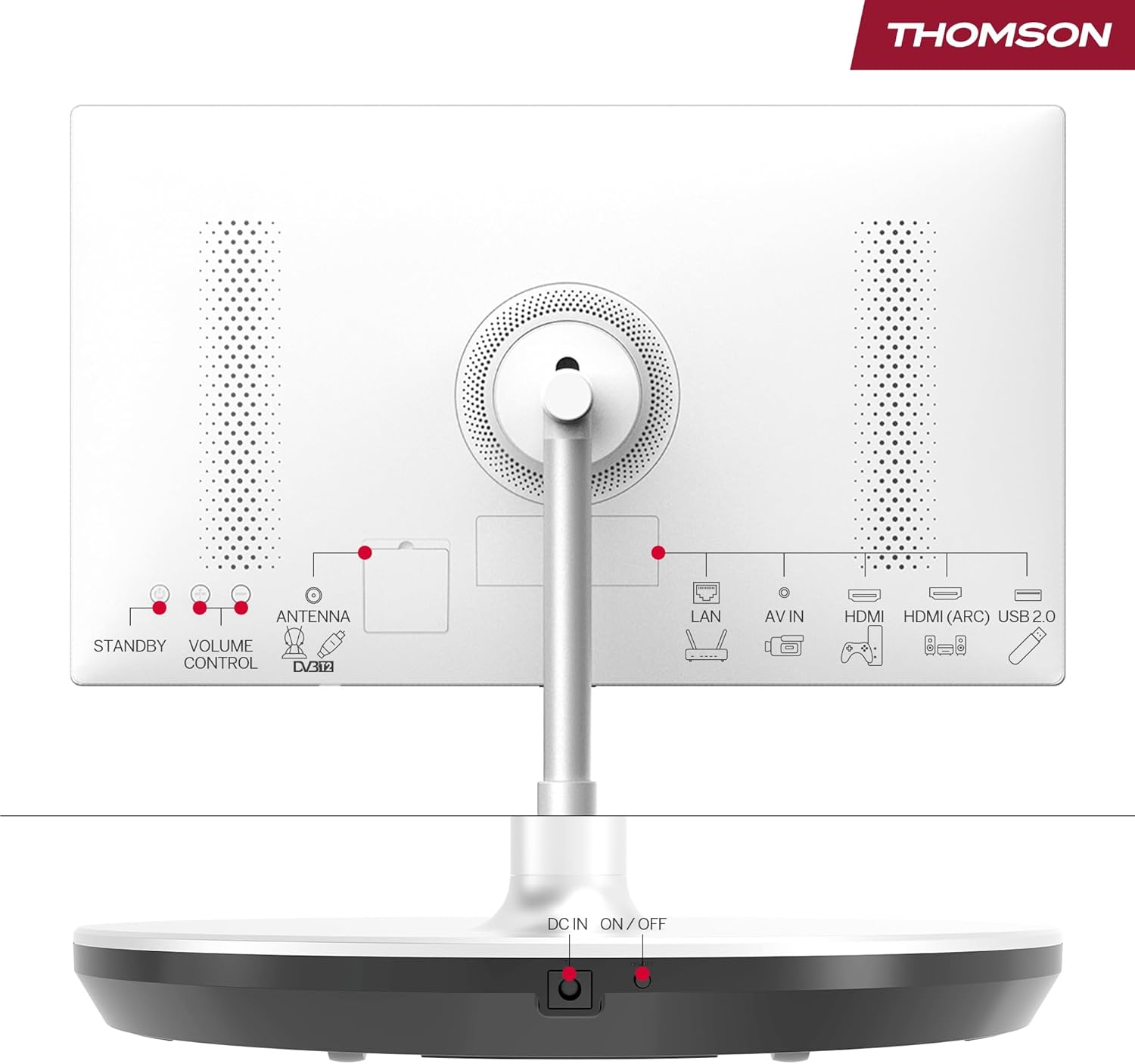
Image: Rear panel of the THOMSON Go TV, highlighting various input ports and controls.
The rear panel provides access to essential connectivity options:
- לאן: עטהערנעט פּאָרט פֿאַר ווייערד אינטערנעט פֿאַרבינדונג.
- AV IN: אַודיאָ/ווידעאָ אַרייַנגאַנג פֿאַר עלטערע דעוויסעס.
- הדמי (קרייַזבויגן): High-Definition Multimedia Interface with Audio Return Channel support.
- וסב 2.0: USB port for media playback or connecting peripherals.
- ANTENNA (DVB-T2): Antenna input for terrestrial digital TV.
- דק אין: Power input for the adapter.
- ON/OFF: הויפּט מאַכט באַשטימען.
- STANDBY / VOLUME CONTROL: Physical buttons for basic control.
4.3. רימאָוט קאָנטראָל

Image: The remote control for the THOMSON Go TV, showing numeric keys, Google Assistant button, illuminated keys, and direct access buttons for streaming services.
The remote control allows full navigation and control of your TV. It features:
- נומעריק שליסלען: פֿאַר דירעקט קאַנאַל סעלעקציע.
- גוגל אַסיסטאַנט קנעפּל: Activate voice control.
- יללומינאַטעד שליסלען: For easy use in low-light conditions.
- דירעקט צוטריט קנעפּלעך: Quick launch for popular streaming apps like Netflix, Prime Video, and YouTube.
5. סעטאַפּ
5.1. Initial Placement and Power Connection
Place the TV on a stable, level surface. Thanks to its integrated wheels, you can easily move it to your desired location. Connect the power adapter to the DC IN port on the TV and then to a power outlet. Ensure the main ON/OFF switch is in the 'ON' position.
5.2. ערשטע מאָל אויפשטעלן
ביים ערשטן מאָל אנצינדן, וועט דער טעלעוויזיע אייך פירן דורך דעם ערשטן סעטאַפּ פּראָצעס:
- שפּראַך סעלעקציע: קלייַבן דיין בילכער שפּראַך.
- נעץ קאַנעקשאַן: פֿאַרבינדט זיך צו אייער Wi-Fi נעץ אָדער ניצט אַן עטהערנעט קאַבל פֿאַר אַ דראָטיקע פֿאַרבינדונג.
- גוגל אקאונט אריינלאגירן: Sign in with your Google account to access Google TV features, personalized recommendations, and app downloads.
- קאַנאַל יבערקוקן: If connecting an antenna, the TV will scan for available terrestrial channels.
- פּריוואַטקייט סעטטינגס: Configure your privacy preferences.
6. אַפּערייטינג ינסטרוקטיאָנס
6.1. גוגל טיווי צובינד
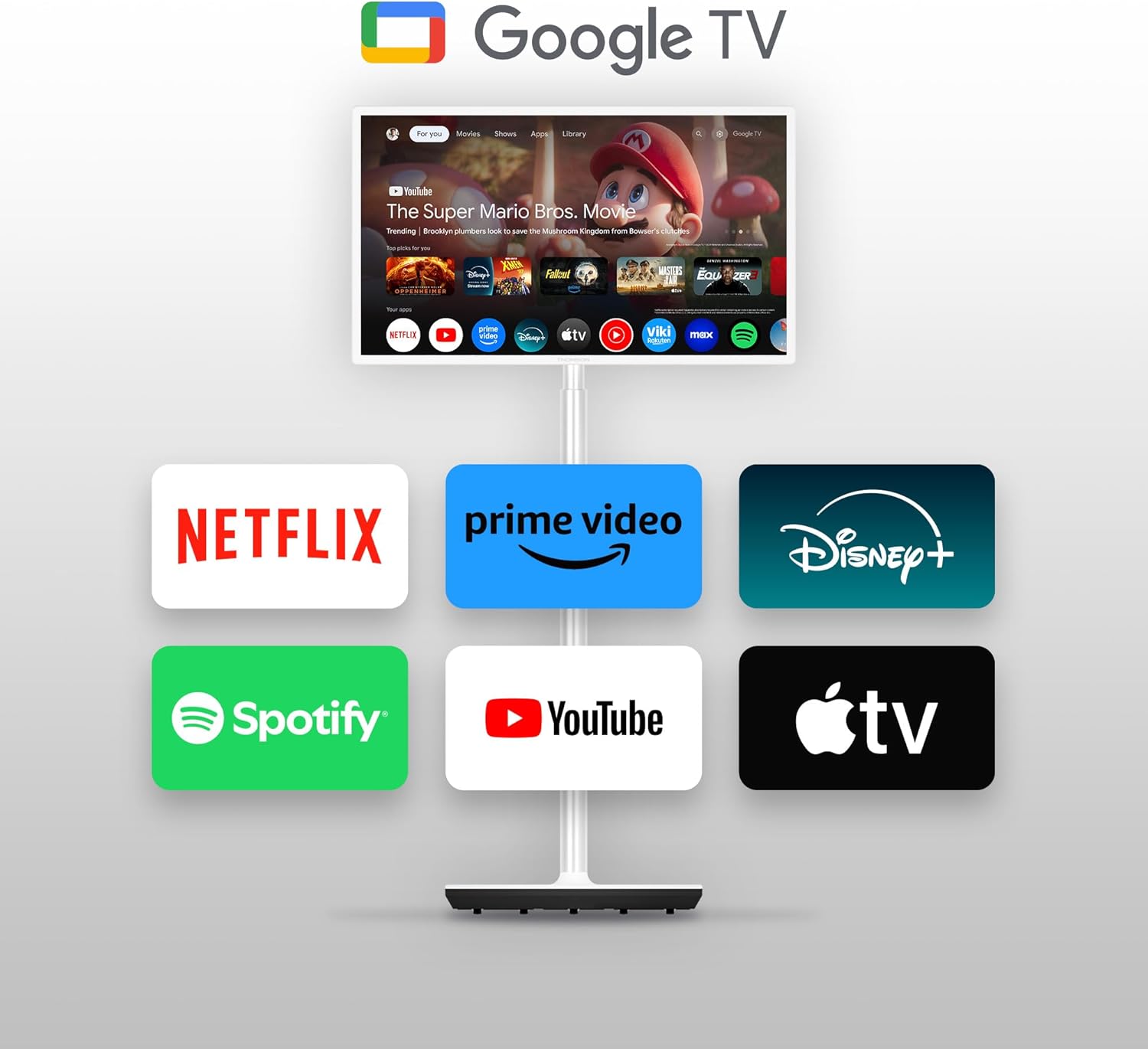
Image: The THOMSON Go TV screen showing the Google TV home screen with various streaming service icons like Netflix, Prime Video, Disney+, Spotify, YouTube, and Apple TV.
Google TV organizes content from your streaming services into a unified, personalized interface. You can create multiple user profiles, each with customized recommendations.
6.2. שטימע קאנטראל מיט גוגל אסיסטענט
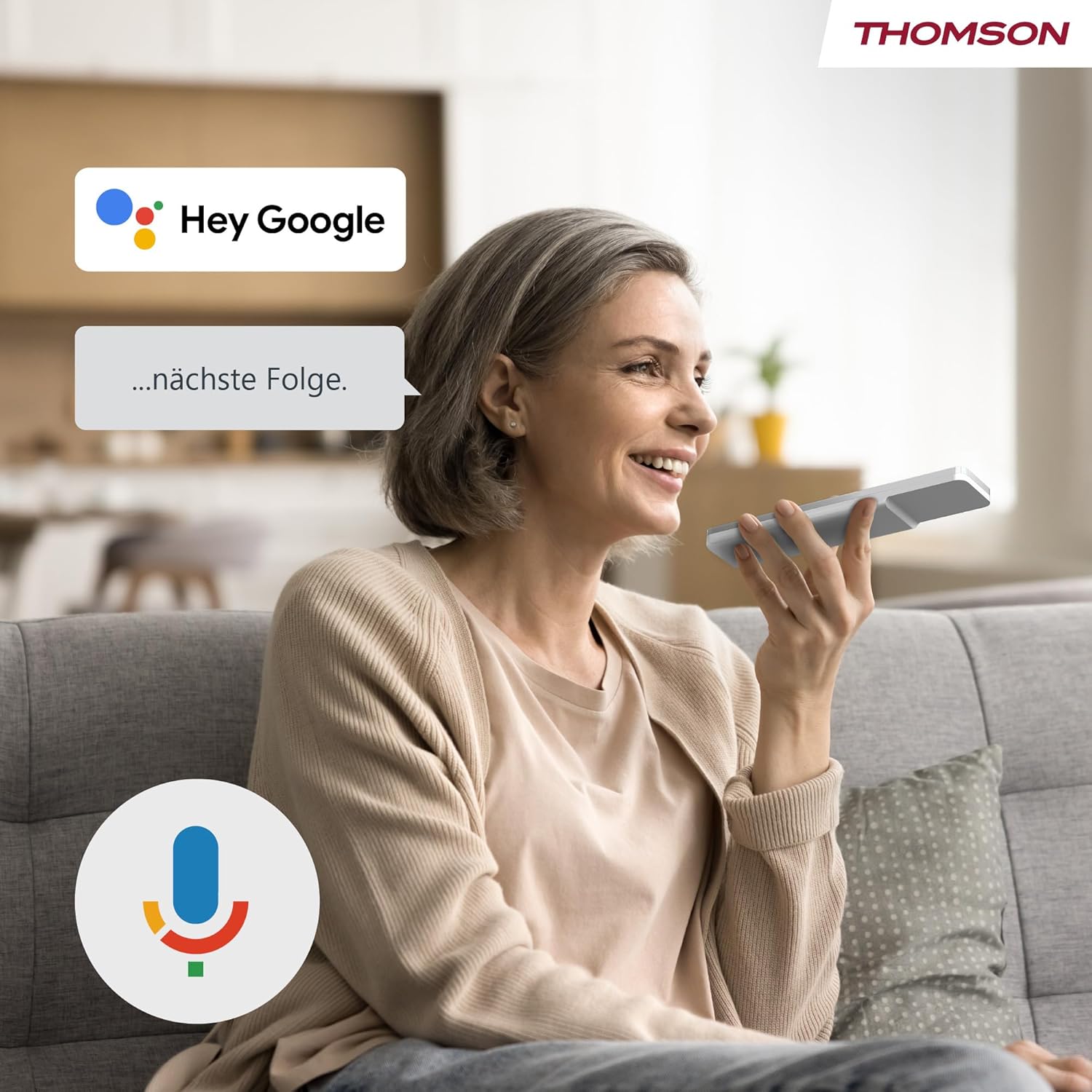
Image: A woman speaking into the remote control, with a 'Hey Google' speech bubble and the Google Assistant logo, demonstrating voice control functionality.
Press the Google Assistant button on your remote control and speak your commands. You can search for content, ask for recommendations, control smart home devices, and more.
6.3. Google Cast Functionality

Image: A smartphone screen showing content being cast to the THOMSON Go TV, with the Google Cast logo indicating the feature.
Use Google Cast to wirelessly stream content from compatible devices (smartphones, tablets, computers) directly to your TV screen.
6.4. Battery Usage and Mobility

Image: A woman performing yoga, with the THOMSON Go TV in the background displaying an exercise video. An overlay indicates '5000 mAh' and 'up to 4 hours life', highlighting the TV's portability and battery duration.
The integrated battery provides up to 4 hours of viewing time, allowing you to enjoy entertainment anywhere without a power outlet. The base wheels facilitate easy movement between rooms.
6.5. אַודיאָ פֿעיִטשערז

Image: The THOMSON Go TV displaying a beach scene, with the Dolby Audio logo and animated sound waves emanating from the screen, illustrating its audio capabilities.
Experience high-quality sound with integrated 16W speakers and Dolby Audio support.
7. וישאַלט
7.1. רייניקן דעם עקראַן
ווישט אָפּ דעם עקראַן מיט אַ ווייכן, לינט-פֿרײַעם שטאָף. פֿאַר שווערע פֿלעקן, ווישט אַ ביסלampווישט דעם שטאָף מיט וואַסער אָדער אַ ספּעציאַליזירטן עקראַן רייניגער. שפּריצט נישט פליסיקייט גלייך אויפן עקראַן.
7.2. אַלגעמיינע קער
- Keep the TV free from dust by regularly wiping the casinג מיט אַ טרוקענעם, ווייכן שטאָף.
- ויסמיידן פּלייסינג שווער אַבדזשעקץ אויף די טעלעוויזיע.
- ענשור אַז ווענטאַליישאַן אָופּאַנינגז זענען נישט אפגעשטעלט.
8. טראָובלעשאָאָטינג
אויב איר טרעפט פּראָבלעמען, זעט די פאלגענדע געוויינטלעכע פּראָבלעמען און לייזונגען:
| פּראָבלעם | מעגלעך סיבה | לייזונג |
|---|---|---|
| קיין מאַכט | Power cable disconnected; Main switch off | Check power connections; Ensure main ON/OFF switch is on |
| קיין בילד נישט, אבער סאונד איז דא | Incorrect input source; Loose HDMI cable | Select correct input source; Reconnect HDMI cable securely |
| קיין קלאַנג, אָבער בילד איז דאָ | Volume muted or too low; Audio settings incorrect | Increase volume; Check audio output settings |
| ווייַט קאָנטראָל נישט ארבעטן | באַטעריעס אויסגעשעפּט; שטערונג צווישן ווײַטקאָנטראָל און טעלעוויזיע | Replace batteries; Remove any obstructions |
| קענען ניט פאַרבינדן צו ווי-פי | אומרעכט פּאַראָל; ראַוטער פּראָבלעם; טעלעוויזיע צו ווייט פֿון ראַוטער | Verify password; Restart router; Move TV closer to router |
9. ספּעסאַפאַקיישאַנז
9.1. אַלגעמיינע
- סאָרט: THOMSON
- מאָדעל נומער: 32HG4M45
- פאַרשטעלן גרייס: 32 אינטשעס (80 סענטימעטער)
- ווייַז טעכנאָלאָגיע: הד געפירט
- רעזאלוציע: 1366 X 768 (768 פּ)
- דערפרישן קורס: 60 הז
- אַספּעקט פאַרהעלטעניש: 16:9
- קאַנטראַסט: 3000:1
- אַפּערייטינג סיסטעם: אַנדרויד (גוגל טיווי)
- זכּרון סטאָרידזש קאַפּאַציטעט: 1 גיגאבייט
- ספּעציעלע פֿעיִקייטן: Google TV, Voice Control, Bluetooth 5.1, Portable (up to 4 hours battery life)
- פּראָדוקט דימענסיעס (DxWxH): 22.7 X 73.4 X 132.3 סענטימעטער
- Product Weight (without stand): 18.1 קג
- VESA שטיצן: Wall mount, Table stand
9.2. קאַנעקטיוויטי
- קאַנעקטיוויטי טעכנאָלאָגיע: בלועטוט, עטערנעט, יו-עס-בי, וויי-פיי
- HDMI פּאָרץ: 2
- וסב פּאָרץ: 1 (Total USB 2.0: 1, Total USB 3.0: 1 - Note: JSON lists both 1 USB and 1 USB 2.0 and 1 USB 3.0, assuming 1 physical port supporting both standards or a typo.)
- אַודיאָ אַרייַנשרייַב: HDMI, וסב
- ווירעלעסס טעכנאָלאָגיע: ווי-פי
- Internet Applications: Disney Plus, Netflix, Prime Video, YouTube
9.3. אַודיאָ
- Speaker Description: Integrated speakers with Dolby Audio and 16 W power
- Integrated Surround Sound Format: Dolby Audio
9.4. Power and Energy Efficiency

Image: EU Energy Label for the THOMSON 32HG4M45, showing energy efficiency class E and 26 kWh/1000h consumption.
- ענערגיע עפעקטיווקייַט קלאַס: E
- מאַכט קאַנסאַמשאַן (SDR): 26.0 וו
- מאַכט קאַנסאַמשאַן (HDR): 26.0 וו
- באַטערי: 1 Non-standard battery (type required)
פֿאַר מער דעטאַלירטע ענערגיע אינפֿאָרמאַציע, ביטע זען די אָפֿיציעלע EU EPREL דאַטאַבאַזע: https://eprel.ec.europa.eu/qr/2242286
10. וואָראַנטי און שטיצן
10.1. פּראָדוקט וואָראַנטי
דער פּראָדוקט קומט מיט אַ 3 יאָר לימיטעד וואָראַנטי. Please refer to the included Warranty Card for full terms and conditions.
10.2. פאַבריקאַנט און שטיצע
For technical support or service inquiries, please contact the manufacturer:
- פאַבריקאַנט: סטריםView GmbH
- Webפּלאַץ: www.streamview.קאָם
- בליצפּאָסט: קאָנטאַקט@סטריםview.קאָם
- טעלעפֿאָן: +4318900066
- אַדרעס: פראנץ-יוסף-קיי 1, 1010 ווין, עסטרייך