הקדמה
Thank you for choosing the Generic K54 Wireless Earbuds. These earbuds are designed to provide a superior audio experience with HD decoding technology, deep bass, and stereo surround sound. Featuring a convenient digital display for battery levels and an ergonomic design for comfortable wear, the K54 earbuds offer seamless Bluetooth connectivity for various devices. Please read this manual carefully to ensure proper use and optimal performance of your new earbuds.
פּעקל אינהאַלט
ביטע טשעק די פּאַקעט פֿאַר די פאלגענדע זאכן:
- K54 Wireless Earbuds (Left and Right)
- טשאַרדזשינג קאַסע
- וסב טיפּע- C טשאַרדזשינג קאַבלע
- באַניצער מאַנואַל
- Multiple sizes of ear tips (typically included for comfortable fit)
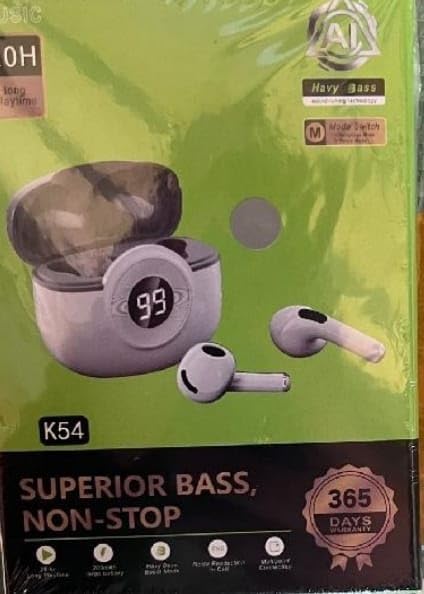
Image: The K54 Wireless Earbuds packaging, displaying the earbuds, charging case, and key features like 'Superior Bass' and '365 Days Warranty'.
סעטאַפּ
1. אויפלאָדן די אויערקנעפּלעך און קעסטל
פארן ערשטן באַנוץ, לאָדן די אויערקנעפּלעך און די טשאַרדזשינג קעסטל גאָר אויף.
- לייגט די אויערן-קנעפּלעך אין דעם טשאַרדזשינג קעסטל. מאַכט זיכער אַז זיי זענען ריכטיק אײַנגעזעצט.
- פֿאַרבינדט דעם USB טיפּ-C טשאַרדזשינג קאַבל צום טשאַרדזשינג פּאָרט אויף דער קעיס און דעם אַנדערן עק צו אַ USB מאַכט אַדאַפּטער (נישט אַרייַנגערעכנט) אָדער אַ קאָמפּיוטער'ס USB פּאָרט.
- דער דיגיטאַלער אַרויסווייַז אויף דער טשאַרדזשינג קעסטל וועט ווייַזן די באַטאַרייע פּראָצענטtage, indicating charging status. The earbuds will also show a charging indicator (usually a light) while charging.
- טשאַרדזשינג צייט איז בעערעך 1.5 שעה פֿאַר אַ פול אָפּצאָל.
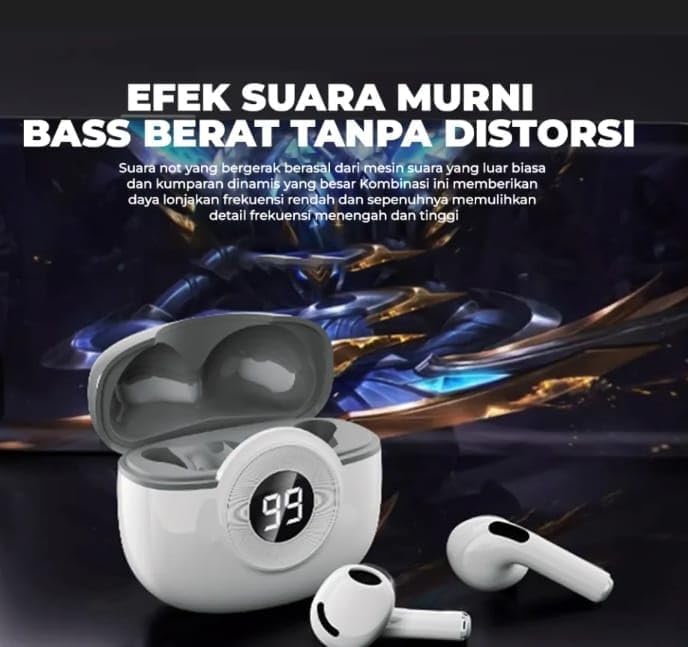
Image: The K54 Wireless Earbuds resting in their charging case. The case features a digital LED display showing '99', indicating a full battery charge. The earbuds are white.
2. פּערינג מיט אַ מיטל
Follow these steps to pair your K54 Wireless Earbuds with your smartphone or other Bluetooth-enabled device:
- מאַכן זיכער אַז די עאַרבודז זענען באפוילן.
- עפֿנט דעם טשאַרדזשינג קעסטל. די אויערקנעפּלעך וועלן אויטאָמאַטיש אַרײַן אין פּערינג מאָדע (אָנגעצייגט דורך בלינקנדיקע ליכטלעך אויף די אויערקנעפּלעך).
- אויף אייער דעווייס, גייט צו בלועטוט סעטינגס און צינדט אן בלועטוט.
- זוכן פֿאַר available devices. You should see "K54" or a similar name appear in the list.
- Select "K54" to connect. Once connected, the earbuds will indicate successful pairing (e.g., a voice prompt or steady light).
- די אויערקנעפּלעך וועלן זיך אויטאָמאַטיש ווידער פֿאַרבינדן צום לעצטן געפּאָרטן מיטל ווען מען נעמט זיי אַרויס פֿון קעסטל, אויב בלועטוט איז אַקטיוויזירט אויף דעם מיטל.
אַפּערייטינג ינסטראַקשאַנז
טראָגן די עאַרבודז
Gently insert the earbuds into your ears. Adjust them for a comfortable and secure fit. The ergonomic design is intended for stable wear during various activities.
ריר קאָנטראָלס
The K54 earbuds feature touch controls for easy management of music and calls. Specific functions may vary slightly depending on your device and operating system.
| קאַמף | פֿונקציע |
|---|---|
| איין צאַפּ (לינקס/רעכטס) | שפּילן/פּויזירן מוזיק, ענטפֿערן/ענדיגן רוף |
| טאָפּל צאַפּן (רעכט עאַרבוד) | ווייַטער שפּור |
| טאָפּל צאַפּן (לינקס עאַרבוד) | פֿריִערדיקע שפּירט |
| טריפל טאַפּ (לינקס/רעכטס) | אַקטאַווייט קול אַססיסטאַנט (סירי, Google אַססיסטאַנט) |
| Long Press (Left/Right, 2 seconds) | אָפּוואַרפן ינקאַמינג רופן |
| Long Press (Left/Right, 3 seconds) | מאַכט אויף/אויס (ווען נישט אין פאַל) |
וישאַלט
Proper maintenance ensures the longevity and optimal performance of your K54 Wireless Earbuds.
- רייניקונג: Regularly clean the earbuds and charging case with a soft, dry, lint-free cloth. Do not use abrasive cleaners or immerse in water.
- סטאָרידזש: ווען נישט אין באַנוץ, לייגט די אויערן-קנעפּלעך אין זייער טשאַרדזשינג קעסטל צו באַשיצן זיי און האַלטן זיי טשאַרדזשד.
- ויסמיידן עקסטרעמע טנאָים: Do not expose the earbuds to extreme temperatures, humidity, or direct sunlight. The earbuds are נישט וואַסער-קעגנשטעליק.
- טשאַרדזשינג: ניצט נאָר דעם צוגעשטעלטן USB טיפּ-C קאַבל צום אָפּלאָדן.
טראָובלעשאָאָטינג
If you encounter issues with your K54 Wireless Earbuds, please refer to the following common solutions:
- אויערקנעפּלעך נישט פּערינג:
- מאַכן זיכער אַז ביידע עאַרבודז זענען באפוילן.
- אויסלעשן און אן די בלועטוט פון אייער דעווייס.
- Forget "K54" from your device's Bluetooth list and try pairing again.
- לייגט צוריק די אויערן-קנעפּלעך אין דעם קעסטל, מאַכט צו דעם דעקל, וואַרט אַ פּאָר סעקונדעס, און דערנאָך עפֿנט זיי צו ווידער אַרײַן אין פּערינג מאָדע.
- נאָר איין אויערקנעפּל אַרבעט:
- מאַכן זיכער אַז ביידע עאַרבודז זענען באפוילן.
- Place both earbuds back into the charging case, close the lid, then take them out together.
- Try resetting the earbuds (refer to specific reset instructions if available, otherwise, a full charge and re-pairing often resolves this).
- קיין קלאַנג אָדער נידעריקע באַנד:
- קאָנטראָלירט דעם וואָלומען אויף ביידע אייער דעווייס און די אויערקנעפּלעך.
- זיכער מאַכן אַז די אויערקנעפּלעך זענען ריכטיק פֿאַרבונדן צו דיין מיטל.
- רייניקט יעדן דעבריס פון די אויערקנעפל רעדנער מעש.
- טשאַרדזשינג פאַל ניט טשאַרדזשינג:
- זיכער מאַכן אַז דער USB טיפּ-C קאַבל איז זיכער פארבונדן צו ביידע דעם קעסטל און דער מאַכט מקור.
- פּרוּווט אַ אַנדערש וסב פּאָרט אָדער מאַכט אַדאַפּטער.
ספּעסאַפאַקיישאַנז
| שטריך | דעטאַל |
|---|---|
| מאָדעל נומער | K54 |
| קאַנעקטיוויטי | ווירעלעסס, בלועטאָאָטה |
| בלועטאָאָטה ווערסיע | 5.0 |
| אויער פּלייסמאַנט | אין אויער |
| קאָנטראָל מעטאָד | דריק קנעפל, ריר |
| טשאַרדזשינג צייט | בעערעך 1.5 שעה |
| פּונקט וואָג | 45 גראַמז |
| מאַטעריאַל | פּלאַסטיק |
| קאָליר | ווייַס |
| וואַסער קעגנשטעל מדרגה | ניט וואַסער קעגנשטעליק |
| ספּעציעלע פֿעיִקייטן | Digital Display, HD Decoding, LED Battery Indicator, Superior Bass, Surround Sound |
| ימפּידאַנס | 32 אָהמס |
| אָפטקייַט ענטפער | 20 Hz (Note: This value typically represents the lower limit of a frequency range) |
| סענסיטיוויטי | 98 דב |
| טשאַרדזשינג פּאָרט | יו-עס-בי טיפ-סי (פארן אויפלאדונג קעיס) |
וואָראַנטי אינפֿאָרמאַציע
The Generic K54 Wireless Earbuds come with a manufacturer's limited warranty. Please refer to the terms and conditions provided at the time of purchase for full details.
- וואָראַנטי פּעריאָד: 6 months limited warranty (as per product specifications).
- This warranty covers manufacturing defects. It does not cover damage caused by misuse, accidents, unauthorized modifications, or normal wear and tear.
- ביטע האַלטן דיין דערווייַז פון קויפן פֿאַר וואָראַנטי קליימז.
קונה שטיצן
For further assistance, technical support, or warranty inquiries, please contact your retailer or the manufacturer's customer service. Contact information is typically available on the product packaging or the retailer's webפּלאַץ.
Note: As this is a generic product, specific manufacturer contact details are not provided here.


