
1. הקדמה
א דאנק פארן קויפןasing the ULTIMEA Aura A60 U2621 7.1ch Dolby Atmos Soundbar System. This manual provides essential information for setting up, operating, and maintaining your new sound system. Please read this manual thoroughly before use to ensure proper functionality and to maximize your audio experience.

Figure 1.1: Immersive audio experience with the ULTIMEA Aura A60 system.
2. זיכערקייַט אינפֿאָרמאַציע
כדי צו רעדוצירן דעם ריזיקע פון עלעקטרישן קלאַפּ, פייער, אדער שאָדן צו אייער דעווייס, ביטע אָבסערווירן די פאלגענדע זיכערהייט מיטלען:
- דו זאלסט נישט ויסשטעלן דעם אַפּפּליאַנסע צו רעגן אָדער נעץ.
- דו זאלסט נישט שטעלן אַבדזשעקץ אָנגעפילט מיט ליקווידס, אַזאַ ווי וואַסעס, אויף דעם אַפּאַראַט.
- זיכער מאַכן אַז עס איז דאָ געהעריקע ווענטילאַציע. נישט פֿאַרשטאָפּן קיין ווענטילאַציע עפענונגען.
- דו זאלסט נישט ינסטאַלירן לעבן קיין היץ קוואלן אַזאַ ווי ראַדיאַטאָרס, היץ רעדזשיסטערז, סטאָוווז אָדער אנדערע אַפּאַראַט (אַרייַנגערעכנט ampליפיערס) וואָס פּראָדוצירן היץ.
- באַשיצן די מאַכט שנור פון גיין אויף אָדער פּינטשט, ספּעציעל אין די פּלאַגז, קאַנוויניאַנס רעסאַפּיז און די פונט ווו זיי אַרויסגיין פון די אַפּאַראַט.
- נאָר נוצן אַטאַטשמאַנץ / אַקסעסעריז ספּעסיפיעד דורך דער פאַבריקאַנט.
- אָפּשטויסן דעם אַפּאַראַט בעשאַס בליץ סטאָרמז אָדער ווען אַניוזד פֿאַר לאַנג פּיריאַדז.
- אָפּשיקן אַלע סערוויסעס צו קוואַלאַפייד סערוויס פּערסאַנעל.
3. פּעקל אינהאַלט
ביטע קאָנטראָלירט אַז אַלע זאכן זענען פאַראַן און אין גוטן צושטאַנד:
- ULTIMEA Aura A60 Soundbar
- Wireless Subwoofer (4-inch, BassMX Technology)
- 4 x Surround Speakers (2 front, 2 rear)
- ווייַט קאָנטראָל
- HDMI קאַבלע
- Power Adapter/Cables
- באַניצער מאַנואַל (דעם דאָקומענט)
4. פּראָדוקט איבערview
The ULTIMEA Aura A60 U2621 is a 7.1ch Dolby Atmos soundbar system designed to deliver an immersive home theater audio experience. It features a main soundbar unit, a powerful wireless subwoofer with BassMX technology, and four surround speakers.
4.1 Main Soundbar Unit
The main soundbar unit houses 3 main channels for clear dialogue and primary audio. It serves as the central hub for all audio connections.

Figure 4.1: Main soundbar unit with front surround speakers.
4.2 ווירעלעסס סובוואָאָפער
The dedicated 4-inch wireless subwoofer incorporates BassMX technology to enhance low frequencies, providing deep and resonant bass for a more impactful audio experience.

Figure 4.2: Wireless subwoofer with BassMX technology.
4.3 סעראַונד ספּיקערז
The system includes four surround speakers: two front and two rear. The rear speakers connect wirelessly to the soundbar, minimizing cable clutter and allowing flexible placement to create an expansive acoustic space.

Figure 4.3: Diagram of 7.1ch sound distribution.
4.4 ינפּוט / רעזולטאַט פּאָרץ
The soundbar features multiple input options for versatile connectivity:
- HDMI עאַרק: For high-quality audio transmission and seamless TV integration.
- אָפּטיש: דיגיטאַל אַודיאָ אַרייַנגאַנג.
- AUX: אַנאַלאָג אַודיאָ אַרייַנשרייַב.
- וסב: פֿאַר מעדיע ווידערשפּיל.
- בלועטאָאָטה: וויירלעס אַודיאָ סטרימינג.

Figure 4.4: Rear panel connections, including HDMI eARC.
5. סעטאַפּ
5.1 פיזישע פּלאַצירונג
די אָפּטימאַלע פּלאַצירונג פון אייערע סאַונד סיסטעם קאָמפּאָנענטן איז קריטיש פֿאַר דער בעסטער אַודיאָ דערפאַרונג.
- סאָונדבאַר: Place the soundbar centrally below your television. Ensure it is not obstructed.
- סובוואָאָפער: Position the wireless subwoofer on the floor near the soundbar. Experiment with placement to find the best bass response for your room.
- Front Surround Speakers: Place the two wired front surround speakers to the left and right of your TV, ideally at ear level when seated.
- דערציען סעראַונד ספּיקערז: Position the two wireless rear surround speakers behind your primary listening position, to the left and right. These speakers will automatically connect wirelessly to the soundbar once powered on.

Figure 5.1: Recommended speaker placement for Dolby Atmos.
5.2 קאַנעקשאַנז
פֿאָלגט די סטעפּס צו פֿאַרבינדן אייער סאַונדבאַר סיסטעם:
- מאַכט קשר: Connect the power cables to the soundbar, subwoofer, and surround speakers, then plug them into a power outlet.
- HDMI eARC (רעקאָמענדירט): Connect one end of the provided HDMI cable to the HDMI eARC port on your soundbar and the other end to the HDMI eARC/ARC port on your TV. This connection supports Dolby Atmos and allows for TV remote control of the soundbar.
- אָפּטישע פֿאַרבינדונג (אַלטערנאַטיוו): If your TV does not have an HDMI eARC/ARC port, connect an optical cable (not included) from your TV's optical output to the OPTICAL input on the soundbar.
- AUX Connection (Alternative): For analog audio sources, connect a 3.5mm AUX cable (not included) from your device's audio output to the AUX input on the soundbar.
- USB קשר: Insert a USB drive into the USB port on the soundbar for direct media playback.
- Bluetooth Pairing: To connect a Bluetooth device, select the Bluetooth input on the soundbar. On your device, search for 'ULTIMEA Aura A60' and pair.
6. אַפּערייטינג ינסטרוקטיאָנס
6.1 מאַכט אויף / אַוועק
דריק דעם פּאַוער קנעפּל אויף דער סאַונדבאַר אָדער די ווײַטקאָנטראָל צו דרייען די סיסטעם אָן אָדער אויס.
6.2 אַרייַנשרייַב סעלעקציע
Use the 'Input' button on the remote control or the soundbar to cycle through available input sources: HDMI eARC, Optical, AUX, USB, and Bluetooth.

Figure 6.1: Remote control for easy operation.
6.3 באַנד קאָנטראָל
Adjust the master volume using the 'Volume Up' and 'Volume Down' buttons on the remote control or the soundbar. You can also adjust subwoofer and surround speaker levels independently.
6.4 Sound Modes and EQ Presets
The Aura A60 offers various sound modes and EQ presets to optimize audio for different content and preferences.
- Dedicated Modes: Select from 6 specialized modes: Movie, Music, Voice, Sports, Game, and Night.
- EQ פּרעסעץ: Access 121 professional EQ presets for genres like Bass, Pop, Classical, and Rock via the ULTIMEA app.

Figure 6.2: 121 preset EQ matrix for customized audio.
6.5 אַפּ קאָנטראָל
Download the ULTIMEA app to your smartphone for advanced control and customization options, including a 10-band EQ and access to all EQ presets.
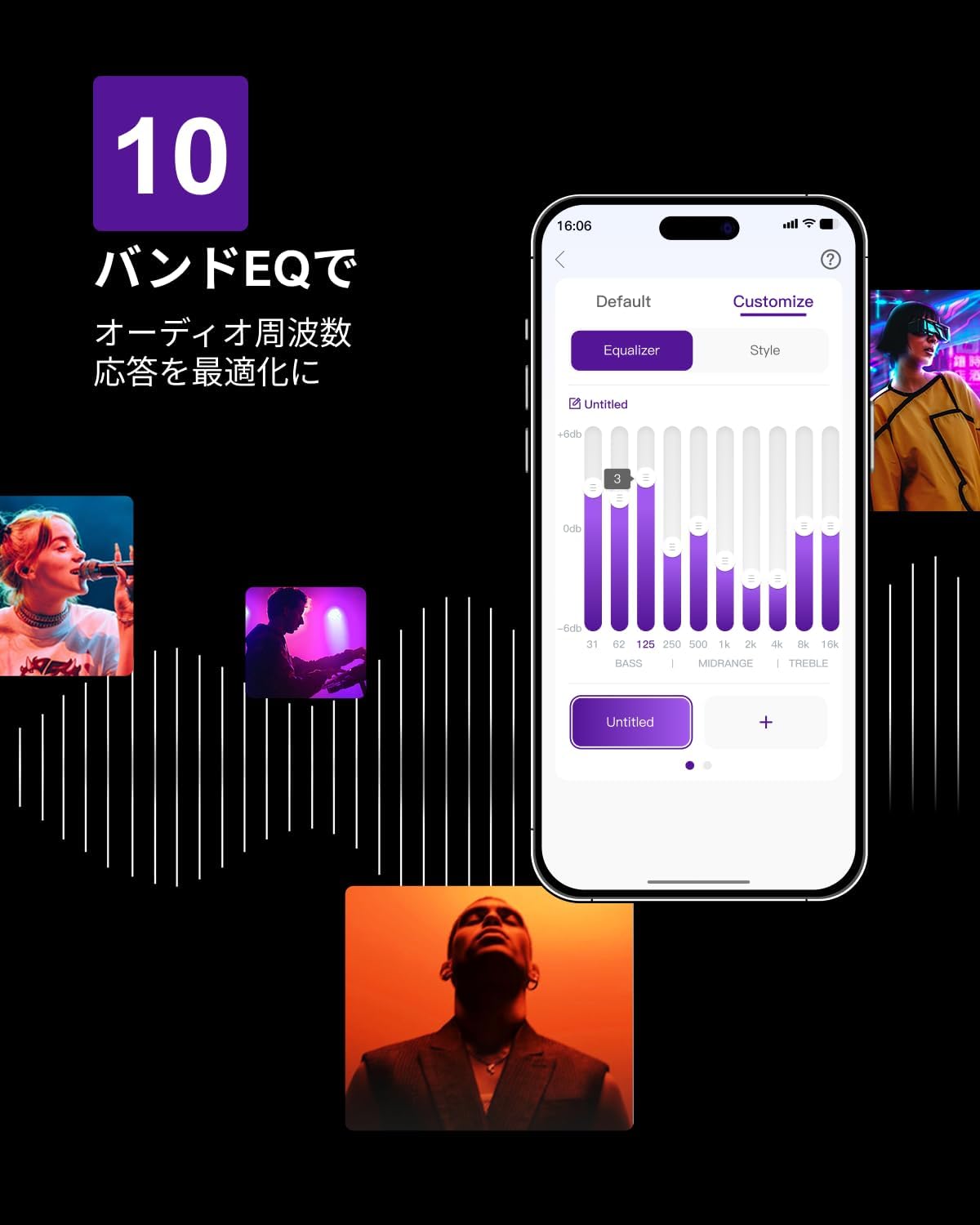
Figure 6.3: ULTIMEA mobile application interface.
7. וישאַלט
To ensure the longevity and optimal performance of your ULTIMEA Aura A60 soundbar system, follow these simple maintenance guidelines:
- רייניקונג: Use a soft, dry cloth to wipe the surfaces of the soundbar, subwoofer, and speakers. Do not use liquid cleaners or abrasive materials, as they may damage the finish.
- ווענטילאַטיאָן: Ensure that all ventilation openings remain clear and unobstructed to prevent overheating.
- סטאָרידזש: אויב איר לייגט די סיסטעם אויף פאר א לענגערע צייט, שטעלט עס אפ פון עלעקטריציטעט און לייגט עס אויף אין א קיל, טרוקן ארט ווייט פון דירעקט זונשייַן און עקסטרעמע טעמפּעראַטורן.
8. טראָובלעשאָאָטינג
אויב איר טרעפט פּראָבלעמען מיט אייער סאַונדבאַר סיסטעם, זעט די פאלגענדע געוויינטלעכע פּראָבלעמען און לייזונגען:
| פּראָבלעם | מעגלעך סיבה | לייזונג |
|---|---|---|
| קיין געזונט פון די סאָונדבאַר. | פאַלשער אינפוט אויסגעקליבן, וואָלומען צו נידעריק, קאַבלען נישט ריכטיק פארבונדן. | Verify the correct input source. Increase volume. Check all cable connections (HDMI, Optical, AUX). Ensure the soundbar is powered on. |
| No sound from subwoofer/surround speakers. | Subwoofer/speakers not paired or powered on, volume too low. | Ensure subwoofer and surround speakers are powered on. They should automatically pair. If not, refer to the pairing instructions in the full manual (if available) or contact support. Increase their individual volume levels. |
| פארדרייט אדער שלעכטע קלאַנג קוואַליטעט. | Incorrect audio settings, poor source quality, interference. | Adjust EQ settings or try different sound modes. Ensure the audio source is high quality. Check for nearby electronic devices causing interference. |
| בלועטאָאָטה קשר ישוז. | Device out of range, not in pairing mode, interference. | Ensure the soundbar is in Bluetooth pairing mode. Move your device closer to the soundbar. Disconnect and re-pair the device. |
If the problem persists after trying these solutions, please contact ULTIMEA customer support.
9. ספּעסאַפאַקיישאַנז
| שטריך | דעטאַל |
|---|---|
| סאָרט | ULTIMEA |
| מאָדעל נאָמען | Aura A60 |
| מאָדעל נומער | U2621 |
| רעדנער טיפּ | Soundbar with 7.1ch Surround Sound |
| אַודיאָ טעכנאָלאָגיע | Dolby Atmos, BassMX Technology |
| קאַנעקטיוויטי | HDMI eARC, Bluetooth, Optical, AUX, USB |
| סובוואָאָפער | 4-inch Wired Subwoofer (integrated BassMX) |
| אַרומרינגלען ספּיקערז | 4 (2 wired front, 2 wireless rear) |
| קאָנטראָל | Remote Control, ULTIMEA App |
| קאָליר | שוואַרץ |
| דימענשאַנז (די רענטגענ וו x ה) | 9 cm x 40 cm x 7 cm (Soundbar, approximate) |
| לאַנד פון אָריגין | כינע |
10. וואָראַנטי און שטיצן
ULTIMEA is committed to providing high-quality products and customer satisfaction. Your Aura A60 U2621 soundbar system comes with comprehensive support.
10.1 וואָראַנטי אינפֿאָרמאַציע
Specific warranty details may vary by region. Please refer to the warranty card included with your product or visit the official ULTIMEA webזייטל פֿאַר די מערסט אַרויף-צו-דאַטע וואָראַנטי טערמינען און באדינגונגען.
10.2 קונה שטיצן
For any questions, technical assistance, or troubleshooting not covered in this manual, please contact our dedicated support team:
- 365-Day Support: Our expert staff is available year-round to assist you.
- לעבן שמועסן: Instant responses are available via live chat on our webפּלאַץ.
- קערט: We offer a 30-day return policy with free shipping for your peace of mind.

365-Day Expert Support

Instant Live Chat

30-טאָג פריי רעטורנס
פֿאַר ווייטערדיקע הילף, ביטע באַזוכט די ULTIMEA Brand Store.