
הקדמה
This manual provides instructions for the VINABTY RC45135P replacement universal remote control. This remote is designed to function as a direct replacement for original remote controls of various HANSEATIC, Kendo, and Clayton TV models.
It operates using infrared (IR) technology and does not require programming or pairing, offering a straightforward solution for your television control needs.
Compatible TV models include:
- CL32LED23BSW, CL43UHDSW22B
- 32H500FDS, 39H500FDS, 50H600UDS
- 24DVD3201B, 39LED3221B, 40LED5192B
- F32ST2000, ED40A01FHD-VE, ED50AE04UHD-VE
- ED65A01UHD-VE, ED65A01UHD-HD
- ED43A06UHD-VE, ED49A02UHD-VE, ED50A0A0A02UHD-VE
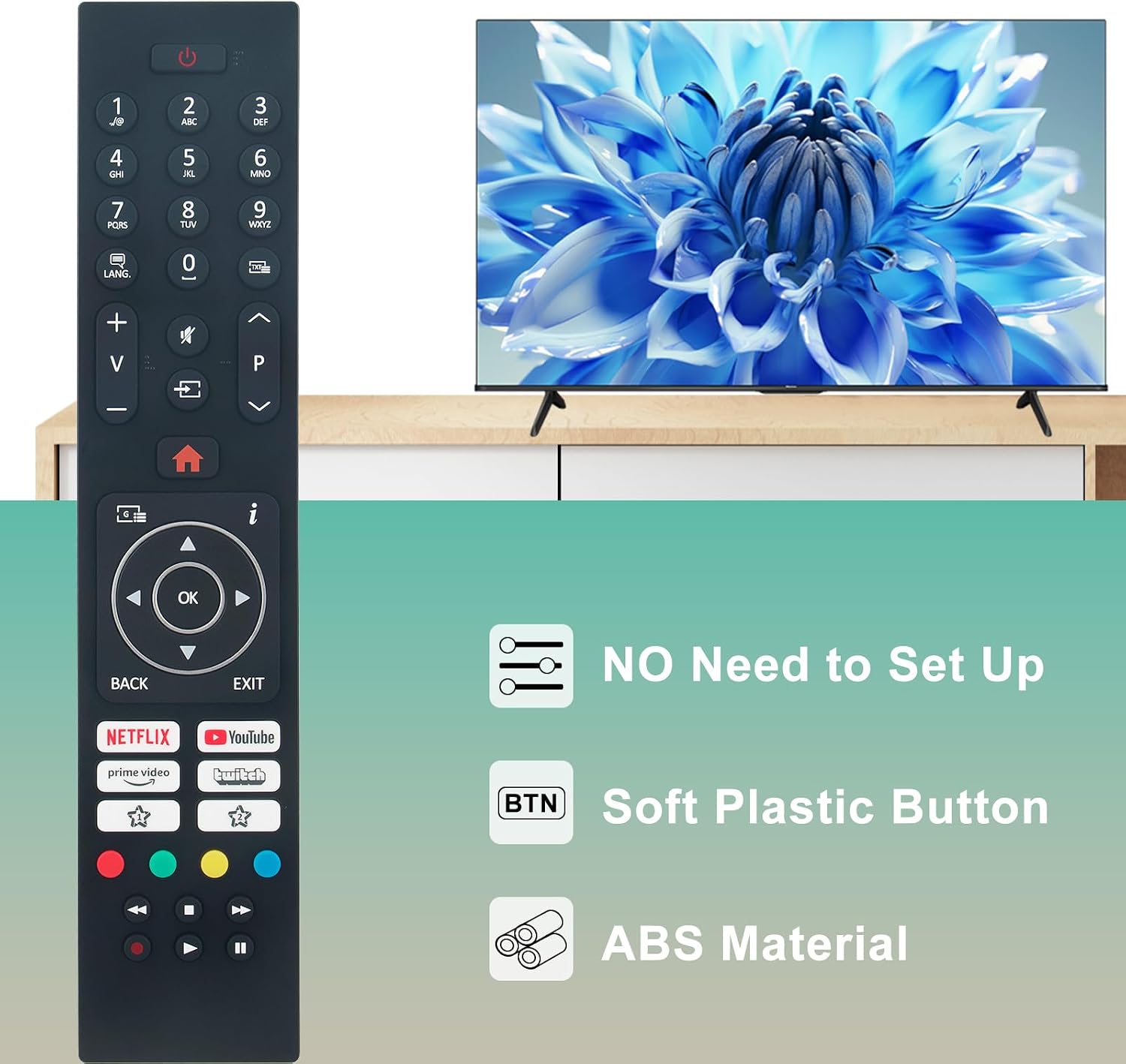
Image: The VINABTY RC45135P remote control, highlighting its plug-and-play functionality with no setup required.
סעטאַפּ
1. באַטאַרייע ייַנמאָנטירונג
The VINABTY RC45135P remote control requires two AAA batteries (not included).
- שריט 1: געפֿינען די באַטאַרייע אָפּטייל אויף די צוריק פון די ווייַט קאָנטראָל.
- שריט 2: רוקט דעם דעקל פונעם באַטעריע־אָפּטייל אַראָפּ צו עס עפֿענען.
- שריט 3: אַרײַנשטעלן צוויי AAA באַטעריעס, און זיכער מאַכן אַז די פּאָזיטיוו (+) און נעגאַטיוו (-) טערמינאַלן זענען ריכטיק אויסגעשטעלט מיט די מאַרקירונגען אינעווייניק אין דעם אָפּטייל.
- שריט 4: שטופּט צוריק דעם דעקל פון דעם באַטעריע־אָפּטייל ביז עס קליקט זיכער.

בילד: הינטערשטע view of the remote control, illustrating the open battery compartment for AAA battery insertion.
2. ערשט נוצן
This remote control is pre-programmed and does not require any additional setup or pairing. Once batteries are installed, it is ready for immediate use with compatible TV models.
אַפּערייטינג ינסטראַקשאַנז
The VINABTY RC45135P remote control provides full functionality for your compatible television. Point the remote directly at your TV's infrared receiver for optimal performance.

בילד: פראָנט view of the remote control, displaying the complete button layout for operation.
יקערדיק פאַנגקשאַנז
- Power Button (Red Circle with Line): טורנס די טעלעוויזיע אויף אָדער אַוועק.
- נומער קנעפּלעך (0-9): גלייך אויסקלייבן קאַנאַלן.
- באַנד אַרויף / אַראָפּ (+/-): אַדזשאַסץ די טעלעוויזיע באַנד.
- Channel Up/Down (P^/P˅): טוישט טעלעוויזיע קאַנאַלן סיקווענשעל.
- Mute Button (Speaker with X): מיוטעס אָדער אַנמיוט די טעלעוויזיע אַודיאָ.
- Input/Source Button (Rectangle with Arrow): גייט דורך די פארהאן אינפוט קוועלער (HDMI, AV, אא"וו).
- היים קנעפּל (הויז בילדל): Accesses the TV's main menu or smart TV interface.
- Navigation Pad (Up, Down, Left, Right Arrows with OK): נאַוויגירט דורך מעניוז און סעלעקטירט אָפּציעס.
- צוריק קנעפּל: קערט צו די פריערדיקע מעניו אָדער פאַרשטעלן.
- אַרויסגאַנג קנעפּל: פֿאַרלאָזט דעם איצטיקן מעניו אָדער אַפּליקאַציע.
Smart TV and App Buttons
Dedicated buttons provide quick access to popular streaming services:
- Netflix קנעפּל: לאָנטשיז די Netflix אַפּלאַקיישאַן.
- הויפּט ווידעא קנעפּל: לאָנטשט די אַמאַזאָן פּריים ווידעא אַפּליקאַציע.
- יוטוב קנעפל: לאָנטשיז די יאָוטובע אַפּלאַקיישאַן.
- Twitch Button: Launches the Twitch application.
ינפרערעד טעכנאָלאָגיע
This remote utilizes infrared 3.0 technology, providing a strong signal with a range of over 10 meters (33 feet) and an operating angle of 120 degrees. Ensure no obstructions are between the remote and the TV's IR receiver for optimal performance.

Image: The remote control in use, illustrating its capability for long-distance and precise control through infrared technology.
וישאַלט
כדי צו זיכער מאַכן די לאַנגלעבעניש און ריכטיקע פונקציאָנירן פון אייער ווייַט קאָנטראָל, פאָלגט די וישאַלט גיידליינז:
- רייניקונג: Wipe the remote control with a soft, dry cloth. Do not use liquid cleaners or abrasive materials, as these can damage the surface or internal components.
- באַטערי פאַרבייַט: Replace batteries when the remote's response becomes sluggish or it stops functioning. Always replace both batteries at the same time with new AAA batteries. Do not mix old and new batteries, or different types of batteries.
- סטאָרידזש: האַלט די ווײַטקאָנטראָל אין אַ קיל, טרוקן אָרט ווײַט פֿון דירעקטער זון, עקסטרעמע טעמפּעראַטורן און הויכער פֿײַכטקייט.
- ויסמיידן טראפנס: While made from durable ABS material, avoid dropping the remote control, as this can cause internal damage.
טראָובלעשאָאָטינג
If you experience issues with your VINABTY RC45135P remote control, refer to the following common solutions:
ווייַט ניט ריספּאַנדינג
- טשעק באַטעריז: Ensure batteries are correctly inserted with the correct polarity (+/-). Replace old or depleted batteries with new ones.
- שורה פון דערזען: Verify there are no obstructions between the remote control and the TV's infrared receiver. Ensure you are pointing the remote directly at the TV.
- דיסטאַנסע: Confirm you are within the effective operating range (up to 10 meters).
טייל פאַנגקשאַנאַליטי
- קאַמפּאַטאַבילאַטי: Double-check that your TV model is listed as compatible with the VINABTY RC45135P remote control. Refer to the "Introduction" section for a list of compatible models.
- טעלעוויזיע סעטטינגס: Some advanced functions might require specific TV settings. Consult your TV's original user manual for details.
קנעפּלעך נישט ארבעטן
- ריין קנעפּלעך: Ensure buttons are free from dirt or debris that might prevent proper contact.
- אינערלעכער שעדיקן: If specific buttons consistently fail, there might be internal damage. In such cases, consider contacting customer support.
ספּעסאַפאַקיישאַנז
| שטריך | דעטאַל |
|---|---|
| סאָרט | VINABTY |
| מאָדעל נאָמען | RC45135P |
| קאַנעקטיוויטי טעכנאָלאָגיע | Infrared (IR 3.0) |
| מאַקסימום קייט | 10 Metres (33 feet) |
| קאַמפּאַטאַבאַל דעוויסעס | Television (Specific HANSEATIC, Kendo, Clayton models) |
| מאַקס נומער פון שטיצט דעוויסעס | 1 |
| ספּעציעלע פֿעיִקייטן | Ergonomic design, No programming required |
| מאַטעריאַל | ABS |
| קאָליר | שוואַרץ |
| פּונקט וואָג | 70 גראַמז |
| פּראָדוקט דימענשאַנז (L x W x H) | 18 ל רענטגענ 4 וו רענטגענ 1.5 ה סענטימעטער |
וואָראַנטי און שטיצן
פּראָדוקט וואָראַנטי
This VINABTY remote control comes with a 2-יאָר לימיטעד וואָראַנטיביטע באַהאַלטן אייער קויפן באַווייַז פֿאַר וואָראַנטי קליימז.
קונה שטיצן
If you encounter issues not covered in this manual or require further assistance, please contact VINABTY customer support. Refer to the contact information provided with your purchase or visit the official VINABTY webפּלאַץ פֿאַר שטיצן דעטאַילס.
When contacting support, please provide your product model (RC45135P) and a detailed description of the issue to facilitate a quicker resolution.