
1. פּראָדוקט איבערview
The MSXTTLY U2AC-L9 Wireless Android Auto Adapter transforms your vehicle's wired Android Auto system into a seamless wireless experience. Enjoy navigation, music, and apps on your car's display without the need for cables, offering a more practical and fluid driving experience.

Figure 1.1: Wired vs. Wireless Android Auto Connectivity
שליסל פֿעיִקייטן:
- ווירעלעסס קאַנעקטיוויטי: Converts wired Android Auto to wireless.
- הינטער-קאָמפּאַקט פּלאַן: 70% smaller than previous versions, ensuring a discreet fit in any car USB port.
- Fast 3-Step Connection: שנעל און גרינג סעטאַפּ פּראָצעס.
- אָטאַמאַטיק ריקאַנעקשאַן: Connects automatically after initial pairing.
- סטאַביל פאָרשטעלונג: Enhanced chip and 5 GHz Wi-Fi module for reliable connection.
- דוראַבאַל קאַנסטראַקשאַן: Features a pure copper, gold-plated USB port for excellent conductivity and corrosion resistance.

Figure 1.2: Compact Design of the U2AC-L9 Adapter
2. פּעקל אינהאַלט
באַשטעטיקן אַז אַלע זאכן זענען פאַראַן אין דיין פּעקל:
- 1 x MSXTTLY U2AC-L9 Wireless Android Auto Adapter
- 1 קס וסב-א צו וסב-C קאַבלע
- 1 x USB Extension Cable
- 1 x באַניצער מאַנואַל
- 1 x 3M Adhesive Tape

פיגור 2.1: אריינגערעכנטע פּאַקעט אינהאַלט
3. קאַמפּאַטאַבילאַטי
To ensure proper functionality, please check the following compatibility requirements:
3.1 טעלעפאָן קאָמפּאַטאַביליטי
- Requires a smartphone running אַנדרויד 11 אָדער העכער.
- Your phone must support Android Auto.
3.2 פאָרמיטל קאָמפּאַטאַביליטי
- Works exclusively with vehicles or audio systems that are already equipped with ווייערד אַנדרויד אַוטאָ פון דער פאַבריק.
3.3 ניט געשטיצט
- Not compatible with Apple CarPlay.
- Not compatible with iPhones.
- Does not support Zlink/Mirroring functions.
פיגור 3.1: קאמפאטיבילעטי מיט דיווייס איבערview
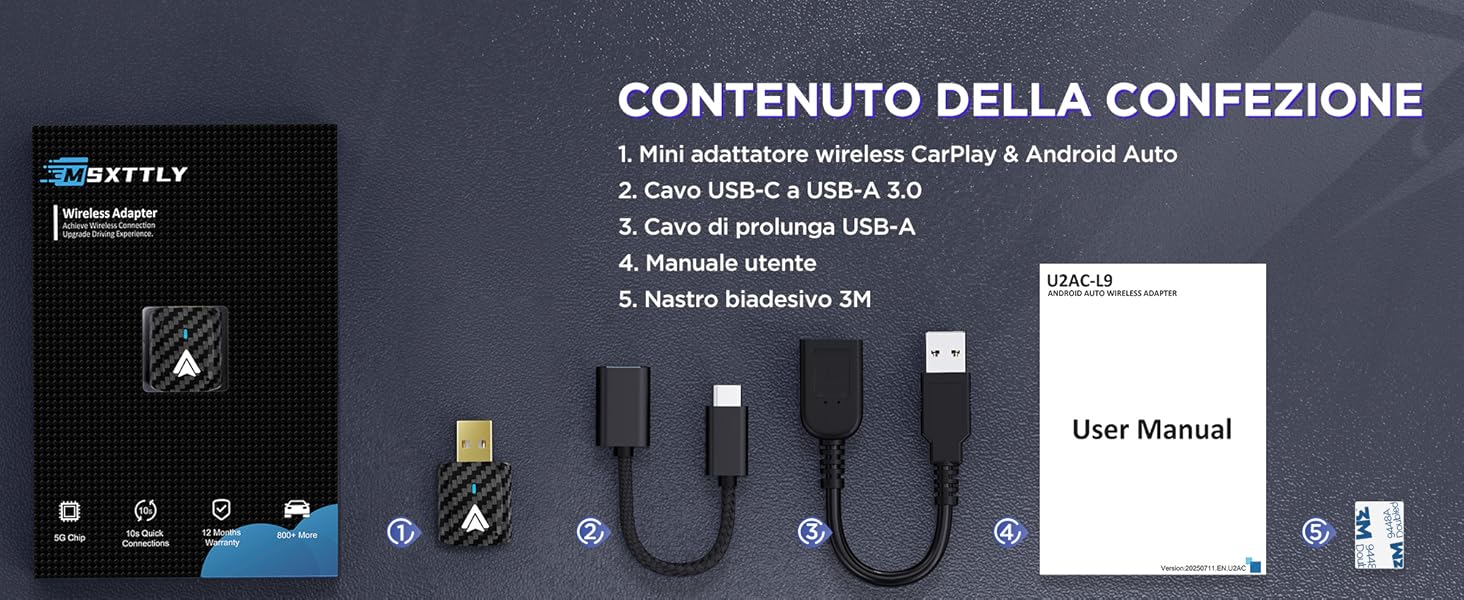
Figure 3.2: Detailed Vehicle Compatibility List
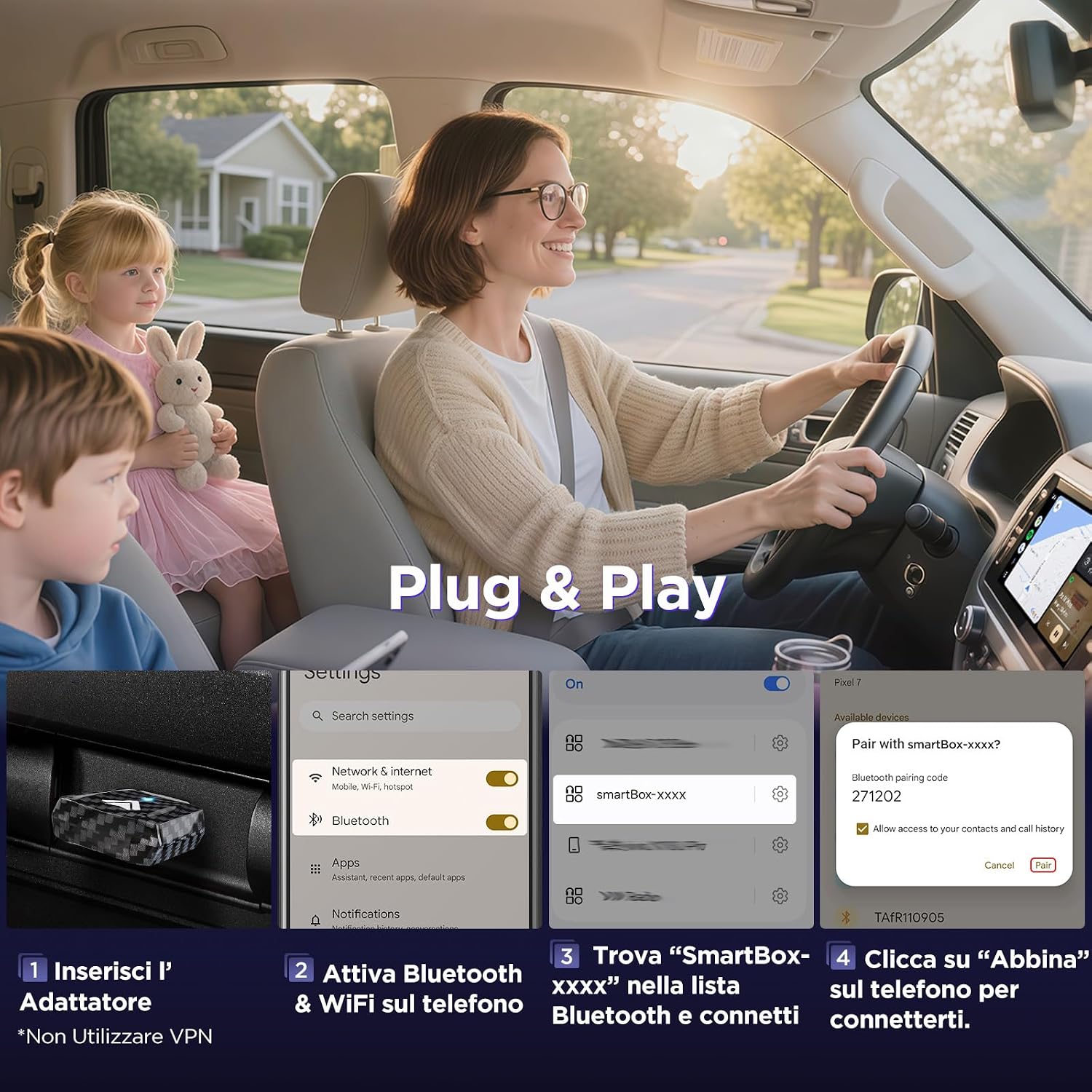
4. סעטאַפּ אינסטרוקציעס
Follow these steps for a quick and easy setup:
- אַרייַנלייגן די אַדאַפּטער: Plug the MSXTTLY U2AC-L9 adapter into your car's USB port that supports wired Android Auto. Use the provided USB-A to USB-C cable or USB extension cable if needed.
- Activate Bluetooth & Wi-Fi: On your Android smartphone, enable both Bluetooth and Wi-Fi.
- צוזאַמענשטעלן מיט אַדאַפּטער: On your phone, go to Bluetooth settings and search for a device named "SmartBox-xxxx" (where xxxx is a unique identifier). Select it to connect.
- באַשטעטיקן פּערינג: A pairing request will appear on your phone. Confirm by clicking "Pair."
באַמערקונג: Do not use a VPN during the initial setup process.

Figure 4.1: Plug & Play Setup Steps

Figure 4.2: Wireless Android Auto Connection Steps
5. אַפּערייטינג די מיטל
5.1 אָטאַמאַטיק ריקאַנעקשאַן
After the initial pairing, the U2AC-L9 adapter will automatically reconnect to your smartphone every time you start your vehicle, providing a seamless wireless Android Auto experience without further manual intervention.
5.2 קאָנטראָל מעטהאָדס
You can control Android Auto through your car's existing interface:
- סטירינג ראָד קאָנטראָלס: Use your vehicle's steering wheel buttons for audio playback, calls, and navigation.
- טאָוטשסקרעען קאָנטראָל: Interact directly with your car's touchscreen display.
- OEM Control Knob: Utilize your car's original equipment manufacturer (OEM) control knob for navigation and selections.

Figure 5.1: Android Auto Control Options
6. וישאַלט
6.1 פירמוואַרע דערהייַנטיקונגען
Regular firmware updates are released to improve connection stability, effectiveness, and overall performance. It is recommended to keep your adapter's firmware up to date.
To check for and install firmware updates, please visit the official MSXTTLY product page for the U2AC-L9 adapter. Detailed instructions for the update process will be provided there.
טיפּ: For optimal heat dissipation, especially during long drives, consider using the provided USB extension cable to position the adapter near a car's air vent.

Figure 6.1: Improved Heat Dissipation
7. טראָובלעשאָאָטינג
If you encounter issues with your MSXTTLY U2AC-L9 adapter, please refer to the following common solutions:
- No Connection / Adapter Not Recognized:
- Ensure your vehicle supports wired Android Auto.
- Verify your smartphone is running Android 11 or higher.
- Check that Bluetooth and Wi-Fi are enabled on your phone.
- Try plugging the adapter into a different USB port in your car, if available.
- ריסטאַרט דיין אויטאָ'ס אינפאָטאַינמענט סיסטעם און דיין סמאַרטפאָון.
- Intermittent Connection / Disconnections:
- זיכער מאַכן אַז דער אַדאַפּטער איז זיכער אַרייַנגעשטעקט אין די USB פּאָרט.
- Check for any physical obstructions or interference near the adapter or your phone.
- Update the adapter's firmware to the latest version (refer to Section 6.1).
- Ensure your phone's Android Auto app is updated.
- Android Auto Not Appearing on Car Screen:
- Confirm successful Bluetooth pairing with "SmartBox-xxxx".
- On your car's infotainment system, navigate to the Android Auto section. It might require manual selection the first time.
- Some vehicles may require specific settings to be enabled for Android Auto. Consult your car's manual.
- Lag or Delay:
- Ensure your phone has a strong Wi-Fi signal to the adapter.
- שליסט אומנייטיקע הינטערגרונט אַפּליקאַציעס אויף דיין סמאַרטפאָון.
- A firmware update might improve performance.
If these steps do not resolve the issue, please contact MSXTTLY customer support for further assistance.