
1. הקדמה
Welcome to the user manual for your LOKLNEYK H610 S4 Motherboard. This guide provides detailed instructions for installation, operation, maintenance, and troubleshooting to ensure optimal performance and longevity of your system. Please read this manual thoroughly before beginning installation.
2. סעטאַפּ
2.1. פּעקל אינהאַלט
Verify that all components are present in your motherboard package:
- LOKLNEYK H610 S4 Motherboard
- איך / אָ שילד
- SATA דאַטן קייבאַלז (די קוואַנטיטעט קען זיין אַנדערש)
- באַניצער מאַנואַל (דעם דאָקומענט)
- דרייווער סי-די/יו-עס-בי (אדער דאונלאוד אינסטרוקציעס)
2.2. מאָטהערבאָאַרד אויסלייג
Familiarize yourself with the various components and connectors on the motherboard. Refer to the diagram below for a detailed overview of the H610 S4 motherboard's key areas.

Figure 1: Labeled diagram of the LOKLNEYK H610 S4 Motherboard, highlighting CPU socket, RAM slots, PCIe slots, M.2 slots, SATA ports, and various headers.
2.3. ינסטאַלירונג סטעפּס
פֿאָלגט די סטעפּס פֿאַר ריכטיקער אינסטאַלאַציע פֿון אייער מאַדערבאָרד און קאָמפּאָנענטן:
- צוגרייטן דעם שאַסי: אינסטאלירט דעם I/O שילד אין דער הינטערשטער עפענונג פון אייער קאמפיוטער קעסטל.
- Install the Motherboard: Carefully place the motherboard into the chassis, aligning it with the standoffs. Secure it with screws.
- CPU Installation (LGA 1700):
- Open the CPU socket lever and protective cover.
- Align the CPU's triangular mark with the mark on the socket.
- לייגט פֿאָרזיכטיק די סי-פּי-יו אין דער סאָקעט. צווינגט עס נישט.
- מאַכט צו דעם הייבער צו באַפֿעסטיקן די סי-פּי-יו.
- CPU קולער אינסטאַלאַציע: Install your CPU cooler according to its manufacturer's instructions, ensuring proper thermal paste application.
- RAM Installation (DDR4):
- עפֿנט די קליפּס אויף ביידע ענדס פֿון די DDR4 זכּרון סלאָץ.
- Align the memory module's notch with the slot's key.
- דריק פעסט אַראָפּ אויף ביידע עקן פון דעם מאָדול ביז די קליפס קלאַפּן זיך אַרײַן אין פּלאַץ.
- Storage Installation (NVMe M.2 / SATA):
- For M.2 SSDs, insert the drive into the M.2 slot and secure it with the provided screw.
- For SATA drives, connect SATA data cables to the motherboard's SATA ports and to your drives. Connect power cables from your power supply to the drives.
- PCIe קאַרטל אינסטאַלאַציע: Insert your graphics card or other PCIe expansion cards into the appropriate PCIe slots and secure them.
- מאַכט צושטעלן קאַנעקשאַנז: פֿאַרבינדט דעם 24-פּין ATX מאַכט קאַנעקטאָר און דעם 8-פּין CPU מאַכט קאַנעקטאָר פֿון אייער מאַכט צושטעל צום מוטערבאָרד.
- פראָנט פּאַנעל קאַנעקשאַנז: Connect the front panel headers (power button, reset button, USB ports, audio jacks, LED indicators) to the corresponding pins on the motherboard. Refer to the motherboard layout diagram (Figure 1) for pin locations.
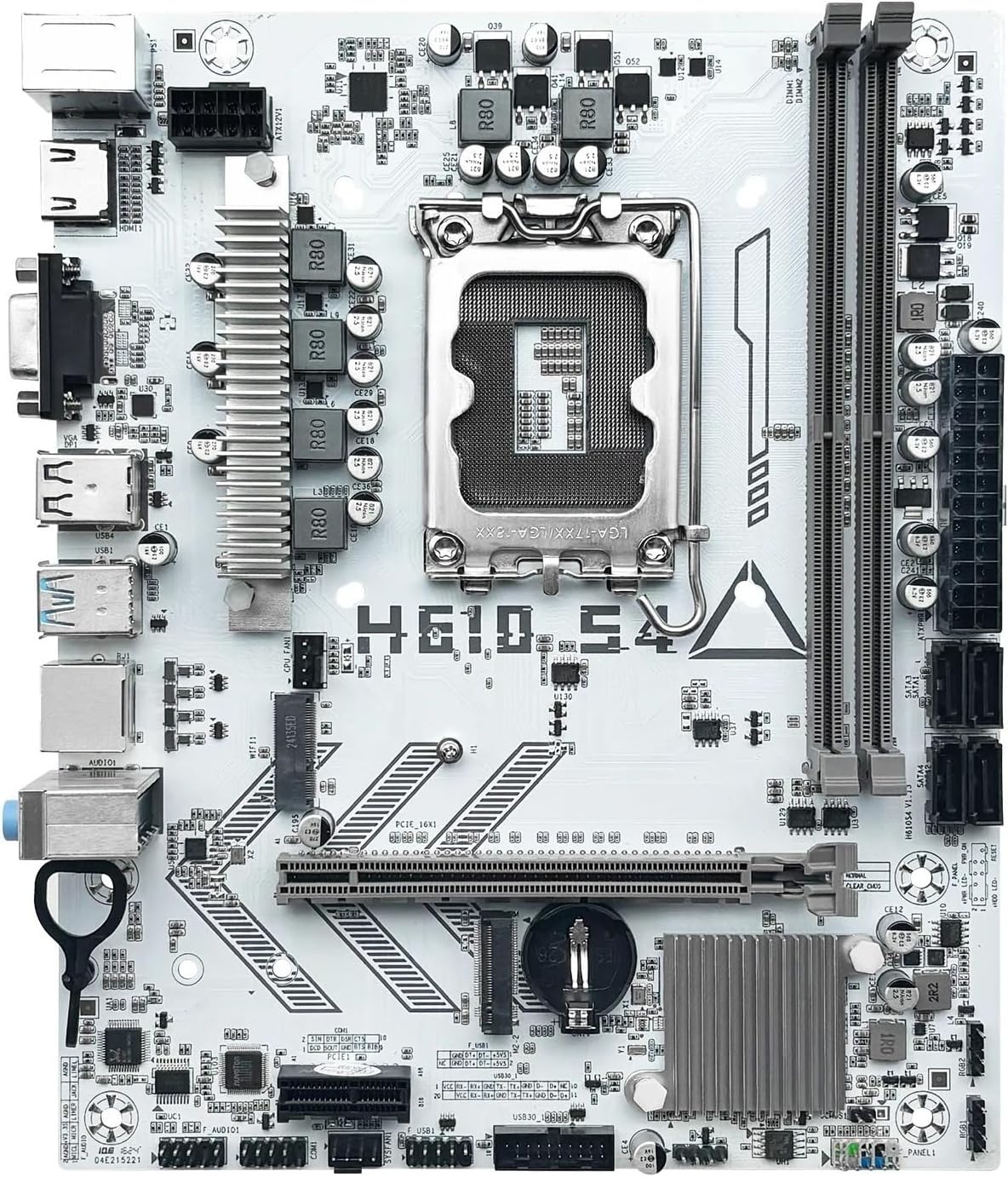
פיגורע 2: איבערview of the LOKLNEYK H610 S4 Motherboard, showing the general layout of components.
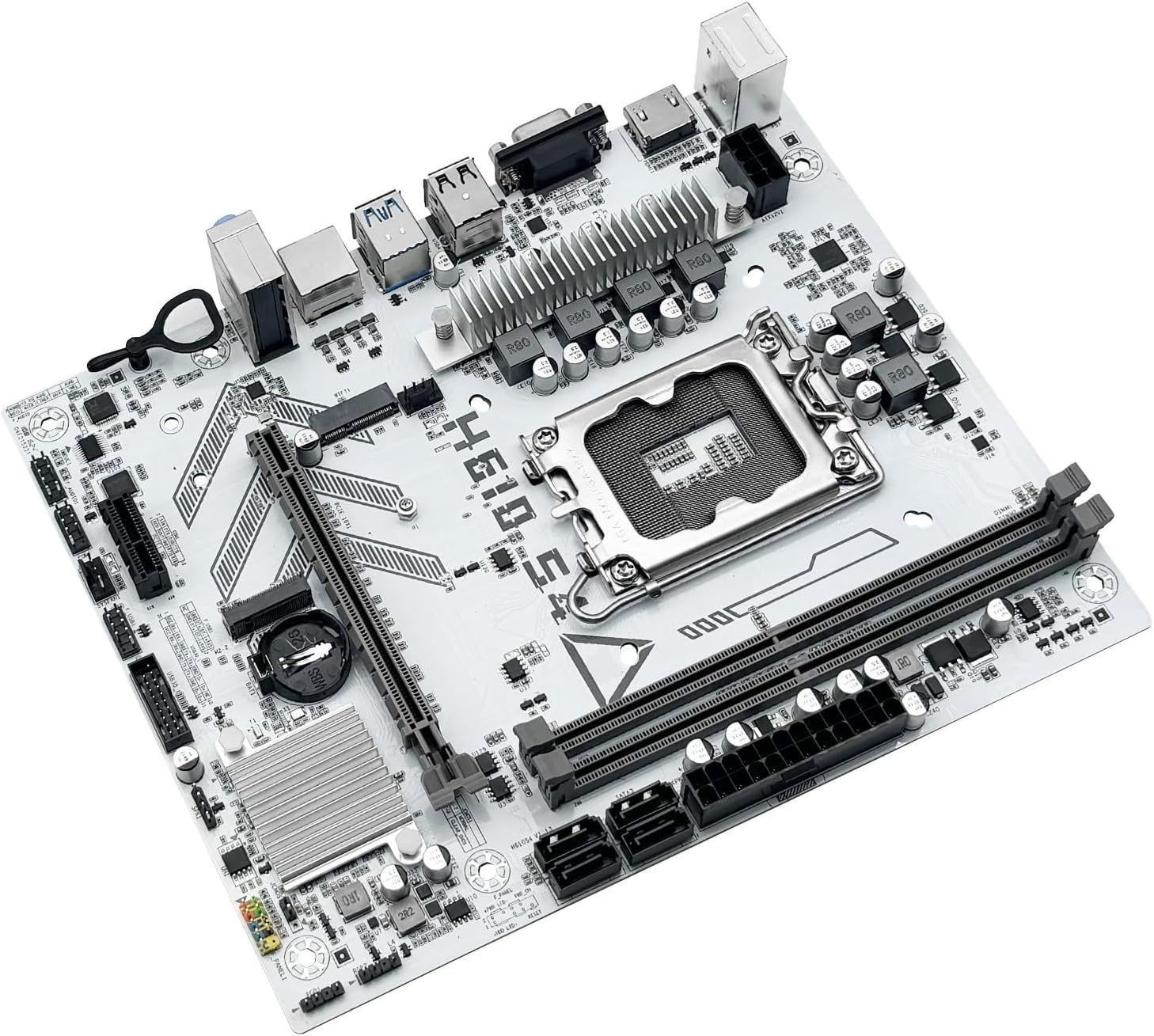
Figure 3: Rear I/O panel connectors and typical accessories like the I/O shield and SATA cables.
3. אַפּערייטינג ינסטרוקטיאָנס
3.1. ערשטער שטיוול
After completing all hardware installations, connect your monitor, keyboard, and mouse. Power on your system. The system should display the BIOS/UEFI splash screen. If not, check all power connections and component seating.
3.2. בייאָס/UEFI קאָנפיגוראַציע
כדי אריינצוגיין אין די BIOS/UEFI סעטאַפּ יוטיליטי, דריק די DEL or F2 key during the initial boot sequence. Here you can configure:
- Boot order for your operating system drive.
- דאַטע און צייט סעטטינגס.
- Memory profiles (e.g., XMP for DDR4).
- Fan speed controls.
- SATA mode (AHCI/RAID).
3.3. דרייווער ינסטאַלירונג
After installing your operating system, it is crucial to install the latest drivers for your motherboard components. These include:
- Chipset drivers
- LAN (Ethernet) drivers
- אַודיאָ דריווערס
- Graphics drivers (for integrated graphics or discrete GPU)
Drivers can typically be found on the LOKLNEYK official website or on the provided driver media.
4. וישאַלט
4.1. רייניקונג
Regular cleaning helps maintain optimal performance and extends the lifespan of your motherboard. Use compressed air to remove dust from heatsinks, fans, and other components. Ensure the system is powered off and unplugged before cleaning.
4.2. בייאָס/UEFI דערהייַנטיקונגען
Periodically check the LOKLNEYK website for updated BIOS/UEFI versions. Updates can provide improved compatibility, stability, and new features. Follow the specific instructions provided by LOKLNEYK for updating the BIOS/UEFI to avoid system damage.
5. טראָובלעשאָאָטינג
די סעקציע גיט לייזונגען צו געוויינטלעכע פראבלעמען וואָס איר קענט באַגעגענען.
5.1. געוויינטלעכע פראבלעמען און לייזונגען
- קיין מאַכט:
- קאָנטראָלירט צי די מאַכט צושטעל איז ריכטיק פארבונדן צום מוטערבאָרד (24-פּין ATX און 8-פּין CPU).
- זיכער מאַכן אַז דער מאַכט צושטעל סוויטש איז אין דער 'ON' פּאָזיציע.
- באַשטעטיקן די פֿאַרבינדונג פֿון דעם פֿראָנט פּאַנעל אויף/אַרויס קנעפּל.
- קיין ווייַז:
- Ensure the monitor cable is securely connected to the graphics card or motherboard (if using integrated graphics).
- לייג צוריק די גראַפיקס קאַרטל און ראַם מאָדולן.
- פרובירט צו בוטן מיט נאר איין ראַם סטיק.
- סיסטעם אינסטאביליטעט/קראכן:
- טשעק די CPU און GPU טעמפּעראַטורן.
- זיכער מאַכן אַז אַלע דרייווערס זענען אַרויף צו דאַטע.
- Test RAM modules for errors.
- שטיוול דעווייס נישט געפונען:
- Verify that your storage drive (SSD/HDD) is properly connected.
- Check BIOS/UEFI settings for correct boot order and SATA mode.
- Ensure the operating system is correctly installed on the drive.
For more complex issues, consult the LOKLNEYK support webפּלאַץ אָדער אַ קוואַליפֿיצירטער טעכניקער.
6. ספּעסאַפאַקיישאַנז
Below are the technical specifications for the LOKLNEYK H610 S4 Motherboard:
| שטריך | באַשרייַבונג |
|---|---|
| קפּו סאָקקעט | LGA 1700 |
| קאָמפּאַטיבלע CPUs | Intel Core 12th, 13th, 14th Generation i3, i5 Processors |
| טשיפּסעט | Intel H610 |
| זכּרון סלאָץ | 2 x DDR4 DIMM |
| מאַקסימום זכּרון קאַפּאַציטעט | 64 גיגאבייט |
| סטאָרידזש אינטערפייסיז | 2 x M.2 (NVMe 2280), 4 x SATA 3.0 |
| PCIe Slots | 1 x PCIe 4.0 x16, 1 x PCIe x1 |
| לאַן | 1 X RJ45 Gigabit עטהערנעט |
| וסב פּאָרץ | USB 3.0, USB 3.1 Gen1, USB 2.0 (Front & Rear) |
| ווידעא אַוטפּוץ | הדמי, ווגאַ |
| אַודיאָ | אַנבאָרד אַודיאָ |
| פאָרם פאַקטאָר | Compact (180mm x 220mm) |

Figure 4: LOKLNEYK H610 S4 Motherboard showing its physical dimensions.
7. וואָראַנטי און שטיצן
7.1. וואָראַנטי אינפֿאָרמאַציע
Please refer to the warranty card included with your product or visit the official LOKLNEYK webזייטל פֿאַר דעטאַלירטע וואָראַנטי טערמינען און באַדינגונגען. האַלט דיין באַווייַז פון קויפן פֿאַר וואָראַנטי קליימז.
7.2. טעכניש שטיצן
If you encounter any issues that cannot be resolved using this manual, please visit the LOKLNEYK support webזייטל פֿאַר אָפֿט געשטעלטע פֿראַגעס, דרייווער דאַונלאָודז, און קאָנטאַקט אינפֿאָרמאַציע פֿאַר טעכנישע הילף.