
1. הקדמה
The Reflexion HIF2082DAB is a versatile retro-style music system designed to combine nostalgic aesthetics with modern audio technology. This unit integrates a turntable, CD player, DAB+/FM radio, USB playback and recording capabilities, and Bluetooth 5.3 connectivity. It is equipped with external speakers to deliver clear and powerful sound, making it a comprehensive audio solution for various environments.
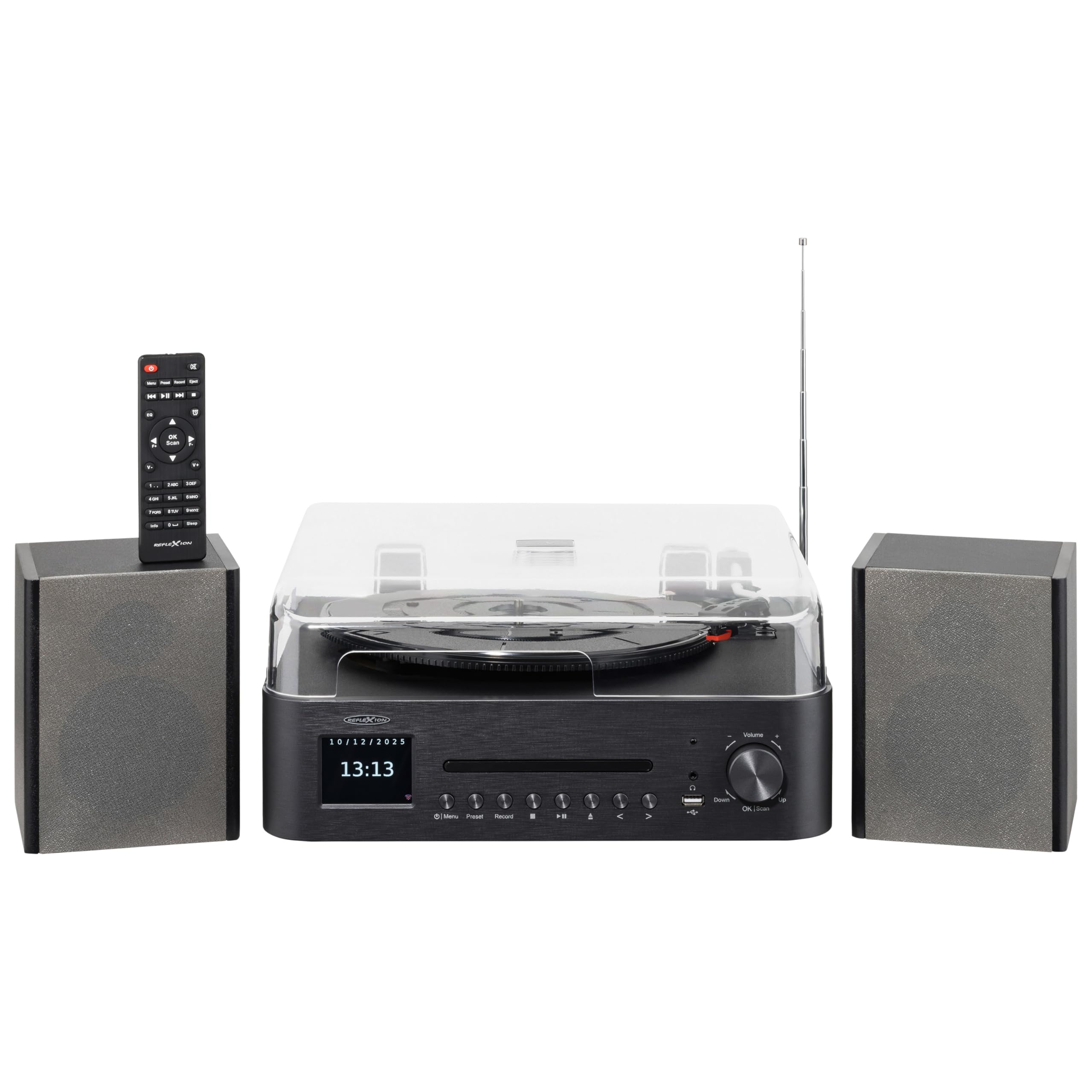
Image 1.1: The Reflexion HIF2082DAB Retro Turntable with included external speakers.
2. זיכערקייַט אינסטרוקציעס
- לייענען אַלע ינסטראַקשאַנז קערפאַלי איידער אַפּערייטינג די מיטל.
- האַלטן די מאַנואַל פֿאַר צוקונפֿט דערמאָנען.
- שטעלט נישט אויס דעם אַפּאַראַט צו רעגן אָדער פייכטקייט כּדי צו פאַרמייַדן פייער אָדער עלעקטרישע קלאַפּן.
- זאָרגט פֿאַר געהעריקע ווענטילאַציע; פֿאַרשטאָפּט נישט קיין ווענטילאַציע עפענונגען.
- שטעלן די אַפּאַראַט אויף אַ סטאַביל, פלאַך ייבערפלאַך.
- נאָר נוצן אַטאַטשמאַנץ / אַקסעסעריז ספּעסיפיעד דורך דער פאַבריקאַנט.
- אָפּשטעקן די אַפּאַראַט בעשאַס בליץ סטאָרמז אָדער ווען אַניוזד פֿאַר לאַנג פּיריאַדז.
- אָפּשיקן אַלע סערוויסעס צו קוואַלאַפייד סערוויס פּערסאַנעל.
3. פּעקל אינהאַלט
ביטע קאָנטראָלירט אַז אַלע זאכן וואָס זענען ליסטעד אונטן זענען אַרייַנגערעכנט אין דיין פּעקל:
- 1 x Reflexion HIF2082DAB Main Unit
- 2 x סטערעאָ רעדנערס
- 1 x מאַכט קאַבלע
- 1 x Remote Control (2 AAA batteries not included)
- 1 x ינסטרוקטיאָן מאַנואַל

Image 3.1: Included remote control and power cable.
4. פּראָדוקט איבערview
4.1 Front Panel and Controls
The front panel features the main display, control buttons for various functions, and the CD tray. The volume knob and USB port are also located here for easy access.
4.2 Top Panel (Turntable)
The top panel houses the semi-automatic turntable, including the platter, tonearm, and stylus. A protective dust cover is also provided.

בילד 4.1: נאָענט־אַרויף view of the turntable with auto-stop and tonearm return features highlighted.
4.3 דערציען פּאַנעל קאַנעקשאַנז
The rear panel includes connections for the external speakers, Line Out for connecting to an external amplifier, and Aux In for connecting external audio sources.

Image 4.2: Rear panel showing speaker terminals, Line Out, Aux In, and power input.
5. סעטאַפּ
5.1 אַנפּאַקינג און פּלייסמאַנט
- קערפאַלי באַזייַטיקן אַלע קאַמפּאָונאַנץ פון די פּאַקקאַגינג.
- Place the main unit and speakers on a stable, level surface, ensuring adequate ventilation around the unit.
- האַלט דעם אַפּאַראַט אַוועק פון דירעקט זונשייַן, היץ קוועלער און נעץ.
5.2 פֿאַרבינדן די רעדנערס
- Connect the included stereo speakers to the speaker terminals on the rear of the main unit. Ensure correct polarity (red to red, black to black).
5.3 מאַכט קאַנעקשאַן
- Insert the power cable into the AC input on the rear of the unit.
- Plug the other end of the power cable into a suitable wall outlet (AC 100-240V).
5.4 ערשט סעטאַפּ
- Upon first power-on, the unit may prompt you to select a language and set the time/date. Follow the on-screen instructions using the navigation buttons and OK/Scan button.
6. אַפּערייטינג ינסטרוקטיאָנס
6.1 דריי-טיש אָפּעראַציע
- סעלעקטינג גיכקייַט: Choose the appropriate speed (33, 45, or 78 RPM) using the speed selector switch.
- פּלייַינג אַ רעקאָרד: Place a record on the platter. Remove the stylus protector. Gently lift the tonearm using the cueing lever and position it over the desired track. Lower the tonearm slowly onto the record.
- אַוטאָ סטאָפּ פֿונקציע: The turntable features an auto-stop function that automatically stops the platter when a record finishes playing. The tonearm will also return to its rest position.
6.2 קאָמפּאַקטדיסק שפּילער
- Press the CD mode button.
- Press the Eject button to open the CD tray. Place a CD (audio CD or MP3 CD) with the label side up.
- Press Eject again to close the tray. Playback will begin automatically.
- Use the Skip/Search buttons to navigate tracks and Play/Pause for playback control.
6.3 DAB+/FM Radio
- Press the DAB+ or FM mode button.
- אַוטאָ סקאַן: For DAB+, the unit will automatically scan for available stations. For FM, press and hold the OK/Scan button to perform an auto scan.
- מאַנואַל טונינג: Use the navigation buttons to manually tune to a frequency.
- פּרעסעץ: Save your favorite stations by pressing and holding the Preset button, then selecting a preset number. Recall saved stations by pressing the Preset button and selecting the desired number.
6.4 בלועטוט קאָנעקטיוויטי
- Press the Bluetooth mode button. The display will show "Pairing" or similar.
- אַקטיווירן בלועטוט אויף אייער מאָביל מיטל (סמאַרטפאָן, טאַבלעט, אאז"וו).
- זוכן פֿאַר "Reflexion HIF2082DAB" in your device's Bluetooth list and select it to pair.
- Once paired, you can stream audio from your device to the HIF2082DAB.
6.5 USB ווידערשפּיל און רעקאָרדינג
- וסב פּלייַבאַקק: Insert a USB flash drive (up to 32GB, FAT format) containing MP3 files into the USB port. Press the USB mode button. The unit will automatically detect and play MP3 files.
- USB רעקאָרדינג (פון וויניל): While playing a vinyl record, press the Record button. The unit will begin recording the audio directly to the connected USB drive as an MP3 file. Press Record again to stop.
6.6 אַלאַרם און שלאָף טייַמער
- שרעק: The unit features two adjustable alarms. Access the alarm settings through the menu to set wake-up times and desired audio sources (e.g., radio, CD).
- שלאָפן טימער: Set the sleep timer (up to 90 minutes) to automatically turn off the unit after a specified duration. This is useful for falling asleep to music.
7. וישאַלט
7.1 רייניקונג די אַפּאַראַט
- ווישט אָפּ דעם אַפּאַראַט מיט אַ ווייכן, טרוקענעם שטאָף. ניצט נישט קיין שרײַבנדיקע רייניגער אָדער סאָלווענטן.
- For the dust cover, use a soft, slightly damp שטאָף, דעמאָלט טרוקן ונ דורך.
7.2 סטילוס זאָרג
- Regularly clean the stylus using a soft brush, brushing gently from back to front.
- Replace the stylus when sound quality deteriorates or after approximately 300-500 hours of use to prevent damage to your records.
8. טראָובלעשאָאָטינג
| פּראָבלעם | מעגלעך סיבה | לייזונג |
|---|---|---|
| קיין מאַכט | שטראָם קאַבל נישט פארבונדן; שטראָם אַוטלעט דעפעקט | Ensure power cable is securely connected; Try a different outlet |
| קיין געזונט | קול צו נידעריג; רעדנערס נישט פארבונדן; אומרעכטע איינגאבע מאָדע | Increase volume; Check speaker connections; Select correct source mode |
| טערטייבאַל נישט ספּיננינג | Speed selector incorrect; Auto-stop engaged | Check speed setting; Ensure tonearm is over the record |
| נעבעך ראַדיאָ אָפּטראָג | אַנטענע נישט אויסגעשטרעקט; שוואַך סיגנאַל | Fully extend the telescopic antenna; Reposition the unit for better reception |
| בלועטאָאָטה פּערינג פיילז | Device too far; Bluetooth not enabled on device; Unit not in pairing mode | Move device closer; Enable Bluetooth; Ensure unit is in pairing mode |
9. ספּעסאַפאַקיישאַנז
- סאָרט: רעפלעקסיע
- מאָדעל: HIF2082DAB
- קאָליר: שוואַרץ
- דימענשאַנז (L x W x H): 32.9 X 37.1 X 16 סענטימעטער (12.95 X 14.61 X 6.3 אינטשעס)
- פּראָדוקט וואָג: 6.5 קילאָגראַמס (14.33 לבס)
- בלועטאָאָטה טעכנאָלאָגיע: יא
- נומער פון ספּיקערז: 2 (External Stereo Speakers)
- Max Speaker Power: 2 x 160 W (Peak Power)
- טערנטייבאַל ספּידז: 33, 45, 78 רפּם
- ווייַז: 2.8" קאָליר TFT דיספּליי
- USB קאַמפּאַטאַבילאַטי: Up to 32GB, FAT format (for MP3 playback and recording)
- ראַדיאָ: DAB+, עפעם
- נאָך פֿעיִקייטן: CD Player (MP3/Audiobook compatible), USB Recording, Remote Control, Dual Alarms, Sleep Timer, Auto-Stop with Tonearm Return, Line Out, Aux In.
10. וואָראַנטי און שטיצן
For warranty information and customer support, please refer to the warranty card included in your package or contact your local Reflexion dealer or service center. Keep your proof of purchase for any warranty claims.
For further assistance, you may also visit the official Reflexion website or consult the contact information provided in the original product documentation.