
1. הקדמה
Thank you for choosing the FINOTI F204 RC Drone. This manual provides essential information for the safe operation, setup, and maintenance of your drone. Please read this manual thoroughly before operating the aircraft to ensure proper function and to avoid damage or injury. Keep this manual for future reference.

Figure 1.1: The FINOTI F204 RC Drone in its folded, portable configuration.
2. פּראָדוקט איבערview
2.1 שליסל פֿעיִקייטן
- 4K Professional HD Camera: Captures high-resolution photos and 1080p videos with a 1/1.28-inch sensor.
- 3-Axis Mechanical Stabilizing Gimbal: Ensures smooth and stable footagע בעתן פלי.
- Laser Obstacle Avoidance: Intelligently detects obstacles ahead for safer flight.
- גפּס פּאַזישאַנינג: Provides stable hovering, intelligent following, and precise return-to-home functions.
- ברושלעס מאָטאָרן: Offers powerful, quiet, and durable performance.
- פאָלדאַבלע פּלאַן: סאָליד און פּאָרטאַטיוו פֿאַר גרינג אַריבערפירן.
- לאנג פלי צייט: ביז 25 מינוט אויף איין אָפּצאָל.
- 5G WiFi Image Transmission: Real-time video feed to your smartphone.
- באַניצער-פרייַנדלעך קאָנטראָלס: Features like one-key takeoff/landing and headless mode for ease of use.
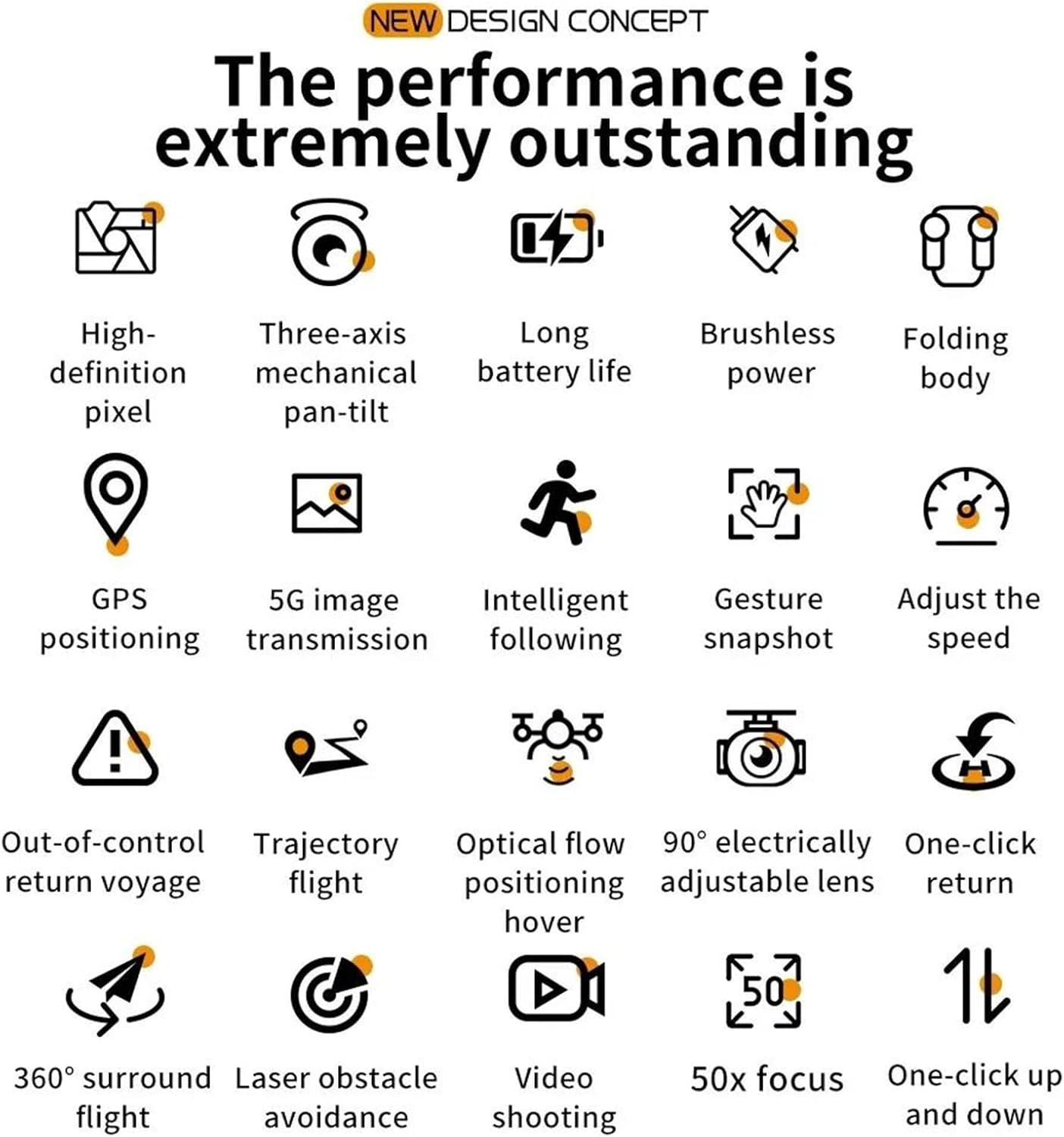
Figure 2.1: Visual representation of the drone's core features, including high-definition pixel, three-axis mechanical pan-tilt, long battery life, brushless power, folding body, GPS positioning, 5G image transmission, intelligent following, gesture snapshot, speed adjustment, out-of-control return, trajectory flight, optical flow positioning hover, 90° electrically adjustable lens, one-click return, 360° surround flight, laser obstacle avoidance, video shooting, 50x focus, and one-click up and down.
2.2 פּעקל אינהאַלט
ביטע קאָנטראָלירט די אינהאַלט פון דער פּאַקעט ווען איר נעמט עס אויס. אויב עס פעלט עפּעס אָדער עס זענען צעבראָכן, קאָנטאַקטירט אייער הענדלער.
- FINOTI F204 RC Drone
- ווייַט קאָנטראָללער
- Flight Battery (Single Battery variant)
- וסב טשאַרדזשינג קאַבלע
- ספּער פּראַפּעלערז
- שרויפנ - ציער
- באַניצער מאַנואַל
2.3 דראָון קאָמפּאָנענטן
Familiarize yourself with the drone's main parts:
- Foldable Arms with Motors and Propellers
- 4K HD Camera with 3-Axis Gimbal
- Laser Obstacle Avoidance Sensor
- געפירט ינדיקאַטאָר ליגהץ
- באַטערי אָפּטייל

Figure 2.2: The drone's three-axis mechanical stabilizing gimbal, capable of vertical, horizontal, and overhead shooting, with examples of 45° frontal, side 65°, and 110° vertical camera angles.
2.4 רימאָוט קאָנטראָללער קאַמפּאָונאַנץ
The remote controller is your primary interface for controlling the drone. Refer to the diagram below for button functions.
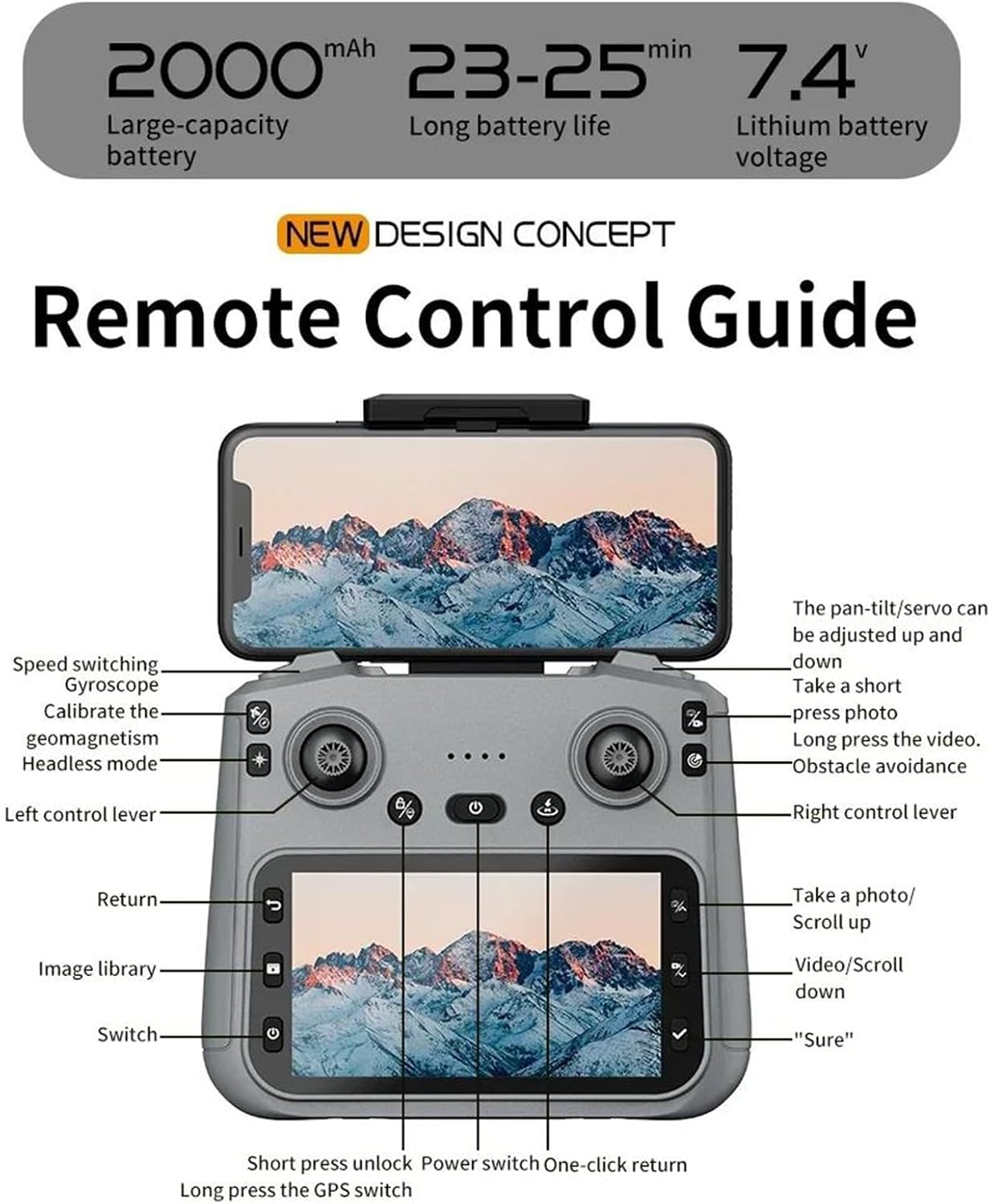
Figure 2.3: Remote Control Guide. Key controls include: Speed switching, Gyroscope, Calibrate geomagnetism, Headless mode, Left control lever, Return, Image library, Switch, Short press unlock, Power switch, One-click return, Long press GPS switch, Pan-tilt/servo adjustment, Take a short press photo, Long press video, Obstacle avoidance, Right control lever, Take a photo/Scroll up, Video/Scroll down, and 'Sure' button.
3. סעטאַפּ גייד
3.1 Charging the Flight Battery
- אַראָפּנעמען די פלי באַטאַרייע פון די דראָון.
- פֿאַרבינדט די באַטאַרייע צום צוגעשטעלטן USB טשאַרדזשינג קאַבל.
- שטעקט אריין דעם USB קאַבל אין אַ 5V/2A USB מאַכט אַדאַפּטער (נישט אַרייַנגערעכנט).
- The charging indicator on the battery will show its status (e.g., red for charging, green for fully charged).
- טשאַרדזשינג נעמט טיפּיש 120-150 מינוט. לאָזט נישט באַטעריעס אָן השגחה בשעתן טשאַרדזשינג.
3.2 אינסטאַלירן פּראָפּעלער
Ensure propellers are installed correctly according to their rotation direction (A and B). Match the propellers to the corresponding motor arms.
- עפֿנט אויס די דראָון אָרעמס.
- Attach the propellers to the motor shafts, ensuring a secure fit. Use the provided screwdriver if necessary.
3.3 פּריפּערינג די רימאָוט קאָנטראָללער
- Install 3x AA batteries (not included) into the remote controller.
- פארלענגערט דעם טעלעפאָן האָלדער אויף דעם ווײַטקאָנטראָל און באַפֿעסטיגט אײַער סמאַרטפאָון.
3.4 Downloading and Connecting the App
- Scan the QR code in the manual or search for the designated drone app (e.g., 'FINOTI Drone' or similar, check packaging) in your smartphone's app store.
- ינסטאַלירן די אַפּ.
- צינדט אן דעם דראָון און דעם ווײַטקאָנטראָל.
- On your smartphone, go to Wi-Fi settings and connect to the drone's Wi-Fi network (e.g., 'FINOTI-F204-XXXX').
- Open the drone app. The live video feed should appear, indicating a successful connection.
4. פלי אָפּעראַציע
4.1 פאַר-פלי טשעקליסט
- Ensure drone battery and remote controller batteries are fully charged.
- פּראָפּעלערס זענען ריכטיק אינסטאַלירט און פריי פון שעדיקן.
- Choose an open area free from obstacles, people, and electromagnetic interference.
- Check weather conditions; avoid flying in strong winds (above 10 KM/H) or rain.
- Ensure the drone and app are connected and GPS signal is acquired (if applicable).

Figure 4.1: The drone utilizing GPS positioning for stable flight and to prevent loss of contact.
4.2 צוזאמענשטעלן דעם דראָון און קאָנטראָללער
- שטעלן די דראָון אויף אַ פלאַך, גלייַך ייבערפלאַך.
- מאַכט אויף די דראָון.
- מאַכט אויף די ווייַט קאָנטראָללער.
- Push the left joystick up then down. The drone's indicator lights will stop flashing and become solid, indicating successful pairing.
4.3 אויפשטייג און לאַנדונג
- איין-קלאַס אָפּפאָר: Press the one-key takeoff button on the remote controller (refer to Figure 2.3). The drone will automatically ascend to a safe height and hover.
- מאַנועלע אָפּפֿליִען: Push both joysticks down and outwards to unlock the motors. Then, slowly push the left joystick up to ascend.
- איין-שליסל לאַנדינג: Press the one-key landing button. The drone will automatically descend and land.
- מאַנואַל לאַנדינג: Slowly pull the left joystick down to descend. Once landed, push both joysticks down and inwards to lock the motors.
4.4 גרונטלעכע פלי קאָנטראָלן
Refer to the Remote Control Guide (Figure 2.3) for joystick and button functions.
- לינקער דזשויסטיק (גאז/גיי): אַרויף/אַראָפּ פֿאַר הייך, לינקס/רעכטס פֿאַר ראָטאַציע (יאָו).
- רעכטער דזשויסטיק (פּיטש/ראָלל): Up/Down for forward/backward movement (pitch), Left/Right for left/right movement (roll).
- גיכקייט סוויטשינג: Adjust flight speed (e.g., low, medium, high) using the dedicated button.
4.5 פארגעשריטענע פלי-אייגנשאפטן
- GPS מאָדע: גיט סטאַבילע שוועבונג און פּינקטלעכע פּאָזיציאָנירונג. זיכערט אַז גענוג GPS סאַטעליטן זענען באַקומען איידערן פלי.
- גיי מיר מאָדע: The drone will automatically follow the remote controller or a designated subject (via app).
- טרייַעקטאָריע פלי: Draw a path on the app interface, and the drone will fly along the specified route.
- Laser Obstacle Avoidance: The drone uses its laser sensor to detect and avoid obstacles, enhancing flight safety. This feature is particularly useful in complex environments.

Figure 4.2: The drone equipped with a laser obstacle avoidance sensor to intelligently detect potential hazards, ensuring a safer flight experience.
- 360° Surround Flight: The drone can orbit a point of interest.
- אָפּטיש פלאָו פּאַזישאַנינג: Assists with stable hovering indoors or in areas with weak GPS signals.
- איין-קליק צוריקקער: Press the return button, and the drone will automatically fly back to its takeoff point.
5. אַפּאַראַט אָפּעראַציע
The F204 drone is equipped with a 4K professional HD camera for capturing aerial photos and videos.

Figure 5.1: The drone's anti-shake dual cameras, featuring a built-in Electronic Image Stabilization (EIS) chip for improved image quality. The image also contrasts self-stabilizing gimbal shooting effect with non-stabilized shooting.
5.1 נעמען בילדער
- ווייַט קאָנטראָללער: Press the dedicated photo button (short press) on the remote controller (refer to Figure 2.3).
- אַפּ קאָנטראָל: Tap the photo icon in the drone app interface.
- געשטן מאָמענטבילד: Perform the designated hand gesture (refer to app instructions) while facing the drone's camera to trigger a photo.
5.2 רעקאָרדינג ווידיאס
- ווייַט קאָנטראָללער: Press and hold the video button on the remote controller to start/stop recording.
- אַפּ קאָנטראָל: Tap the video icon in the drone app interface to start/stop recording.
5.3 גימבאַל אַדזשאַסטמענט
The drone features a 3-axis mechanical gimbal for camera stabilization. You can adjust the camera angle during flight:
- Use the pan-tilt/servo adjustment wheel/button on the remote controller (refer to Figure 2.3) to tilt the camera up or down.
- The camera supports 90° electrically adjustable lens movement.
6. וישאַלט
6.1 רייניקן דעם דראָון
- Always power off the drone and remove the battery before cleaning.
- Use a soft, dry cloth to wipe the drone's body.
- For the camera lens, use a specialized lens cleaning cloth and solution.
- אַראָפּנעמען יעדן דעבריס פֿון די מאָטאָרן און פּראָפּעלערס.
6.2 באַטעריע זאָרג און סטאָרידזש
- Store batteries in a cool, dry place, away from direct sunlight and heat sources.
- דו זאלסט נישט אָוווערטשאַרדזש אָדער איבער-אָפּזאָגן באַטעריז.
- פֿאַר לאַנג-טערמין סטאָרידזש, לאָד די באַטעריעס צו אַרום 50-60% קאַפּאַציטעט.
- Inspect batteries regularly for any signs of swelling or damage. Discontinue use if damaged.
6.3 פּראָפּעלער פאַרבייַט
- If a propeller is damaged, replace it immediately with a new one.
- Ensure you use the correct type of propeller (A or B) for the corresponding motor arm.
- Use the provided screwdriver to remove and install propellers.
7. טראָובלעשאָאָטינג
די סעקציע באהאנדלט אלגעמיינע פראבלעמען וואס איר קענט באגעגענען.
| פּראָבלעם | מעגלעך סיבה | לייזונג |
|---|---|---|
| דראָון טוט זיך נישט אָן | באַטעריע נישט אויפגעלאָדן אָדער נישט ריכטיק אינסטאַלירט | Charge battery fully; ensure it is securely inserted. |
| Drone cannot pair with controller | Incorrect pairing sequence; low controller battery | Follow pairing steps (Section 4.2); replace controller batteries. |
| נישט-סטאַבילער פלי / דריפטינג | Drone not calibrated; damaged propeller; strong wind | Calibrate gyroscope/geomagnetism (refer to Figure 2.3); replace damaged propellers; avoid flying in strong winds. |
| No live video feed in app | Wi-Fi not connected; app not open; drone/phone too far | Ensure phone is connected to drone's Wi-Fi; restart app; keep drone and phone within range. |
| GPS פונקציעס ארבעטן נישט | Insufficient GPS signal; flying indoors | Fly in an open outdoor area; wait for sufficient GPS satellites to be acquired. |
8. ספּעסאַפאַקיישאַנז
| שטריך | באַשרייַבונג |
|---|---|
| מאָדעל | F204 (Model Number: 66655594-SINGLEBATTERY) |
| סאָרט | FINOTI |
| מאָטאָר טיפּ | ברושלעסס מאָטאָר |
| מאַקס פלי צייט | 23-25 מינוט |
| דראָון וואָג | 245ג |
| אַפּאַראַט | 4K Professional HD Camera |
| ווידעא האַכלאָטע | 1080p HD Recording |
| סענסאָר גרייס | 1/1.28 אינטשעס |
| גימבאַל | 3-Axis Mechanical Stabilizing Gimbal, 90° Electrically Adjustable Lens |
| שטערונג אַוווידאַנס | Laser Barrier Avoidance |
| גפּס | יא |
| ווייַט דיסטאַנסע | אַרויף צו 1000 מעטער |
| אַפּערייטינג אָפטקייַט | 2.4 GHz (Aircraft), 5G WiFi (Image Transmission) |
| קאַנעקטיוויטי | אַפּ קאָנטראָללער, ווײַט קאָנטראָל, ווײַפֿײַ |
| מאַקסימום טייקאָף וואָג | <1 קג |
| מאַקס ווינד ספּיד קעגנשטעל | <10 קילאמעטער/ה |
| באַטאַרייע קאַפּאַציטעט | 2000mAh, 7.4V Lithium Battery |
9. וואָראַנטי און שטיצן
Specific warranty information for the FINOTI F204 RC Drone is not provided in this manual. For details regarding warranty coverage, return policies, or technical support, please refer to the product packaging, the retailer's website, or contact FINOTI customer service directly.
Always ensure you purchase from authorized sellers to guarantee valid warranty and support services.